What your broker actually checks
Every API order you send carries something you never typed: the address it came from.
When a broker issues you API access, they record one address and treat it as the only place your orders may originate. Every order that arrives is compared against it. Match, and the order is processed normally. No match, and it is refused before it ever reaches the exchange — usually with an error that says nothing useful about why.
This is not an inconvenience the broker invented. An API key is a bearer credential: if it leaks, anyone holding it can place orders in your name. Pinning it to a single address means a stolen key is worthless from anywhere else. It is the same reasoning behind a registered mobile number for an OTP, applied to the network instead of the phone.
The consequence is the part that catches people. The check is on where the connection came from, not on who you are. Your password, your TOTP and your API secret can all be perfectly correct and the order still gets refused.
Your orders do not leave from your laptop
Here is the assumption that makes the whole thing confusing.
Most people picture the order travelling from their screen to the broker. On a manual trade in a broker's own app, that is roughly what happens. On any platform that runs strategies for you, it is not.
A stop-loss that must trigger at 2:47pm cannot depend on your browser being open. Nor can an algo that has to react within seconds of a signal, or a price alert that fires while you are in a meeting. Those run on servers, continuously, whether or not you are at your desk. That is the entire point of them.
So when the order is finally sent, it is sent by a server — and the address your broker sees is that server's, never your laptop's. Your own connection is not in the path at all. This is true of every platform that offers automation, ours included; it is a property of server-side execution, not a design choice.
Watch what happens to one order
The sequence below is the whole problem and the whole fix, in three parts. It plays on a loop; use the chapters underneath to step through it at your own pace.
The moment worth watching is in the third part, inside the middle box: as the request passes through, its source address is rewritten from the shared one to yours. Nothing else about the order changes. That single substitution is what a static IP buys.
Why the account connects but will not trade
This is the specific failure that sends people to support, and it looks like a broken integration when it is nothing of the kind.
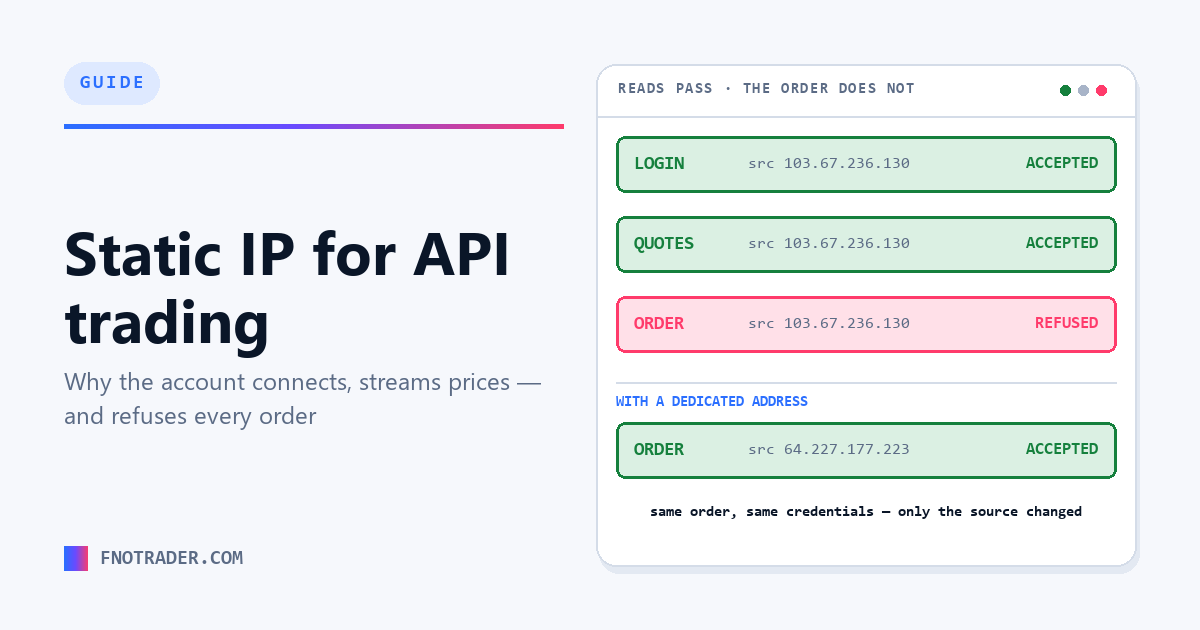
Brokers do not enforce the address check uniformly across their API. Signing in, refreshing a session, pulling quotes, reading your positions and downloading your holdings are frequently allowed from anywhere. The order endpoint is the one that enforces it.
So the account genuinely connects. Your holdings appear. Live prices tick. Every visible signal says the broker is wired up correctly — and then the first order comes back refused, and the second, and every one after that.
If you are diagnosing this yourself, the tell is that reads work and writes do not. A credential problem breaks the login. An address problem lets you in and stops you at the order.
Why you cannot use an address you already own
The reasonable next thought is: I already have a static IP — from my office connection, or a VPS I rent. Register that with the broker, tell the platform to use it, done.
It cannot work, and the reason is worth understanding because it is not a platform limitation that anyone could lift.
An address is not a label you attach to a request. It is where the reply goes. Our server opens a connection to your broker; the broker's response is routed back to whoever actually holds that address. If we claimed an address we do not control, the reply would travel to the machine that does hold it — not to us — and the connection would never complete. The order would not be refused so much as never finished. Networks also drop traffic claiming a source the sender has no right to, which is what stops this being an attack.
For traffic to genuinely originate from an address, whatever holds that address has to be the thing making the connection. So the address has to come with a machine attached, and that machine has to be one our order engine can reach. That is why a dedicated address is something you take from the platform routing your orders, rather than something you bring to it.
What the machine actually does
What you are buying is deliberately small. It is a relay with four jobs and no intelligence of its own — it holds no strategy logic and stores none of your data.
| Step | What happens |
|---|---|
| Accepts | Our order engine connects to it on an authenticated port that only our servers can use. Nothing else on the internet can push traffic through your address. |
| Dials out | It opens the connection to your broker itself, so the source your broker sees is the address you registered — login, token exchange, orders and position reads included. |
| Stays sealed | Your session remains encrypted end to end. The relay moves the bytes through without being able to read them, so broker passwords and tokens are never exposed in the middle. |
| Returns | Confirmations, fills, rejections and login callbacks travel back the same way, so the round trip completes and your book stays in sync. |
Because the address belongs to your account rather than being shared, the per-address rate limits your broker applies are yours alone, and nobody else's activity can affect how your orders are treated.
How to get one
The whole setup is four steps, and only the last one happens outside FNOTrader.
- Buy the address. Open the Brokers page and switch to the Static IP tab. Provisioning takes roughly two to three minutes — a machine is started in an Indian data centre and its address is verified before it is handed to you, so the address you are shown is one that has already been proven to work.
- Assign it to a broker account. On the same tab, attach the address to the account you want to trade with. One address can serve several of your broker accounts, so a second account does not mean a second purchase.
- Whitelist it at your broker. Paste the address into the allowed-IP field in your broker's developer or API portal. Where that field lives differs by broker; it is normally in the same screen where your API key was issued.
- Enable the account for trading. Back on the Brokers page, switch the account on. Until an address is assigned, this step stays blocked for you — which is the platform stopping you from placing orders that were always going to be refused.
Paper trading accounts never make external broker calls, so they are excluded from all of this and will not ask you for an address.
Keeping it working
Two practical points, both of which come down to the same thing: the address should not change once your broker knows it.
Renewal keeps the same address. When a static IP renews it extends the existing machine rather than building a new one, so the address stays exactly as it was. You whitelist it once with your broker and never touch that field again. If a renewal lapses and the address is released, the replacement will be a different one and your broker's whitelist will need updating — which is the one situation worth avoiding.
Expiry runs to the end of the day. Addresses expire at the end of the day in IST, not at the time of day you bought them, so a purchase made in the morning does not lapse mid-morning on its final day.
If orders start being refused after a period of working normally, check two things in order: that the address on the Brokers page still matches the one whitelisted at your broker, and that the account is still enabled for trading. Those two cover almost every case.
So do you need one?
Split it by what you are trying to do.
To place orders — yes. Treat this as the rule. Orders are sent by our servers, brokers check the source address on orders, and an account has to have an address assigned before it can be enabled for trading. (Where a broker genuinely does not require one, the Brokers page simply will not ask you for it — it is the authority, not this page.)
To log in and see data — often not. Plenty of brokers will let you connect, stream prices, and read positions and holdings without one. That is exactly why the account can look finished while trading is still blocked.
From somewhere other than FNOTrader — no. As above: an address only works if the machine holding it is the one making the connection, and that machine has to be reachable by the engine sending your orders.
If you are only analysing, charting or backtesting, none of this applies to you. It starts mattering the moment you want an order to leave the platform on your behalf.
Common questions
Why does my broker reject API orders when my login works?
Because brokers usually enforce the IP whitelist on the order endpoint but not on login or market data. Signing in, streaming prices and reading positions are commonly allowed from any address, so the account looks connected while every order is refused. Reads working and writes failing is the signature of an address problem rather than a credential problem.
Why can't I use my own office or VPS static IP?
Because an IP address is where replies are routed, not a label you attach to a request. Orders are sent by the platform's servers; if they claimed an address held by your office router, the broker's response would be routed to that router rather than back to the server, and the connection would never complete. Traffic can only originate from an address if the machine holding it makes the connection.
Do I need a static IP just to connect my broker and see data?
Usually no. Many brokers allow login, quotes, positions and holdings from any address. The requirement bites when you place an order, which is why an account can connect cleanly and still refuse to trade until an address is assigned.
Can one static IP be used for more than one broker account?
Yes. A single address can be assigned to several of your broker accounts, so adding a second account does not require a second purchase. Each account you want to trade with still needs the address assigned to it, and the address whitelisted in that broker's API settings.
Does the IP address change when it renews?
No. A renewal extends the existing machine rather than provisioning a new one, so the address stays the same and the whitelist entry at your broker keeps working. The address only changes if it is allowed to lapse and is released, in which case the replacement has to be whitelisted again.
How long does it take to get a static IP working?
Provisioning takes roughly two to three minutes, and the address is verified before it is handed over. After that the time depends on your broker: assigning the address and enabling the account take a moment, and whitelisting it in the broker's API portal is usually immediate, though some brokers apply the change on a delay.
Do paper trading accounts need a static IP?
No. Paper accounts never make calls to a broker's API, so they are excluded from static IP assignment entirely and will not ask for one.
More in App Guides · App: Options QuikTrade Terminal · Definitions: glossary · Free tools: calculators · All: every article