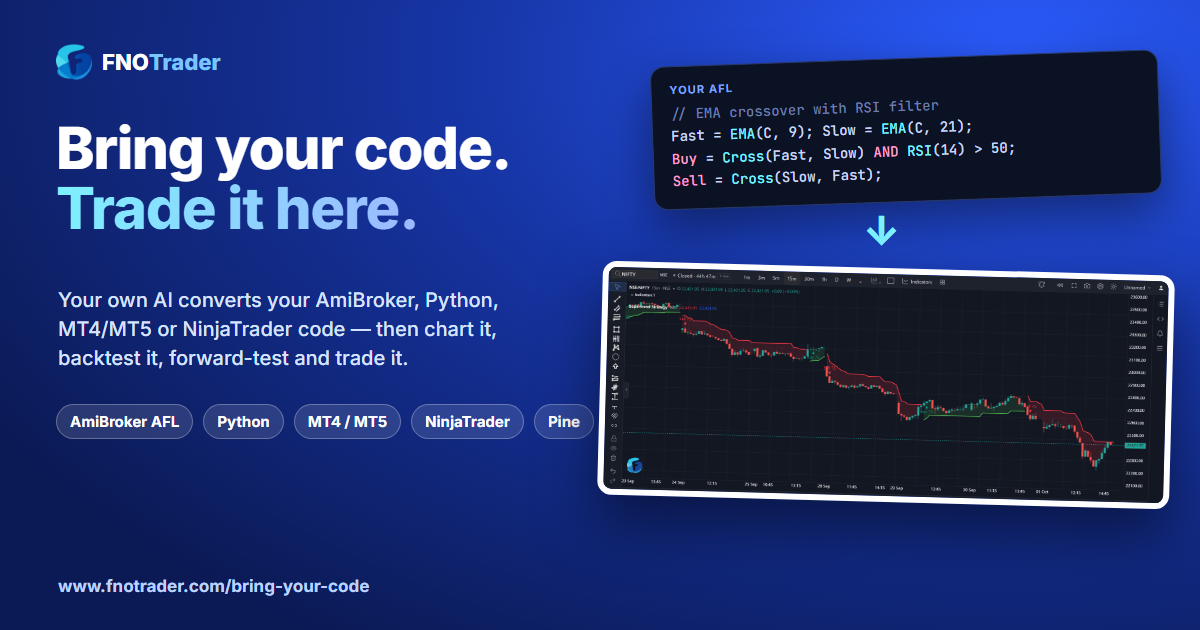
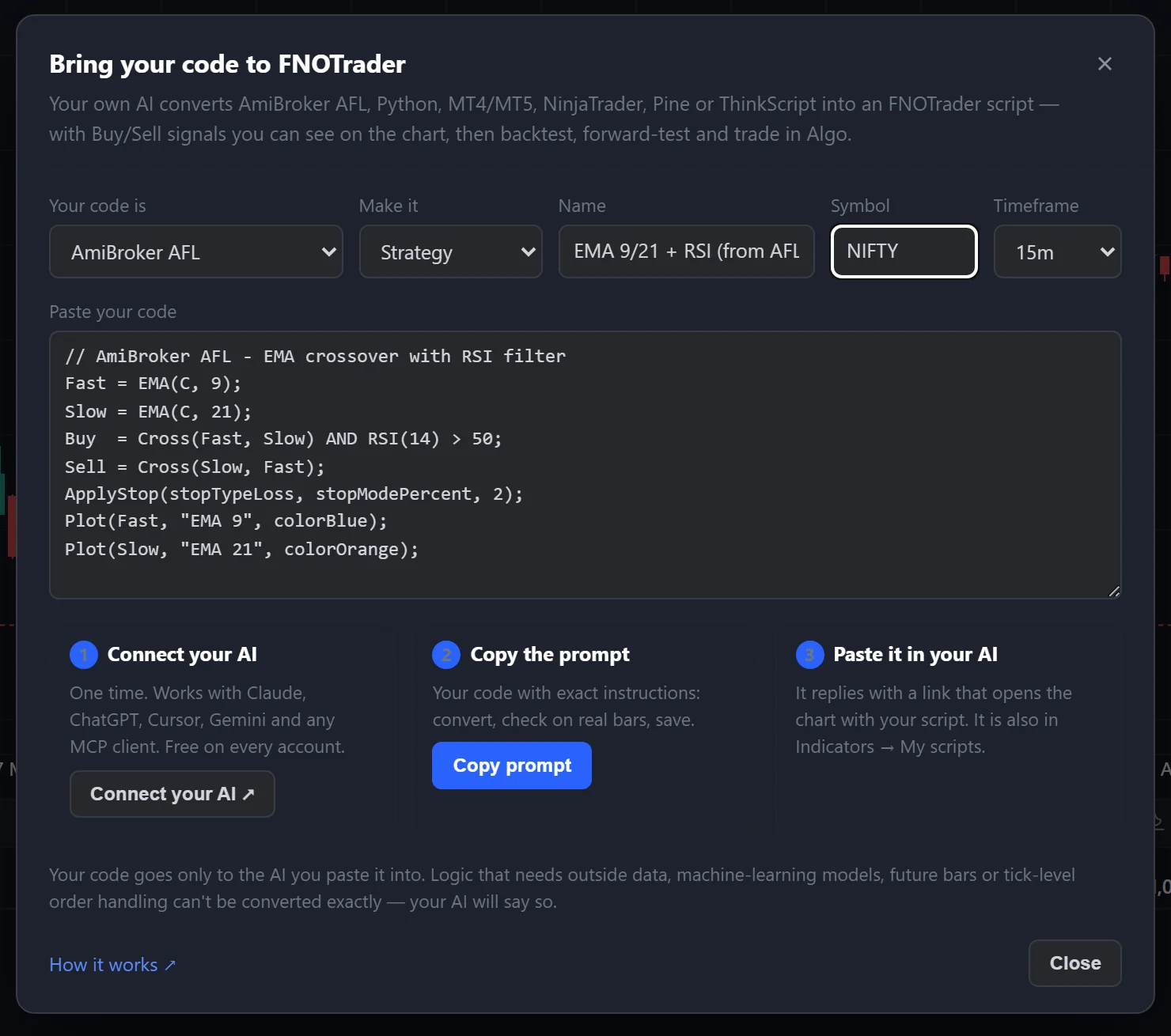
Three steps, a few minutes. Connect your AI once, paste your code with the prompt FNOTrader builds for you, and its equivalent FTScript is on the chart — checked on real bars before it is saved. Free on every account.
How it works
1 · Connect your AI
- One time, from mcp.fnotrader.com/mcp/connect
- Works with Claude, ChatGPT, Cursor, Gemini and any MCP client
- Free on every account, trials included
2 · Paste your code
- On the chart: Indicators → ⇪ Import code
- Say what it is written in, paste it, choose strategy or indicator
- Copy prompt — your code plus exact instructions for the AI
3 · Your AI does the rest
- Writes an equivalent FTScript with Buy/Sell signals
- Runs it on real bars and fixes every error first
- Saves it to My scripts and gives you a link that opens it on the chart
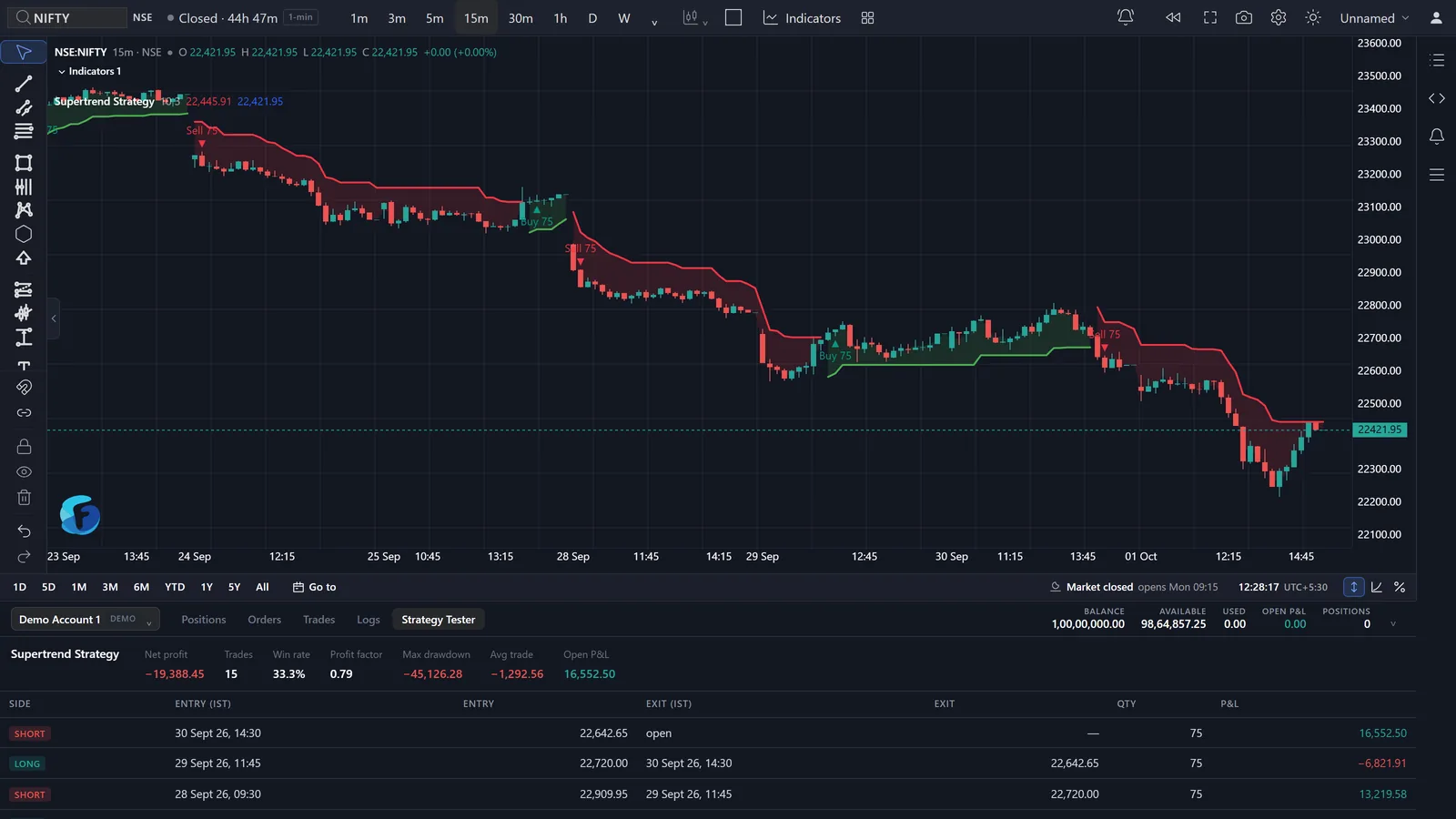
On the chart: Buy/Sell signals and a Strategy Tester
Every strategy draws its trades as Buy and Sell markers, with its lines and shaded trend areas, and fills the Strategy Tester — net profit, win rate, profit factor, drawdown and every trade. Change an input and it recalculates on the spot. Below: a Supertrend strategy on NIFTY 15-minute.
Backtest, forward test, then trade it live
In the Algo app, add an External Signal condition to a strategy and choose chart script as its source. Your script decides when; the strategy decides what to trade — an option, a future or a stock, with its own stop-loss, target and position size.
Backtest
- Pick the script, the symbol it runs on and its timeframe
- Its signals for those exact dates drive the strategy
- Each signal is taken at the close of the bar it was decided on — never earlier
Forward test
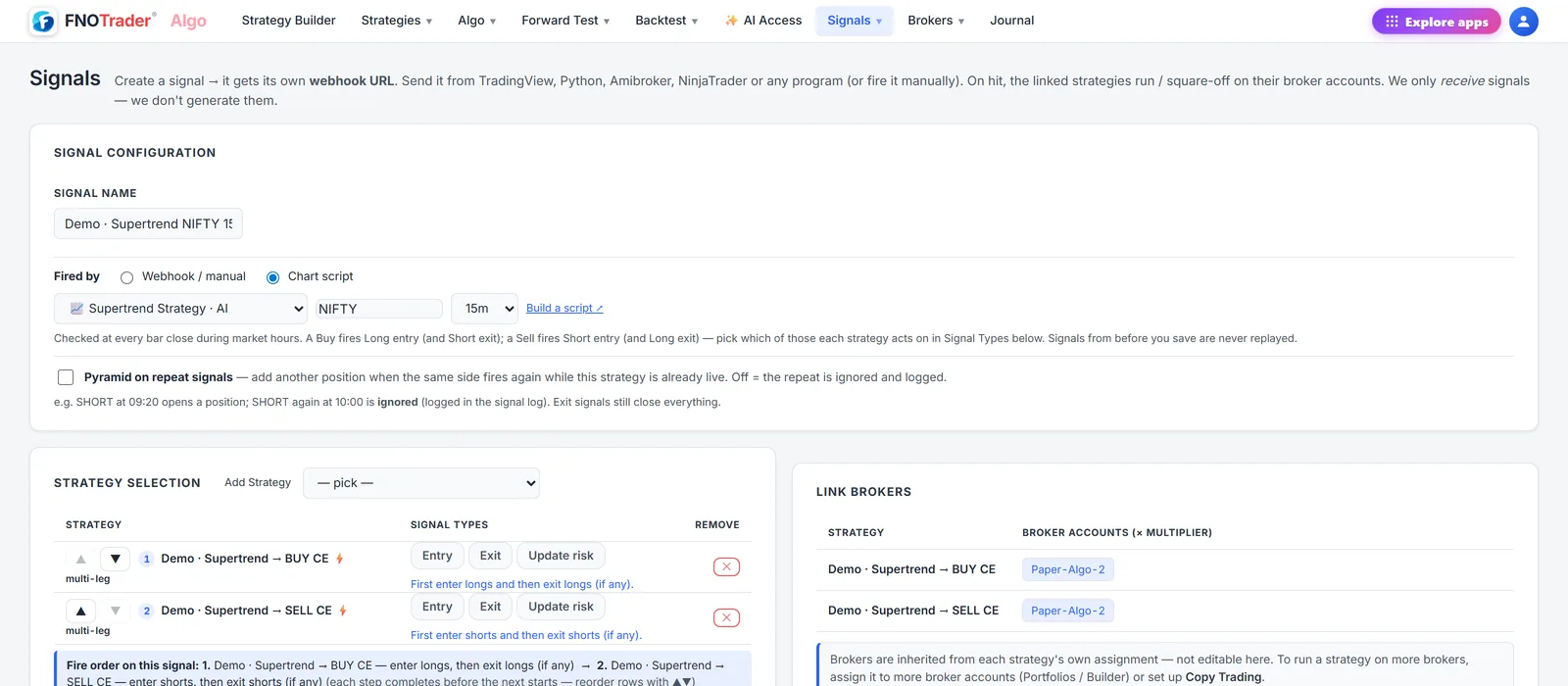
- Signals page → Fired by: Chart script
- Route to a demo account to run it on live markets with paper money
- Checked at every bar close during market hours
Live
- Route the same Signal to your broker account
- Same signals as the backtest — no rewrite
- Stale signals (seen more than 10 minutes late) are logged, never traded
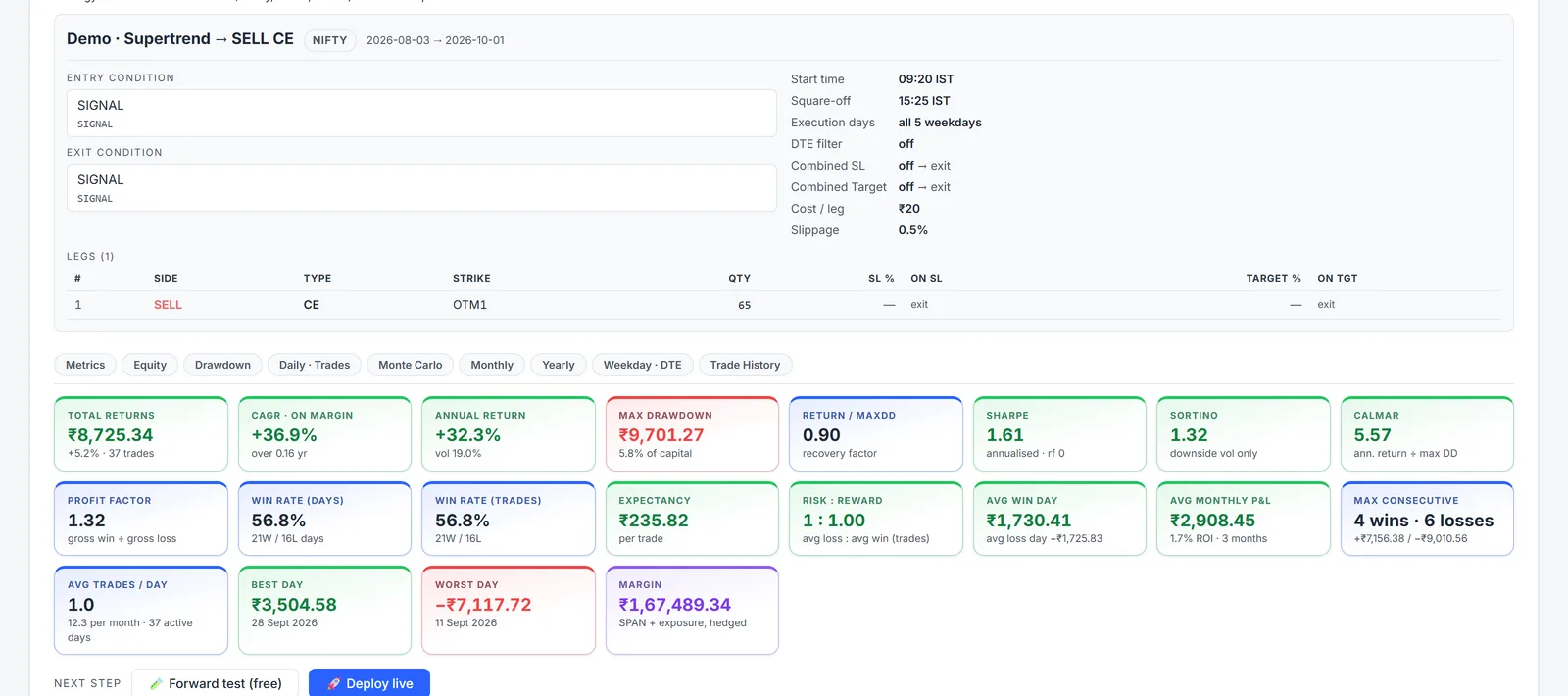
Above: the Supertrend script's short signals selling a weekly NIFTY call, 3 Aug – 1 Oct 2026, with ₹20 per order costs and 0.5% slippage — 37 trades, ₹8,725 net. A backtest, not a promise; past results do not guarantee future returns.
Where your script can come from
| Your script is in | Usually has an FTScript equivalent | May not have an exact equivalent |
|---|---|---|
| AmiBroker AFL | Buy / Sell / Short / Cover, Cross, Ref, HHV/LLV, ApplyStop, Param | Positive Ref (future bars), portfolio-level ranking |
| Python | pandas / TA-Lib indicators, rolling windows, signal columns, backtrader next() | ML models, outside data and files, multi-symbol ranking |
| MT4 / MT5 | iMA, iRSI, iATR, iBands, buffers, OrderSend entries, SL/TP | Tick-level and order-book logic, grids and martingales |
| NinjaTrader | OnBarUpdate, CrossAbove/Below, EnterLong/Short, SetStopLoss/ProfitTarget | Tick replay and order-flow-specific logic |
| TradingView Pine | Indicators and strategies built from standard studies, inputs, plots and orders | Libraries (import), lower-timeframe requests |
| Others | thinkorswim ThinkScript, MetaStock, TC2000, EasyLanguage | US-only symbols (mapped to NIFTY or the index you name) |
An equivalent FTScript — four real examples
Each FTScript was written the same way, then run on real NIFTY 15-minute bars (13 Jul – 1 Oct 2026) by the checker your AI uses before saving. The results show the script runs and trades; they are not a recommendation.
Your AmiBroker AFL
// AmiBroker AFL - EMA crossover with RSI filter and 2% stop
Fast = EMA(C, 9);
Slow = EMA(C, 21);
Buy  = Cross(Fast, Slow) AND RSI(14) > 50;
Sell = Cross(Slow, Fast);
ApplyStop(stopTypeLoss, stopModePercent, 2);
Plot(Fast, "EMA 9",  colorBlue);
Plot(Slow, "EMA 21", colorOrange);
Equivalent FTScript
//@version=6
strategy("EMA 9/21 + RSI", overlay=true, initial_capital=100000, default_qty_type=strategy.percent_of_equity, default_qty_value=100)
fastLen = input.int(9, "Fast EMA")
slowLen = input.int(21, "Slow EMA")
stopPct = input.float(2.0, "Stop loss %")
fast = ta.ema(close, fastLen)
slow = ta.ema(close, slowLen)
rsi = ta.rsi(close, 14)
buyCond = ta.crossover(fast, slow) and rsi > 50
sellCond = ta.crossover(slow, fast)
if buyCond
    strategy.entry("Long", strategy.long)
if sellCond
    strategy.close("Long")
strategy.exit("SL", "Long", stop=strategy.position_avg_price * (1 - stopPct / 100))
plot(fast, "Fast EMA", color.blue)
plot(slow, "Slow EMA", color.orange)
Checked on NIFTY 15m: 29 trades · each Buy and Sell taken at the close of its bar.
May not have an exact equivalent: Positive Ref() reads a future bar — there is no honest equivalent · Portfolio-level ranking across many symbols (PositionScore) · Custom backtester (CBT) code.
Your Python (pandas)
# Python (pandas) - Donchian breakout
import pandas as pd

df["upper"] = df["high"].rolling(20).max().shift(1)
df["lower"] = df["low"].rolling(10).min().shift(1)

df["buy"]  = (df["close"] > df["upper"]) & ~(df["close"].shift(1) > df["upper"].shift(1))
df["exit"] = (df["close"] < df["lower"]) & ~(df["close"].shift(1) < df["lower"].shift(1))
Equivalent FTScript
//@version=6
indicator("Donchian breakout", overlay=true)
upper = ta.highest(high, 20)[1]
lower = ta.lowest(low, 10)[1]
plot(upper, "Upper", color.green)
plot(lower, "Lower", color.red)
buy = close > upper
sell = close < lower
plotshape(buy and not buy[1], "Buy", shape.triangleup, location.belowbar, color.green)
plotshape(sell and not sell[1], "Exit Long", shape.xcross, location.abovebar, color.red)
alertcondition(buy and not buy[1], "Buy", "Close broke the 20-bar high")
alertcondition(sell and not sell[1], "Exit Long", "Close broke the 10-bar low")
Checked on NIFTY 15m: 40 Buy signals with their exits · usable in Algo as entry/exit signals.
May not have an exact equivalent: Machine-learning models (scikit-learn, TensorFlow) · Outside data — APIs, files, fundamentals, news · Ranking or rotating a basket of symbols.
Your MT4 / MT5 (MQL5)
// MT5 Expert Advisor - SMA 50 trend with ATR stop and target
#include <Trade\Trade.mqh>
CTrade trade;
int hMA, hATR;
int OnInit() { hMA = iMA(_Symbol, PERIOD_CURRENT, 50, 0, MODE_SMA, PRICE_CLOSE);
               hATR = iATR(_Symbol, PERIOD_CURRENT, 14); return INIT_SUCCEEDED; }
void OnTick() {
  double ma[2], atr[1]; CopyBuffer(hMA, 0, 1, 2, ma); CopyBuffer(hATR, 0, 1, 1, atr);
  double c1 = iClose(_Symbol, PERIOD_CURRENT, 1), c2 = iClose(_Symbol, PERIOD_CURRENT, 2);
  if (PositionsTotal() == 0 && c2 < ma[0] && c1 > ma[1])
     trade.Buy(1, _Symbol, 0, c1 - 1.5 * atr[0], c1 + 3.0 * atr[0]);
  if (PositionsTotal() == 0 && c2 > ma[0] && c1 < ma[1])
     trade.Sell(1, _Symbol, 0, c1 + 1.5 * atr[0], c1 - 3.0 * atr[0]);
}
Equivalent FTScript
//@version=6
strategy("SMA 50 trend + ATR exits", overlay=true)
maLen = input.int(50, "SMA length")
atrMult = input.float(1.5, "Stop (x ATR)")
tpMult = input.float(3.0, "Target (x ATR)")
ma = ta.sma(close, maLen)
atr = ta.atr(14)
plot(ma, "SMA", color.blue)
if ta.crossover(close, ma) and strategy.position_size == 0
    strategy.entry("Long", strategy.long)
if ta.crossunder(close, ma) and strategy.position_size == 0
    strategy.entry("Short", strategy.short)
if strategy.position_size > 0
    strategy.exit("L exit", "Long", stop=strategy.position_avg_price - atrMult * atr, limit=strategy.position_avg_price + tpMult * atr)
if strategy.position_size < 0
    strategy.exit("S exit", "Short", stop=strategy.position_avg_price + atrMult * atr, limit=strategy.position_avg_price - tpMult * atr)
Checked on NIFTY 15m: 46 trades, long and short, with the ATR stop and target.
May not have an exact equivalent: Tick-by-tick logic in OnTick (scripts run once per closed bar) · Order-book / DOM reads, grids and martingales that depend on broker fills · Multi-symbol baskets in one Expert Advisor.
Your NinjaTrader 8 (NinjaScript)
// NinjaTrader 8 (NinjaScript) - MACD cross with a tick stop
public class MacdCross : Strategy {
  protected override void OnStateChange() {
    if (State == State.Configure) SetStopLoss(CalculationMode.Ticks, 400);
  }
  protected override void OnBarUpdate() {
    if (CurrentBar < 26) return;
    if (CrossAbove(MACD(12, 26, 9), MACD(12, 26, 9).Avg, 1)) EnterLong();
    if (CrossBelow(MACD(12, 26, 9), MACD(12, 26, 9).Avg, 1)) ExitLong();
  }
}
Equivalent FTScript
//@version=6
strategy("MACD cross", overlay=false)
stopTicks = input.int(400, "Stop (ticks; 1 tick = 0.05)")
[macd, sig, hist] = ta.macd(close, 12, 26, 9)
plot(macd, "MACD", color.blue)
plot(sig, "Signal", color.orange)
plot(hist, "Histogram", color.gray, style=plot.style_columns)
if ta.crossover(macd, sig)
    strategy.entry("Long", strategy.long)
if ta.crossunder(macd, sig)
    strategy.close("Long")
strategy.exit("Stop", "Long", loss=stopTicks)
Checked on NIFTY 15m: 57 trades with the 400-tick stop.
May not have an exact equivalent: Tick Replay and order-flow-specific logic · Unmanaged orders (SubmitOrderUnmanaged) · Custom drawing tools and add-ons.
Common questions
Where can my script come from?
Indicators and strategies written for AmiBroker (AFL), Python (pandas, TA-Lib, backtrader-style), MT4 and MT5 (MQL4 / MQL5), NinjaTrader (NinjaScript), TradingView (Pine Script) or thinkorswim (ThinkScript), and MetaStock, TC2000 or EasyLanguage formulas. Your AI reads what the script does and writes an equivalent FTScript; your original is never run on FNOTrader.
Who writes the FTScript?
Your own AI assistant — Claude, ChatGPT, Cursor, Gemini or any MCP client — connected to your FNOTrader account. It reads FNOTrader's FTScript guide, writes the equivalent script, checks it on real market bars and saves it to My scripts. Your code goes only to the AI you paste it into.
Will the FTScript match my original exactly?
We do our best, but we can't guarantee a 100% match. Before saving, the FTScript is compiled and run on real bars of the symbol and timeframe you choose, and your AI gets back every error, or what the script actually did — how many Buy and Sell signals fired and when. A script that fails the check is not saved. Compare its signals with your original on the chart before you trade with it.
What may not have an exact equivalent?
Logic that needs data FNOTrader does not have (fundamentals, outside APIs, files), machine-learning models, code that reads future bars, and tick-level or order-book logic in MT5 Expert Advisors. Your AI tells you what may not match exactly instead of guessing.
Is FNOTrader affiliated with these platforms?
No. AmiBroker, MetaTrader/MQL, NinjaTrader, TradingView/Pine Script, thinkorswim and the other names are trademarks of their respective owners. FNOTrader is not affiliated with, endorsed or sponsored by them, and does not use, copy or run their software, files or libraries. The names only describe where your script came from.
Can I trade the strategy automatically?
Yes. In the Algo app, a strategy with an External Signal condition can take its entries and exits from your FTScript. Backtest it, run it on a demo (paper) account as a forward test, then route it to your broker. Signals are acted on only after the bar they were decided on has closed, so live trading behaves like the backtest.
What does it cost?
Connecting your AI and building chart scripts is free on every FNOTrader account, trials included. Backtests, forward tests and live trading in the Algo app follow your Algo plan or credits — see Pricing.
Related
Algo & Backtesting · Charts · Connect your AI · Options backtesting
Start a 7-day free trial No card needed. Bringing your code is free on every account.
We do our best to understand your existing indicator or strategy and provide an equivalent FTScript. Results can differ from the original and we can't guarantee a 100% match — review the FTScript and check its signals on the chart before trading with it. FNOTrader does not use, copy or run any other platform's software, files or libraries; FTScript runs only on FNOTrader's own engine. AmiBroker, MetaTrader/MQL, NinjaTrader, TradingView/Pine Script, thinkorswim, MetaStock, TC2000, EasyLanguage and other names are trademarks of their respective owners. FNOTrader is not affiliated with, endorsed or sponsored by them, and names them only to describe where your script came from.