What a condition reads
A condition can only read what you have told the strategy to watch. Step 2,
Instruments to watch, is that vocabulary: every row becomes an alias you can use in
Step 3 as ALIAS.METRIC.
| Scope | What it watches |
|---|---|
| Underlying Spot | The index or stock itself. |
| Futures | The underlying’s future. |
| Option (single strike) | One CE or PE at a chosen distance from ATM, or a fixed strike. |
| Rolling ATM Straddle | The platform’s published rolling straddle — see the rolling ATM straddle. |
| ATM Straddle (locked strike) | ATM CE + PE, with the strike fixed at start, fixed at a time of day, or re-adjusted every minute. |
| Straddle / Strangle | A fixed-strike straddle, or an out-of-the-money CE + PE pair. |
| Custom Strategy | Your own combination of legs, read as one premium series. |
Each row also has a timeframe — 1, 3, 5, 15 or 30 minutes, or 1 hour.
It sets the candle size for indicators on that alias, so OPT.EMA(10) on a 5m row is
ten 5-minute candles, not ten minutes. Point-in-time fields like LTP, OI, IV and Greeks are
unaffected by it.
How a condition row is built
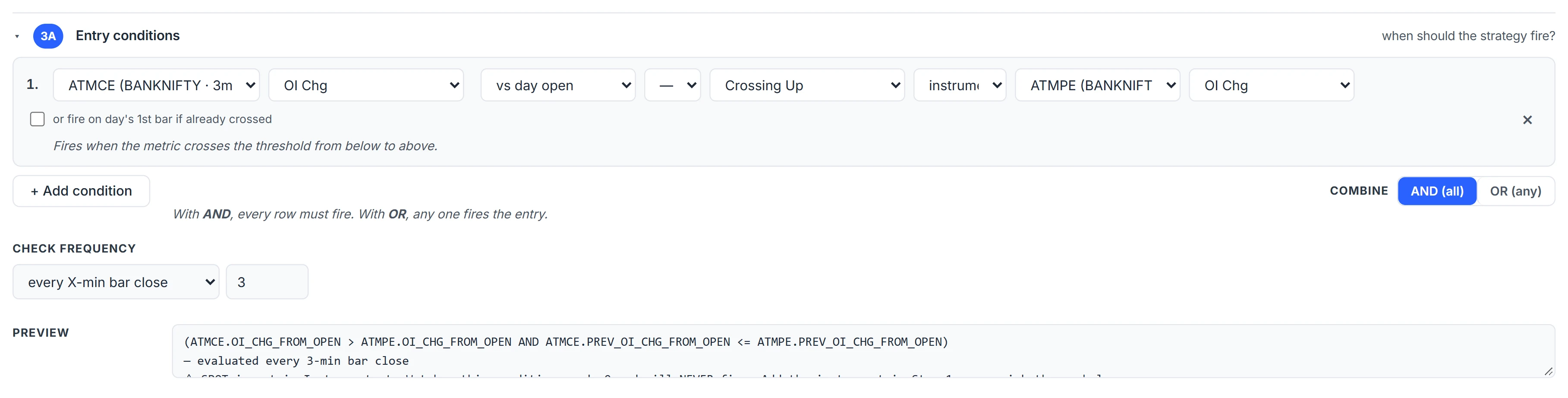
Each row is one true-or-false clause: an instrument, a metric, an operator and a right-hand side. The right-hand side can be a number, another metric on the same instrument, or a metric on a different watched instrument — which is how you compare ATM CE open-interest change against ATM PE open-interest change.
The metric list covers price and structure (LTP, OHLC, day high/low, previous close, VWAP, SMA, EMA, WMA, SAR), momentum (RSI, ROC, MACD and its signal and histogram, Stochastic, ADX, CCI, Williams %R), volatility (ATR, Bollinger bands, Supertrend), volume and OI (volume, OBV, OI and OI change, cumulative delta volume, build-up), option Greeks (IV, delta, gamma, theta, vega) and pivot levels (floor, CPR, Fibonacci, Camarilla). Change metrics let you pick the basis: versus the previous bar, versus the day’s open, or, for OI, versus the previous day’s close.
Operators include greater/less than, crossing up, crossing down or either way, inside or outside a channel, entering or leaving a channel, a new day high or low, and an opening-range breakout up, down or either side with an editable window.
Rows combine with AND (all must be true) or OR (any one). You cannot mix the two inside one block.
When conditions are checked
Check Frequency has two settings, and it changes behaviour more than any metric does.
- Every X-min bar close (the default). The expression is evaluated once per bar, right after the bar closes — never mid-bar, never on an intrabar spike. With X = 5 the checks land at 09:20, 09:25 and so on.
- Tick. Evaluated in real time on every tick in live trading. A backtest cannot go finer than its one-minute bars, so tick mode replays at one-minute resolution.
A crossing is true on exactly one bar. Against a moving right-hand side it is a true crossing — both sides are compared on the previous bar too — not merely one line staying above the other.
If the two lines are already crossed at the open and never cross again, a crossing row stays silent all day. Tick “or fire on day’s 1st bar if already crossed” on that row to also accept the state on the session’s first closed bar.
No-lookahead fills in the backtest
In a backtest, a signal computed from bar X’s close fills at bar X+1’s open. You cannot know a bar’s close until it has closed, so filling at that same bar would use a price that had already gone. The same one-bar delay applies to indicator-driven exits and to stops that are checked at bar close.
A strategy driven purely by the clock — enter at 09:20, no indicator involved — fills on the same bar, because no bar data was used to decide.
This is the single most common source of backtests that look better than live: a fill at the signal bar’s close. More on that in how to read an options backtest.
A worked example
Watch: Option, alias ATM_CE, distance ATM, timeframe 5m. Entry row:
ATM_CE.CLOSE crossing_up ATM_CE.EMA(10), checked every 5-minute bar close.
Suppose the 10:10–10:15 candle opens at ₹96 and closes at ₹104, while the 10-period EMA of 5-minute closes sits at ₹100 and the previous close was ₹98. The previous bar was below the EMA and this one is above it, so the row is true at the 10:15 close. In a backtest the entry fills at the 10:15 bar’s open, not at ₹104. If the next candle also closes above the EMA, nothing fires — it is no longer a crossing.
Exit conditions and common mistakes
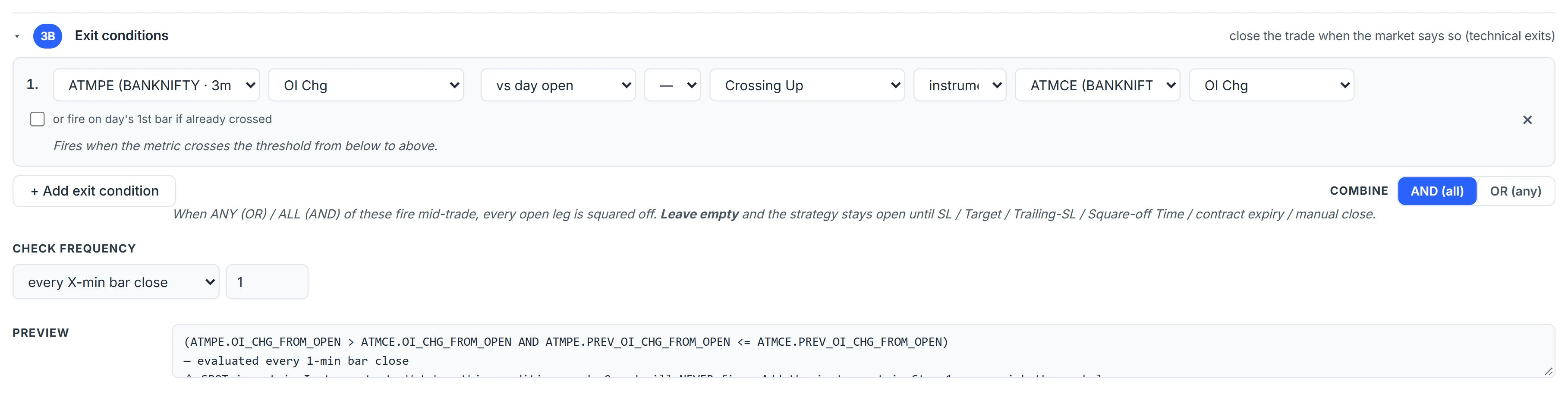
Step 3B uses the same builder but is evaluated after entry. When it fires, every open leg is closed. Exit conditions sit alongside the legs’ own stops and targets and the basket limits; whichever triggers first wins.
- Trading the open by accident. A session VWAP at 09:16 is two minutes old. Add a time row unless you mean to trade the first minutes.
- Mismatched timeframes. An RSI on a 1m alias and a check every 15 minutes reads a 1-minute RSI four times an hour. Match the row timeframe to the check frequency.
- OI on spot. Spot has no open interest; OI metrics on a spot watch read zero.
Where to find it
- In Algo & Backtest, open the builder and expand Step 2.
- Add each instrument you want to read and give it a clear alias.
- Open Step 3A, add rows, pick AND or OR and the check frequency.
- Read the Preview box under the rows — it shows exactly what will run.
Common questions
Does the backtest have lookahead bias?
Indicator-driven entries and exits are filled at the next bar's open, not the signal bar's close. Pure time-based entries fill on the same bar because no price data was used to decide.
Can I compare two different options in one condition?
Yes. Set the right-hand side to an instrument and pick a metric on another watched instrument, for example ATM CE OI change against ATM PE OI change.
What timeframes can indicators use?
Each watched instrument can use 1, 3, 5, 15 or 30-minute candles, or 1-hour candles. The timeframe applies only to bar-based indicators on that alias.
Can I mix AND and OR in one entry condition?
Not within one block. Rows combine with either AND or OR. For more complex logic, split the idea into two strategies and chain them with on-hit actions.
How do I build an opening range breakout?
Use the range breakout operators on a spot or option row and set the window, for example 09:15 to 09:30 IST. Up, down and either-side versions are available.
More on Algo & Backtesting
More in Algo & Backtesting · App: Algo & Backtest · Definitions: glossary · All: every article