Static and dynamic strikes
A leg’s strike is chosen at the moment it enters. Static modes are fixed in the recipe; dynamic modes look at the market at entry and choose the strike that matches your target.
Static strikes keep the geometry of a structure the same every day. Dynamic strikes keep the risk or premium the same every day. Neither is better; they answer different questions.
The strike modes
| Mode | What it picks |
|---|---|
| Distance | ATM, or ITM1–ITM15 / OTM1–OTM15 strike steps from ATM. |
| Absolute | An exact strike. Picking it loads the listed strikes and listed expiries for the underlying, with the contract’s live premium shown beside the box. |
| Premium | The strike whose premium is closest to a ₹ target. |
| Delta | The strike whose |delta| is closest to a target such as 0.30. |
| Underlying Price | The strike nearest spot × (1 + X%), with X signed. |
| OI Levels | The highest open-interest strike (max call OI for CE, max put OI for PE), shifted by ± N strikes. |
| Rolling ATM | ATM ± distance, anchored on the published rolling ATM straddle’s strike — see rolling ATM straddle. |
What counts as “ATM” is set in Step 6 by Strike Reference: spot, the current-month future, or a synthetic future from the chain. On days when futures trade at a premium, these can point at different strikes.
What the engine does at entry
Dynamic strikes are resolved from the live option chain. The engine is strict about it:
- If the chain is unavailable, or there is no live price for the underlying, the entry is refused rather than picking strikes off a stale number.
- The chosen contract must exist in the live chain with a real quote, or the entry is refused with the reason.
A refused entry is visible and fixable. A strategy that quietly trades a strike computed from old data is not.
Worked examples
Underlying Price. NIFTY at 24,000, offset +0.5%: 24,000 × 1.005 = 24,120. On a 50-point step the nearest strike is 24,100, so a CE leg sells the 24,100 call — slightly out of the money — and a PE leg the 24,100 put, slightly in the money. Use a negative offset for the put side of a strangle.
Delta vs distance. Suppose OTM2 is the 24,100 CE on both a calm day and a volatile day. On the calm day it might be a 0.30-delta option; on the volatile day the same distance could be 0.40 delta, because higher IV widens every option’s delta. A Delta 0.30 leg would move further out on the volatile day and keep the risk shape constant. (Illustrative numbers.)
OI Levels. If the largest call OI sits at 24,500 and the offset is +1, a CE leg sells 24,550 on a 50-point step — one strike beyond the wall.
Relative and absolute expiries
Each leg has its own expiry, which is how calendars and diagonals are built.
- Relative: Current, Next or Far Weekly; Current, Next or Far Monthly; Quarterly; Half-Yearly; Yearly. “Far” is the third upcoming series. A relative expiry rolls with the calendar, so a saved strategy keeps trading “this week’s expiry” without edits.
- Absolute: a specific listed date — the exact contract, in live runs and backtests alike.
Weekly expiries exist only on NIFTY and SENSEX. For BANKNIFTY, FINNIFTY and stock options, choose a monthly expiry.
In a backtest, and common mistakes
The backtest replays every strike mode by searching the archived strikes at the entry bar, using the same rules. If a target resolves deeper than the archive holds — a very low delta, or a distance far out of the money — the leg is replayed at the nearest archived strike and the report’s warnings say which legs were substituted. A nearer strike collects more premium and carries more gamma, so read that result as the nearer-strike version.
- Using Absolute strikes in a strategy meant to run for months. The strike will drift far from the money; use a relative mode instead.
- Choosing a weekly expiry for an underlying that has only monthly options.
- Comparing a Distance backtest across years without noticing that the same distance meant very different deltas.
Where to find it
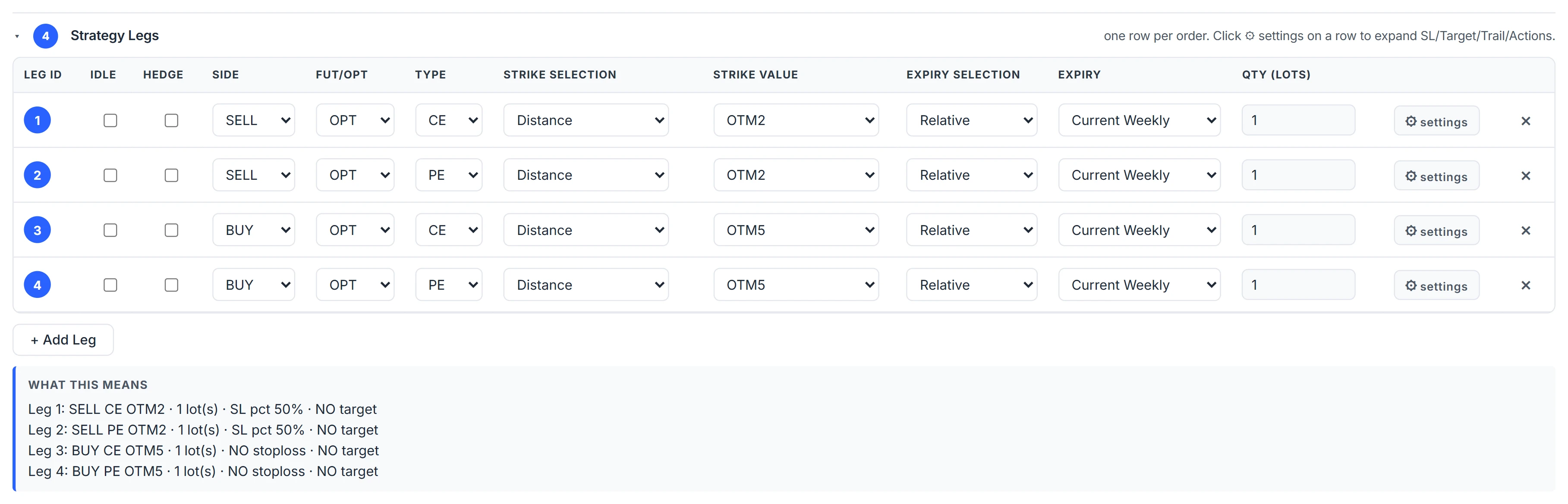
- In Algo & Backtest, open Step 4 and add a leg.
- Choose the strike mode in the Strike Selection column and enter its value.
- Choose Relative or Absolute expiry for that leg.
- Set Strike Reference in Step 6 if you want ATM measured from futures.
Common questions
How do I sell a 30-delta option automatically?
Set the leg's strike mode to Delta and the value to 0.30. At entry the engine picks the listed strike whose absolute delta is closest to 0.30.
What happens if the option chain is not available at entry?
The entry is refused with the reason rather than picking a strike from stale or missing data.
Can each leg have a different expiry?
Yes. Expiry is set per leg, which is how calendar and diagonal spreads are built.
Do dynamic strike modes work in backtests?
Yes. They are resolved from the archived strikes at the entry bar. Targets beyond the archived range use the nearest archived strike and are flagged in the report.
Which expiry should I use for BANKNIFTY?
BANKNIFTY has monthly options only, so use Current, Next or Far Monthly, or an absolute monthly date.
More on Algo & Backtesting
More in Algo & Backtesting · App: Algo & Backtest · Definitions: glossary · All: every article