The problem order controls solve
The leader's fill is history by the time a follower's order goes out, about a second later. The question is how much you are willing to pay to be sure of a fill.
Trade Copy never sends a bare MARKET order to a real broker. A market order goes out as Market Protect: a LIMIT a set buffer through the price, so it behaves like a market order in a normal market and refuses to chase in a runaway one. If no live price is available for a real account, nothing is sent and the Activity Log says so.
The four order types
| Order type | What the follower's order is |
|---|---|
| As leader | Whatever the leader placed. A leader LIMIT copies at its limit price; a leader MARKET fill goes out as Market Protect; a resting LIMIT or SL rests at the same price and trigger. |
| Mkt Protect | A LIMIT the buffer % through the price. Fills almost always. |
| Leader's avg px | A LIMIT exactly at the leader's average fill. Best price, may not fill in a fast market. |
| LIMIT at LTP | A LIMIT at the contract's last traded price when the copy is placed. With no live price it falls back to Market Protect. |
Two cases are always priced as Market Protect whatever you pick: a mapped contract (a NIFTY premium means nothing for SENSEX, so the copy is priced from the follower contract's own live price) and a leader order with no fill price yet.
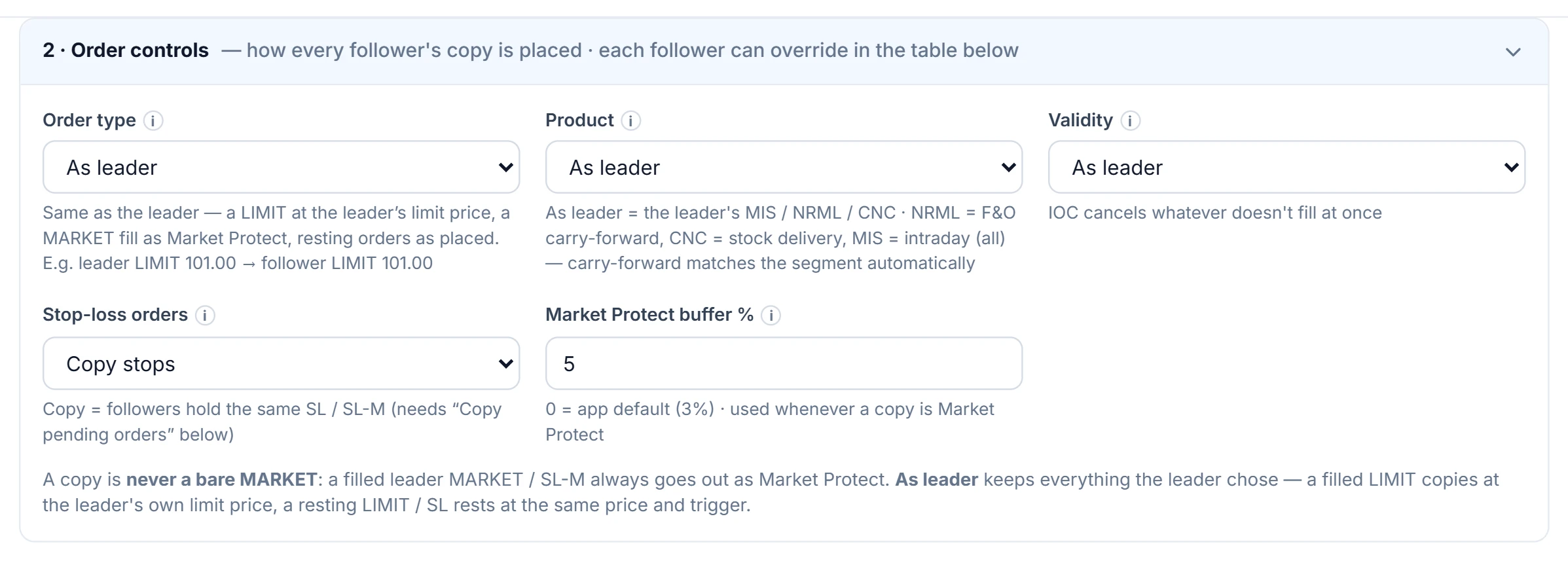
Product, validity, stops and buffer
| Setting | Choices and effect |
|---|---|
| Product | As leader, or force MIS, NRML or CNC. A forced carry-forward product switches to the one valid for the segment — NRML forced on a stock becomes CNC, CNC forced on an option becomes NRML. |
| Validity | DAY rests until the session ends; IOC cancels whatever does not fill at once. |
| Stop-loss orders | Copy stops (followers hold the same resting SL / SL-M, which needs Copy pending orders), or Skip stops (followers exit only when the leader's stop actually fills). |
| Market Protect buffer | 0–20%. 0 uses the default from Engine Settings, which is 3%. |
Each follower can override product, order type, buffer, validity and stop handling, so one account can take the leader's average price while the rest use Market Protect.
What happens when a copy rests unfilled
On a fast expiry-day option, the price can run past the buffer within the second it takes to copy, and the protected LIMIT rests. Trade Copy checks a resting copy every 3 seconds and re-prices it to the live price ± the buffer — still a LIMIT, and only ever moved towards the market.
- Entries get up to 3 re-prices. One that still has not filled is cancelled, with an alert: the follower simply stays out, rather than filling late at a stale price. Check Positions → Sync takes it at the current price if you still want it.
- Exits get up to 10. One that still has not filled is left working, with a loud alert, because the follower is holding something the leader has closed and its margin stays blocked. Fill or cancel it in the broker's terminal, then Sync.
A worked example
Hypothetical: the leader buys a NIFTY call with a market order and fills at an average of ₹102.40. With the 3% buffer, Market Protect sends the follower a BUY LIMIT at 102.40 × 1.03 = 105.47, rounded to the nearest 5-paise tick: ₹105.45. A sell at the same price would go as a LIMIT at 102.40 × 0.97 = 99.33, which rounds to ₹99.35.
With a 2% buffer the buy would be at ₹104.45; at 5%, ₹107.50. A wider buffer fills more reliably but allows more slippage on the copy; it caps the worst price, it does not set it. With Leader's avg px the order is ₹102.40 exactly — and if the premium has already run to ₹104, it waits unfilled.
Common mistakes
- A 0% buffer on options. 0 does not mean "no buffer", it means "use the Engine Settings default". To get as close as possible to the leader, choose Leader's avg px.
- IOC on illiquid contracts. Whatever does not fill at once is cancelled, and the follower ends up with part of the position.
- Copy stops without copying pending orders. Resting stops are pending orders; turn on Copy pending orders in What to copy, or choose Skip stops.
Where to find it
- Open Copy Settings and select the group.
- Set the group's defaults in Order controls.
- For one follower, change its Product, Order type, Buffer %, Validity or Stop-loss from Group to its own value in Followers & sizing.
- Change the app-wide default buffer in Engine Settings.
Common questions
Does Trade Copy ever send a MARKET order?
Not to a real broker. A market order is sent as a LIMIT a buffer through the live price (Market Protect), and if there is no live price nothing is sent.
What is the default Market Protect buffer?
3%, set in Engine Settings. A group or a single follower can use its own buffer from 0 to 20%, where 0 means the default.
Why was my entry copy cancelled?
It rested unfilled through 3 re-prices, so it was cancelled to avoid a late fill at a stale price. Check Positions can take the position at the current price if you still want it.
Why is an exit copy still open after the leader closed?
Exits get up to 10 re-prices and are then left working with an alert rather than cancelled, because the follower still holds the position. Fill or cancel it in the broker's terminal, then Sync.
More on Trade Copier
More in Trade Copier · App: Trade Copy · Definitions: glossary · All: every article