What a copier actually does
A trade copier is a loop: read one account's order book, notice what is new, and place the equivalent order in other accounts.
Trade Copy calls the account you trade the leader and the accounts that mirror it followers. You keep trading the leader wherever you already do — your broker's app, a terminal or an API. The copier reads the leader's order book about once a second and copies what has appeared since the last read. It works for futures, options, stocks and ETFs on NSE, BSE and MCX.
The leader is only read, never written to. It needs to be logged in on the Brokers page and nothing more — no trading switch, no static IP — because no order is ever sent to it. A follower receives orders, so it must also be enabled for trading.
Copy groups and the three switches
A copy group is one leader and its followers. You can run several groups; a leader's orders go only to its own group. A group is either all demo accounts or all real broker accounts — the two are never mixed, so a test can never leak into real money.
Copying needs three switches to be ON at once:
| Switch | What OFF does |
|---|---|
| Master switch | Nothing is copied in any group. Open copied positions stay open, and leader exits made while it is off are not copied. |
| Group switch | New leader orders are not copied to that group. Copied positions stay open. |
| Follower switch | That one follower stays in the group but receives nothing. |
A new group is saved switched off, and saving a group never changes its ON/OFF state — only the switch does. Locking an account, a broker that is not enabled, or a broker that has logged out also stops copies reaching it; a logged-out leader means its book cannot be read, so nothing in that group is copied.
The safety rules every copy follows
- Old orders are never replayed. When a group is switched on, everything already in the leader's book is marked as seen (baselined). Only orders placed after that are copied. Switching on mid-day does not suddenly buy what the leader bought at 09:30.
- Exits are sized like entries. Each leader exit closes the leader's lots × the follower's multiplier, never more than the follower holds — see follower sizing.
- No bare MARKET orders. A market order goes out as a LIMIT a small buffer through the price — see order controls and Market Protect.
- Real money asks first. Switching on anything that involves a real broker account — the master switch, a group, a follower, or saving a live group with a new real follower — names those accounts and asks you to confirm.
Watching it run: the Status Dashboard
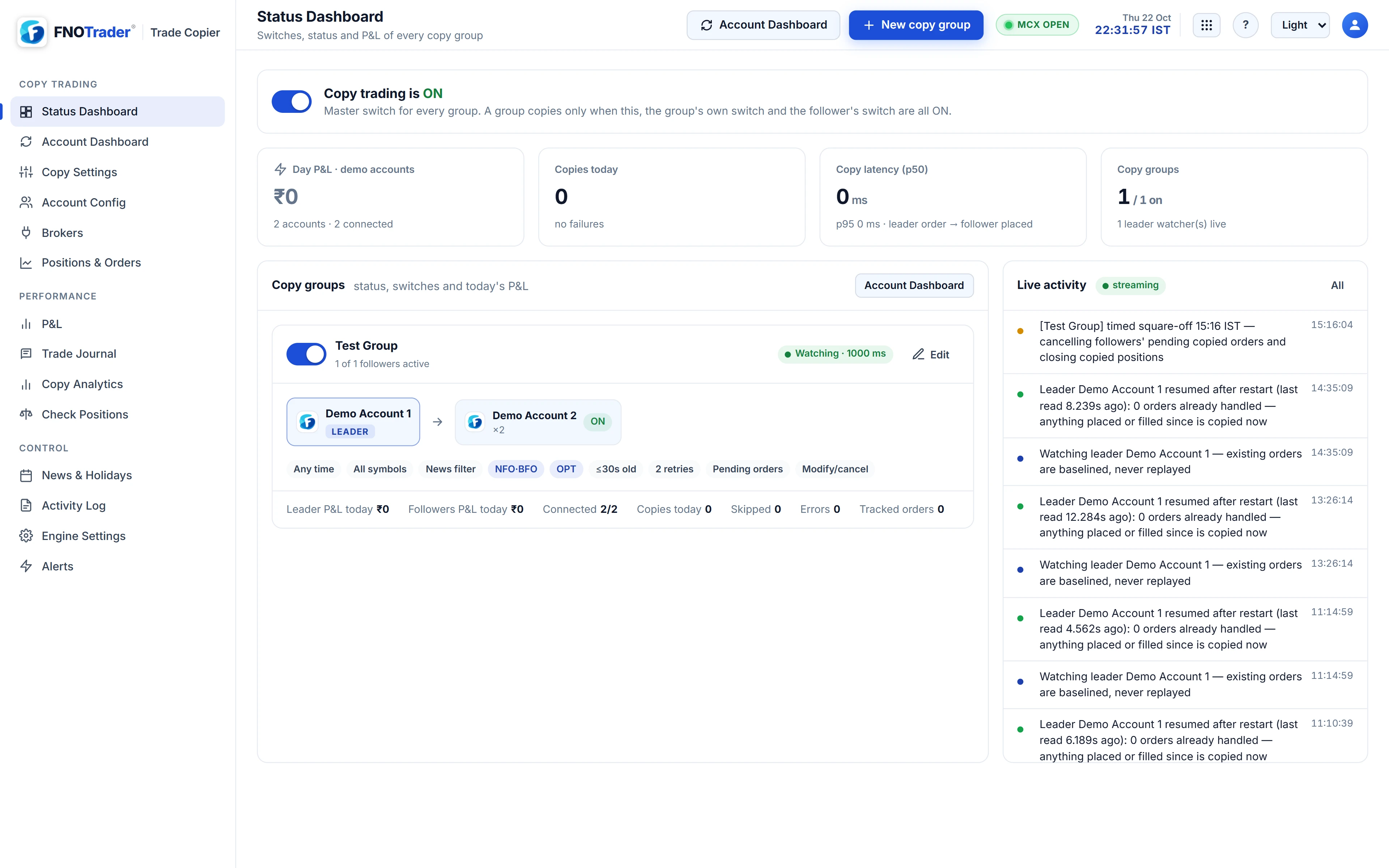
The Status Dashboard is the morning check. At the top: the master switch, today's P&L, copies today and how many failed, and copy latency as a median and a 95th percentile, measured from the leader's order to the follower's order. The median tells you the typical delay; the p95 tells you how bad the slow ones get, which is the number that matters on an expiry-day spike.
Below it, one card per group shows its switch and status — Watching, Leader logged out, Leader unreadable or OFF — the leader and followers with their switches, the group's rules, today's P&L for each account, and counts of copies, skips and errors. A live feed shows every copy, skip and error as it happens, each with its reason. The Activity Log keeps the same events, filterable by level, kind and account.
A worked example
Suppose a group has a leader and two followers: A at multiplier ×1 and B at ×3. The group is switched on at 10:00; the leader already holds 2 lots of a NIFTY call bought at 09:40. Nothing is copied for that position — it was baselined.
At 10:20 the leader buys 1 more lot. A buys 1 lot, B buys 3. At 11:05 the leader sells all 3 lots it holds. A's exit is 3 × 1 = 3 lots, but A holds 1, so A sells 1. B's is 3 × 3 = 9 lots, but B holds 3, so B sells 3. Both followers are flat; neither was pushed into a short position by the leader's larger exit.
If you wanted the followers to hold the 09:40 position too, that is a job for Check Positions, which compares each follower with the leader and proposes the difference for you to confirm.
Common mistakes
- Testing on real accounts first. Build the group with demo accounts, which trade real contracts at live market prices while the exchange is open, and switch on real accounts once the behaviour is what you expect.
- Forgetting the leader's login. Brokers end sessions around midnight. Log the leader in before the open, or nothing is read.
- Assuming OFF closes positions. Switching copying off leaves copied positions open; close them yourself or switch back on so leader exits copy.
Where to find it
- Open Trade Copy and connect your brokers on Brokers.
- In Account Config, press Add account and pick each broker account (or a demo account).
- In Copy Settings, press New group, pick the leader, add followers and set their sizing, then Save settings.
- Turn on the master, group and follower switches and confirm the real accounts named in the popup.
- Trade the leader as usual and watch the Status Dashboard.
Common questions
Does the leader account need static IP or API trading enabled?
No. The leader is only read, never sent an order, so it only needs to be logged in. Followers receive orders and must be enabled for trading. See static IP for API trading for the follower side.
Will switching a group on copy positions the leader already holds?
No. Orders already in the leader's book are baselined and never copied. Use Check Positions to bring followers in line with what the leader holds now.
Can I copy from one broker to a different broker?
Yes. Leader and followers can be at different brokers; each follower order is placed through that follower's own broker connection.
Can demo and real accounts be in the same group?
No. A group is all demo or all real. Use a separate demo group for testing.
How fast is a copy?
The leader is read about once a second, so a copy typically lands one to two seconds after the leader's order. The Status Dashboard and Copy Analytics show your actual median and p95 latency.
More on Trade Copier
More in Trade Copier · App: Trade Copy · Definitions: glossary · All: every article