What it does
You supply a list of timestamped entry and exit events. The backtest fires your strategy only while the list says the signal is on.
Everything you built in the Strategy Builder still decides what is traded: legs, strikes, expiry, stops, targets, trailing and square-off. The signal is only a gate. It works in single-strategy, portfolio and parameter sweep runs.
TradingView is a trademark of its owner. FNOTrader is not affiliated with it; it is named only to describe where your own export comes from.
Three ways to supply signals
| Source | How |
|---|---|
| TradingView export | Put a strategy (not just an indicator) on the chart, open Strategy Tester → List of Trades, export, and upload the file without editing. Rows still marked open are skipped and duplicate rows from a re-export are removed. |
| The template | For signals you write manually or generate from Python or a
spreadsheet. Two columns matter: Date and time (IST, 24-hour, YYYY-MM-DD HH:MM) and
Signal. |
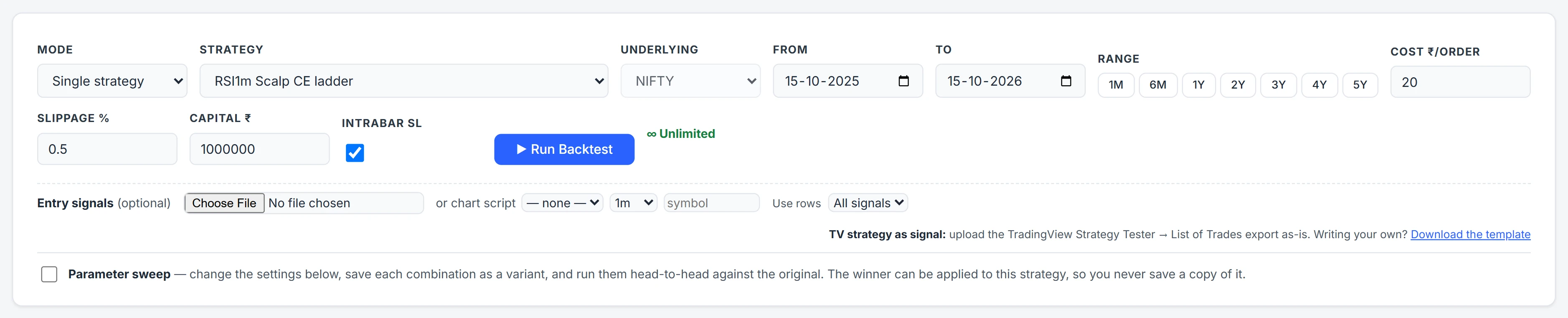
| A chart script | Pick your own indicator or strategy from charts.fnotrader.com, with a timeframe (1m to 1D) and a symbol. Its Buy, Sell and Exit output becomes the signal. |
A chart-script signal is taken at the close of the bar it was decided on — a 15-minute Buy is known at that bar's close, never its open — so the backtest can never act before the signal existed. The symbol defaults to the strategy's underlying, but any charted symbol works, for example a stock's signal timing an index trade.
Signal values and the Use rows filter
| Signal value | Code | Meaning |
|---|---|---|
| ENTRY / EXIT | E / X | Untagged; counts in every filter mode. |
| LONG ENTRY / LONG EXIT | LE / LX | Tagged as the long side. |
| SHORT ENTRY / SHORT EXIT | SE / SX | Tagged as the short side. |
The tag is only a label. The engine never reads a direction out of a row and never changes your legs because of it. The Use rows filter picks All signals, Long only or Short only. A stop-and-reverse export can therefore drive two strategies: a call-buying strategy on Long only, and a put-buying strategy on Short only.
Every entry needs an explicit exit row. An opposite-side entry does not imply one.
How the gate fires
- The signal is a state, not a moment. It is on from an entry row until the next exit row, overnight included. A signal from 09:05 still admits an entry when your window opens at 09:20.
- With an External Signal condition in the strategy, the file drives exactly
that term, so
(TIME ≥ 09:20) AND SIGNAL AND (LTP > VWAP)replays as written. - Without one, the gate wraps the whole entry: entry needs signal on and your conditions; exit happens on signal off or your exit conditions.
- Entries fill at the next bar's open after the combined condition turns true. Stops, targets, trailing and square-off keep working, so a stop can close you while the signal is still on.
A worked example
A hypothetical file holds LONG ENTRY at 2025-03-03 14:50 and
LONG EXIT at 2025-03-04 11:10. The strategy buys an at-the-money call, trades
09:20–15:15 and squares off intraday.
On 3 March the signal turns on at 14:50, so the call is bought at the next bar's open, 14:51, and squared off at 15:15. On 4 March the state is still on, so the strategy enters again when its window opens and exits on the 11:10 exit row. TradingView would have scored one long trade on the index; the option replay shows two separate days of premium and theta, which is exactly the difference worth knowing before going live.
Common mistakes
- Uploading an indicator export. The List of Trades comes from a strategy. An indicator has no trade list.
- Mismatched dates. The run's range is not stretched to fit the file. The summary line warns when the file and the range do not overlap.
- Missing exit rows in a manually written file, which leave the signal on far longer than intended.
- Expecting the same P&L as TradingView. It scored the index; this scores real options.
The same signal codes are used by live webhooks, so a system you backtest from a file can go live unchanged — see signals and webhooks.
Where to find it
- In Algo, open Backtest and pick the strategy.
- In the signal row, choose your CSV file, or pick a chart script with its timeframe and symbol. Download the template from the same row if you are writing your own.
- Choose All signals, Long only or Short only.
- Run the backtest. The report's rules header and warnings say how many signal events were used.
Common questions
Can I backtest a TradingView strategy on NIFTY options?
Yes. Export the Strategy Tester's List of Trades and upload it on the Backtest page. Your signals time the trades; the strategy you built decides which options are bought or sold and how they are managed.
Why is my options backtest P&L different from TradingView's?
TradingView measured the signals on the index. Algo replays real option legs with premium, theta and IV, plus your costs and slippage, so the same timing can produce a different result.
Does a LONG ENTRY signal make the strategy buy?
No. The long or short tag is only a label for the Use rows filter. What is bought or sold is set by the strategy's legs.
Can I use my own chart indicator as a backtest signal?
Yes. Pick a script saved on charts.fnotrader.com, choose its timeframe and symbol, and its Buy, Sell and Exit output gates the backtest. Each signal is taken at the close of the bar that produced it.
More on Algo & Backtesting
More in Algo & Backtesting · App: Algo & Backtest · Definitions: glossary · All: every article