What per-leg risk is for
Every leg in Step 4 has a ⚙ settings panel with its own entry wait, stop loss, target and trailing stop. These act on that leg alone; basket-level limits on the whole position live in Step 5 and are covered in basket risk.
Both levels can be on at once. Whichever triggers first wins.
How a stop is measured
| SL type | Fires when |
|---|---|
| pct | The premium moves the stated % of entry against you. |
| points | The premium moves a fixed number of points against you. |
| pnl | The leg’s ₹ loss across its full quantity reaches the value. |
| underlying move (either / up / down) | The underlying moves N points from your entry spot — a directional stop, not a premium stop. |
| delta | The leg’s |delta| crosses a threshold, for example a short call reaching 0.60. |
| atr | The move reaches N × ATR, so the stop widens on volatile days and tightens on calm ones. |
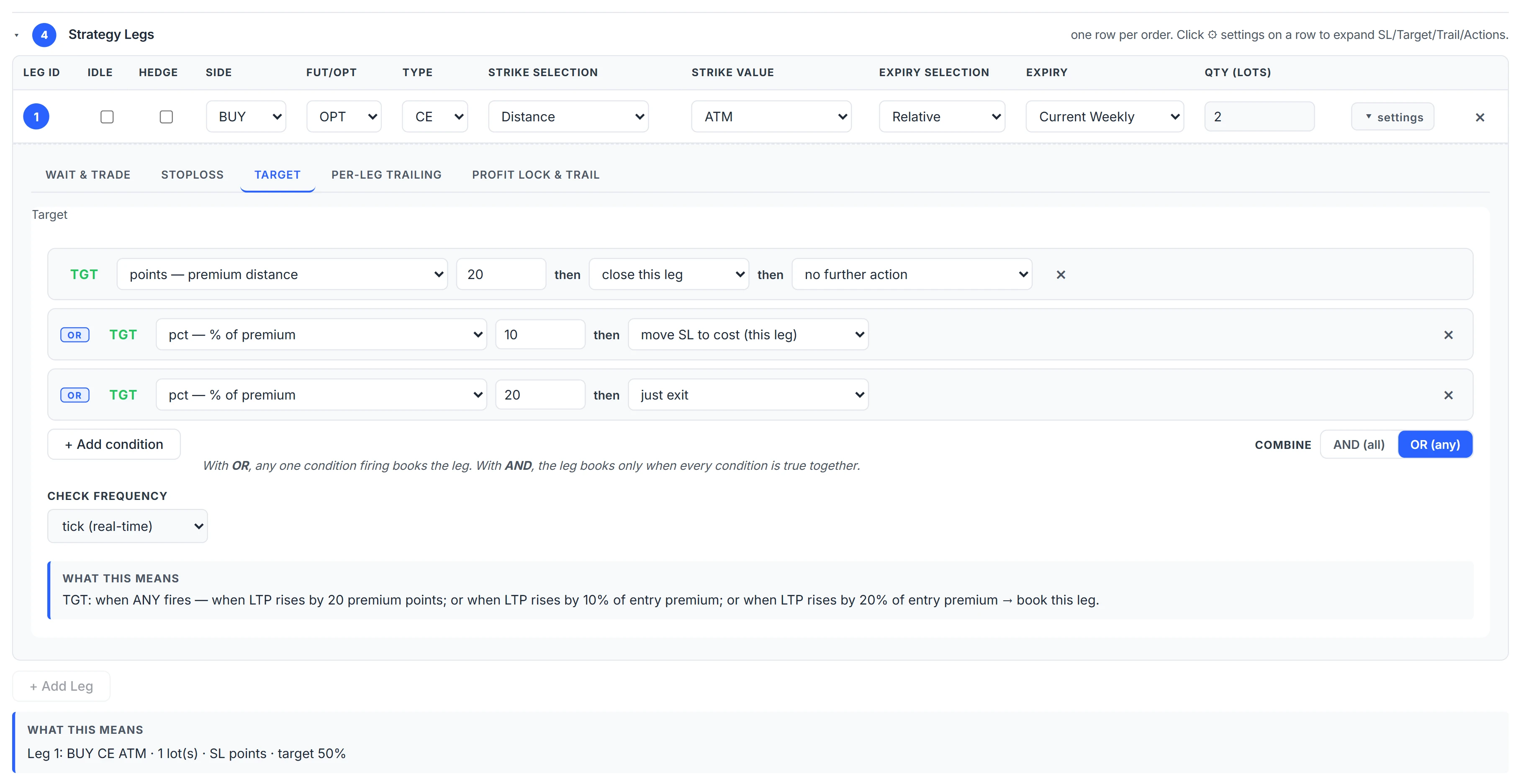
Targets use the same types plus r_multiple: the target distance is N times the stop distance. With a stop 30 points away, a 2R target sits 60 points in your favour.
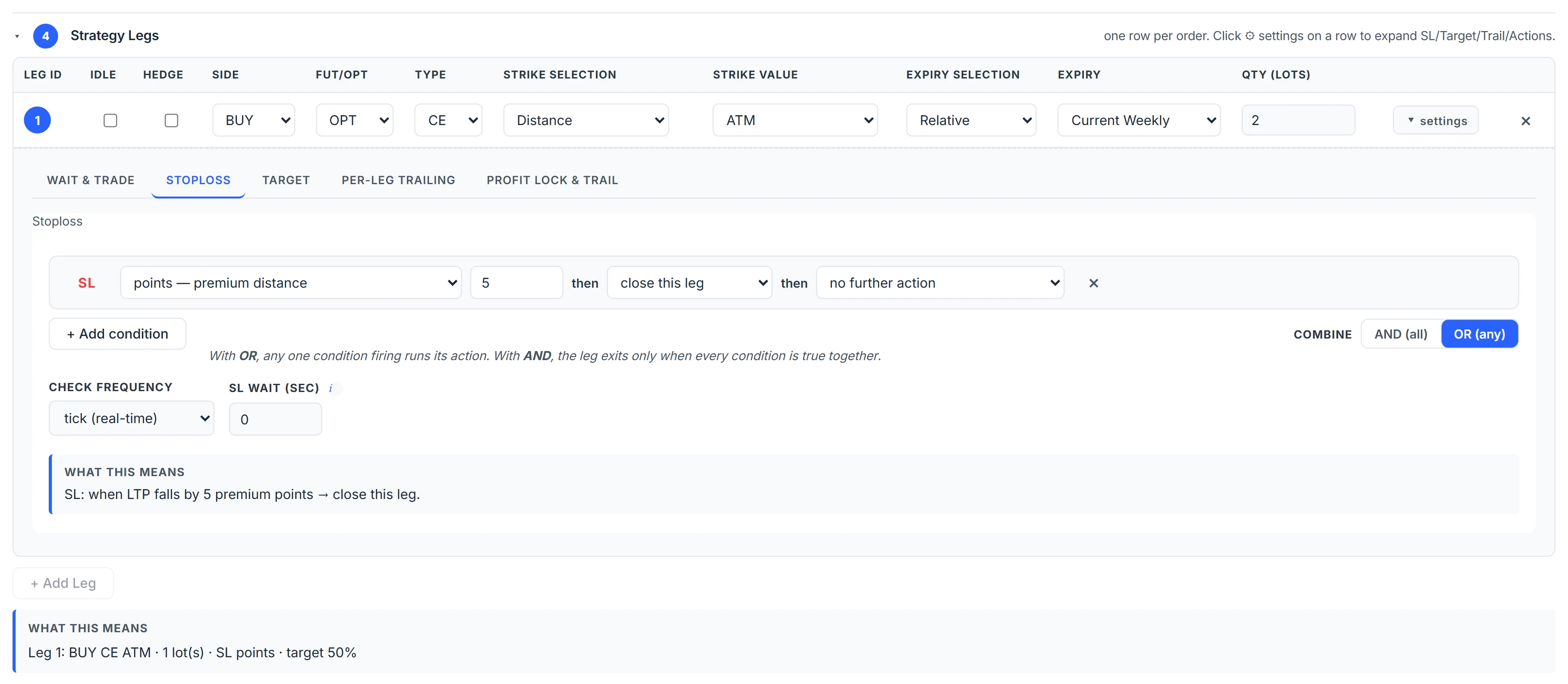
Ladders, SL wait and check frequency
A stop does not have to close everything at once. Add SL2, SL3 rungs, each with its own trigger and the quantity it closes, for a scale-out instead of an all-or-nothing exit. Targets ladder the same way.
SL Wait (sec) is a debounce: a breached stop must stay breached for that many consecutive seconds before the exit fires, and a recovery inside the window resets the timer. Zero exits on the first breach. It exists for the single-tick wick that would otherwise stop you out at the worst price of the day.
Stops and targets can be checked on every tick or only at the close of every X-minute bar.
How the trailing stop moves
The per-leg trail has a Trigger, a Step and a Lock, in % of entry premium or in premium points. Once the premium has moved the trigger distance in your favour, every further step of favourable move shifts the leg’s stop by the lock amount from where it started. A blank lock means lock = step.
The stop never crosses the best price seen, so a trail can never exit on the very tick it arms. If the leg has more than one stop rung, Trail Mode decides whether all rungs shift together (the default) or the trail becomes the single stop.
A worked example
You sell a CE at ₹100 with a 30% stop, so the stop starts at ₹130. Trail: trigger 20%, step 10%, lock 10% — that is ₹20, ₹10 and ₹10 on this entry.
- Premium falls to ₹78: favourable move ₹22, past the ₹20 trigger. Steps beyond the trigger: floor(2 ÷ 10) = 0, so the stop stays at ₹130.
- Premium falls to ₹70: move ₹30, one full step → stop moves ₹10 to ₹120.
- Premium falls to ₹50: move ₹50, three steps → stop at ₹100, which is breakeven.
If the premium then climbs back to ₹100, the leg exits at cost instead of at the original ₹130 stop.
Profit lock, wait and trade, and common mistakes
Profit Lock works on the leg’s ₹ P&L rather than its price. When the leg’s P&L reaches ₹X, a minimum of ₹Y is locked; every further ₹S of peak P&L lifts that floor by ₹L. If P&L falls back to the floor, the leg exits in full. It works independently of the price trail.
Wait & Trade delays a leg’s entry after the strategy has fired until its premium reaches a trigger: an absolute level, points relative to the premium when the wait started, or a percentage. A SELL leg waits for the premium to rise to the trigger, so you sell a bounce instead of chasing a falling premium. An optional timeout abandons the wait.
Common mistakes:
- Percentage stops on cheap options. 30% of ₹12 is under four rupees, well inside normal noise. Use points or ₹ P&L for low premiums.
- A tight trail with no SL Wait. The pair turns every wobble into an exit.
- Leg stops and a basket stop that disagree. If the basket stop is smaller than one leg’s stop, the leg stop never matters.
What happens after a stop or target fires — re-entering, hedging, moving other stops — is covered in re-entry and on-hit actions.
Where to find it
- In Algo & Backtest, open Step 4.
- Click ⚙ settings on a leg.
- Use the Stoploss, Target and Trailing tabs; add rungs for ladders.
- Run a backtest and check the exit reasons in the trade list.
Common questions
How does a trailing stop loss work for option selling?
After the premium falls by the trigger amount, each further step of decline moves the stop down by the lock amount from its original level. If the premium rises back to the moved stop, the leg exits.
What is SL wait in Algo?
A debounce in seconds. A breached stop must stay breached for that long before it fires, which filters single-tick spikes. Zero means exit on the first breach.
Can I scale out of a leg in parts?
Yes. Add SL2 or SL3 rungs, or target rungs, each closing a share of the remaining quantity at its own trigger.
What is an r-multiple target?
A target set as a multiple of the stop distance. With a 30-point stop, a 2R target is 60 points in your favour.
Can a stop be based on the index instead of the option price?
Yes. The underlying move stop types fire when spot moves a set number of points from your entry, in either direction or one direction only.
More on Algo & Backtesting
More in Algo & Backtesting · App: Algo & Backtest · Definitions: glossary · All: every article