What Ask AI is, and the question it answers
Most AI chat tools know nothing about the page you are looking at. You end up copying numbers into a chat box and explaining the screen before you can ask anything.
Ask AI removes that step. It is a round button at the bottom-right of every FNOTrader app — Options, Trade, Stocks, Footprint, Algo, Mutual Funds, Vol Lab, Trade Copy and the account dashboard. Press it, type a question, and the assistant answers with the page you are on already in hand.
Its job is to explain: what the open interest on this chain is saying, why a backtest's drawdown came where it did, what a fund's rolling return means.
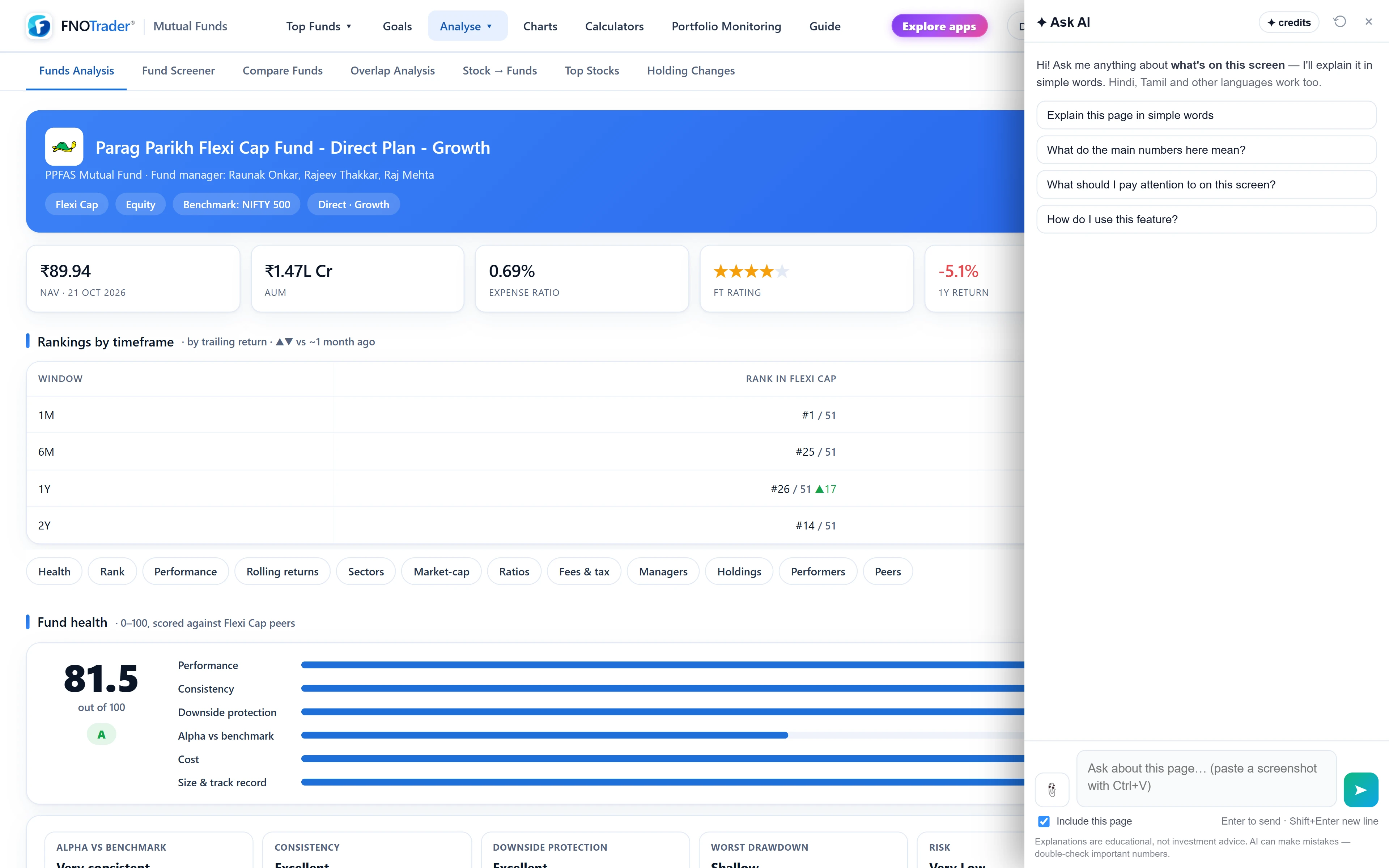
What it reads from your screen
When you send a question, the panel collects the page's context and sends it with the question. That context is one of two things:
- The page's own data. Pages built for it hand over the numbers directly — the Options chain sends strikes, OI and IV; the strategy builder sends your legs and net Greeks; Algo sends the backtest, sweep or strategy you are viewing. Numbers that arrive as numbers are more accurate than scraped text.
- The visible text. Everywhere else it reads the text on the page, up to a generous limit; very long pages are trimmed.
Two controls change this. Untick Include this page under the box and only your question goes. Highlight some text on the page before asking and that selection is sent first, marked as what you selected, so “what does this mean?” points at exactly that passage.
Anything drawn on a canvas — a footprint chart, most price charts — is pixels, not text. For those, attach a screenshot: the clip button takes up to three images per question (PNG, JPEG, WebP or GIF, about 2 MB each), or paste one with Ctrl+V, or drag it onto the panel.
Quick answers and full answers
Not every question needs your screen. “What is theta decay?” has the same answer on every page. So before anything is sent, the question is checked for words that tie it to the screen — this, here, my, chart, table, position, backtest, today and many more.
| Question | What happens |
|---|---|
| Short, general, no image, nothing selected, no screen words | The page is left out. A faster model gives a short answer, and may suggest asking about “this page” to relate it to your screen. |
| Refers to the screen, has an image, or has a selection | The page context goes with it and the main model answers in full. |
If the check gets it wrong, add “on this page” to your question and it will read the screen. Erring towards the screen is harmless; it just uses the full answer.
Answers stream in as they are written, so you start reading at once. Each answer has a Copy button. The conversation keeps its recent turns, and every new question sends the screen as it is now, not as it was when you started — useful when the chain has moved. The ⟲ button starts a new chat. It answers in the language you write in, including Hindi, Tamil, Telugu and Hinglish.
How usage is charged
Ask AI draws from an AI credit wallet on your account. It is one wallet for all apps — a question asked in Stocks and one asked in Algo come out of the same balance, shown on the chip at the top of the panel.
- Each answer is charged after it finishes, from what it actually used. A short how-to costs less than a long explanation of a data-heavy page. The panel shows what each answer used and what is left.
- Nothing is charged when the service fails to respond or declines a question.
- Questions outside markets and FNOTrader — weather, sport, general trivia — get a fixed reply and are not charged.
- There is a daily question limit that resets at midnight IST, and a short cool-down if you send questions very fast.
New accounts start with some credits, and more can be bought from the chip without leaving the page. For current allowances and prices, see /pricing.
A worked example
Say you are on the NIFTY option chain. Ask “what is PCR?” and nothing in it points at the screen, so the chain is left out and you get a short definition of the put-call ratio.
Ask “what is PCR here?” and the word “here” brings the chain in. The Options chain sends its own summary of strikes, open interest and IV, and the answer uses the chain's actual ratio — for example, that 1.3 puts are open for every call — and says what that suggests about where writers are defending.
The same applies to questions that sound specific but contain no screen word. “Where are support and resistance by OI?” reads as a general question and gets a general answer about OI walls. “Where are support and resistance by OI here?” gets the strikes from your chain. One word, two different jobs.
Limits worth knowing
- It explains; it does not advise. It will not tell you to buy, sell, hold, enter or exit anything, give price targets or stop levels to act on, or promise returns. It will describe what the data on screen reads like — that is analysis of the screen, not a recommendation.
- It can be wrong. Check any number that matters against the page itself.
- It sees only the page. Your broker's other screens, your other tabs and anything off-page are invisible to it.
- You must be logged in. Logged out, the chip reads “Log in”.
For good questions on each app, see what to ask Ask AI on each app. Backtesting from Claude or ChatGPT is a separate feature, covered elsewhere in this section.
Where to find it, and how to hide it
- Open any FNOTrader app while logged in. The Ask AI button is at the bottom-right; hover it to see the label.
- Click it, check the chip for your balance, and type a question or pick a suggested one.
- On multi-chart layouts the button can sit on a price label. To hide it, hover the button and click the small ✕ beside it (desktop), or open Profile in your account and switch off Show Ask AI button under Floating buttons. The Support button has the same switch.
- The choice is saved to your account, not the browser, so it applies in every app. A change made on another device reaches this one within a few hours.
- Hidden is not gone: Profile keeps an Open Ask AI link, and switching the button back on there restores it everywhere.
Common questions
Does Ask AI see my screen?
It reads the page you are on when you send a question: the page's own data where the app provides it, otherwise the visible text. Untick 'Include this page' to send only your question. It cannot see other tabs or other apps.
Can Ask AI place trades for me?
No. It cannot place, modify or cancel orders or change settings. It explains what is on the screen and will not tell you to buy or sell anything.
Why did I get a short answer that ignored my screen?
Short general questions with no screen words skip the page and get a quick answer. Add 'on this page' or 'here' to your question and it will read the screen.
How do I hide the Ask AI button?
Hover it and click the small ✕, or switch off 'Show Ask AI button' under Floating buttons in your Profile. The setting is saved to your account and applies in every app.
Can I ask about a chart?
Yes, but charts are drawn as images, so attach or paste a screenshot (up to three per question). Pages that send their own chart data, such as the Options charts, need no screenshot.
More on Ask AI & AI backtesting
More in Ask AI & AI backtesting · App: Ask AI · Definitions: glossary · All: every article