Why the question matters
Ask AI reads the page you are on, so the question does not need to describe the screen. It needs to say what you want to know about it.
Three habits make the biggest difference. Ask for a conclusion, not a recital — you can already see the numbers. Use a screen word (this, here, these strikes) so the page goes with the question; a short general question skips the screen and gets a quick definition instead. And ask one thing at a time; answers are written for a narrow side panel and kept short.
How the assistant reads the page and how usage is charged is covered in Ask AI: an assistant that reads the screen you are on.
Options: chain, GEX and straddles
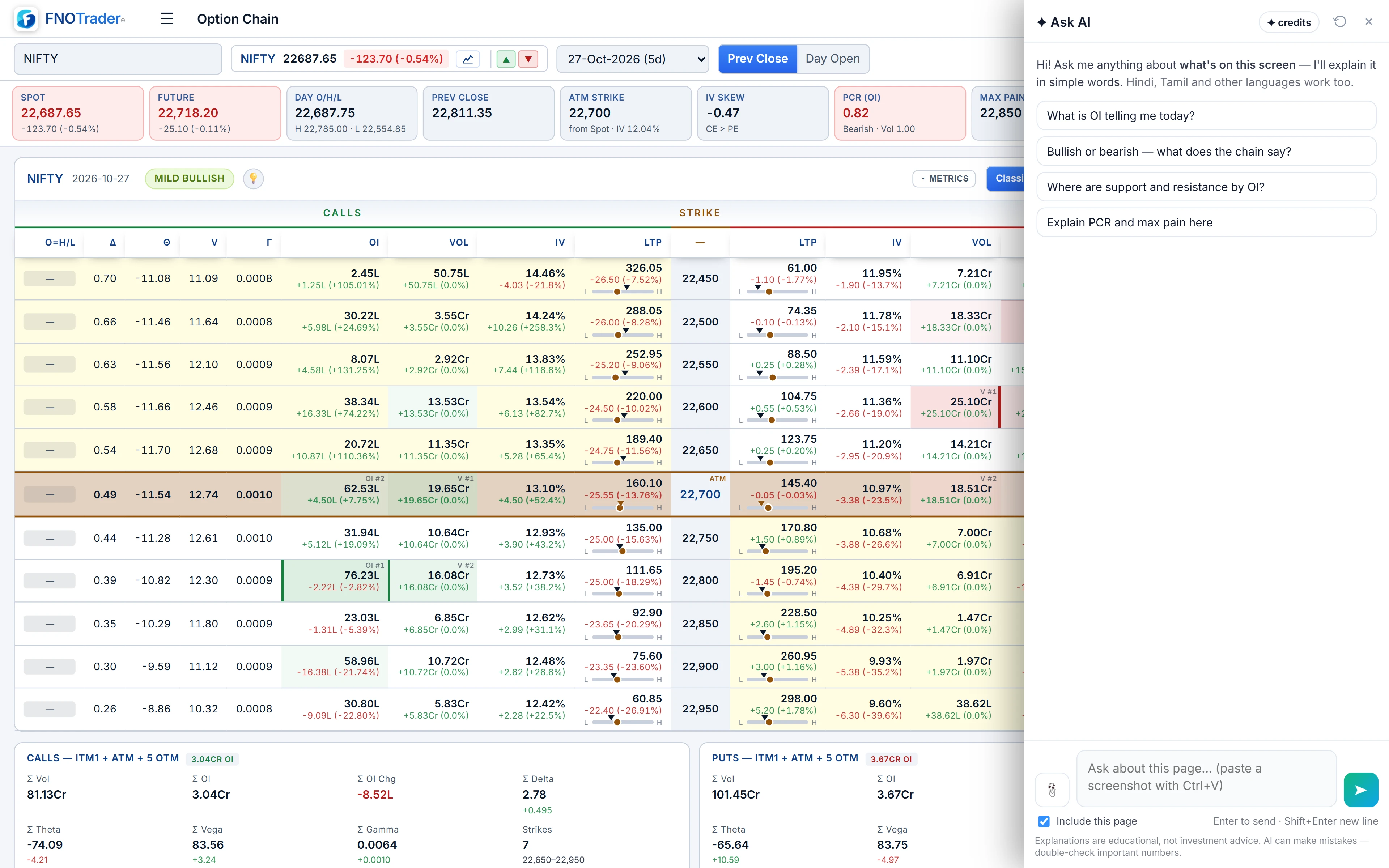
The Options app sends structured data from these pages, so the assistant works from the actual strikes and premiums, not a text scrape. Each page also offers suggested questions when you open the panel. Whether you type your own or edit a suggestion, keep a screen word in it — here, today, these — so the page goes with it.
| Page | Questions that work |
|---|---|
| Option chain | “What is OI telling me today?” · “Where are support and resistance by OI here?” · “Explain PCR and max pain here.” |
| GEX | “Will the market trend or pin today?” · “What does DEX say about direction today?” |
| Straddle charts | “Which of these straddles are decaying and which are expanding?” · “What do the CE and PE legs say about direction?” |
| Strategy builder | “What is my maximum risk here?” · “What happens to this position if the market moves sharply?” · “Explain these Greeks simply.” |
A market read is written to a fixed shape: a bullish, bearish or neutral read with its strength and reason, the market type (range, pin, trend or breakout risk), the key support and resistance levels, two or three insights, and what would flip the read. On straddle pages it reads the premium series against VWAP rather than open interest. If you ask how to set an alert, the Options app passes its own alert guide along, so the steps match the app.
For the concepts underneath, see option chain analysis and straddle vs strangle.
Footprint and Market Profile
A footprint chart is drawn as an image, so the text on the page does not carry the bid-ask numbers. Attach a screenshot of the area you care about, then ask:
- “Is there absorption at the high of this candle?”
- “Where are the stacked imbalances here, and which side are they on?”
- “Is delta confirming this move or diverging from price?”
- “Where are POC and the value area on this profile, and is price inside it?”
Crop tight. A screenshot of the last few bars with the price scale visible beats a full screen of tiny cells. Background on the chart itself is in footprint charts in India.
Stocks: screens and plain-English search
On a screener or setup page, the assistant reads the table you are looking at. Useful questions are comparative: “Which of these have the strongest relative strength?”, “What do these columns mean?”, “Why would a stock appear in this setup?”
The Stocks app adds a second mode to the panel, Find stocks. Describe a screen in English — “IT stocks near their 52-week high with rising volume” — and it is turned into a Custom Query, run by the Stocks app's own screening engine, and returned as a match count, the first few names, the query itself and a link to open the full list in Stocks. You can edit the query in Custom Query afterwards. It is charged only when a query actually runs.
Always read the query it wrote. If “near the high” was translated as within 5% and you meant 2%, change the number. See also stock screeners in India.
Mutual funds and backtests
On a fund page, ask what the numbers mean for that fund: “Explain these rolling returns”, “How does this fund's expense ratio compare with its category?”, “What does the overlap between these two funds mean in practice?”
On an Algo backtest the suggested questions are a good start: “Explain these backtest results simply”, “Why did this strategy lose money on its worst days?”, “Is this result reliable, or could it be luck or overfitting?” On a sweep, “Is the best variant here likely overfitted?” is the question most people forget to ask. The answer reminds you that past results do not predict future ones, and that a result tuned across many parameters deserves suspicion.
A worked example: turning a vague question into a useful one
On a NIFTY chain, “explain this” gets a general tour. Compare three rewrites:
- “Where are the biggest call and put OI walls here?” — two levels, quickly.
- “Is this chain range-bound or set up for a breakout?” — the market type and why.
- “What would have to happen for this read to flip?” — the level or change that would make the read wrong, which is the part most worth knowing before you trade.
Asking the third after the first two works well: the conversation keeps context, and each new question sends the chain as it is now.
What it will not answer
- “Should I buy this?” It says in one line that it cannot advise on a trade, then gives the read of the data so you can decide.
- Targets and stop-losses for you to act on. It names levels the data shows, not orders to place.
- Anything off the page. It cannot see your broker's screens, other tabs or tomorrow's news.
- Off-topic questions. Outside markets, investing and FNOTrader it replies with a fixed message, and is not charged.
Treat every answer as a second pair of eyes on the screen. If a number in the answer matters to a decision, find it on the page yourself.
Common questions
What is the best question to ask about an option chain?
Ask for a conclusion with a screen word, such as 'Where are support and resistance by OI here?' or 'Is this chain range-bound or set up for a breakout?'. You can already see the numbers; ask what they add up to.
Can Ask AI read a footprint chart?
Yes, from a screenshot. Footprint charts are drawn as images, so attach or paste a cropped screenshot with the price scale visible, then ask about absorption, imbalances or delta.
Can Ask AI build a stock screen for me?
In the Stocks app, switch the panel to Find stocks and describe the screen in English. It writes a Custom Query, runs it, and links to the full list. Check the thresholds in the query it wrote.
Will Ask AI tell me whether to buy or sell?
No. It explains what the data on screen reads like, but it does not recommend trades, give targets or stop levels, or promise returns.
Can it tell if a backtest is overfitted?
It can explain the warning signs in the result on screen, such as many tuned parameters or a handful of days carrying the profit. It cannot prove a strategy will work in future.
More on Ask AI & AI backtesting
More in Ask AI & AI backtesting · App: Ask AI · Definitions: glossary · All: every article