What FTScript is, and the problem it solves
FTScript is FNOTrader’s own scripting language for chart indicators and
strategies. If you have written Pine-style scripts before, the syntax will feel familiar: a
script runs once per bar, top to bottom, every variable is a series, and close[1]
means the previous bar’s close.
The engine behind it is written once and compiled two ways: one copy runs inside your browser, so a script re-plots on every live update without a round trip to a server, and the other runs on our servers for backtests over long histories. Because both come from the same source, a signal that appears on the chart is the same signal the backtest acts on.
The mistake this avoids is subtle. Two separate implementations of “the same” indicator drift on edge cases — how the first bars of an EMA are seeded, what happens on a gap, when an order fills. Each difference is small; together they produce a backtest that quietly trades a different strategy from the one you looked at.
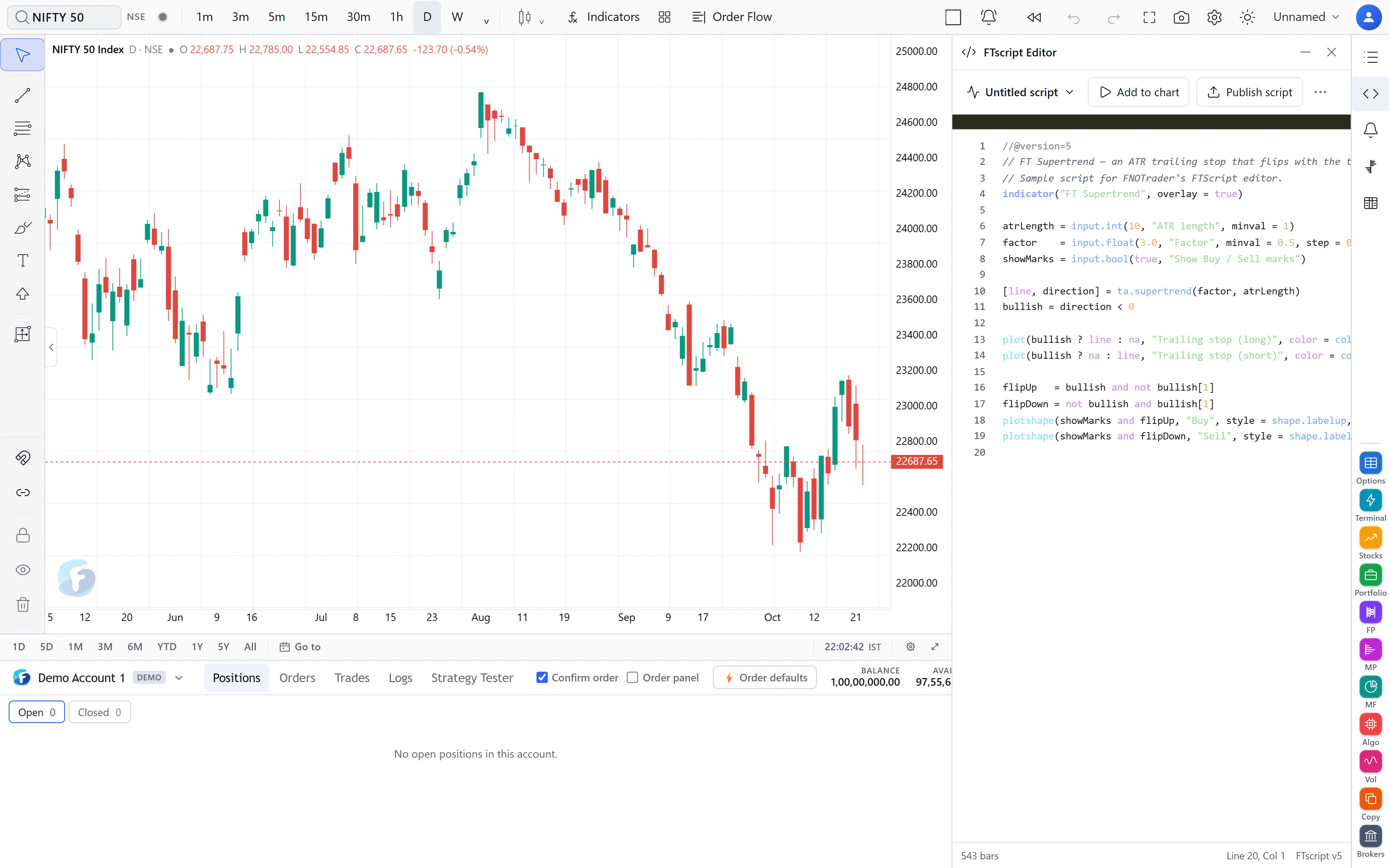
What the language covers
The ta.* namespace has 68 names: moving averages (ta.sma,
ta.ema, ta.rma, ta.wma, ta.hma,
ta.alma, ta.vwma), oscillators (ta.rsi,
ta.stoch, ta.cci, ta.mfi, ta.tsi), volatility
(ta.atr, ta.bb, ta.kc, ta.stdev), trend
(ta.supertrend, ta.sar, ta.dmi), pivots, crossovers, and
built-in series such as ta.obv and ta.tr.
Around that sit the math, str, color, array,
matrix and map libraries; the drawing calls (plot,
plotshape, hline, fill, bgcolor,
barcolor, plus line, label, box and
table objects); alertcondition; and request.security for
reading a higher timeframe or another symbol.
Inputs become a settings dialog automatically
Every input.* call in your script — input.int,
input.float, input.bool, input.source,
input.enum, input.color, input.timeframe and the rest
— becomes a field on the indicator’s Inputs tab, and every plot becomes a row on its
Style tab. Change “ATR period” from 10 to 14 and the script re-runs with the new value.
You do not register anything or declare a fixed number of plot slots; the dialog is generated from
the script itself each time it runs.
How a strategy is tested
A script that calls strategy() and places orders with
strategy.entry, strategy.exit or strategy.close is a
strategy. Its results appear in the Strategy Tester tab under the chart: net
profit, number of trades, win rate, profit factor, max drawdown, average trade and open P&L,
followed by the list of trades with entry and exit times in IST.
Each bar is processed in a fixed order:
- Market orders queued on the previous bar fill at this bar’s open.
- Inside the bar, price is assumed to travel open → the nearer of high or low → the farther one → close. Limit, stop and exit levels fill where that path first touches them, or at the open if the bar gaps through.
- Your script then runs at the close and sees the position those fills left.
The strategy() declaration’s capital, default quantity (fixed, cash or percent
of equity, in whole units), pyramiding, commission, slippage and
process_orders_on_close are honoured, and strategy.risk.* limits are
enforced. A position still open on the last bar stays open and is reported separately.
A worked example
A simple EMA crossover strategy, written in FTScript:
//@version=5

   strategy("EMA cross", overlay=true)

   fast = input.int(9, "Fast")

   slow = input.int(21, "Slow")

   if ta.crossover(ta.ema(close, fast), ta.ema(close, slow))

       strategy.entry("L", strategy.long)

   if ta.crossunder(ta.ema(close, fast), ta.ema(close, slow))

       strategy.close("L")
Suppose (hypothetical numbers) the crossover happens on the bar that closes at 10:15 IST. The entry is queued at that close and fills at the 10:16 bar’s open, not at 10:15’s close — which is what would happen in real trading.
Say the Strategy Tester then shows six winners totalling 12,000 and four losers totalling 8,000. Net profit is 12,000 − 8,000 = 4,000, win rate is 6 ÷ 10 = 60%, and profit factor is 12,000 ÷ 8,000 = 1.5. You can redo each number from the trade list, which is the point of showing it.
Limits worth knowing
- The Strategy Tester tests the bars on the chart. If it says “no trades”, scroll back or pick a longer timeframe so more history is loaded.
- No strict type checker. Qualifiers like
seriesandsimpleare parsed but not enforced, so a script some other platforms would reject may run here. Treat a clean run as “it compiles”, not as “it is correct”. - History depth is automatic. Buffers start at 500 bars and grow, up to 5,000, when a script reaches further back.
varipbehaves likevar, because the chart re-runs the whole script on each update.- A backtest is a description of the past under a fill model. It is not a forecast. For the wider method, see options backtesting in India.
Where to find it
- Open FNOTrader Charts and sign in.
- Open the FTScript editor from the rail on the right of the chart. Write or paste your script.
- Press Add to chart. Fix anything listed in the problems list under the code.
- Save it — it appears under Indicators → My scripts on every device you sign in on.
- For a strategy, open the Strategy Tester tab to read the results.
Already have a script written for another platform? See bringing your code to FTScript. To share or sell what you write, see the script marketplace.
Common questions
Is FTScript the same as Pine Script?
No. FTScript is FNOTrader's own language with a Pine-style syntax, running on FNOTrader's own engine. Many scripts read the same way, but it is not affiliated with or a copy of any other platform's software.
Does the backtest use the same calculation as the chart?
Yes. The engine is written once and compiled for the browser and for the server, so the chart and the backtest run the same code.
When does a market order fill in an FTScript backtest?
A market order placed on a bar fills at the next bar's open. With process_orders_on_close = true it fills at the same bar's close instead.
Can an FTScript indicator read a higher timeframe?
Yes, with request.security. On historical bars a higher-timeframe value appears on the chart bar that closes it, so the script does not see a bar before it finished.
Where are my saved scripts stored?
In your FNOTrader account. They appear under Indicators, My scripts, on any device you sign in on.
More on Charts & Marketplace
More in Charts & Marketplace · App: FNOTrader Charts · Definitions: glossary · All: every article