What it does, and what it does not
Bring your code takes an indicator or strategy you already use and produces an FTScript that behaves the same way on FNOTrader Charts.
It accepts code written as AmiBroker AFL, Python (pandas, TA-Lib or backtrader style), MT4/MT5 MQL4/MQL5, NinjaTrader NinjaScript, Pine Script, thinkorswim ThinkScript, or anything else such as MetaStock, TC2000 or EasyLanguage under “Other”.
The important word is equivalent. Nothing runs your original code, and nothing translates it line by line. The AI reads what your script does — which averages it compares, when it buys, when it exits — and writes FTScript that does that. It is a best effort. It is not a guaranteed one-to-one conversion, and the result can differ from the original. FNOTrader is not affiliated with any of the platforms named here; they are named only to describe where your code came from.
How it works, step by step
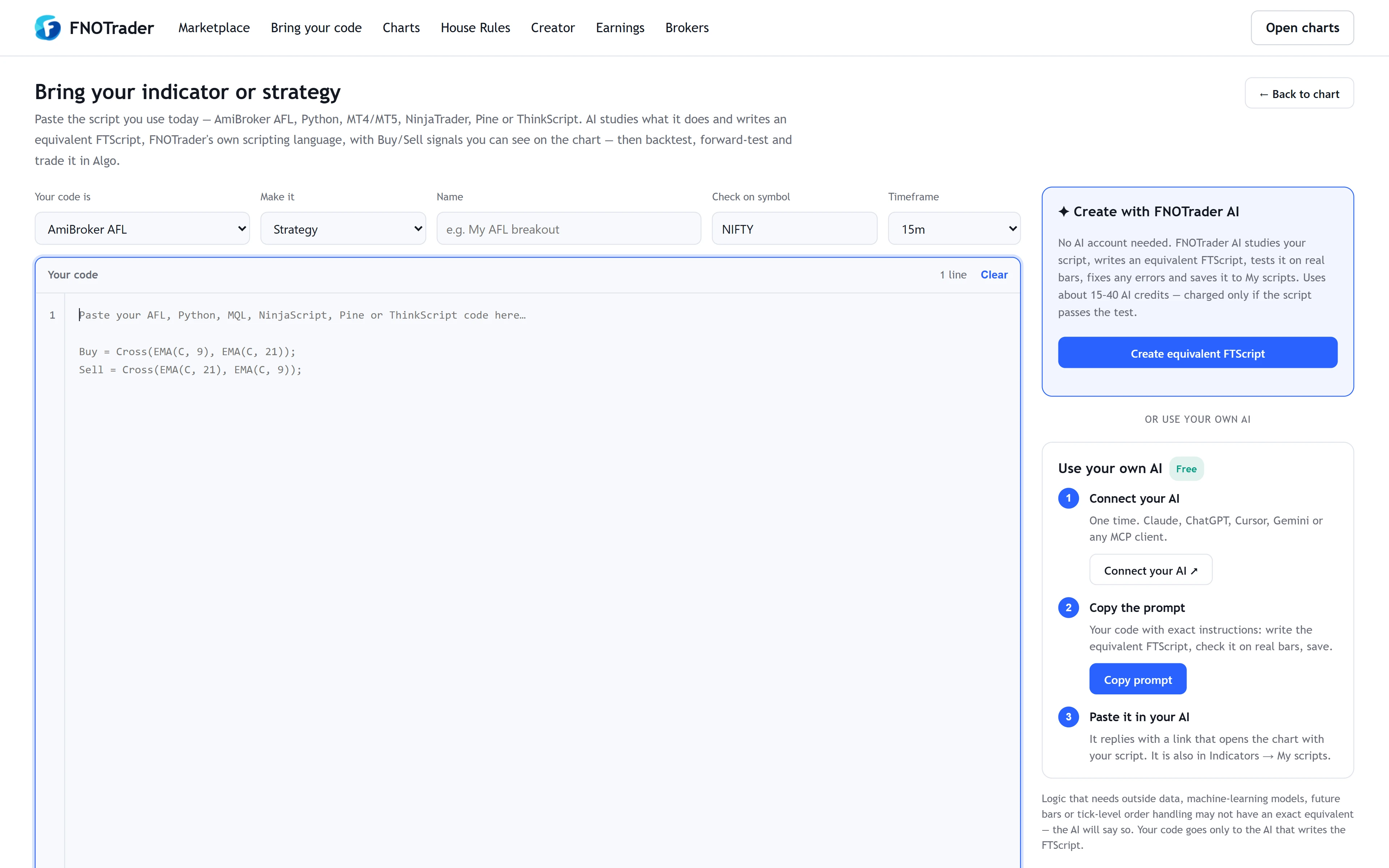
On the Bring your code page you choose what your code is, whether you want a Strategy or an Indicator with Buy/Sell signals, a name, and a symbol and timeframe to test on (it pre-fills from the chart you came from, otherwise NIFTY on 15 minutes). Then you paste the code.
There are two ways to get the FTScript:
- FNOTrader AI, inside the page. It writes the script, runs it on real bars for the symbol and timeframe you picked, fixes any errors it finds and saves the result to My scripts. It uses AI credits, and is charged only if the script passes that test.
- Your own AI — Claude, ChatGPT, Cursor, Gemini or any client that supports MCP — connected to FNOTrader once. The page builds the exact prompt with your code inside and copies it to your clipboard; you paste it into your AI, which checks the script on real bars, saves it and replies with a link that opens it on the chart. See connecting your AI over MCP.
Either way, the output also includes a plain-language note on what the FTScript does and anything that may not match your original exactly. Read that note first.
A worked example
Take a two-line AFL crossover:
Buy = Cross(EMA(C, 9), EMA(C, 21));
Sell = Cross(EMA(C, 21), EMA(C, 9));
An equivalent FTScript strategy computes the same two averages and enters on
ta.crossover(ta.ema(close, 9), ta.ema(close, 21)), closing on the reverse cross.
Here is the check that matters. On the same symbol, timeframe and date range, count the signals on both platforms. Suppose your old platform shows 14 buys over the last three months and the FTScript shows 13. One missing signal is a lead, not a rounding error: find that bar. A common cause is how the first bars of an EMA are seeded, or whether the order fills at the signal bar’s close or the next bar’s open. Once the signals line up bar for bar, compare trade-level P&L.
How to check the result before you trust it
- Read the code. FTScript is short and readable. Confirm the lengths, sources (close versus hl2) and conditions are the ones you meant.
- Compare signals bar by bar on a period you know well, as in the example.
- Check the fill timing. FTScript fills market orders at the next bar’s open by default. If your original filled at the signal bar’s close, results will differ even with identical signals. See how FTScript tests a strategy.
- Check costs. Commission and slippage settings must match before P&L can.
- Only then add it to a live chart, and treat its signals as you would any new tool — carefully.
What may not have an exact equivalent
Some logic has no clean counterpart, and the AI is asked to say so instead of guessing:
- scripts that need outside data the chart does not carry;
- machine-learning models trained elsewhere;
- code that peeks at future bars (often by accident in Python backtests);
- tick-level order handling.
Your code is sent only to the AI that writes the FTScript.
Where to find it
- On FNOTrader Charts, open Indicators and press Import code. The Bring your code page opens in a new tab with your chart’s symbol and timeframe filled in.
- Pick the language, Strategy or Indicator + Buy/Sell, and a name. Paste your code.
- Press Create equivalent FTScript, or connect your own AI and press Copy prompt.
- Open the saved script on the chart. It is also in Indicators → My scripts.
Common questions
Can I convert my AFL code to run on FNOTrader?
Your AFL code itself does not run here. AI studies what it does and writes an equivalent FTScript, which you then check against your original.
Is the FTScript guaranteed to match my original script?
No. It is a best effort. Results can differ, which is why you should compare signals bar by bar and check fill timing before trading with it.
Do I need my own AI account?
No. FNOTrader AI can write it inside the page. You can also use your own MCP-capable AI client, connected once.
Which languages can I bring?
AmiBroker AFL, Python, MQL4/MQL5, NinjaScript, Pine Script and ThinkScript are listed, and an Other option covers MetaStock, TC2000, EasyLanguage and similar.
Where does the finished script go?
It is saved to your account under Indicators, My scripts, and can be opened on any chart.
More on Charts & Marketplace
More in Charts & Marketplace · App: FNOTrader Charts · Definitions: glossary · All: every article