What the Notification Center controls
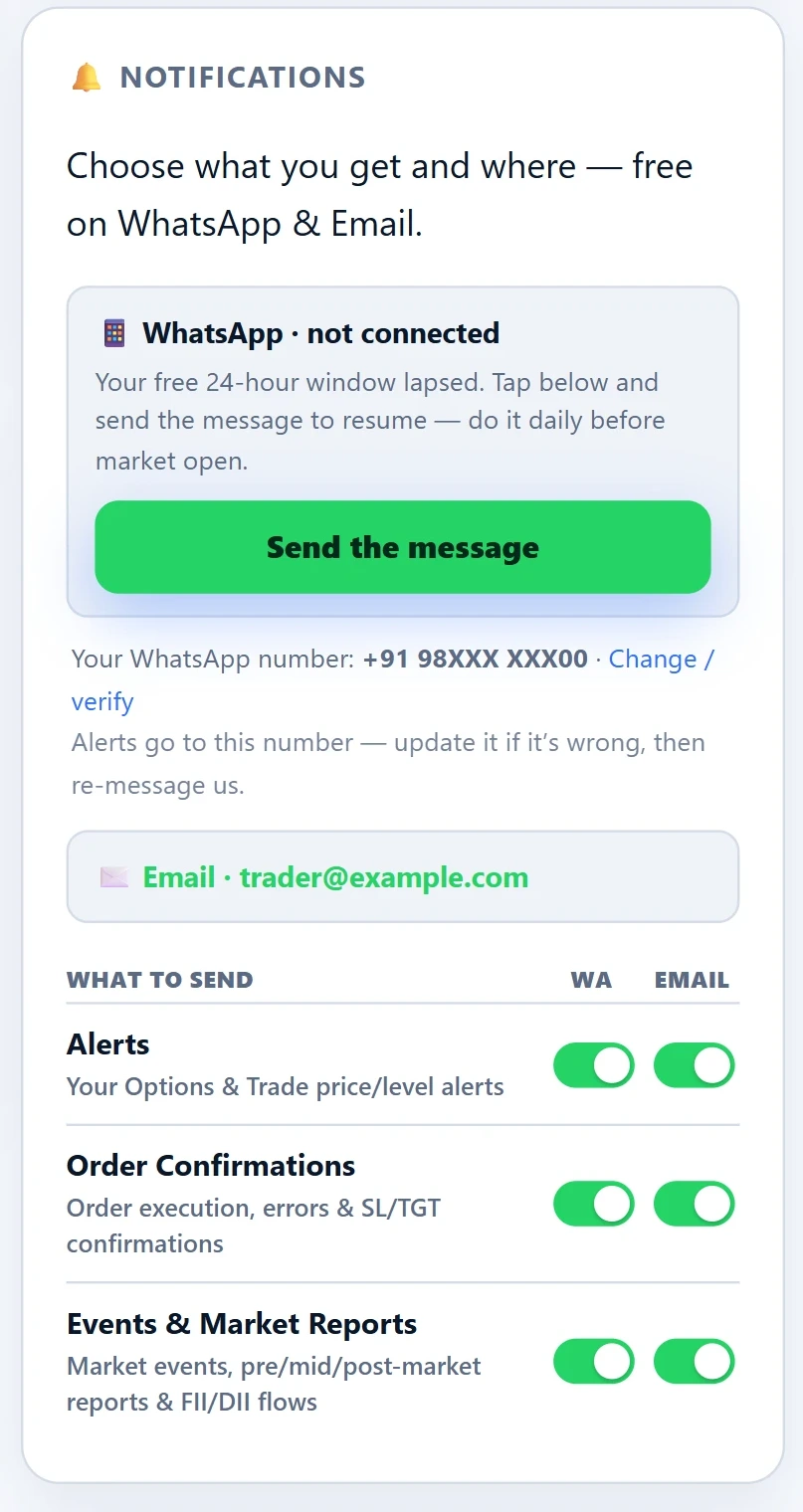
Every message FNOTrader sends you belongs to one of three categories, and each category has its own WhatsApp and email switch.
| Category | What it carries | Default |
|---|---|---|
| Alerts | Your price and level alerts from Options and Trade | WhatsApp and email |
| Order Confirmations | Order execution, errors, and stop-loss / target confirmations | WhatsApp only |
| Events & Market Reports | Market events, pre-, mid- and post-market reports, and FII/DII flows | WhatsApp only |
Email is on by default only for Alerts, the lowest-volume category, so your inbox is not filled with routine confirmations. Change any switch and it saves immediately.
How WhatsApp delivery works
WhatsApp allows a business to send you free-form messages only within 24 hours of your last message to it. FNOTrader works inside that rule rather than around it, which is why WhatsApp notifications are free.
- In the Notification Center, tap Click to message. WhatsApp opens to the FNOTrader number with a short message already typed.
- Send it from your registered mobile number. That switches WhatsApp notifications on and opens a 24-hour window, shown as “connected” with the time it stays open until.
- Every message you send resets the 24 hours. When it lapses, the panel says so and offers a Send the message button to reopen it.
The practical habit is the one the panel suggests: message once a day before market open, so the window covers the whole session.
When WhatsApp does not get through
A WhatsApp message is skipped when the window has closed, when WhatsApp notifications are off, or when there is no number on the account. Email is skipped only when there is no email address.
Order Confirmations and Market Reports default to WhatsApp only. So that a failed send is not silent, a WhatsApp message in a category with email switched off is backed by email: if WhatsApp is attempted and the message is not delivered, the same message goes to your email instead.
That safety net covers a failed delivery, not a closed window. If your 24-hour window has lapsed, WhatsApp is skipped before anything is sent, and a category with email off sends nothing. Keeping the window open is still your job.
The panel also shows the WhatsApp number notifications go to. If it is wrong — an old number, or a placeholder from sign-up — use Change / verify, then message the FNOTrader number again from the new one.
A worked example
Say you trade options intraday and want your level alerts on your phone, order confirmations on your phone, and market reports only when you look for them.
- Alerts: WhatsApp on. Leave email on too, as a record you can search later.
- Order Confirmations: WhatsApp on, email off. If a WhatsApp message is not delivered, the email fallback still reaches you.
- Events & Market Reports: both off.
Then, at about 09:00 IST each trading day, send the opt-in message. By 09:15 your window is open until 09:00 the next morning, which covers the session and anything after it.
Limits and common mistakes
- Messaging from a different phone. The window is matched to your registered number. A message from another number does not open it.
- Assuming WhatsApp is on because it was on yesterday. Check for “connected”; if the window has lapsed, WhatsApp messages are skipped until you message again.
- Turning a category off on both channels. Nothing in that category reaches you away from the screen.
To stop WhatsApp notifications entirely, use Turn off in the WhatsApp row.
Where to find it
- Log in and open your account dashboard at /app.
- Click Notifications to open the panel.
- Connect WhatsApp if it is not connected, check your number, then set the WhatsApp and email switch for each category.
Alerts themselves are created in the apps: see Options and Trade. Broker setup, which order confirmations depend on, is covered in connecting your broker.
Common questions
Can I get FNOTrader alerts on WhatsApp?
Yes. Open Notifications in your account, tap Click to message and send the pre-filled message from your registered mobile. That turns on WhatsApp notifications for the categories you switch on.
Why did my WhatsApp alerts stop?
WhatsApp only allows free-form business messages within 24 hours of your last message. When that window lapses, send the message again; doing it daily before market open keeps it open.
Which notifications go to email by default?
Only Alerts. Order Confirmations and Events & Market Reports go to WhatsApp by default, with email off.
What happens if a WhatsApp order confirmation fails?
If email is off for that category and the WhatsApp message is not delivered, the same message is sent to your registered email instead. This does not cover a lapsed 24-hour window, when WhatsApp is skipped altogether.
Do WhatsApp notifications cost anything?
No. They are sent inside WhatsApp's 24-hour customer-service window, which is why the window has to be kept open.
More on Platform & setup
More in Platform & setup · App: Notification Center · Definitions: glossary · All: every article