The question it answers
"Which option contracts, anywhere in the market, changed meaningfully in the last few minutes?" A stock screener asks this of shares; this one asks it of options.
The universe is index options on NSE and BSE, stock options, and MCX options. Every minute, five seconds after the minute closes, the screener recomputes each contract's change over windows of 1, 3, 5, 10, 15 and 30 minutes, then applies the scans you have ticked. NSE results freeze at the close while MCX keeps scanning into the evening.
The page refreshes itself shortly after each minute while you are looking at it. Without a plan, results are 15 minutes old and the page says so.
The liquidity floor every scan sits on
A 300% move on a contract that traded twice is noise. Before any rule runs, a contract must pass these gates:
- LTP at least ₹2 for index options, ₹1 for stock and MCX options.
- Open interest of at least 500 lots (index), 50 (stock) or 20 (MCX).
- A trade within the last three minutes.
- Within ten strikes of ATM (the gamma-burst scan uses 1 to 15 strikes OTM instead).
- Premium traded in the scan's window of at least ₹10 lakh (index) or ₹2 lakh (stock, MCX).
Volume and OI are shown in lots for NSE and BSE contracts. Moneyness is signed so that a positive number means out of the money for both calls and puts.
The 16 preset scans, as coded
| Scan | Rule |
|---|---|
| Fresh long buildup | 10 min: OI +10% or more, premium +15% or more, relative volume 3× or more. |
| Call writing / Put writing | 10 min, ATM to 5 strikes OTM: premium down 3% or more while OI rises 5% or more. |
| Short covering | 10 min: OI down 8% or more, premium up 10% or more. |
| Long unwinding | 10 min: OI down 8% or more, premium down 10% or more. |
| Unusual volume | 5 min: volume 5× today's pace, with ₹50 lakh (index) or ₹10 lakh (stock, MCX) of premium traded. |
| Strike suddenly active | 5 min: the strike's share of its chain's volume is 10% or more, at least 3× its 30-minute share, and it ranks top 3. |
| Breakout + strike activity | 5 min, ATM to 3 OTM: underlying above its earlier day high (CE) or below its day low (PE), premium +10% on 3× volume. |
| ATM/OTM momentum | 5 min, ATM to 5 OTM: premium +20% and at least 5% beyond what delta alone implies. |
| IV spike / crush | 15 min, ATM±3, delta 0.15–0.85: IV moved 2 vol points or more either way. |
| Expiry-day gamma burst | Expiry day only, OTM: premium +50% in 5 min on 5× volume. |
| Big-ticket print | One minute with ₹1 crore (index) or ₹25 lakh (stock, MCX) of premium traded. |
| PCR shift | 5 min: underlying's OI PCR moved 0.10 or more, or crossed 0.7, 1.0 or 1.3. |
| ATM call-vs-put tilt | 10 min: net PE-minus-CE OI added across ATM±2 is at least 3% of that OI. |
| OI wall shift | 5 min: the highest-OI call or put strike changed. |
| Straddle expansion / crush | 15 min: ATM straddle premium moved 8% or more. |
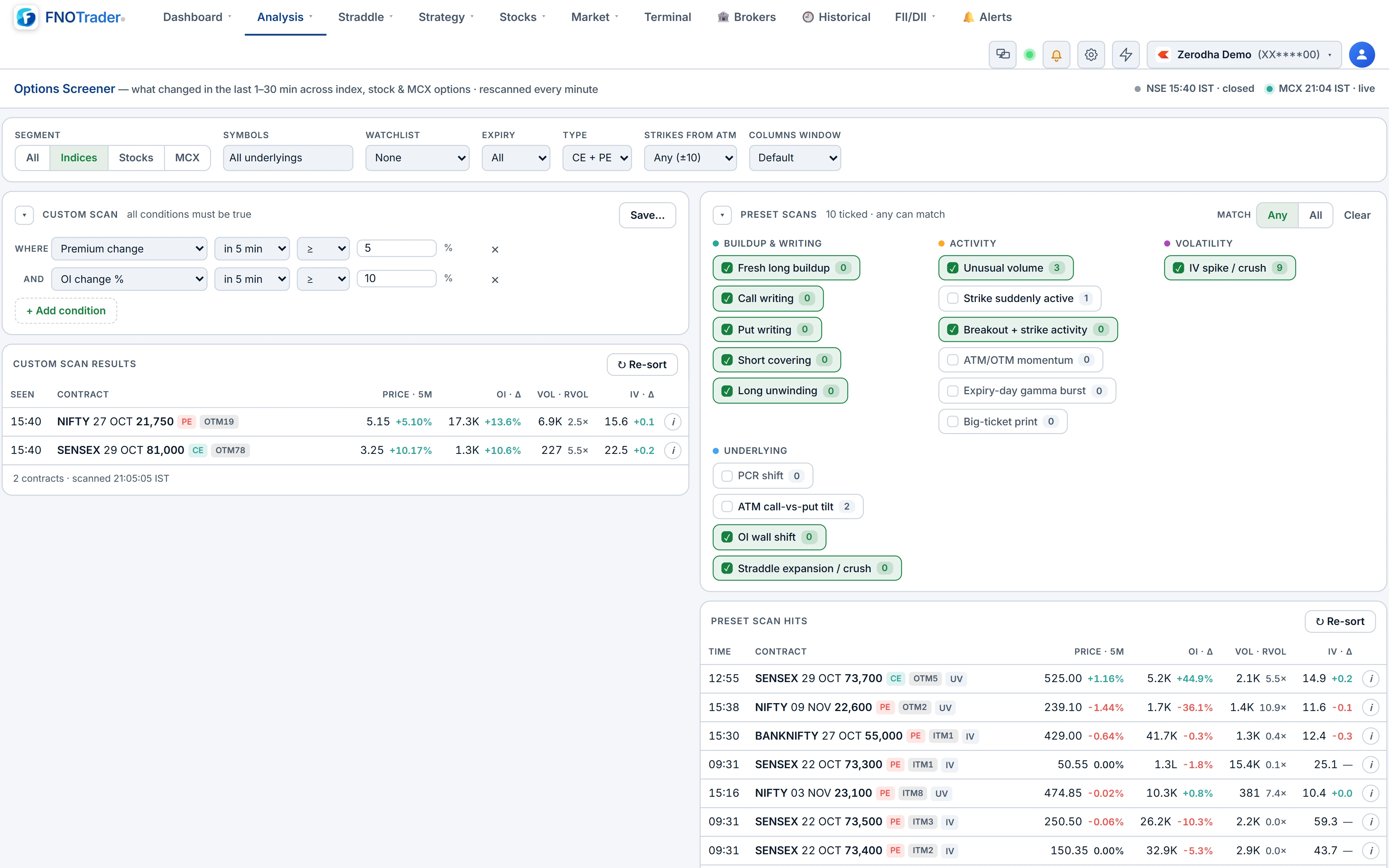
The last four work per underlying and appear in their own table. You can tick several presets and choose Match Any or Match All; each chip shows a live hit count. The first minute a contract hit a scan is recorded and shown in the Time column, so you can see how early it fired.
Building your own scan
The custom builder lets you write conditions over 16 metrics: premium change %, OI change in lots and %, volume, relative volume, premium traded (₹ lakh), IV change, underlying change, move beyond delta, buildup tag, LTP, OI, IV, |delta|, strikes from ATM and days to expiry. The first ten use the window you choose; the rest are current values.
Operators are greater/less than, with or without equality, and absolute-value versions for moves in either direction. Conditions are always combined with AND, up to 12 of them. Save a scan with a name and it becomes a "My scans" chip; up to 20 are kept on your account, so they follow you to another device.
Shared filters narrow both tables: segment (indices, stocks, MCX), symbols, a MarketWatch watchlist, nearest or next expiry, CE or PE, and strikes from ATM.
A worked relative-volume example
Relative volume compares the window with the day's own pace. Suppose a NIFTY strike traded 12,000 lots in the first 100 minutes of the session — 120 lots a minute. In the last five minutes it traded 3,600 lots. Expected at the day's pace: 120 × 5 = 600. Relative volume: 3,600 ÷ 600 = 6×, which clears the Unusual volume bar of 5× if enough premium changed hands.
The screener needs at least ten session minutes before the window to establish a pace, so the first few minutes after the open are quiet by design.
Reading the results without being fooled
Rows do not reshuffle between refreshes. New hits are inserted at the top and highlighted, rows that stop qualifying are dimmed, and a Re-sort button reorders when you are ready. Click a row and three charts open side by side — CE, the underlying (spot or futures) and PE — with candles, volume and OI on 1, 3, 5 or 15-minute bars.
The common mistake is reading a scan name as a direction call. Call writing near ATM is often hedged; a big-ticket print can be someone closing. Use the hit as the reason to look, then check the options flow and the chart.
Where to find it
- In Options Analytics, open Analysis → Options Screener.
- Tick one or more presets on the right, or write conditions on the left.
- Narrow with the shared filters, then click a row for the CE | underlying | PE charts.
Common questions
How often does the options screener update?
It rescans every contract once a minute, five seconds after the minute closes, and the page refreshes shortly after. Without a plan results are 15 minutes delayed.
Does the screener cover MCX options?
Yes. It scans index options, stock options and MCX options, and keeps scanning MCX after the NSE close.
What is relative volume in the options screener?
Volume in the chosen window divided by what the contract would have traded at today's average per-minute pace over the same length of time.
Can I combine conditions with OR?
Custom conditions are always AND-ed. For OR, tick several preset scans and choose Match Any, or save separate custom scans.
Why does a contract with a huge percentage move not appear?
It probably failed the liquidity floor: minimum price, minimum OI, a recent trade, distance from ATM, or premium traded in the window.
More on Options App
More in Options App · App: Options Analytics · Definitions: glossary · All: every article