What the page shows
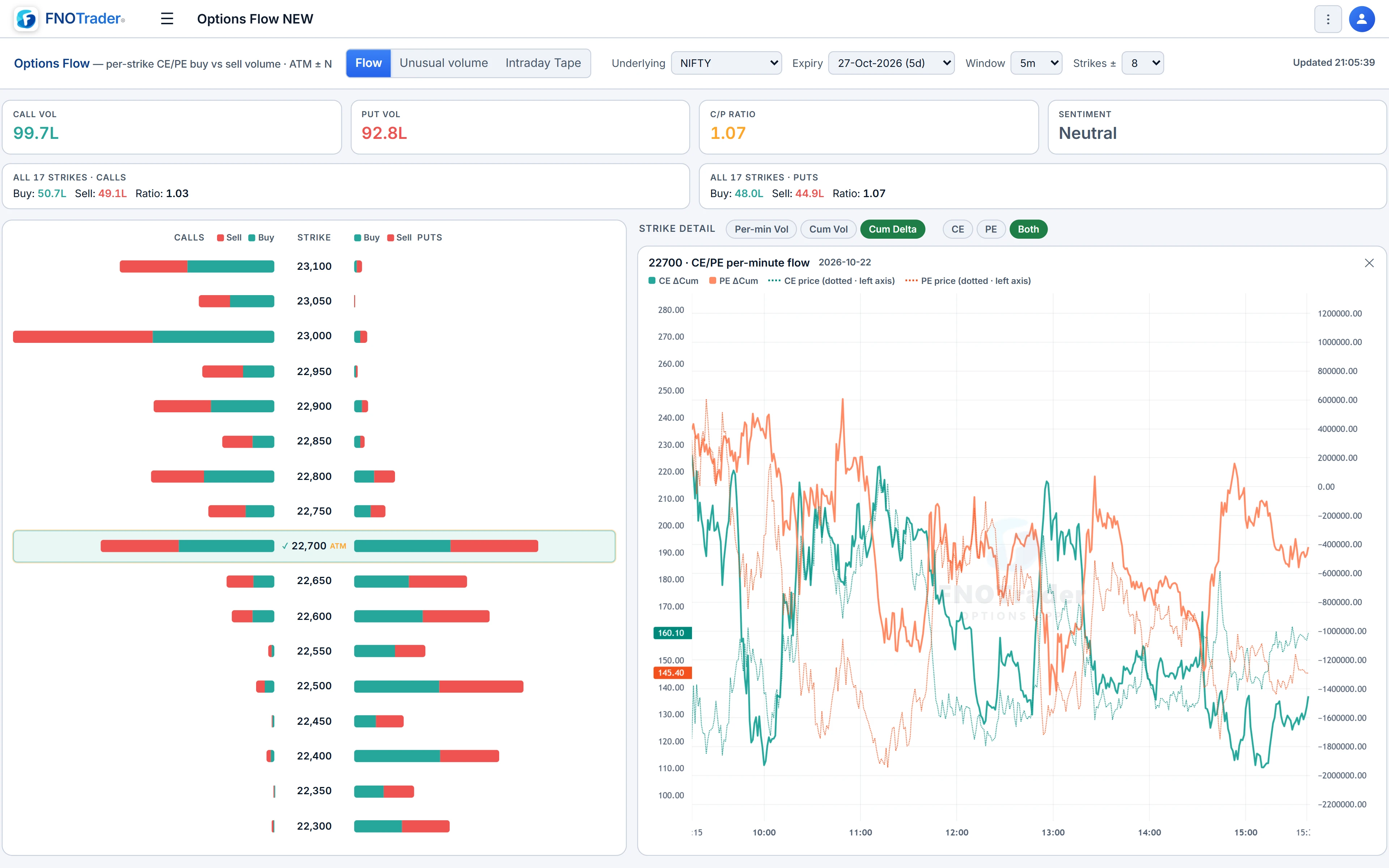
A ladder of strikes around ATM, with calls on the left and puts on the right, and two bars per side: volume classed as buying and volume classed as selling.
It answers a narrower question than the chain. Not "where is OI parked" but "in the last N minutes, at which strikes did aggressive buyers or sellers show up, and on which side". That is the options version of the order-flow reading described in footprint charts.
Symbols are NIFTY, BANKNIFTY and SENSEX, plus the main MCX contracts: crude oil, natural gas, gold and silver and their mini versions.
How a trade is classed as buying or selling
Each trade is classified with the tick rule. Every new print of a contract is compared with the previous print of the same contract:
- Price higher than the last print → the volume counts as buying.
- Price lower → selling.
- Price unchanged → it takes the direction of the previous print.
The volume is the increase in the contract's traded volume since the previous print. Nothing is left unclassified. The rule does not look at bid and ask, so a large print that happens to come at the same price as the last one inherits its direction. That is the standard trade-off of the tick rule: robust and available on every contract, but approximate in a two-sided, choppy tape.
Windows, strike range and refresh
| Control | Options |
|---|---|
| Window | 1m, 5m (default), 10m, 15m, 30m, 45m, 1h, or 1D for the whole session. |
| Strikes ± | 4, 6, 8 (default), 10, 12, 15, 20 or 25 each side of ATM. |
| Expiry | Nearest by default; your choice is remembered per underlying. |
| Refresh | Every 15 seconds while the page is visible. |
ATM here is the strike nearest the nearest future, not spot. Before the open, on weekends and on holidays, the page shows the last session frozen at its close.
Summary cards above the ladder show total call and put volume, the call/put volume ratio, and a flow sentiment. Bullish flow is call buying plus put selling; bearish is put buying plus call selling. If bullish flow is 57.5% or more of the two combined, the card reads Bullish; 42.5% or less reads Bearish; in between, Neutral.
Strike detail and cumulative delta
Click any row to chart that strike below the ladder; click more rows to add more cards. ATM is charted automatically when the page loads. Each card covers the whole session in one-minute buckets and has three modes:
- Cum Delta (default): the running total of buying minus selling, one line for the CE and one for the PE.
- Cum Vol: running totals of each of the four streams.
- Per-min Vol: CE buy, CE sell, PE buy and PE sell per minute.
The CE and PE prices are drawn as dotted lines, so you can see whether price followed the flow. A CE/PE/Both toggle hides the side you do not need.
A worked example
Hypothetical 15-minute window. Calls: 40,000 bought, 25,000 sold. Puts: 18,000 bought, 30,000 sold.
Bullish flow = call buying + put selling = 40,000 + 30,000 = 70,000. Bearish flow = put buying + call selling = 18,000 + 25,000 = 43,000. Share bullish = 70,000 ÷ 113,000 = 61.9%, above 57.5%, so the card reads Bullish. Call/put volume ratio = 65,000 ÷ 48,000 = 1.35.
Now look at the ladder. If most of that call buying sits at one OTM strike while ATM is balanced, it is a concentrated bet at that strike, not a broad move — a reason to open its cumulative-delta card and see when it started.
Limits and common mistakes
Selling is not necessarily writing. Volume classed as selling can be a buyer closing a long. Pair the flow with OI change on the buildup view to tell opening from closing.
Short windows are noisy. A 1-minute window on a quiet strike can flip on one print. Use 5 to 15 minutes for a read, 1D for the session's balance.
Without a plan, the flow you see is as of 15 minutes ago.
Where to find it
- In Options Analytics, open Analysis → Options Flow.
- Choose the symbol and expiry, then a window and strike range.
- Click strikes on the ladder to open their cumulative-delta charts.
Common questions
How does FNOTrader decide if option volume was a buy or a sell?
With the tick rule: a print above the previous print counts as buying, below as selling, and an unchanged price keeps the previous direction. It does not use bid and ask.
What is cumulative delta in options flow?
The running total of buyer-classified minus seller-classified volume for a strike through the session, plotted separately for the call and the put.
How often does the options flow page refresh?
Every 15 seconds while the page is open and visible.
Which symbols does options flow support?
NIFTY, BANKNIFTY and SENSEX, plus MCX crude oil, natural gas, gold and silver and their mini contracts.
Does heavy selling on a call mean calls are being written?
Not on its own. It can be longs closing. Check whether OI rose (writing) or fell (closing) over the same window.
More on Options App
More in Options App · App: Options Analytics · Definitions: glossary · All: every article