What Ask AI sees in the Options App
On most websites an assistant reads scraped text. Several Options pages hand Ask AI their own numbers instead, so it works from the real strikes and premiums.
| Page | What is sent with your question |
|---|---|
| Option chain | A summary of the strikes around ATM: OI, OI change, IV, totals, call and put walls, and the page's insights |
| GEX | The chain summary, a sample of the intraday GEX series, and the stat cards as visible text |
| Straddle Table | For each strike: CE, PE and straddle premium today — open, high, low, last, VWAP and whether it sits above or below it |
| Strategy builder | Your active legs, the multiplier and the net Greeks |
| Chart page | The chart's own symbol, interval, recent bars and indicator values — not the chain panel beside it |
| Alerts, or the Create alert dialog on any page | The alert guide, the draft you are building, a summary of your saved alerts and a live market snapshot |
Other pages send their visible text. The general behaviour is covered in how Ask AI reads your screen.
Creating an alert with Ask AI
Ask for an alert in your own words, from any Options page. Any question containing alert, notify or notification brings the app's alert guide along, so the answer uses only fields the dialog really has. The answer comes in a fixed order: whether the alert is possible, the exact settings row by row, the trigger arithmetic in your numbers, and any pitfall.
When the alert is possible, the finished answer shows a Fill the Create alert form button. If it offers two ways to do it, each option gets its own labelled button. Clicking one opens the dialog already filled in. Nothing is saved until you press Create alert yourself. Ask AI cannot press it for you.
What the button can fill:
- Instrument rows — underlying spot, futures, a single option, Rolling ATM Straddle, locked ATM straddle, fixed-strike straddle or strangle, with symbol, expiry and candle size from 1 minute to 1 hour. A blank or unlisted expiry becomes the nearest one.
- Conditions — a metric (LTP, OI, IV, VWAP, Day Low, EMA, RSI, Supertrend and more), optional arithmetic against a second metric or number, an operator (crossing up or down, greater or less than, channels, moving up or down, new day high or low) and the value.
- Combine AND or OR across rows, check on each bar close or every tick, trigger once or recurring, expiry end of day or never.
- Notifications — in-app, toast and sound are switched on; WhatsApp too if you asked for it.
What it leaves to you: Custom Strategy and Time rows (it explains those settings in words), Telegram and webhook delivery, which need your own bot token or URL, a custom expiry date, and any order to place when the alert fires. That last one is deliberate — an auto-order on a real broker is a live order, so you add it manually or not at all.
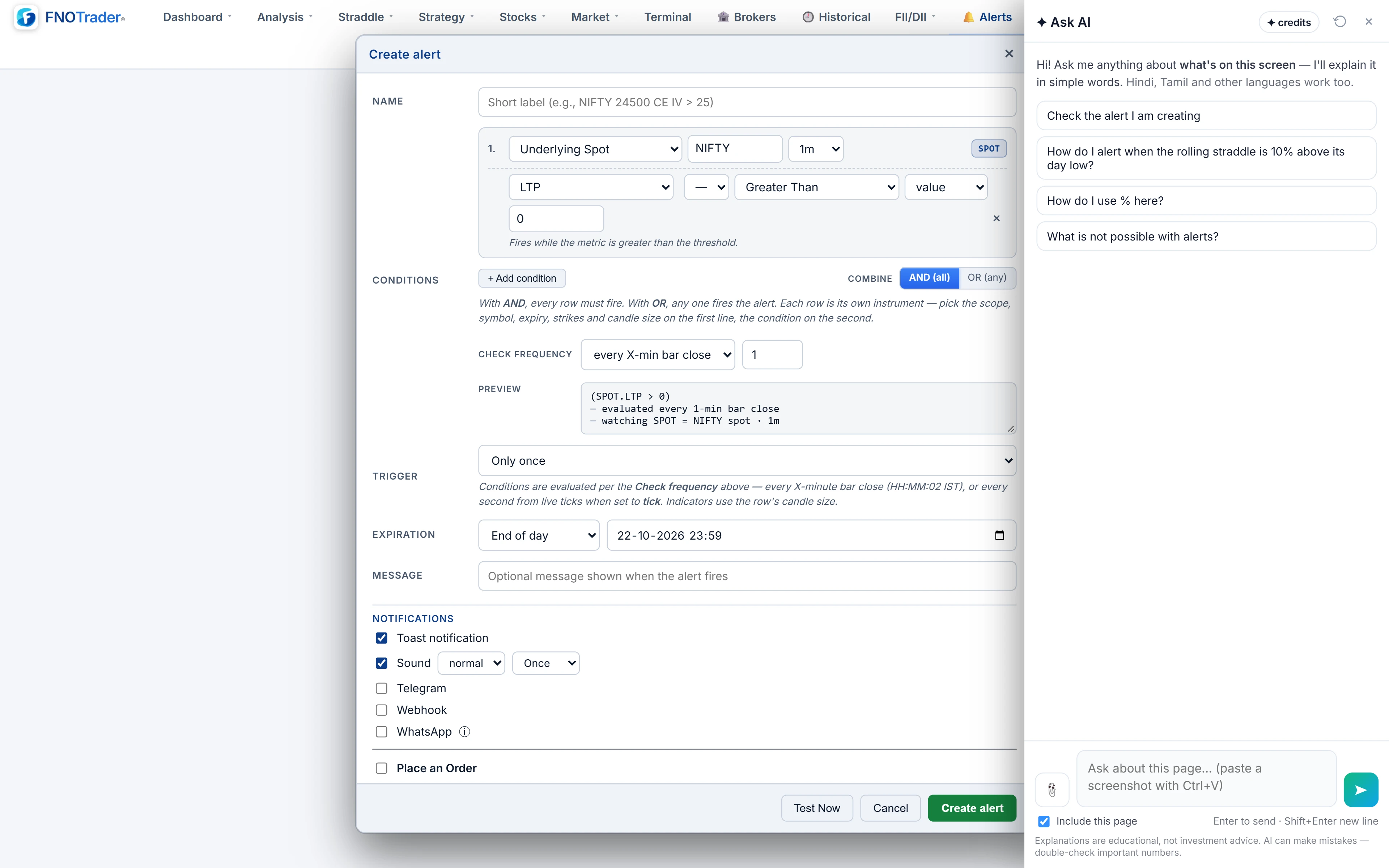
Before you press Create alert
- Read every row in the dialog against what you meant: symbol, expiry, candle size, operator.
- Open the preview line and read the compiled expression. It is the rule the server will run.
- Press Test Now to evaluate the draft on today's data and see the current values. For Day High and Day Low alerts trust the live values, not the replayed fire times.
- Press Create alert. It then lives on the Alerts page, runs on the server with your browser closed, and counts towards the limit of 20 active alerts.
With the dialog open, ask “check the alert I am creating” and Ask AI compares the draft with your request and points at any wrong field. On the Alerts page, “explain my alerts” walks through each saved one and flags any that cannot fire — disabled, expired, or a once-only alert that has already fired. The rules themselves are covered in options alerts.
A worked example: straddle 25% above its day low
Ask: “Create an alert when the NIFTY rolling straddle is 25% above its day low.”
The settings it proposes: a Rolling ATM Straddle row on NIFTY, 1-minute candles; LTP ÷ Day Low; Crossing Up; percent on, value +25; trigger once. The percent box exists only when the metric is divided, and +25 is compiled as a ratio of 1.25.
The arithmetic: if the straddle's low so far is ₹180, the alert fires on the first minute that closes above 180 × 1.25 = ₹225. If the straddle later makes a new low of ₹170, the target moves to ₹212.50. These are example numbers.
The pitfall it will flag if you ask for the opposite: “25% below the day low” can never fire, because price cannot close under its own low. For a fall, divide by Day High and use a negative percent. And “0.5% either side of the current level” is turned into fixed prices from the live snapshot, because an alert cannot remember the level at the moment it was created.
Questions that work, page by page
Keep a screen word in every question — here, this, today, my. Without one, a short question is answered as a general concept and the page is left out.
| Page | Ask |
|---|---|
| Option chain | “What is OI telling me today?” · “Where are support and resistance by OI here?” · “Explain PCR and max pain here.” |
| GEX | “Will the market trend or pin today?” · “What does DEX say about direction here?” |
| Straddle Table | “Which of these straddles are decaying and which are expanding?” |
| Strategy builder | “What is my maximum risk here?” · “What happens to this position if the market moves sharply?” |
| Alerts | “Alert me when NIFTY spot crosses VWAP after 10:00.” · “Notify me when spot breaks 0.5% either side of the current level.” · “Which alerts are not possible?” |
Limits
- It explains; it does not advise. A market read says what the data on screen reads like. It never tells you to buy, sell, enter or exit.
- No orders, no saving. It cannot place orders, press Create alert or change a setting.
- F&O data only for alerts. Alerts watch spot, futures, options and straddles — not news, results or fundamentals.
- Credits. Each answer uses AI credits from your account; see /pricing.
To open it, click the Ask AI button at the bottom-right of any Options page; on the Alerts page its suggested questions are alert questions. The order side of the app has its own guide: Ask AI in the Terminal.
Common questions
Can Ask AI create an options alert for me?
It fills the Create alert form from your request. You review the filled dialog and press Create alert yourself; nothing is saved until you do.
Why did my alert question get a generic answer?
Alert questions bring the alert guide only when they contain alert, notify or notification. Phrase it as 'Alert me when…' or 'Create an alert when…'.
Can Ask AI add an auto-order to an alert?
No. The fill never includes an order. If you want one, add it manually in the dialog, remembering that on a real broker it places a live order.
Can I alert when a straddle falls 10% below its day low?
No. Price cannot close under its own low, so that rule never fires. Ask AI will suggest dividing by Day High with a negative percent instead.
Does Ask AI see my existing alerts?
On the Alerts page or with the dialog open, it sees a summary of your saved alerts: name, on or off, trigger, rule, expiry and last fire time in IST.
More on Options App
More in Options App · App: Options App · Definitions: glossary · All: every article