What the table answers
For every strike around the money: is the call, the put and the straddle trading above or below its own trend?
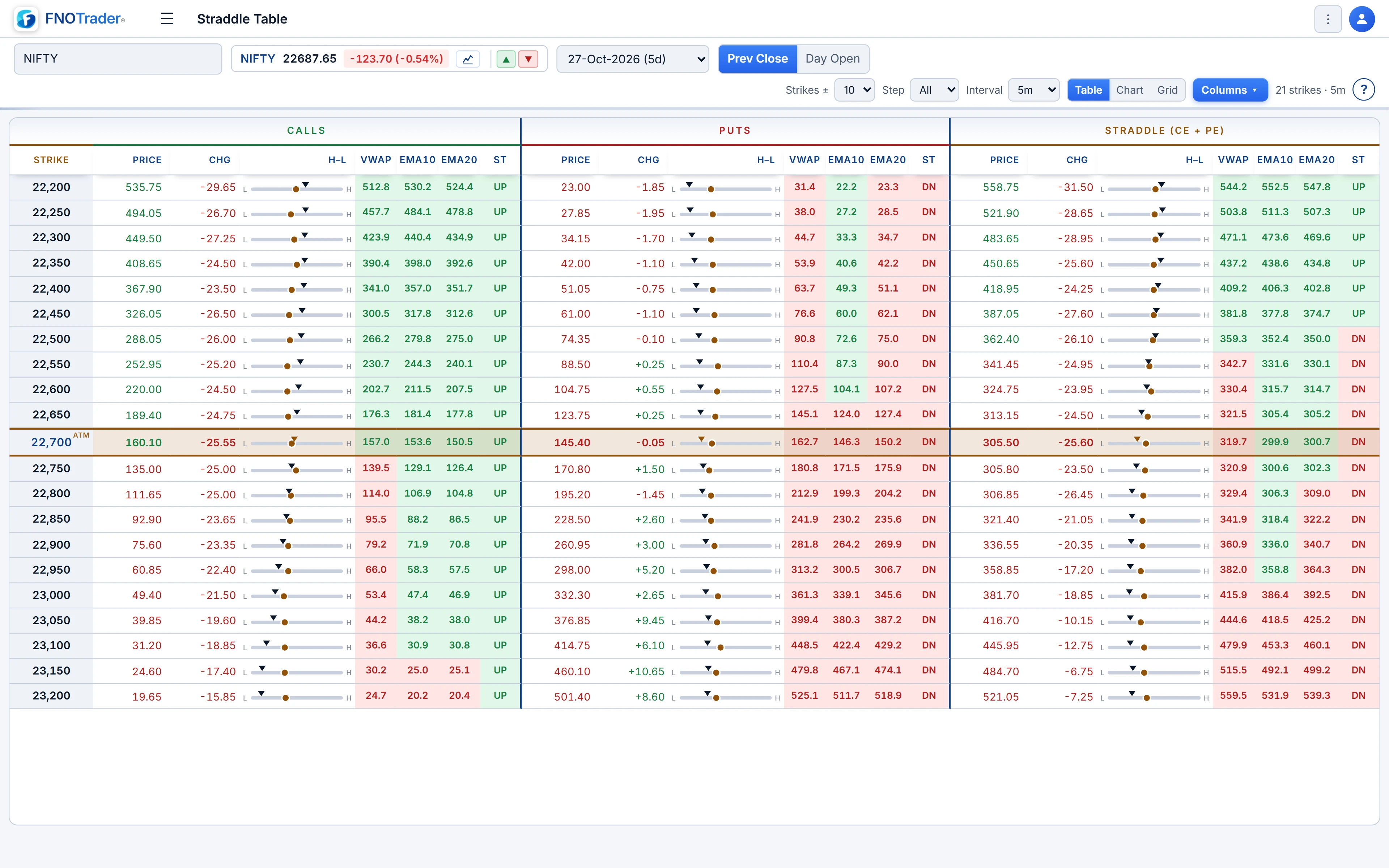
Each strike gets three groups of columns — CALLS, PUTS and STRADDLE (CE + PE). Within each group you see the price, the change, a high–low bar and four indicator cells: VWAP, EMA10, EMA20 and SuperTrend. The ATM row is highlighted.
The value of the layout is comparison. One strike's straddle below VWAP is a data point. Every straddle from 23,700 to 24,300 below VWAP, EMA10 and EMA20, with SuperTrend down, describes the whole near-the-money surface decaying together.
How to read the cells
| Cell | What it shows |
|---|---|
| Price | The current premium. For the straddle group, CE + PE. |
| Chg | Change from the baseline set in the top bar — previous close or today's open. |
| H–L | A bar of the day's range from the intraday bars, with the current price marked inside it. |
| VWAP / EMA10 / EMA20 | The indicator value, coloured green when price is at or above it and red when below. |
| ST | SuperTrend direction, UP or DN. |
Two separate signals use colour, and it helps to know which is which. The number's text colour flickers with each tick — up or down versus the last price seen. The cell background flashes only when the day's actual high or low is broken. A flashing straddle cell means a new intraday high or low for that pair, which catches the eye even when you are looking at another screen.
Settings
| Control | What it changes |
|---|---|
| Strikes ± | How many strikes either side of ATM: 1, 2, 3, 4, 5, 8 or 10 (default 10). |
| Step | Show only strikes that are multiples of a step — useful on chains with very fine strike spacing. |
| Interval | 1m to 30m. The EMAs and SuperTrend are computed on this bar size. |
| Columns | Hide groups or indicator columns you do not use. |
| Table / Chart / Grid | Numbers; a mini-chart per strike for CE, PE and straddle with the overlays; or a grid of straddle-only charts, 3 to 8 columns wide. |
The Chart view adds its own chart types — line, mountain, baseline, a direction-coloured line and a VWAP-coloured line — plus an IV overlay and a row-height slider.
A worked example
Hypothetical rows, NIFTY, 5-minute bars:
- 24,000: CE ₹118 vs VWAP ₹126 (red), PE ₹134 vs VWAP ₹127 (green). Straddle ₹252 vs VWAP ₹253 (red, by ₹1). SuperTrend on the straddle: DN.
- 24,100: CE ₹72 (red vs VWAP), PE ₹190 (green), straddle ₹262 vs VWAP ₹259 (green).
- 23,900: CE ₹178, PE ₹88, straddle ₹266 vs VWAP ₹274 (red), SuperTrend DN.
Read across the CE and PE columns and the picture is directional: calls red, puts green, so spot has been slipping. Read down the straddle column and it is mixed — the 24,100 straddle is above VWAP because spot is moving toward 24,000, away from 24,100's call side. One table shows both the direction and which strikes' straddles it is hurting.
Limits and common mistakes
- Indicator cells use the selected interval. An EMA10 on 1-minute bars and on 15-minute bars can disagree; compare like with like.
- Green and red describe price versus the indicator, not good or bad for you. For a short straddle, a red straddle cell is the decaying case.
- The table shows premium, not position size or margin.
Where to find it
- In Options Analytics, choose symbol and expiry in the top bar.
- Open Straddle › Straddle Table.
- Set Strikes ±, Step and Interval; use Columns to trim the grid.
- Switch to Chart or Grid when you want the shapes rather than the numbers.
For strangles rather than straddles, see the Strangle Table.
Common questions
What does the Straddle Table show?
For each strike near ATM it shows the call, put and straddle premium, each tagged against VWAP, EMA10, EMA20 and SuperTrend, so you can compare strikes without opening a chart for each.
Why does a cell flash?
The cell background flashes when that leg or straddle makes a new intraday high or low. The text colour separately shows the direction of the latest tick.
What is the Chg column measured against?
Against the baseline selected in the top bar, either the previous close or today's open.
Can I see charts instead of numbers?
Yes. The Chart view shows mini-charts for CE, PE and the straddle per strike, and the Grid view shows straddle-only charts in 3 to 8 columns.
More on Options App
More in Options App · App: Options Analytics · Definitions: glossary · All: every article