Two questions, two modes
Now asks: which other stocks have drawn the same shape over the same dates, ending today? History asks: where has this shape appeared before, in any stock, and what happened over the next 5, 10 and 20 bars?
The query is a window of closes from one stock — 1M, 3M (default), 6M or 1Y on daily bars, or an exact date range you choose. On weekly and monthly bars the windows are longer (up to 5Y weekly and 10Y monthly) and outcomes are counted in weeks or months. ETFs and indices are not matched against.
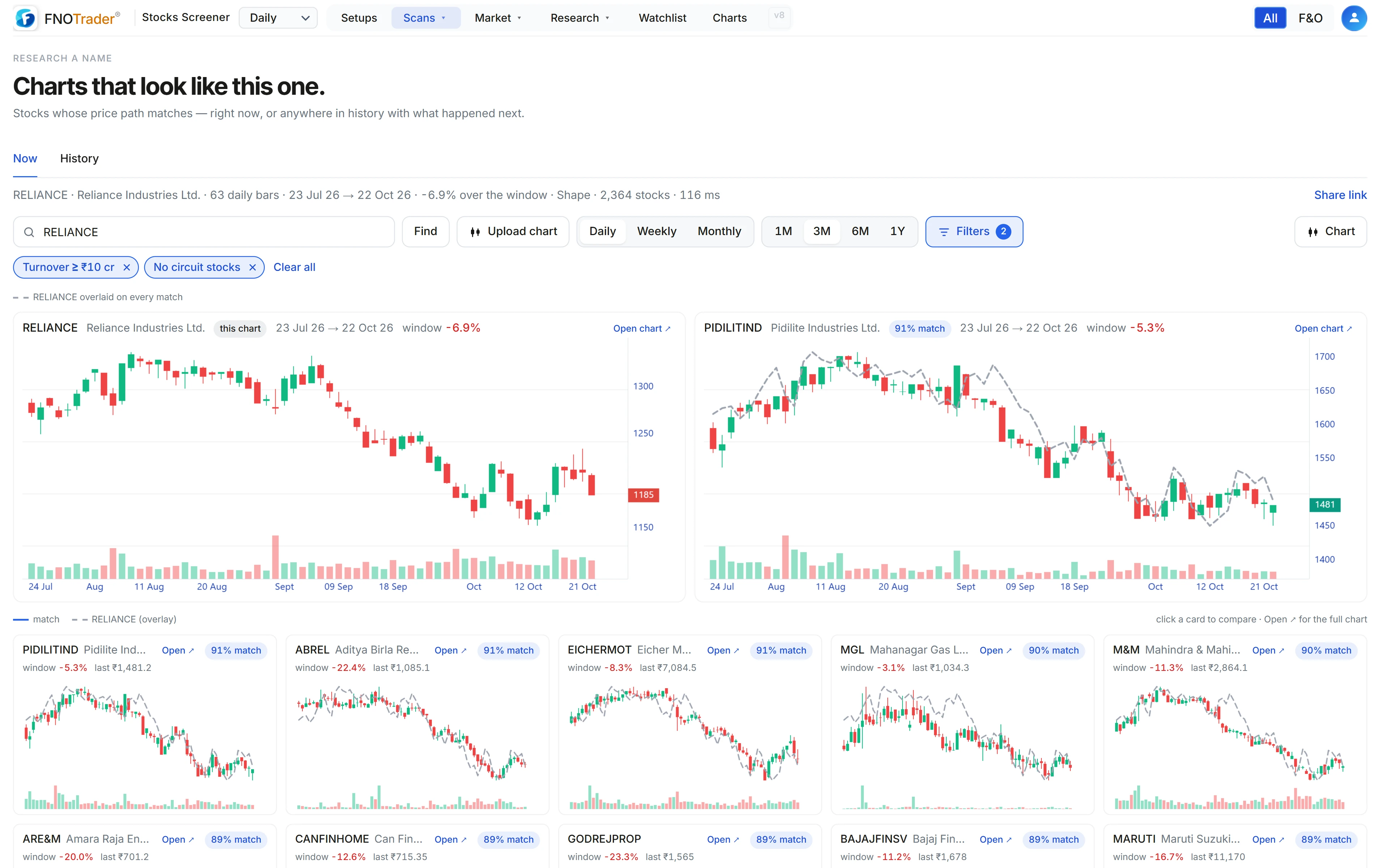
The three matching methods
| Method | What counts as similar |
|---|---|
| Shape (default) | Pearson correlation of the closes. Same shape at any scale: a 5% wiggle can match a 40% one. |
| Euclidean | Distance between the two paths rebased to percentages. Same shape and similar size of move. |
| DTW | Dynamic time warping. Same shape even if one played out faster or slower. It re-ranks the top 200 shape matches. |
Charts are read right to left; where a chart ends matters more than its middle. So Shape and DTW scores are end-anchored: 50% whole-window similarity, 25% how closely the last fifth of the window tracks, and 25% where the final close sits in the range and the final push into it. A chart that ends at its high will not match one that ends at its low, however similar the middle.
A worked example of the score
Hypothetical candidate on the Shape method: whole-window correlation 0.90, tail similarity 0.80, end similarity 0.70.
Score = 100 × (0.50 × 0.90 + 0.25 × 0.80 + 0.25 × 0.70) = 100 × (0.45 + 0.20 + 0.175) = 82.5.
Another candidate with a higher correlation of 0.95 but an end similarity of 0.20 (it finished in a different place) scores 100 × (0.475 + 0.20 + 0.05) = 72.5 and ranks below it, which is what you want.
Euclidean is not end-anchored; its score is 100 / (1 + 20 × distance), so a root-mean-square gap of 5% between the rebased paths scores 100 / 2 = 50.
Reading the history results
In History mode the search covers every window of the same length across every stock from 2010, at every date where the 20 bars after it are known. The stock's own window, and anything overlapping it by more than half, is excluded, and from each overlapping stretch of another stock only the best window is kept, so one long trend doesn't fill the list.
Each match shows its dates, the return inside the window and the return 5, 10 and 20 bars later. A summary row gives, for each horizon, the average, the median, the share of matches that were positive, and how many matches it is based on.
Read that summary for what it is. It describes what happened after some past charts that looked like this one. It is not a probability and not a prediction: the matches are few, they overlap in time (many come from the same market phase), and the next 20 bars depend on things the shape doesn't contain. Use it to see the range of outcomes, not to pick one.
Searching from a screenshot
You can upload a chart image instead of choosing a stock. The price path is read from the picture, matched with Shape or DTW (Euclidean needs a real price scale, which an image doesn't give), and the window defaults to the number of candles counted in the image. Images up to 8 MB are accepted, processed in memory and not stored.
Limits
- Matching uses closes only; volume and intraday ranges are not part of the shape.
- A very short window (the minimum is 10 bars) finds many matches that mean little.
- Windows where the stock barely traded are skipped.
Where to find it
- In the Stocks app, open Scans → Similar charts, or use the Similar button on a stock's chart.
- Enter a symbol (or upload an image), pick Now or History, a window and a timeframe.
- Change the matching method or set custom dates in Filters.
Common questions
How can I find stocks with a similar chart pattern?
Use Similar charts in the FNOTrader Stocks app. Enter a symbol and window, and Now mode ranks every other NSE stock by how closely its chart over the same dates matches.
Can I see what happened after similar charts in the past?
Yes. History mode searches every past window since 2010 and shows each match's return 5, 10 and 20 bars later, with an average, median and share positive. It describes the past, not a prediction.
What is DTW in chart matching?
Dynamic time warping lets two paths match even if one played out faster or slower than the other. Here it re-ranks the top 200 shape matches.
Is an uploaded chart screenshot stored?
No. Images up to 8 MB are processed in memory and not stored.
More on Stocks App
More in Stocks App · App: Stocks Scanner · Definitions: glossary · All: every article