What the monitor is for
The breadth monitor is a daily table in the style popularised by Stockbee: each row is one trading day, and each column is a count of NSE stocks that did something — advanced, fell 4%, ran 25% in a quarter, closed above their 200-day average.
Counts are blunt on purpose. They cannot be propped up by two heavyweights the way an index can, so they show participation directly. A rally where up-4% days dwarf down-4% days is a different market from one where the index rises on a handful of names while the counts shrink.
For how breadth fits next to rates, currency and flows, see how to read macro signals.
The columns
| Group | What is counted |
|---|---|
| NIFTY 50 | The index close and day change, for reference. |
| Advance / Decline | Stocks up, down and unchanged on the day. |
| Daily breadth | Stocks up 4% or more, down 4% or more, and the 5-day and 10-day ratios of the two. |
| Quarter (3M) 25% | Stocks up / down 25%+ over 63 sessions. |
| Month 25% and Month 50% | Stocks up / down 25%+ and 50%+ over 21 sessions. |
| 34D 13% | Stocks up / down 13%+ over 34 sessions. |
| Above SMA / Above EMA | Stocks closing above their 10, 20, 50, 100 and 200-day simple and exponential averages. |
| Weinstein stage breadth | How many stocks sit in Stage 1, Stage 2 (and its early, mid and late parts), Stage 3 and Stage 4. |
Above the table, cards show today’s key readings with the change from the previous session, including 52-week new highs, new lows and the net of the two (a fresh 252-session closing high or low).
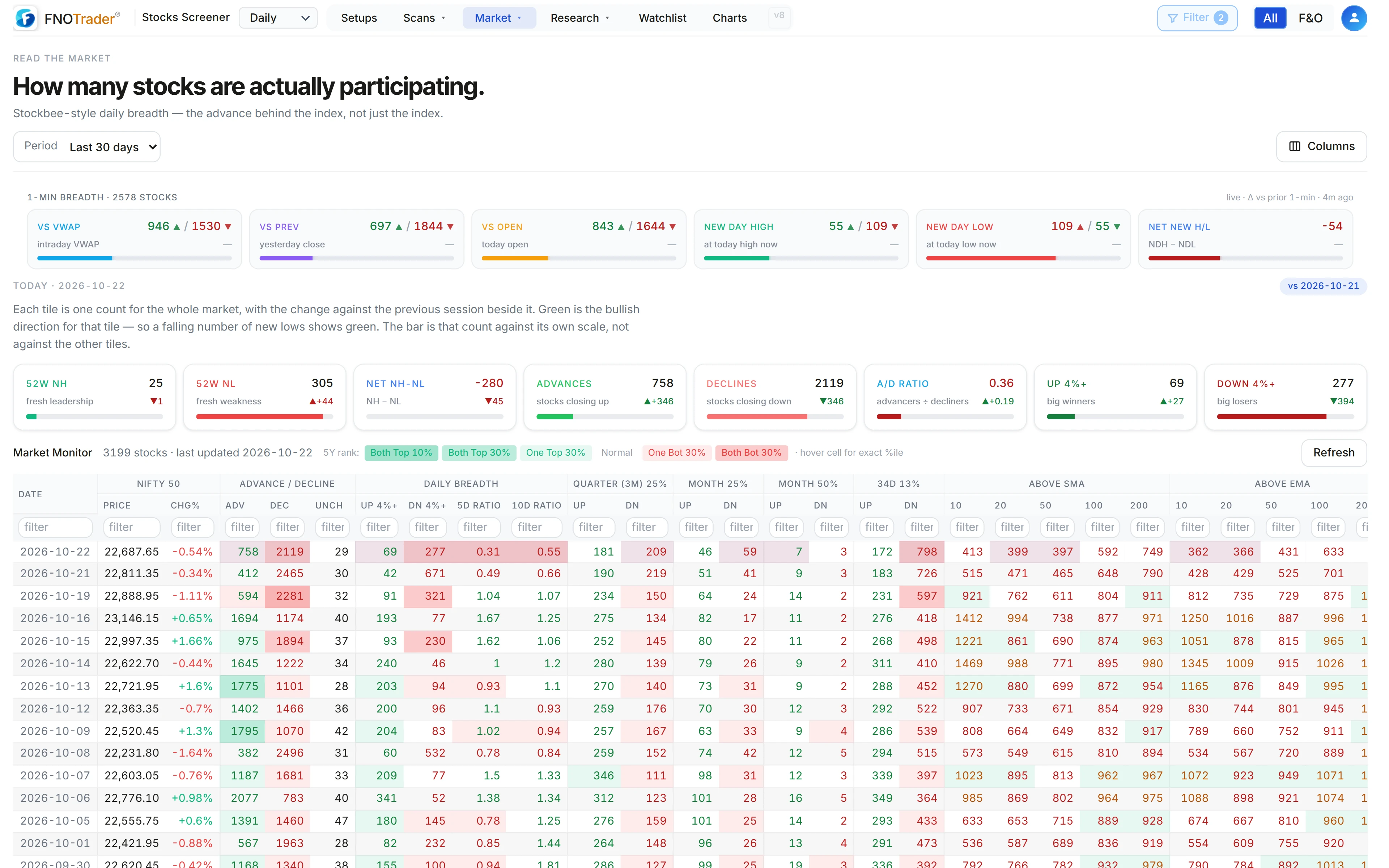
What the colours mean: percentile against history
A raw count means little on its own — is 140 stocks up 4% a lot? So every cell is ranked against that column’s own history and shaded by percentile: green when the reading is in the top 30% or top 10% of history for a bullish measure, red at the bottom. For measures where high is bad (declines, down-4% days) the colours flip.
Advances and declines get a stricter test. The raw count depends on how many stocks traded that day, so the monitor also ranks the ratio of advances to advances-plus-declines. The cell goes dark only when both rankings agree; when only one does, it is lightly shaded. Hover a cell to see its percentile.
A worked example: the 5-day ratio
Made-up counts for five sessions:
- Up 4%+: 40, 55, 30, 62, 48 → total 235
- Down 4%+: 20, 18, 35, 12, 25 → total 110
5-day ratio = 235 ÷ 110 = 2.14. Over that week, strong up-moves outnumbered strong down-moves a little more than two to one. The 10-day ratio does the same over ten sessions and moves more slowly. (If the down total is tiny, the denominator is floored at 0.5 so a quiet week does not produce an absurd number.)
The ratio is most useful at its extremes and in its direction: a ratio falling while the index makes new highs is the classic narrowing pattern.
Intraday: live 1-minute breadth
During the session a strip at the top counts, from live quotes, how many stocks are trading above and below their VWAP, above and below the previous close, and above and below the day’s open. It also counts stocks near the day’s high or low (in the top or bottom 15% of the day’s range) and stocks sitting at the high or low right now.
VWAP breadth is the intraday equivalent of the advance/decline line: a market where most stocks hold above VWAP into the afternoon is being bought through the day, not just at the open.
History back to 2010, and the limits
The period selector shows the last 30 days or any full year from 2010 to now, so you can check what breadth looked like around past tops and bottoms rather than relying on memory.
- Counts are unweighted. A small-cap counts the same as a Nifty heavyweight — that is the point, but it means breadth and the index can disagree for weeks.
- Extremes cluster. A top-10% reading often repeats for several days; one green cell is not a turn.
- Percentiles are relative to history, so a reading is “unusual”, not “good” or “bad” on its own.
- The daily rows settle after the close. Intraday, use the live strip.
To see breadth inside groups rather than the whole market, use Movers or the Indices page.
Where to find it
- Open the Stocks Scanner.
- Choose Market → Breadth.
- Read the live strip and today’s cards, then the table below.
- Use the Period selector to switch from the last 30 days to any year since 2010.
Common questions
What is a market breadth monitor?
A daily table of counts — stocks advancing, falling 4%, up 25% in a quarter, above their 200-day average — that shows how many stocks are taking part in a move rather than how much the index moved.
What does the 5-day ratio mean in breadth?
It is the total number of stocks up 4% or more over five sessions divided by the number down 4% or more. Above 1 means strong up-days outnumbered strong down-days.
How do I see how many NSE stocks are above their 200-day moving average?
The Above SMA and Above EMA columns of the breadth monitor give the count for the 10, 20, 50, 100 and 200-day averages for every session.
What is VWAP breadth?
The number of stocks trading above versus below their volume-weighted average price during the session. It shows whether buying is holding through the day.
How far back does the breadth history go?
The monitor shows any full year from 2010 onwards, plus the last 30 days.
More on Stocks App
More in Stocks App · App: Stocks Scanner · Definitions: glossary · All: every article