What Movers shows, and five ways to group the market
Movers groups every NSE stock the app tracks and ranks the groups by the average return of their members. One row per group, one bar per row, strongest at the top.
The question it answers is “where is the market’s money working right now, and over what horizon?” A one-day ranking shows the day’s rotation. A three-month or one-year ranking shows the trend that has been building underneath it. Switching between them is instant, because the page receives every stock’s returns once and does the grouping in your browser.
It is a map of what has moved. It is not a forecast of what will move next.
The tabs across the top choose how stocks are grouped:
- Themes — curated investing themes such as Defence, Railways, Power T&D, Capital Markets, Semiconductors or Data Centres. A stock joins a theme when its NSE basic industry belongs to the theme or when it is on the theme’s named list, so one company can sit in two themes (a shipyard can be both Defence and Shipbuilding).
- Macro, Sector, Industry and Basic industry — the four levels of NSE’s own classification, from the broadest buckets down to narrow ones like a single product category.
The broad levels are stable and hard to fool. The narrow levels find the pockets — but they also have fewer stocks per group, which is why the group-size filter below exists.
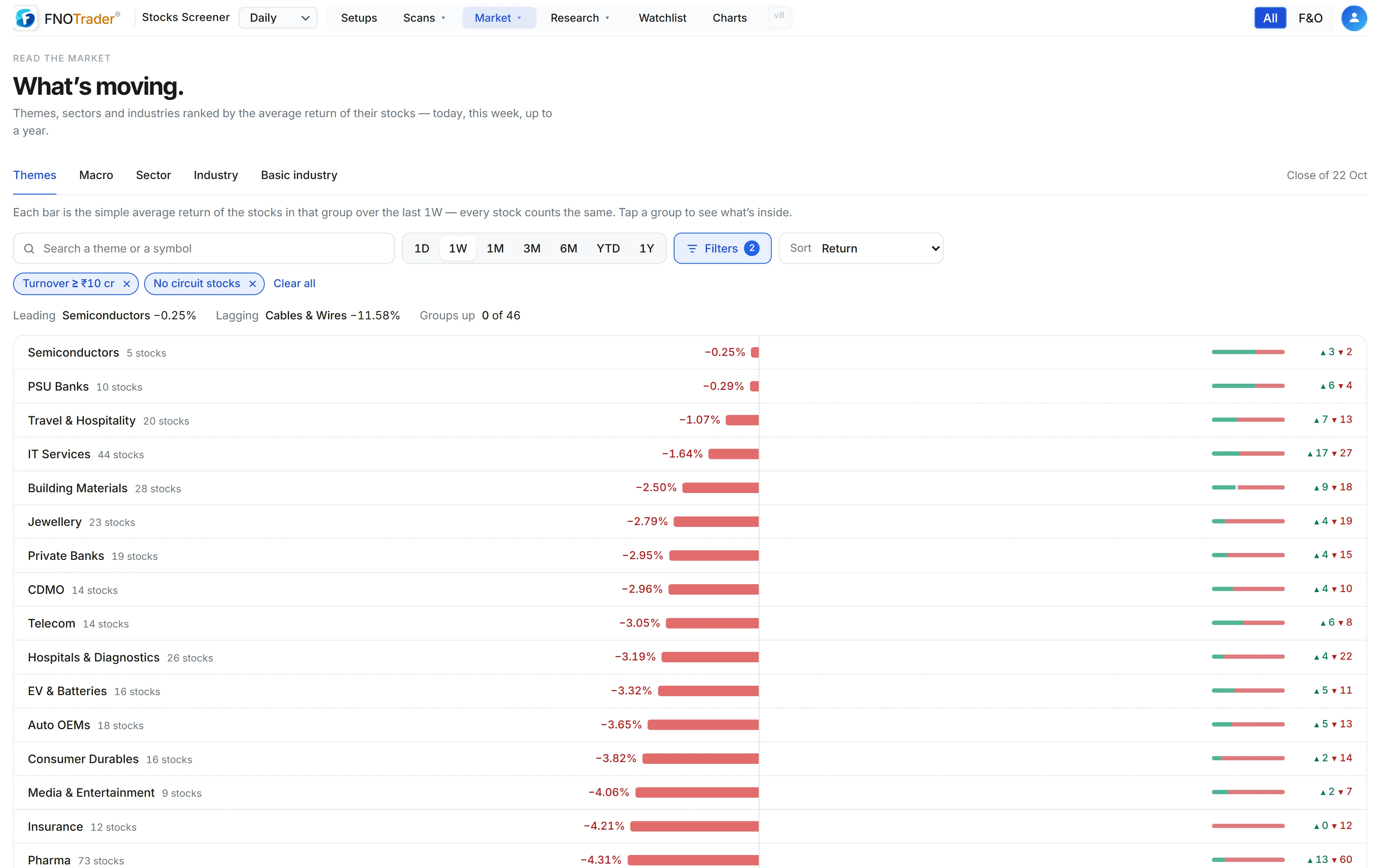
How to read a row
Each row carries four things:
- The bar and the number — the simple average return of the group’s stocks over the chosen period, drawn left (red) or right (green) of a centre line.
- The stock count — how many stocks the average is built from, after your filters.
- Up and down counts — how many members rose and how many fell, with a small split bar. This is the breadth of the move inside the group.
- The inside — tap a row and it opens a table of its stocks with all seven periods and market cap, best first, so you can see who is carrying the average.
A summary line above the list names the leading group, the lagging group and how many groups are up. During market hours the page shows a live stamp and refreshes every minute; after the close it says which session’s close it is showing.
Why equal weight, and how returns are measured
Every stock in a group counts the same. A ₹2 lakh crore company and a ₹2,000 crore company each contribute one vote to the average.
That is deliberate. A market-cap-weighted group return is mostly the return of its two or three largest members, which you can already see on their own charts. Equal weight tells you what the typical stock in the group did, which is the better test of whether a move is broad or narrow.
Returns run from settled daily closes over 1 day, 1 week, 1 month, 3 months, 6 months, year-to-date and 1 year. In the session they are re-based on the live price, so “1D” means today so far.
The settings and what each one changes
| Setting | What it does |
|---|---|
| Period | 1D, 1W, 1M, 3M, 6M, YTD or 1Y. Starts on 1W. |
| Grouping | Themes, Macro, Sector, Industry or Basic industry. Starts on Themes. |
| Min market cap | Stocks below it are left out of every average. Default ₹500 Cr+; also Any size, ₹100 Cr+, ₹1,000 Cr+, ₹5,000 Cr+, ₹20,000 Cr+. |
| Min stocks in a group | Hides groups thinner than this. Default 3+; also Any, 5+, 10+. |
| Sort | Return, share of stocks up, number of stocks, or name. |
| Search | A group name, or a symbol to find the groups that contain it. |
The app’s global filter (turnover, price and so on) also applies, so the averages are built only from stocks you would actually consider.
A worked example: same average, different market
Two made-up groups over one week, four stocks each:
- Group A: +12%, +1%, −2%, −3%. Average = (12 + 1 − 2 − 3) ÷ 4 = +2.0%. Up 2, down 2.
- Group B: +2.5%, +2%, +1.5%, +2%. Average = 8 ÷ 4 = +2.0%. Up 4, down 0.
Sorted by return they tie. Sorted by share of stocks up, B is clearly ahead: one stock is carrying A, while B is moving as a group. Open A and you will see the single +12% name at the top of its table. That is the habit worth building — never read the average without the up/down split beside it.
Limits and common mistakes
- Thin groups are noisy. A three-stock basic industry can top the list on one result. Raise the group-size filter before drawing conclusions from narrow levels.
- Equal weight leans small. Dropping the market-cap floor to “Any size” lets micro-caps swing the averages.
- Returns are not risk-adjusted. A volatile theme will dominate both ends of the list in turn.
- Themes are curated lists. They are a reading aid, not an official classification, and membership is broad by design.
- If market-cap data is briefly unavailable the page says so and shows every size rather than an empty list.
For the bigger question of whether following leadership works as a rule, see sector rotation and how to test it. For the whole-market version of the up/down count, see the breadth monitor.
Where to find it
- Open the Stocks Scanner.
- In the top menu choose Market → Movers.
- Pick a grouping tab and a period, then open Filters to set market cap and group size.
- Tap any group to see its stocks; tap a stock to open its panel and chart.
To rank industries on breakout strength rather than return, use Industry.
Common questions
How do I see which sectors are moving today in India?
Open Market → Movers in the Stocks Scanner, choose the Sector tab and the 1D period. Each sector is ranked by the average move of its stocks, with the number up and down beside it.
Is the Movers return market-cap weighted?
No. Every stock in a group counts equally, so the number shows what the typical stock did rather than what the two largest companies did.
What is the difference between sector, industry and basic industry?
They are levels of NSE's classification, from broad to narrow. Basic industry is the most specific and has the fewest stocks per group, so it finds small pockets but is also the noisiest.
Why are some small groups missing?
By default a group needs at least 3 stocks above ₹500 crore market cap to be shown. Change both in Filters if you want to see thinner groups.
Can one stock belong to two themes?
Yes. Themes are built from NSE basic industries plus named company lists, so a company such as a shipyard can appear under both Defence and Shipbuilding.
More on Stocks App
More in Stocks App · App: Stocks Scanner · Definitions: glossary · All: every article