What the basket is
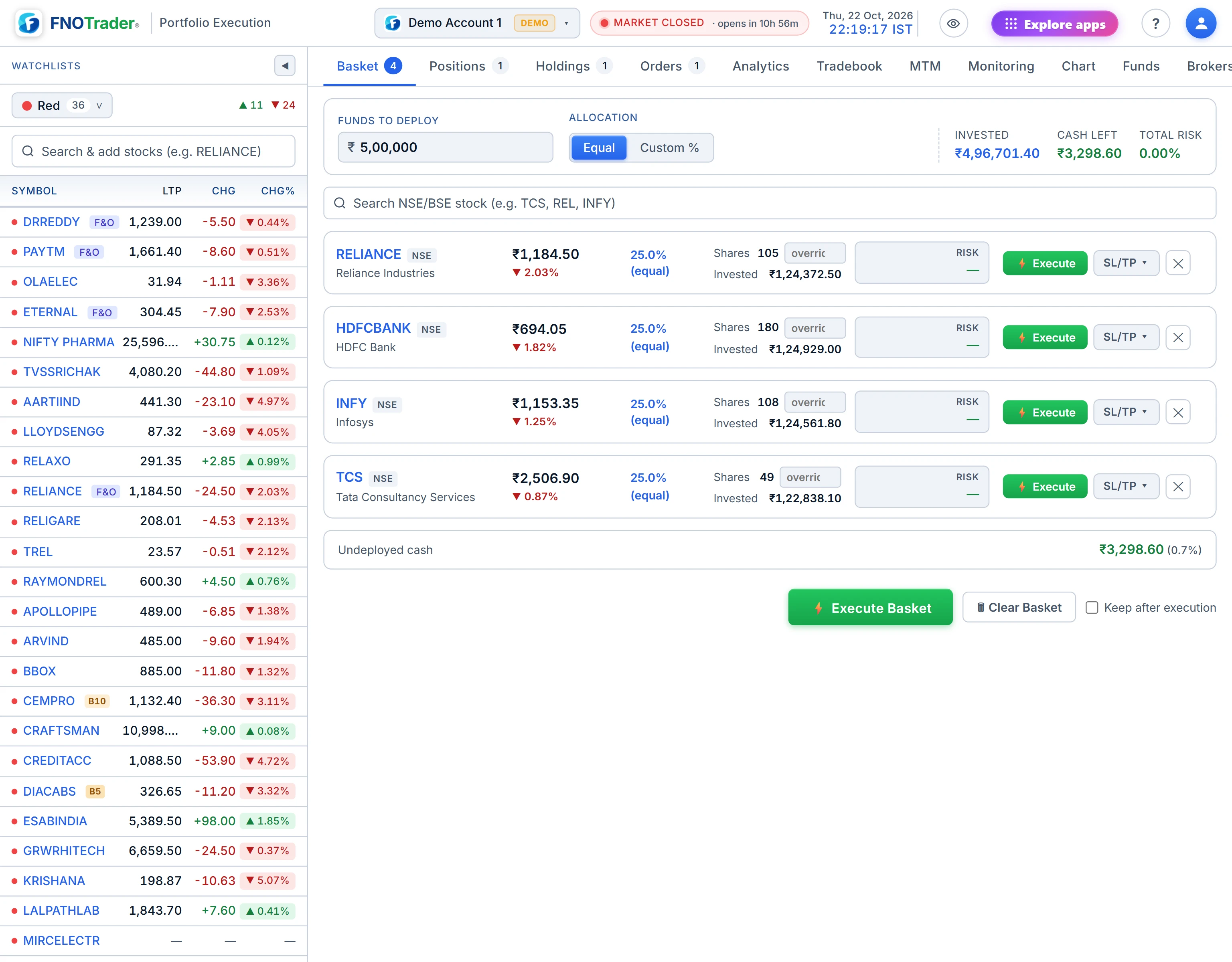
The basket is a staging area: you add stocks, it sizes them from a capital figure, you review, then you send all the buy orders at once.
It answers the question that slows most multi-stock entries: given ₹X to deploy across these names, how many shares of each? It also shows how much of that capital is at risk if every stop is hit, before any money moves.
How sizing works
Type the capital you want to deploy. Then choose an allocation mode:
| Mode | How shares are worked out |
|---|---|
| Equal | Capital is split evenly across the rows. Shares = allocation ÷ price, rounded down. |
| Custom % | You give each row a percentage; the total is shown so you can see whether it reaches 100%. |
| Locked shares | Type a share count on any row to fix it. Its cost comes off the top, and the rest is allocated across the unlocked rows. |
The strip above the rows shows Invested, Cash Left and Total Risk. Each row can carry its own SL and TGT levels; risk per row is what you would lose if its stop fills, as a percentage of the capital figure.
A worked example, hypothetical prices: ₹1,00,000 across four stocks in Equal mode is ₹25,000 each. At ₹1,240 a share that is 20 shares (₹24,800); at ₹318 it is 78 shares (₹24,804). Rounding down is why Cash Left is never quite zero.
What happens when you send it
Each row goes as a buy limit at LTP plus your buffer (3% by default), rounded to the ₹0.05 tick — the same protection a market order gets in the order panel. The confirm screen shows the exact price each order will carry. Any SL and TGT rows are registered with the position so the monitor watches them from the first fill.
Be clear about one thing: a basket is not atomic. Every row is its own order. If seven fill and three are rejected — insufficient funds, a circuit, a broker error — the seven stay filled. Nothing is rolled back, because orders at the exchange cannot be. Successful rows leave the basket (unless you choose to keep them); failed rows stay, with the reason, so you can retry just those.
Bulk actions on Positions and Holdings
Above the Positions and Holdings tables is a bar with four actions:
| Action | What it does |
|---|---|
| SL to Cost | For every row in profit, sets one stop at the average price covering the full quantity. Existing targets are kept. |
| Close Winners | A closing order for every row in profit. |
| Close Losers | A closing order for every row at a loss. |
| Close All | A closing order for every open row. |
Each one opens a preview first: the symbols affected, total quantity, estimated proceeds and current P&L. Nothing is sent until you confirm. Closing orders go as limits at LTP minus your buffer, one after another with a short pause so the broker does not throttle them. As with the basket, each order stands alone; the result screen lists which succeeded and which failed.
Intraday rows close with their own product, so an MIS exit stays MIS. Holdings close as CNC, including shares still settling.
Limits and common mistakes
- The basket buys. It is not a tool for shorting a list.
- Sizing uses the price when the row was priced; at send time the limit is set from the live LTP, so share counts and actual cost can differ slightly.
- “Close Winners” uses current P&L. A row that is ₹1 in profit counts as a winner.
- A partial basket is a real portfolio. If half fails, decide deliberately whether to retry or leave it.
Where to find it
- Add stocks from the watchlist with the basket button, or from the order ticket with Add to Basket.
- Open the Basket tab in Portfolio Execution, type your capital and pick Equal or Custom %.
- Review Invested, Cash Left and Total Risk, then Execute and confirm.
- For exits, use the bulk bar above Positions or Holdings.
Common questions
Are basket orders all-or-nothing?
No. Each stock in the basket is a separate order. If some are rejected, the filled ones stay filled; the failed rows remain in the basket for a retry.
How does the basket decide how many shares to buy?
It divides your capital by the allocation for each row (equal or custom %) and rounds down to whole shares at the current price.
Can I close all my winning positions at once?
Yes. Close Winners in the bulk bar sends a closing order for every row currently in profit, after showing you a preview.
What does SL to Cost do in the bulk bar?
For every position in profit it sets a single stop-loss at your average price for the full quantity, keeping any targets you had.
More on Portfolio Execution
More in Portfolio Execution · App: Portfolio Execution · Definitions: glossary · All: every article