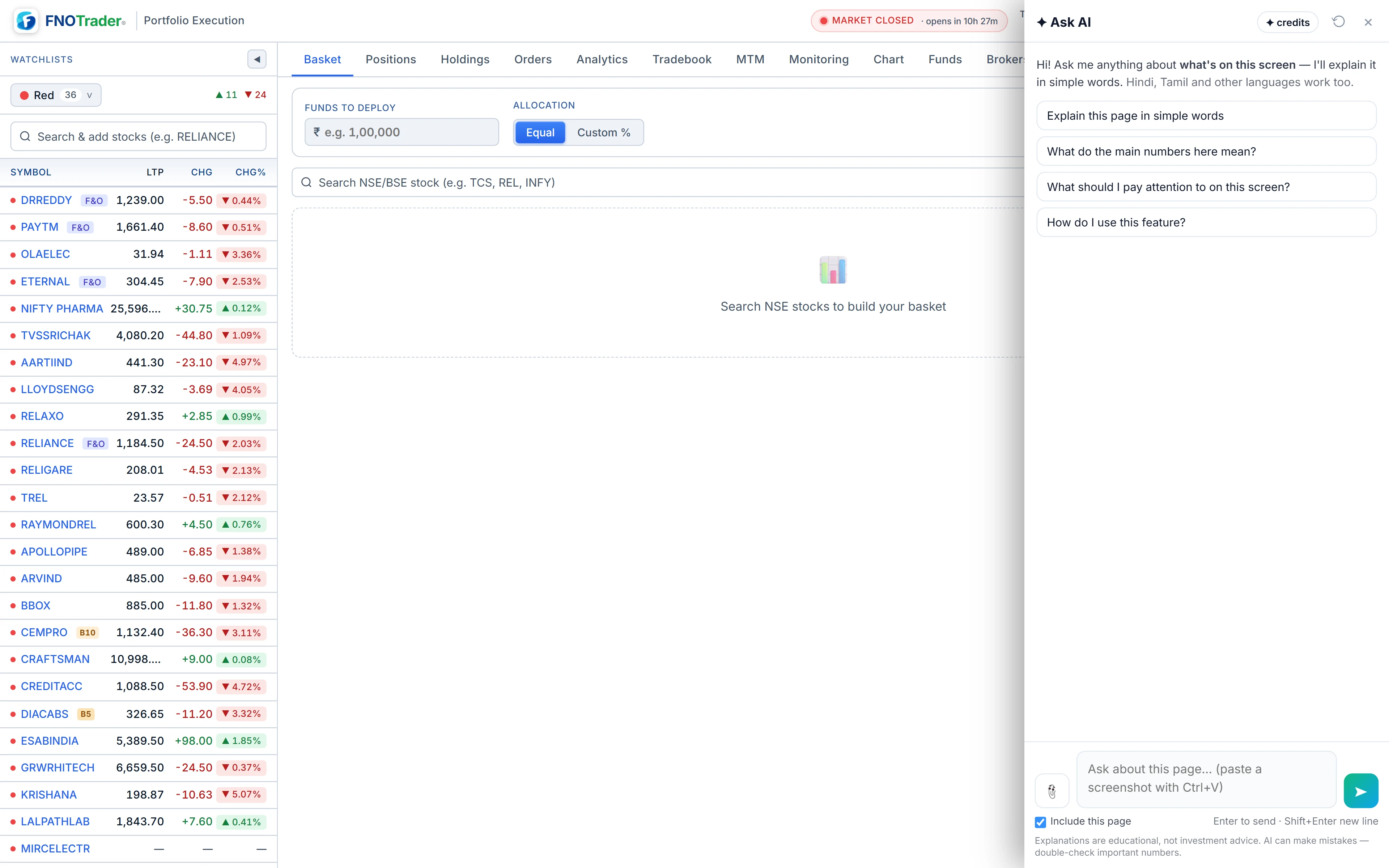
What Ask AI sees in Portfolio Execution
Here Ask AI reads the visible text of the page: the rows of the Positions, Holdings and Orders tables, the funds panel, the MTM calendar and the tradebook analytics, as shown.
Two things follow from that. It sees only the tab that is open, so switch to Holdings before
asking about holdings. And privacy mode carries through: with the eye button on,
amounts, quantities and average prices read as *****, so the assistant sees the
masks too. Percentages stay visible. Switch privacy off for a question about rupee values.
Charts in the app are images; attach a screenshot for a chart question. More in how Ask AI reads your screen.
Two controls narrow what goes out. Highlight a row or a message before asking and that selection is sent first, marked as yours, so “what does this mean?” points at exactly it. Untick Include this page under the box and only your question is sent — useful for a general question you would rather not attach your book to.
What it can do here
- Explain a rejection. Paste or select the rejection text and ask what it means — margin, price band, product type or a broker rule.
- Read the book. Which holdings are down most, what share of P&L comes from one position, how average price relates to LTP.
- Explain levels. What the stop-loss and target levels on a position will do and in what order.
- Read your own stats. Win rate, average win and loss, and the MTM calendar's best and worst days.
It cannot place, modify or cancel orders, change levels or switch brokers. Orders go through the order panel as always — see the order panel.
Questions that work, tab by tab
| Tab | Ask |
|---|---|
| Positions | “Where is most of my P&L coming from today?” · “Explain the levels on this position.” |
| Holdings | “Which of my holdings are down the most?” · “Why does this holding's average look different from what I paid?” |
| Orders | “Why was this order rejected?” · “What is the difference between these two order types?” |
| MTM calendar | “Summarise this month's MTM.” |
| Tradebook | “What do these tradebook stats say about my exits?” |
Every question above has a screen word. “What is a CNC order?” has none and gets a short general answer without your page.
A worked example: a rejected order
Say the Orders tab shows a rejected BUY with the reason text “RMS: Margin Exceeds, Required: 48,500, Available: 31,200”. Example numbers.
Highlight that line, then ask: “Why was this order rejected?” The selection is sent first, marked as what you selected.
The answer: the broker's risk check found the order needs ₹48,500 of margin and the account has ₹31,200 free, a shortfall of ₹17,300. It then lists what typically closes such a gap — a smaller quantity, adding funds, or a different product type — as explanations, not instructions.
Ask next: “What quantity would fit the margin shown here?” At roughly ₹48,500 for the order as placed, ₹31,200 covers about 64% of it, so around 0.64 of the quantity — rounded down to whole shares or lots.
Limits
- Read-only. No orders, exits or level changes.
- Only the open tab. It reads what is on screen, not your whole account.
- Masked values stay masked while privacy mode is on.
- Not advice. It will not say what to buy, sell or hold.
- Credits. Answers use AI credits; see /pricing.
How to open it
- Open Portfolio Execution and switch to the tab you want explained.
- Click the Ask AI button at the bottom-right.
- Highlight a row or an error message first to point the question at it.
The button can be hidden from the account menu's Floating buttons switches. Related: MTM calendar and funds and the tradebook.
Common questions
Can Ask AI explain why my order was rejected?
Yes. Highlight the rejection message in the Orders tab and ask 'Why was this order rejected?'. It explains the reason in plain words.
Does Ask AI see my amounts when privacy mode is on?
No. Privacy mode replaces amounts, quantities and average prices with *****, and that is what the assistant reads. Percentages remain visible.
Can Ask AI place or exit trades in Portfolio Execution?
No. It is read-only and cannot place, modify or cancel orders.
Does it see all my tabs at once?
No, only the page as it is when you ask. Switch to Holdings or Orders first.
Can I ask without sending my positions?
Yes. Untick 'Include this page' under the box and only the question is sent.
More on Portfolio Execution
More in Portfolio Execution · App: Portfolio Execution · Definitions: glossary · All: every article