What the order panel does
The order panel is the ticket you see when you click Buy or Sell anywhere in the app — the watchlist, a chart, a position row or the basket.
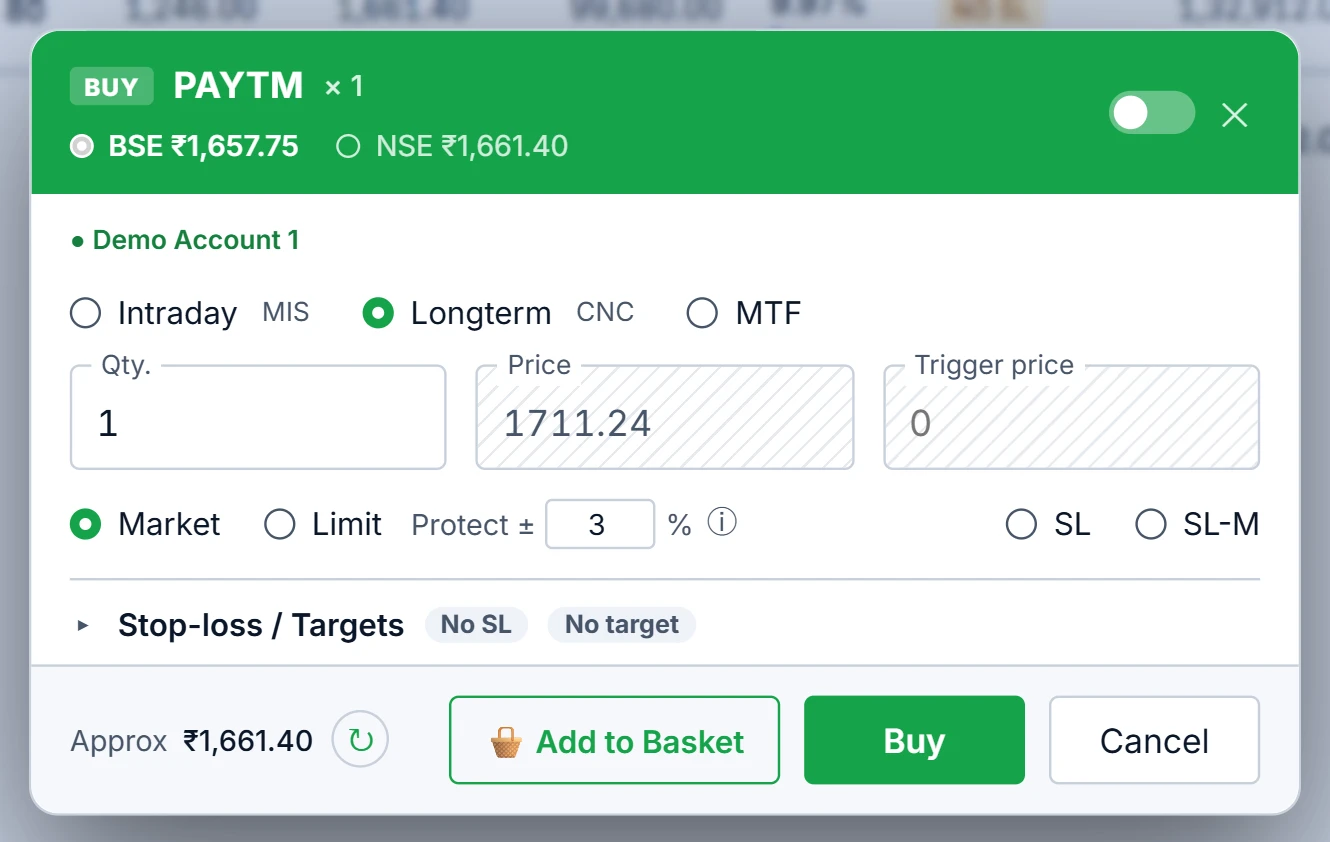
It takes product (CNC for delivery or MIS for intraday), quantity, order type (Market, Limit, SL-M or SL-L) and, optionally, stop-loss and target rows that are armed the moment the order goes in. Around that it does three things a plain ticket does not: it picks the exchange for dual-listed stocks, it turns a market order into a protected limit, and it previews the margin before you send.
How NSE vs BSE is decided
For a stock listed on both exchanges, the panel asks for both order books every time the symbol, side, quantity or product changes, and ranks them on the executable price:
- a sell is compared on the best bid of each exchange;
- a buy is compared on the best ask.
Two checks then disqualify a book that looks better than it is:
| Check | Rule |
|---|---|
| Wide spread | A book with a bid-ask spread above 1% loses when the other exchange's spread is 1% or less. |
| Thin top | A book whose best level holds less than 10% of your order quantity loses when the other exchange's best level holds at least that much. |
Both checks are relative. If a stock is illiquid on both exchanges, it is still routed rather than refused. On an exact tie, NSE wins, because its book is deeper on nearly every scrip. The panel shows the reason for its choice, including the per-share and total difference, so you can see what the routing is worth.
One exception is fixed: when you square off an intraday position, the exit is pinned to the exchange you entered on. An MIS position is per-exchange — selling an NSE long on BSE does not close it, it opens a second, short position. Delivery holdings are not affected, because demat shares can be sold on either exchange.
A worked example
Hypothetical numbers. You want to sell 200 shares of a dual-listed stock.
- NSE: best bid ₹412.10 with 1,500 shares, spread 0.05%.
- BSE: best bid ₹412.40 with 15 shares, spread 0.08%.
BSE's bid is 30 paise higher, and by last price alone it would win. But 10% of your order is 20 shares, and BSE's best bid holds only 15 while NSE's holds 1,500. BSE fails the thin-top check and the order routes to NSE. Selling 200 into a 15-share bid would have walked down BSE's book and filled most of the order below ₹412.10.
You can still click the other exchange. A manual choice sticks until you load a different symbol.
Market orders are sent as protected limits
A Market order from this panel is not sent as a raw market order. It goes as a limit at LTP plus the buffer for a buy, or LTP minus the buffer for a sell. The default buffer is 3%.
At an LTP of ₹1,000 with a 3% buffer, a buy goes as a limit at ₹1,030 and a sell at ₹970. In a liquid stock it fills at once at the market price — the limit is only a ceiling or floor. In a thin book it stops a market order from filling at a runaway price. The same buffer applies to a Limit order where you leave the price blank.
Below the ticket, a margin preview from the broker updates as you change product, quantity or price, so the rejection for insufficient funds happens on screen rather than at the exchange.
Order defaults
The Order Defaults dialog sets what the ticket opens with:
| Setting | Default |
|---|---|
| Product | CNC |
| Order type | Market |
| Quantity | 1 |
| Buffer | 3% |
| “+ Add SL” distance | 3% from entry |
| “+ Add TGT” distance | 5% from entry |
| Trailing trigger / gap | 10 / 5 points |
| Auto-add one SL / one TGT row | Off |
Defaults are stored in the browser, so each device keeps its own.
Limits and common mistakes
- A 3% buffer is a cap, not a target. In a stock with a 2% price band it is wider than the stock can move; lower it if you want a tighter ceiling.
- Routing needs a live book. Pre-open or in a halted scrip, the panel falls back to LTP and says so.
- The app trades cash equity and ETFs only — there is no NRML product.
Where to find it
- Open Portfolio Execution and click B or S on any watchlist row.
- The coloured header shows the NSE and BSE radios with the routing reason on hover.
- Set quantity, product and type; add SL or TGT rows if you want them armed with the order.
- Change your defaults from the Order Defaults dialog.
Next: how those SL and TGT rows are watched — multi-level stop-loss and targets.
Common questions
Should I buy on NSE or BSE?
Compare the side of the book you will hit: the best ask for a buy, the best bid for a sell, and how many shares sit there. The Trade app does this comparison for every dual-listed stock and shows its reasoning.
Why is my market order shown as a limit order?
The Trade app sends a market order as a limit at LTP plus or minus your buffer (3% by default). It still fills at once in a liquid stock, but cannot fill at a runaway price in a thin book.
Can I override the exchange the app picks?
Yes. Click the other exchange in the ticket header. Your choice holds until you open a different symbol.
Why is my intraday exit not routed to the better exchange?
An intraday position exists on one exchange only. Selling it on the other exchange would open a new short instead of closing it, so the exit is pinned to the exchange you entered on.
More on Portfolio Execution
More in Portfolio Execution · App: Portfolio Execution · Definitions: glossary · All: every article