What a multi-level exit plan is
Scaling out means closing a position in pieces: some at the first target, some at the second, and the rest wherever the stop catches it.
It exists because no single exit is right for every outcome. A tight stop on the whole position gets you shaken out by noise; a wide one costs too much when you are wrong. Splitting the stop — half at a near level, half at a far one — is a compromise. Targets work the same way on the upside.
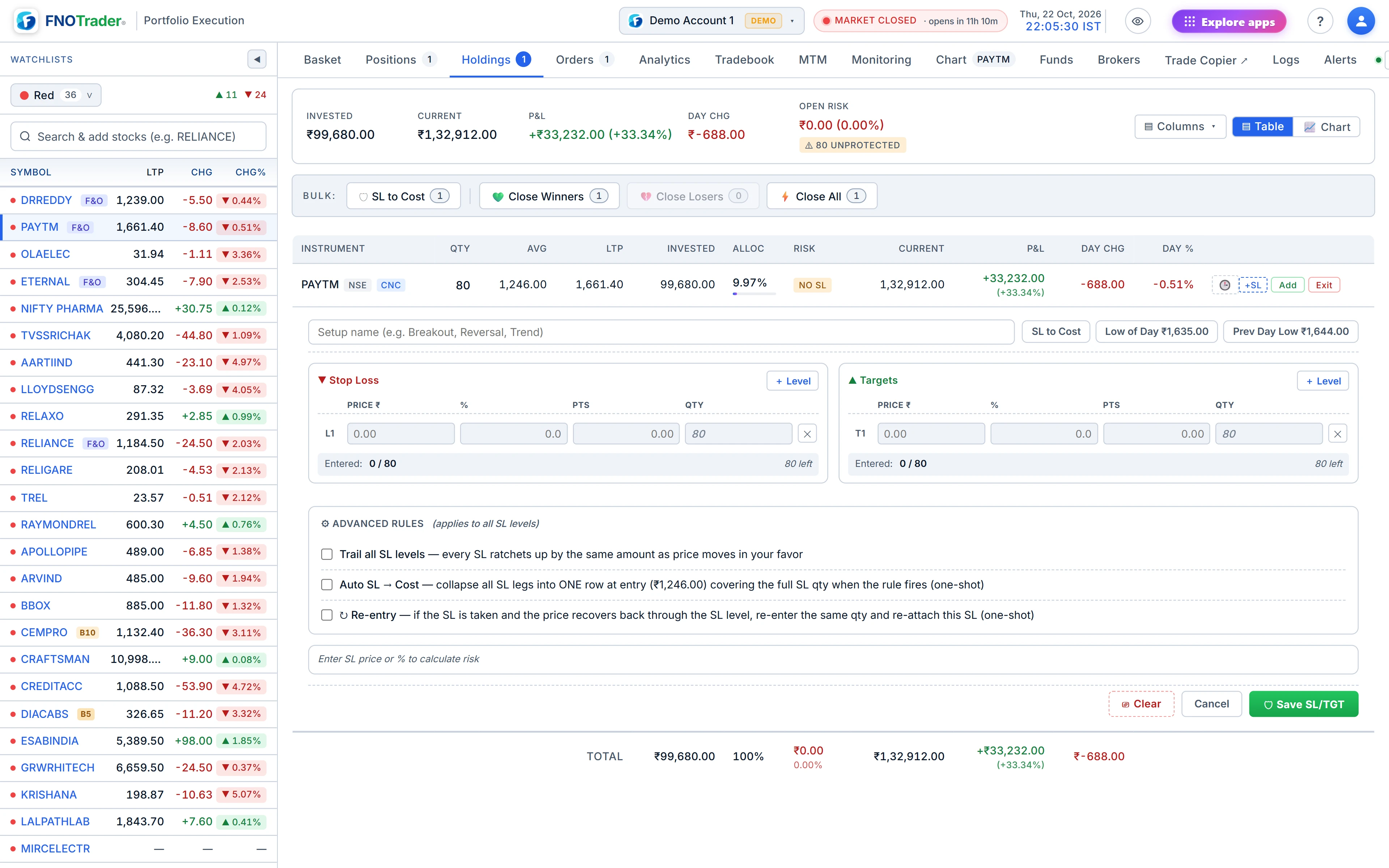
In the Trade app you set these as rows: each SL or TGT row has a price and a quantity. They are stored on the server and watched there, so the plan keeps working with the browser closed.
What happens on every tick
On weekdays between 09:15 and 15:30 IST, every active level is checked against each live price update and a short regular price poll:
- a long position's SL fires when the price is at or below the stop; a TGT fires at or above the target;
- for a short position the directions reverse.
Outside those hours nothing is evaluated, so a stray late price cannot trigger an exit.
When a level fires, it closes its own quantity and nothing more. The exit is sent as a limit order 1% through the last price — a sell at LTP − 1% for a long — so it fills like a market order in a liquid stock without being able to fill at any price at all. A level fires once. The order goes through the same broker account the position is on.
The rules that stop an exit from over-selling
| Rule | What it prevents |
|---|---|
| Total SL quantity cannot exceed the position quantity; nor can total TGT quantity. | Two stops for 300 each on a 300-share position firing back to back and leaving you short 300. |
| When a position closes — by a level, a manual exit or an order placed outside the app — its remaining levels are cancelled within seconds. | A leftover target firing later and selling shares you no longer own. |
| Delivery (CNC) levels are checked against Holdings; intraday levels against Positions. The two are never combined. | An intraday stop surviving because you happen to hold the same stock in delivery. |
CNC levels carry to Holdings the next day
A delivery buy shows under Positions on the day you buy it and moves to Holdings once it settles. A stop you set on it on day one would otherwise be stranded. The app moves it: a long, cash-equity level set on an earlier day, whose shares are now in Holdings with no matching position today, is re-filed as a Holdings level with product CNC, keeping its price, trail settings, break-even rule and re-entry rule.
If you already have a Holdings level at exactly the same exit point, the two merge. If your existing Holdings stops already cover every share, the carried level is dropped rather than over-arming. A level set today on an intraday position that has since closed is never promoted onto older holdings.
A worked example
Hypothetical. You buy 300 shares at ₹800 and add:
- SL 1 at ₹780 for 150 shares, SL 2 at ₹765 for 150 shares (total 300 — allowed);
- TGT 1 at ₹840 for 100, TGT 2 at ₹870 for 100, TGT 3 at ₹900 for 100 (total 300 — allowed).
The price falls to ₹779.50. SL 1 fires and sends a sell limit for 150 at about ₹771.70 (₹779.50 less 1%), which fills at the market bid. You hold 150 with SL 2 and all three targets still armed. If you then exit the last 150 manually, the remaining SL and targets are cancelled automatically.
Had you tried SL 2 for 200 shares, the save would have been refused: 150 + 200 is more than the 300 you hold.
Limits and common mistakes
- A gap through your stop at 09:15 fires at the first price after the open, not at your stop price. A stop is a trigger, not a guaranteed fill.
- The 1% band protects against a runaway fill but means that, in a very fast fall, the exit could rest unfilled for a moment. Check the Orders tab after any fire.
- You can drag an SL or TGT line on the chart to move it; the app asks you to confirm before saving.
Where to find it
- In Portfolio Execution, open Positions or Holdings and click the SL/TGT control on a row (or add rows in the order ticket before you buy).
- Add SL and TGT rows with price and quantity, then save.
- Check the Monitoring tab to see what is armed — see monitoring, orders and logs.
- For trailing stops and break-even, see trailing SL and re-entry.
Common questions
Can I set more than one stop-loss on a stock?
Yes. In the Trade app each SL row has its own price and quantity, as long as the SL quantities together do not exceed what you hold.
Do my stop-losses work if I close the browser?
Yes. Levels are stored and checked on the server during market hours, 09:15 to 15:30 IST on weekdays.
Are stop-loss exits market orders?
They are sent as a limit 1% through the last price, which fills like a market order in a liquid stock but caps how far the fill can slip.
What happens to my SL when a delivery buy moves to Holdings?
The app carries it over to Holdings the next day with the same price and rules, as long as it does not cover more shares than you hold.
What happens to my targets after the stop-loss hits?
Once the position is closed, any remaining levels on it are cancelled automatically within seconds.
More on Portfolio Execution
More in Portfolio Execution · App: Portfolio Execution · Definitions: glossary · All: every article