What an alert is here
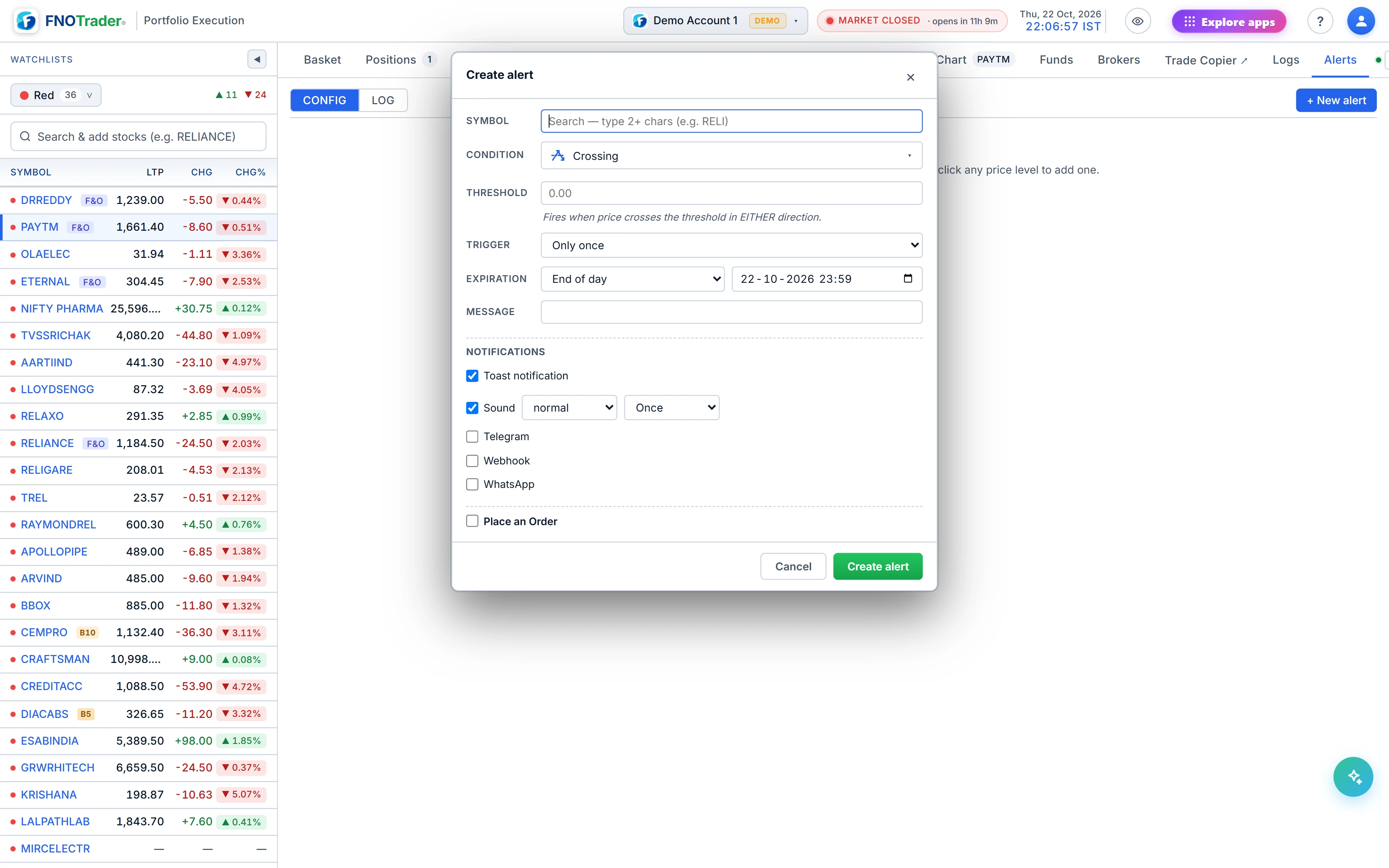
An alert is a condition on a stock's price, a rule for how often it may fire, an expiry, a set of delivery channels and, optionally, an order to place when it fires.
Alerts are on price only. There are no indicator-based conditions (RSI, moving-average crosses and so on) in this app.
The conditions
| Condition | Fires when |
|---|---|
| Crossing | Price crosses the level in either direction. |
| Crossing Up / Crossing Down | Price moves from below to above (or above to below). |
| Greater than (≥) / Less than (≤) | On every update while price is at or beyond the level. |
| Entering / Exiting Channel | Once, when price moves into (or out of) a band between a low and a high. |
| Inside / Outside Channel | On every update while price is inside (or outside) the band. |
| Moving Up / Moving Down | Price has moved by at least ₹X or X% within the last N bars of a chosen interval (1 minute to 1 day). |
The difference between “Crossing Up” and “≥” is the mistake people make most often. A crossing fires on the move; ≥ is a state and keeps firing while it is true. Pair a state condition with the Once per minute trigger if you want repeats, or Only once if you do not.
Expiry and delivery
Expiry presets are End of day, 1 week, 1 month, open-ended, or a custom date and time; new alerts default to end of day.
Channels:
- Toast in the app, and sound (three volume profiles, once or repeating).
- Telegram, using your own bot token and chat id; the app walks you through creating a bot.
- Webhook — a JSON POST to your URL, with a 5-second timeout and no retry.
- WhatsApp to your registered number. WhatsApp only lets a business message you within 24 hours of your last message to it, so you open the window yourself by sending one message from your registered number, ideally before the market opens. If the window has lapsed when the alert fires, delivery falls back to your other channels.
Place an order when it fires
Tick Place an Order and the alert carries an order: side, quantity, product (CNC, MIS or MTF) and type. A Market order goes as a limit at LTP plus or minus your buffer at the moment of firing, as in the order panel; Limit takes either a price or the buffer; SL takes a trigger plus buffer; SL-M a trigger only. You can also attach one stop-loss, in points, % or a fixed price, which is registered as a monitored level once the order fills.
The Alerts header and the Funds tab show the capital committed if every enabled, unexpired order-alert fired: full value for CNC and MTF, and roughly value ÷ 5 for MIS as a proxy for intraday leverage. It is an estimate, not your broker's margin figure.
A worked example
Hypothetical. A stock trades at ₹1,180. You want to buy 50 shares if it breaks ₹1,200, with a 2% stop.
- Condition Crossing Up 1,200; trigger Only once; expiry End of day.
- Order: BUY 50, CNC, Market (buffer 3%); stop-loss 2%.
If it prints ₹1,201, the buy goes as a limit at about ₹1,237 (1,201 × 1.03), fills at the market, and a stop is registered about 2% below the entry reference — roughly ₹1,177 if the reference is ₹1,201. Committed capital for this alert is 50 × ₹1,200 = ₹60,000; as MIS it would show as ₹12,000.
Limits and common mistakes
- A ≥ alert with Once per minute and an order attached can place an order every minute. Use Only once for order-alerts unless you mean to scale in.
- A breakout alert can fire on a single print that immediately reverses. The order goes anyway.
- Webhooks are not retried. If your endpoint is down at that moment, that delivery is lost.
Where to find it
- In Portfolio Execution, click the bell on a watchlist row, or right-click a chart.
- Pick the condition, trigger and expiry; tick the channels you want.
- Optionally tick Place an Order and fill in the order.
- Manage alerts in the Alerts tab; fired alerts appear in its log.
Common questions
Can a price alert place an order automatically?
Yes. Tick Place an Order in the alert and set side, quantity, product and type. A market order is sent as a protected limit, and you can attach a stop-loss.
How do I get stock alerts on WhatsApp?
Enable WhatsApp on the alert and send one message from your registered number to open WhatsApp's 24-hour window; alerts in that window are delivered there.
What is the difference between Crossing Up and Greater than?
Crossing Up fires on the move from below to above. Greater than fires on every update while the price is at or above the level.
Can I set alerts on RSI or moving averages?
Not in the Trade app. Its alerts are on price: crossing, at-or-beyond, channels and moving by an amount over a number of bars.
How long does an alert stay active?
Until its expiry: end of day by default, or 1 week, 1 month, open-ended or a custom date and time.
More on Portfolio Execution
More in Portfolio Execution · App: Portfolio Execution · Definitions: glossary · All: every article