Why execution settings matter
A backtest fills at bar prices. A live run meets real order books, rejections and partial fills. Step 6 is the bridge: it decides the order legs go in, what happens when one fails, what price you are willing to pay, and on which days the strategy runs at all.
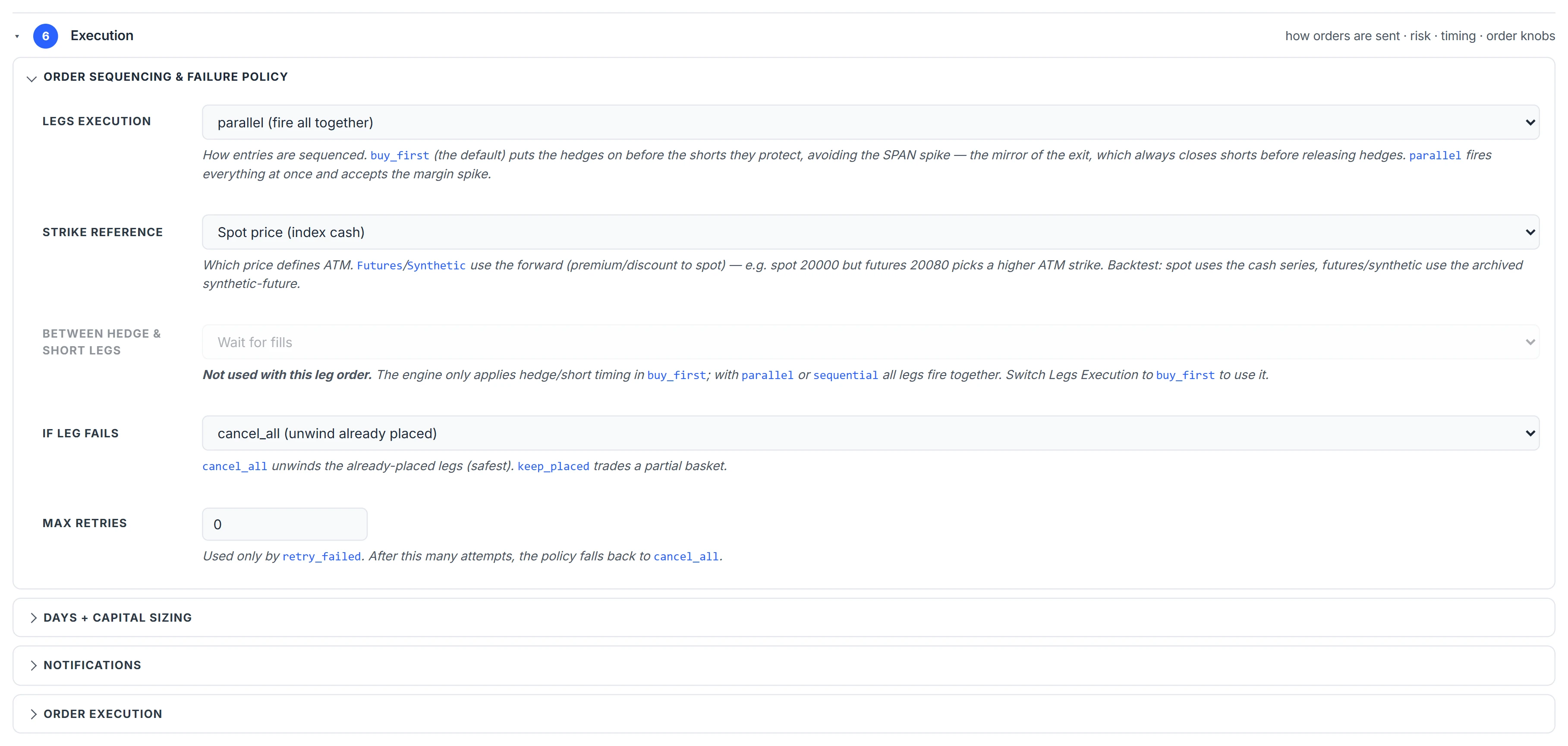
Leg order and failure policy
| Setting | Options |
|---|---|
| Legs Execution | buy_first (default): BUY legs first, then SELL legs. parallel: all together. sequential: one after another. |
| Between hedge and short legs | In buy_first: fire the shorts immediately, wait for the hedge fills, or wait for fills plus 1–10 seconds. |
| If Leg Fails | cancel_all (default): unwind the legs already placed. keep_placed: continue with a partial basket. retry_failed: retry up to Max Retries, then fall back to cancel_all. |
| Strike Reference | Spot, current-month futures, or synthetic futures from the chain — what counts as ATM. |
buy_first with “wait for fills” means an iron condor is never even briefly a naked short, and the hedge benefit to margin is in place before the shorts go out. See SPAN margin explained for why that matters.
Order types and market protection
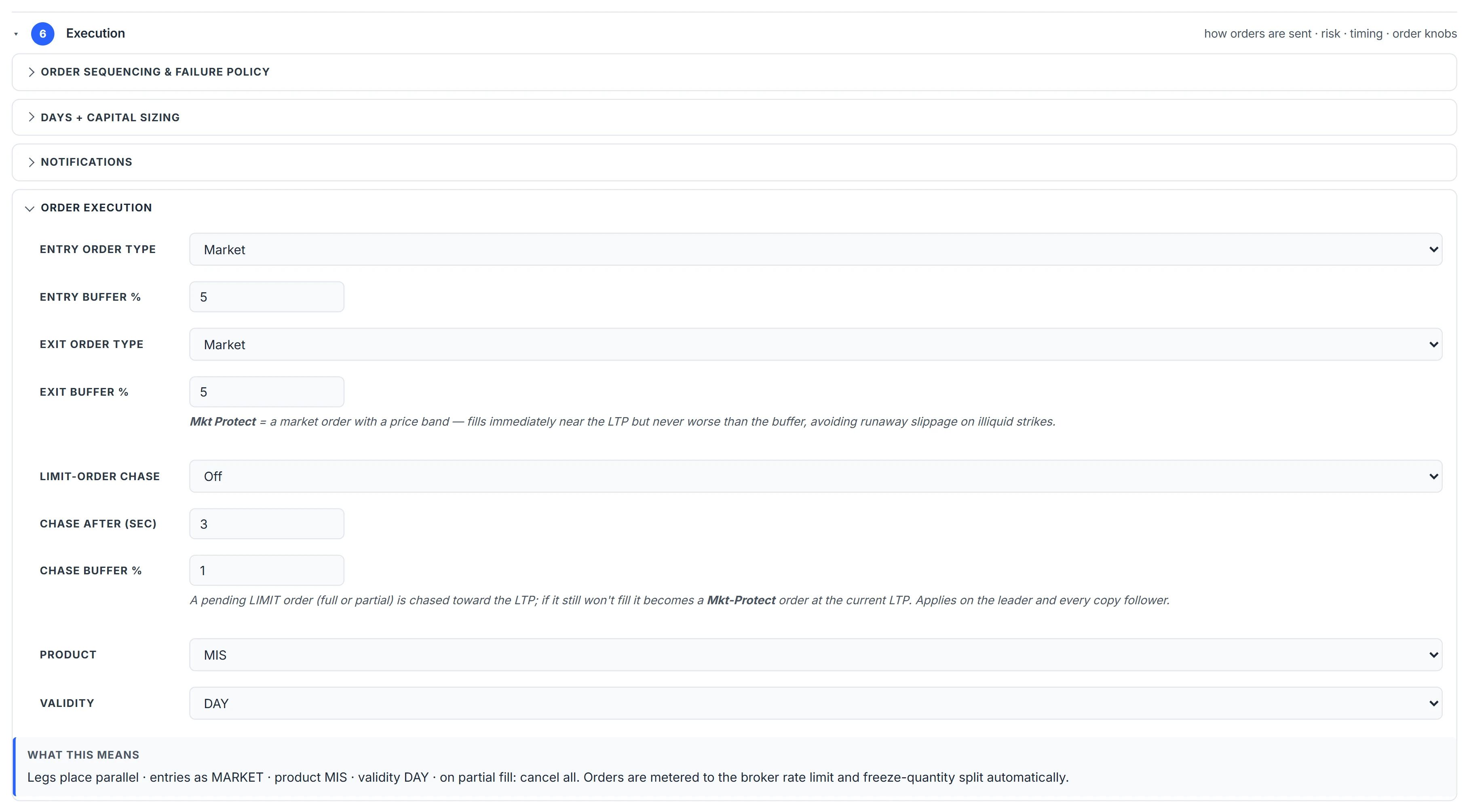
Entry and exit each have an order type — Market, Limit or Mkt Protect — and a buffer %.
A plain market order never leaves the platform. Every market order is sent as a marketable limit at LTP plus the buffer for a BUY or minus it for a SELL, rounded to the contract’s tick. If no buffer is set, a 3% band is used. A market order with no reference price is refused with the reason rather than sent blind.
Limit-order chase, when on, re-prices an unfilled limit toward the LTP after the chosen number of seconds, by the chase buffer %, and if it is still unfilled converts it to a protected market order at the current LTP.
Product is NRML (carry), MIS (intraday) or CNC (delivery). Validity is DAY or IOC, where IOC fills what is available immediately and cancels the rest.
Guards and run filters
- Spike protect % — if a leg’s price jumps more than this % from the previous tick, that tick is not used to trigger the leg’s stop. It filters bad prints; it does not filter real moves that persist.
- Premium gap % — for Premium-mode legs, refuses the entry if the resolved strike’s LTP is more than this % away from your target premium.
- Slippage % — flags any fill that lands more than this % from the LTP at the moment the order was placed.
- Max Lots — total quantity across all legs may not exceed this many lots; a strategy over the cap is refused at launch.
- Run On Days or DTE Filter — pick one. Run On Days allows chosen IST weekdays. The DTE filter counts trading days to expiry (expiry day = 0), on a weekly or monthly basis, as specific values or a range. A strategy outside its filter waits rather than failing.
Independently of these, a strategy does not start on exchange holidays or weekends.
A worked example
An iron condor with buy_first and “wait for fills”, entry type Mkt Protect, buffer 1%.
- The two wing BUY orders go out first. A wing with LTP ₹12.40 is sent as a limit at 12.40 × 1.01 = 12.524, rounded up to the ₹0.05 tick: ₹12.55.
- Once both wings are confirmed filled, the two SELL legs go out. A short leg at LTP ₹98.00 is sent at 98 × 0.99 = 97.02, rounded down to the tick: ₹97.00.
- If one wing is rejected and the policy is cancel_all, the filled wing is unwound and the shorts are never sent.
(Illustrative prices.)
Common mistakes
- parallel on a hedged structure. The shorts can fill before the wings, and margin is computed on the naked position for that moment.
- keep_placed on a condor. A partial basket is a different trade from the one you tested.
- A large buffer on illiquid strikes. The protection band is also the worst price you accept.
- Forgetting the product. BTST, positional and overnight protection all need NRML; see holding past the close.
Placing API orders from a broker account also needs a registered static IP; see static IP for API trading.
Where to find it
- In Algo & Backtest, open Step 6 of the builder.
- Set Legs Execution, the hedge timing and If Leg Fails.
- Choose entry and exit order types and buffers, product and validity.
- Pick Run On Days or a DTE filter, then save.
Common questions
Does Algo send market orders to the broker?
No plain market orders. Every market order is converted to a limit at LTP plus or minus a protection buffer, 3% if none is set, rounded to the tick.
What does buy first mean in leg execution?
The BUY legs, usually hedges, are placed first and the SELL legs after them, optionally only once the BUY legs are confirmed filled.
What happens if one leg of my strategy is rejected?
With cancel_all, the default, the legs already placed are unwound. You can instead keep the partial basket or retry failed legs a set number of times.
How do I run a strategy only on expiry day?
Choose the DTE filter in Step 6, discrete mode, and select 0. DTE counts trading days, with expiry day as 0.
Can I limit how many lots a strategy trades?
Yes. Max Lots caps total quantity across all legs; a strategy that exceeds it is refused at launch.
More on Algo & Backtesting
More in Algo & Backtesting · App: Algo & Backtest · Definitions: glossary · All: every article