Deployments and runs
A deployment is the standing link between a saved strategy and a broker account. A run is one day's execution of it.
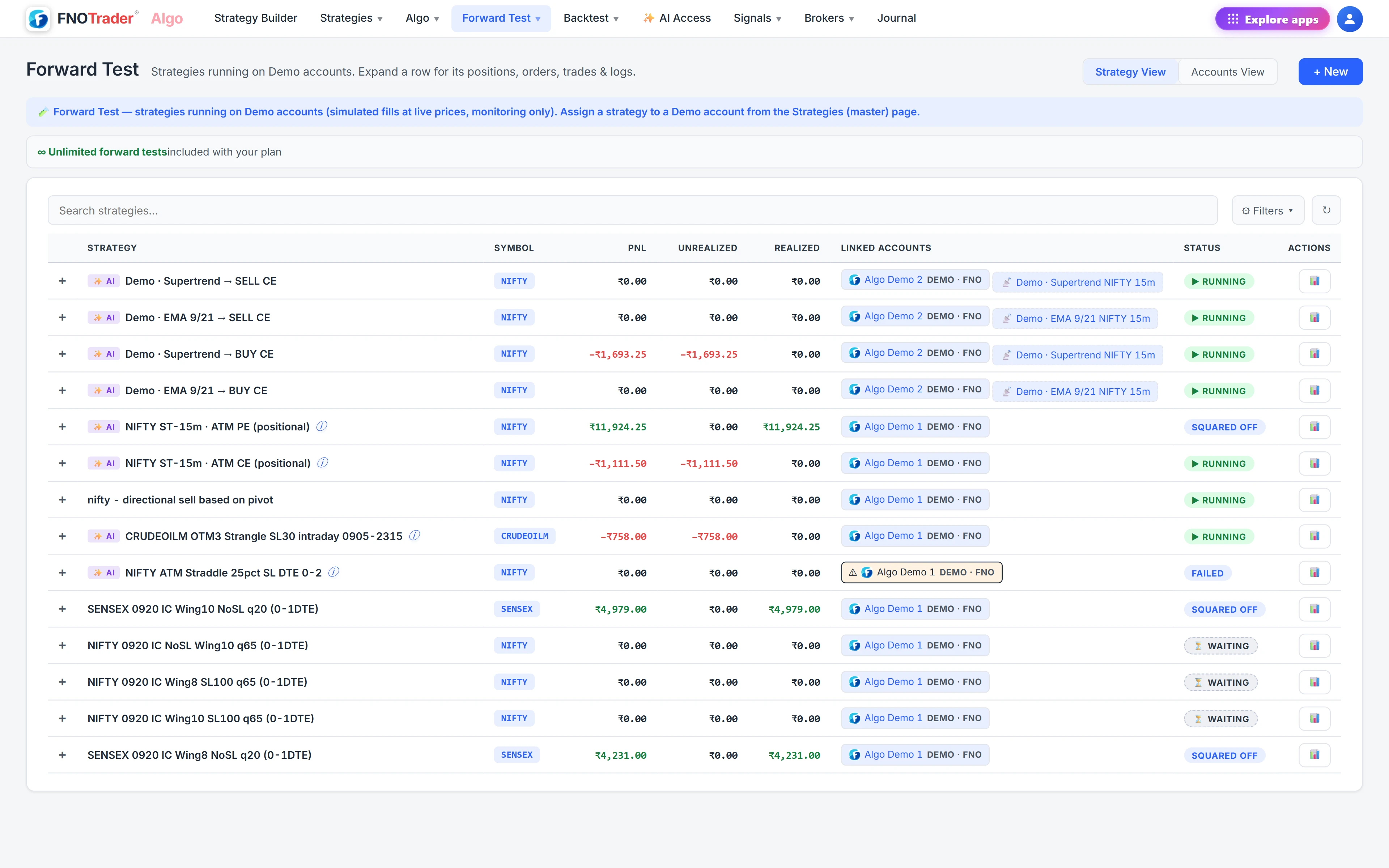
You assign a strategy to an account from the Strategies page. Only accounts that are logged in and enabled for trading can be chosen; hidden accounts are counted with a note pointing to the Brokers page. From then on, each trading day the strategy launches by itself and trades its rules. Live (real broker) deployments are shown under Algo, demo ones under Forward Test.
Mornings: the readiness check and blocked launches
Broker logins expire daily, deployments do not. So:
- 08:45 IST pre-open check. On trading days, anyone with a live deployment gets a message listing each deployment and whether its broker is ready, with time to log in before 09:15. Demo deployments are left out; they need no login.
- A blocked launch says why. If the broker is still logged out at launch time, the deployment shows an amber warning with the reason, and the strategy launches by itself the moment the broker becomes ready.
- No late auto-entries. If the entry time has already passed by then, the strategy is not auto-started for the day. A late entry at a different price is your decision, via Run now.
- Deployment log. The pre-open check, blocked launches and skipped late starts are written to the strategy's Logs, even on days no run was created.
Live controls on a running strategy
Expand a running strategy to see Positions, Orders, Trades and Logs, and the override panel. These act on the running strategy immediately, survive a restart, and do not edit the saved strategy.
| Control | What it does |
|---|---|
| Combined SL / Target ₹ | Replace the basket stop or target mid-run. 0 removes that limit. |
| Combined trailing | Arm at a profit, then every step raises the floor. |
| Profit lock and trailing | The absolute-floor guard, same fields as in the Builder. |
| Pause / Resume | Stop acting on triggers without closing anything. |
| Square-off | Close every open leg now. |
| External close | Book a leg at a price you enter, without sending an order — for a position you exited outside the platform. |
| Per-leg SL / TGT | Edit one leg's stop or target from its row. |
Editing the saved strategy while it runs: now or next run
A run takes a snapshot of the strategy when it launches, so a plain save changes nothing about the run already going. When you save a strategy that has a running run, the Builder lists every change, was → now, each with its own choice:
- now — pushed into the running basket immediately and kept across a restart: exit time, combined SL and target with their conditions and ladders, trailing and profit lock, per-leg stops, targets, trails and actions, the exit condition, adjustment rules and exit execution settings. The Logs record what changed.
- next run — the current run is left as it is; future launches use the new values.
Some changes cannot apply to a basket that is already open — number of legs, strikes, side and quantity, entry conditions, start time, sizing and day or DTE gates. Their "now" option is disabled.
A worked example: the profit lock that closes you
A profit lock's floor comes from the peak P&L the run has seen, not from where it is now. Suppose a hypothetical run peaked at ₹12,000 and has pulled back to ₹5,500. You set a lock whose floor works out to ₹7,000.
The current ₹5,500 is already below the ₹7,000 floor, so the lock is breached the moment it arms and the basket books on the next tick. The platform checks this before applying and shows you the floor, peak and current P&L; you can still go ahead. The same check applies to a profit lock sent by webhook, which is refused unless it says force — see signals and webhooks.
One more trap: every ₹ figure is for the whole basket. A ₹20,000 target built for 10 lots fires far too early on 17.
Where to find it
- Log in and enable the broker account on the Brokers page in Algo.
- Open Strategies and assign the strategy to that account, or use Deploy on a backtest report.
- Watch it under Algo → Strategies; expand a row for the tabs and controls.
- Set account-wide limits on the Risk page — see risk and the kill switch.
How the strategy itself is built is covered on the Algo page.
Common questions
What happens if my broker is logged out when the strategy should start?
The launch is blocked and shows the reason. It starts by itself as soon as the broker is ready, unless the entry time has already passed, in which case it is not auto-started that day and you can use Run now.
Do changes to a saved strategy affect a strategy that is already running?
Only if you choose so. When you save, each change can be applied now to the running basket or from the next run. Structural changes such as legs, strikes and entry conditions always wait for the next run.
What is External close in Algo?
It books a leg at a price you enter without sending a broker order. Use it when you closed a position outside the platform so the run's records match reality.
Why did changing the profit lock close my position?
The lock floor is calculated from the peak P&L the run reached. If profit had already fallen below the new floor, the lock was breached as soon as it armed. The app shows the floor, peak and current P&L before applying.
More on Algo & Backtesting
More in Algo & Backtesting · App: Algo & Backtest · Definitions: glossary · All: every article