What a layout is
A layout is the whole window: how many charts, in what grid, what each one shows, and what they share.
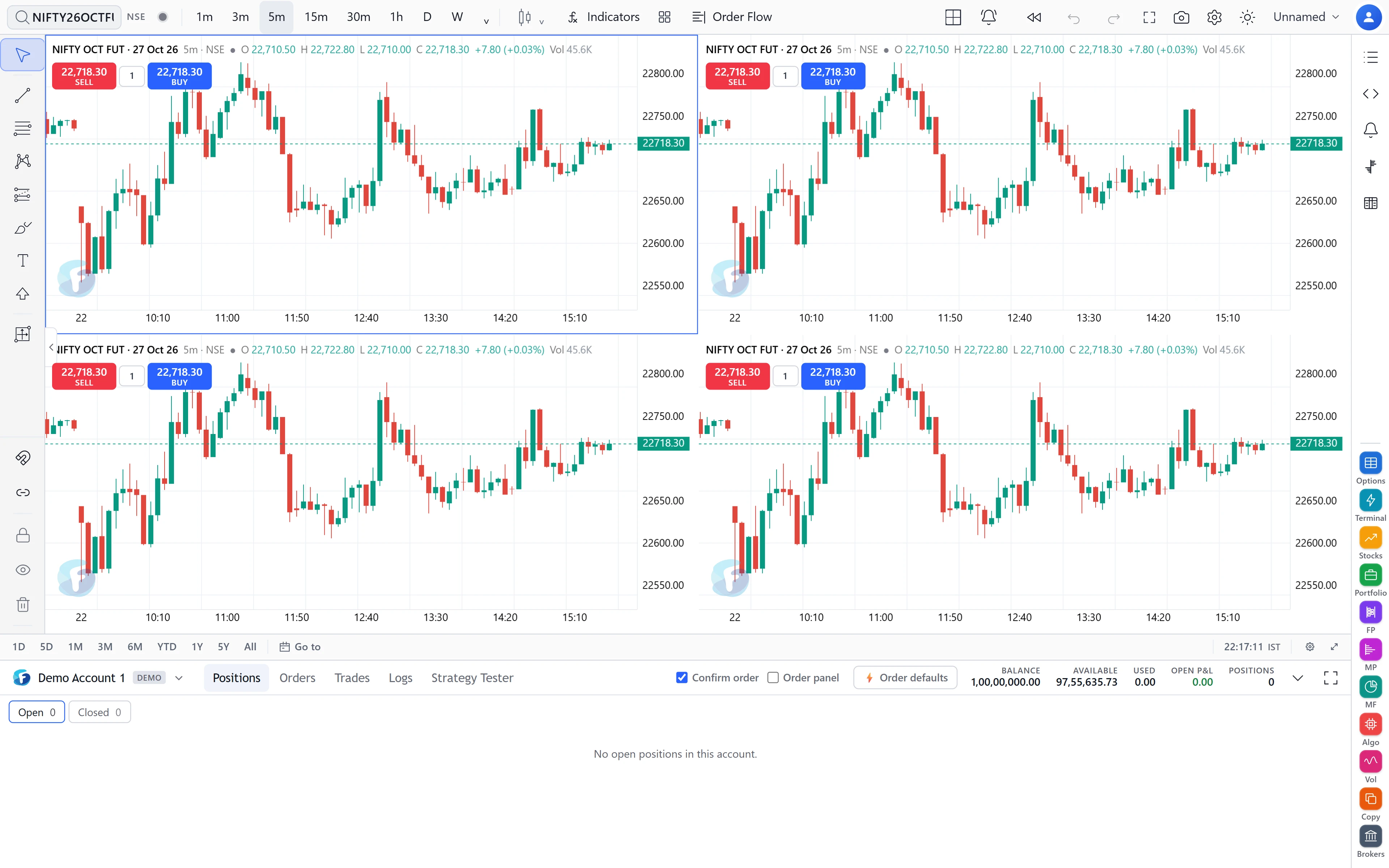
FNOTrader Charts offers over 50 grid arrangements, holding from 1 chart up to 16 — equal grids, rows and columns of different sizes, and “one large plus several small” arrangements. Each chart keeps its own symbol, interval, chart type, indicators and drawings. Any chart can be taken full screen on its own and returned with Esc.
The five sync switches
| Sync | What happens |
|---|---|
| Symbol | Changing the symbol on one chart changes it on every chart. |
| Interval | Changing the interval on one chart changes it on every chart. |
| Crosshair | The crosshair on one chart is mirrored on the others. |
| Time | Scrolling one chart scrolls the others to the same time; each keeps its own zoom. |
| Date range | Every chart shows the same date range; scrolling or zooming one moves them all. |
Each switch is independent, which is what makes the common setups possible.
Two common setups
One instrument, several timeframes. Turn Symbol and Crosshair on, Interval off. Set the charts to 1m, 5m, 15m and D. Type a new symbol on any chart and all four follow; hover a 5-minute candle and you see where that moment sits on the daily.
Several instruments, one timeframe. Turn Interval and Time on, Symbol off. Put NIFTY, BANKNIFTY, a sector index and a stock side by side and scroll them together to compare how each moved at the same time.
A worked example
Suppose you use a 2 × 2 grid with Symbol sync on, and the charts are on 1m, 5m, 15m and D. A 1-minute session of 6 h 15 m is 375 bars; the 5-minute chart covers the same session in 375 ÷ 5 = 75 bars, and the 15-minute in 25. With Date range sync off, each chart can show a sensible number of its own bars. Turn Date range on and all four are forced to the same span — fine for comparing instruments, unhelpful for timeframes, because the daily chart would show a single bar.
Saved layouts and indicator templates
These are two different things with two different menus.
- A chart layout saves the whole window under a name. The layout you are working in is also saved continuously, so a reload puts it back. Autosave can be switched off if you want to open a saved layout, experiment, and leave the saved copy alone.
- An indicator template saves one chart’s studies and their settings. You can apply it to whichever chart is selected, either replacing that chart’s studies or adding to them. Templates can be exported as a file.
Saved layouts and templates are stored in your browser. If two tabs save at the same moment, the conflict is detected rather than one save silently overwriting the other.
Limits and common mistakes
- More charts means more data. Sixteen live charts each request their own bars. On a slow connection, fewer charts with the timeframes you actually use is better.
- Interval sync on a timeframe layout collapses it to one timeframe. If your multi-timeframe grid suddenly shows four identical charts, check that switch first.
- Because layouts live in the browser, clearing site data removes them, and a layout saved on your office PC is not on your laptop. Export templates you care about.
- Crosshair sync across different symbols lines up time, not price. The crosshair on BANKNIFTY sits at the same moment as on NIFTY, at that chart’s own price.
- Time sync keeps each chart’s zoom. A 1-minute chart and a daily chart scrolled to the same moment still show very different spans of history. That is intended: use Date range sync only when every chart should show the same span.
Where to find it
- On FNOTrader Charts, click the layout icon in the top bar.
- Pick a grid by chart count, then set the Sync in layout switches below it.
- Use the layouts menu to save and open named layouts, and the templates menu for indicator templates.
Related: intervals and chart types.
Common questions
How many charts can I open in one FNOTrader Charts window?
Up to 16, in over 50 grid arrangements.
How do I sync the crosshair across charts?
Open the layout menu and turn on Crosshair under Sync in layout.
What is the difference between a layout and an indicator template?
A layout saves the whole window. A template saves one chart's indicators and settings, to apply to any chart.
Is my current layout saved if I close the tab?
Yes, the working layout is saved continuously in your browser unless you switch autosave off.
More on Charts & Marketplace
More in Charts & Marketplace · App: FNOTrader Charts · Definitions: glossary · All: every article