What it is, and the question it answers
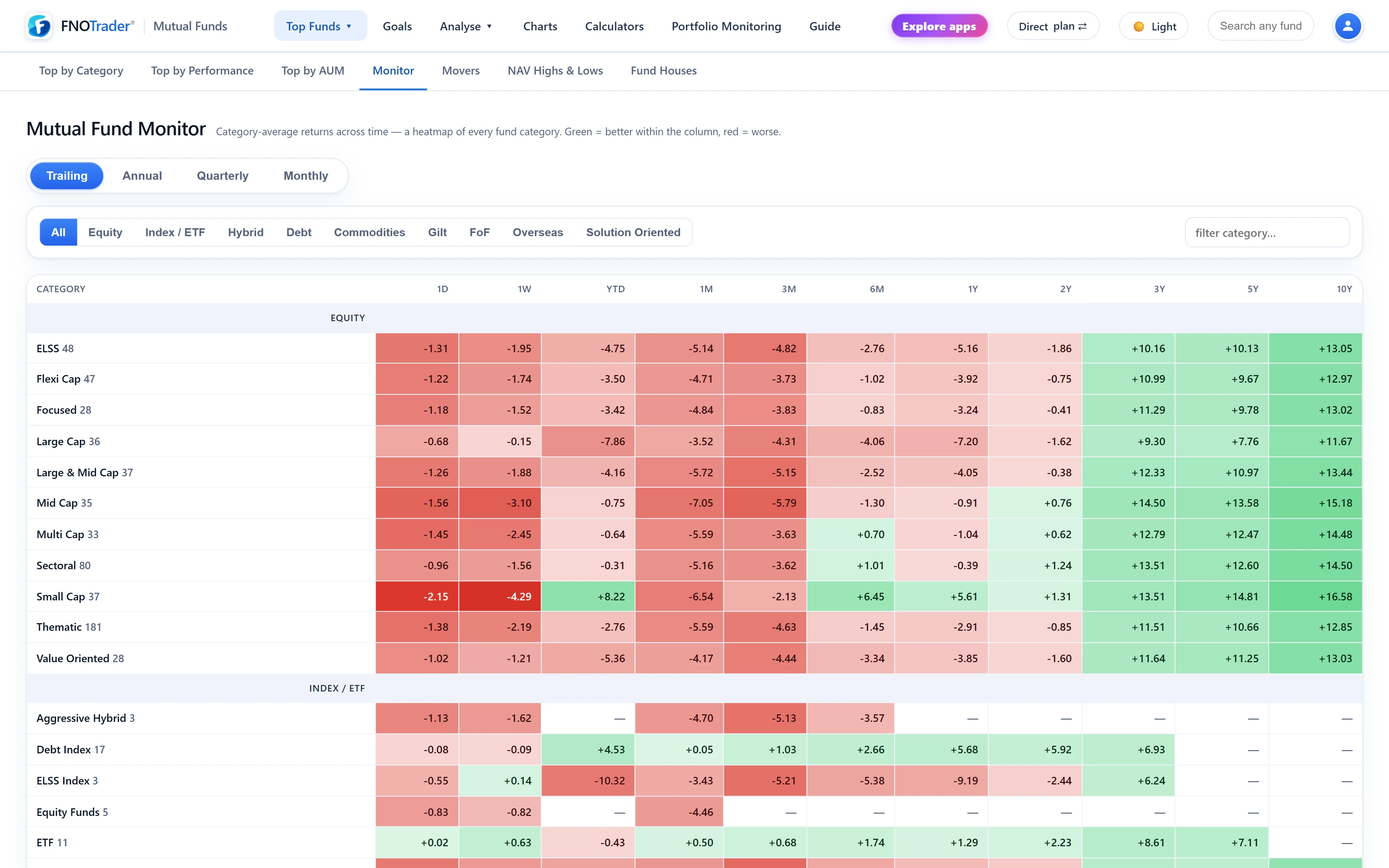
The Monitor is a heatmap: rows are mutual fund sub-categories grouped by asset class, columns are time periods, and each cell is the average return of that category's Direct-Growth funds for the period, coloured by sign and size.
It answers questions about categories rather than funds: where has money been working over every horizon at once, which categories led in which year, and what has turned recently. If the category labels themselves are unfamiliar, start with equity funds, debt funds and hybrid funds.
The four views
| View | Columns | Reads as |
|---|---|---|
| Trailing | 1D, 1W, YTD, 1M, 3M, 6M, 1Y, 2Y, 3Y, 5Y, 10Y | Where money has been working, across every horizon |
| Annual | Calendar years, most recent first | Which categories led in which year |
| Quarterly | The last 12 calendar quarters | Medium-term rotation |
| Monthly | The last 12 calendar months | What has turned recently |
Calendar periods are measured from the last NAV of one period to the last NAV of the next, so the most recent year, quarter or month is the period so far, not a complete one. Trailing columns follow the usual convention: absolute returns up to one year, annualised from two years.
How each cell is calculated
Each cell is a simple, unweighted mean of the period return of every live Direct-Growth fund in that sub-category. Using one plan and one option avoids counting the same portfolio four times (Direct and Regular, Growth and IDCW). A category needs at least two funds with data for the period to appear.
Worked example. Suppose a category has three funds whose calendar-year returns are 22%, 18% and 8%. The cell shows (22 + 18 + 8) ÷ 3 = 16%. Notice what that hides: a 14-point gap between the best and worst fund. The average is what the category did, not what any particular fund did.
How to read it well
- Read down a column first. One column compares categories over the same period. Then read across a row to see how one category behaved through time.
- Use the Annual view against recency bias. Laying ten calendar years side by side shows how rarely one category stays on top. That is the case for rebalancing rather than chasing.
- Remember the spread inside a category. Dispersion between funds in one category is often larger than the difference between neighbouring categories.
- Debt rows look calm by construction. Their NAVs accrue daily, so short columns rarely move much. Compare debt rows with each other, not with small caps.
Filters and shortcuts
You can narrow the grid to one asset class, or filter rows with the category search box. Clicking a category name jumps to the Top Funds table filtered to that category, so you can go from "mid caps had a strong year" to the individual mid-cap funds in one click — covered in Top Funds and Fund Houses.
The Monitor always uses Direct-Growth funds, whatever the plan toggle says, because the question is about the category, not about a plan.
Limits
- Averages are not investable. No fund delivers the category mean, and the mean is not weighted by size.
- Survivorship. The grid uses funds live today. Funds that were merged or wound up in earlier years are not in the older columns, which tends to flatter old periods slightly.
- Past rotation does not schedule the next one. The heatmap shows that leadership changes; it does not tell you when or to whom.
Where to find it
- Open Mutual Funds and choose Top Funds → Monitor.
- Pick Trailing, Annual, Quarterly or Monthly.
- Optionally pick an asset class or type a category name; click a category to open its funds.
Common questions
What does each cell in the category heatmap mean?
It is the simple average return of all live Direct-Growth funds in that sub-category for that period.
Is the latest year in the Annual view a full year?
No. Calendar periods run from the last NAV of the previous period to the latest NAV, so the current year, quarter or month is the period so far.
Why does the Monitor not change with the Direct/Regular toggle?
It describes categories, so it always uses Direct-Growth funds to count each portfolio once.
Why is a category missing from a column?
A category needs at least two funds with data for that period, so newer categories drop out of the longer columns.
More on Mutual Funds
More in Mutual Funds · App: Mutual Funds · Definitions: glossary · All: every article