What it is
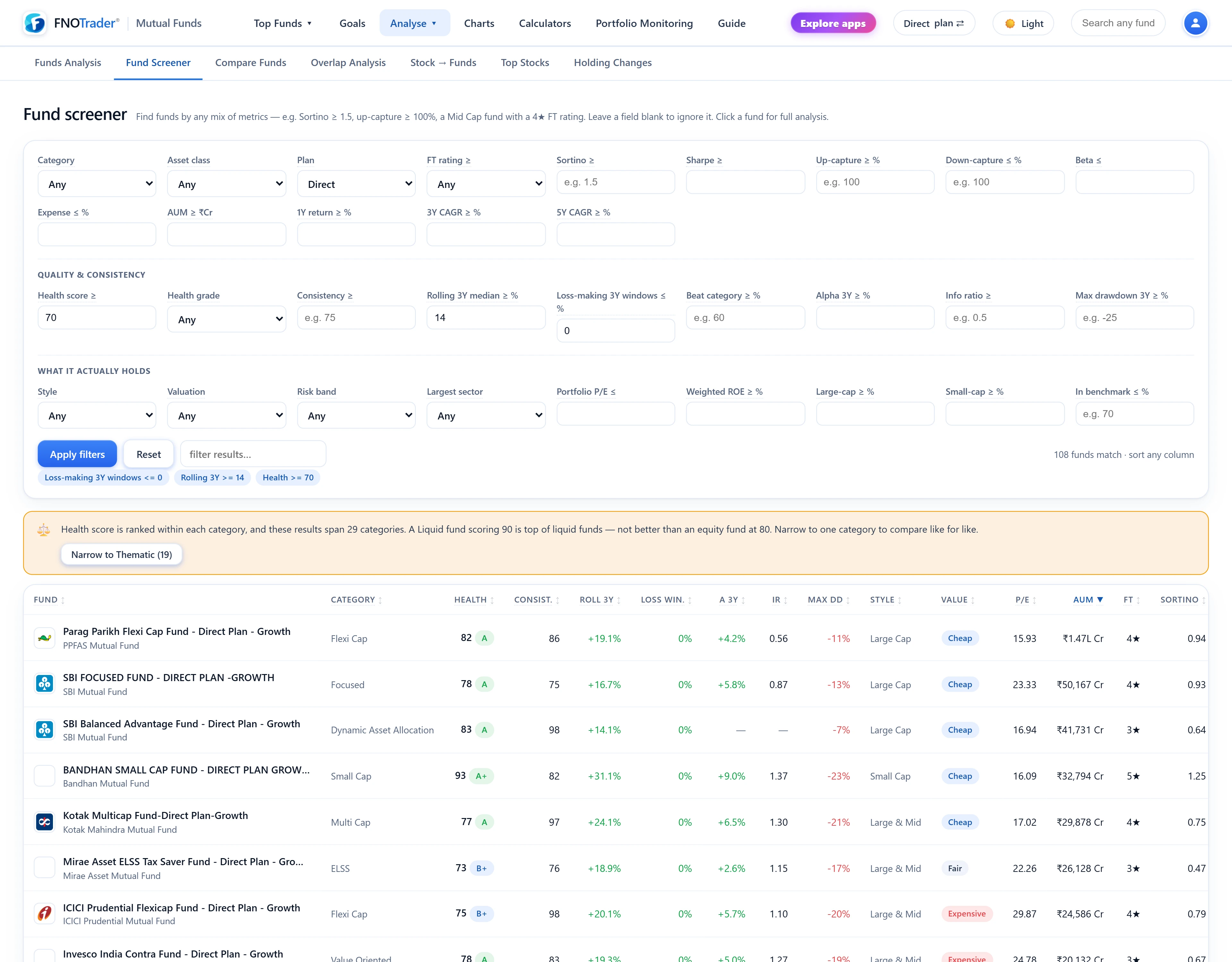
The screener applies any combination of minimum and maximum thresholds and category filters to the whole fund universe, and returns matching funds with the deep metrics as sortable columns, each with a hover explanation.
Leave a field blank to ignore it. By default it screens Direct-Growth funds with at least 60 NAV points and a NAV no more than 15 days old; the Plan field switches to Regular. It returns up to 200 funds, sorted by AUM unless you click another column. If you are new to the ratios, read mutual fund risk measures first.
The three filter groups
| Group | Filters |
|---|---|
| Basics | Category, asset class, plan, FT rating ≥, Sortino ≥, Sharpe ≥, up-capture ≥, down-capture ≤, beta ≤, expense ≤, AUM ≥, 1Y / 3Y / 5Y return ≥ |
| Quality & consistency | Health score ≥, health grade, consistency ≥, rolling 3Y median ≥, loss-making 3Y windows ≤, beat-category windows ≥, 3Y alpha ≥, information ratio ≥, max 3Y drawdown ≥ |
| Portfolio & style | Style label, valuation label, risk band, largest sector, portfolio P/E ≤, weighted ROE ≥, large-cap share ≥, small-cap share ≥, share of equity in the benchmark ≤ |
The definitions behind these are on the fund page and in the Health score post. Drawdown is a negative number, so "max drawdown ≥ −30" means "fell no more than 30%".
The cross-category warning
Health score, health grade, consistency, FT rating and the valuation label are ranked inside a category; the risk band is ranked inside an asset class. Screening one of them across many categories compares numbers that were never on the same scale. A liquid fund scoring 90 is top of liquid funds, not better than an equity fund at 80.
So when you filter or sort on one of these and the results span two or more categories, the screener shows a banner saying so. If one category dominates the results, it offers a one-click shortcut to narrow to it. It still returns the rows; it just will not let you read them as comparable.
Checking for closet indexing
A closet indexer charges an active fee for a portfolio that mostly mirrors its benchmark. The app measures index containment: the share of a fund's equity sitting in stocks that are members of its own benchmark index. It is not the textbook "active share" — that needs index weights — and the app labels it as containment so it is not mistaken for one.
Containment alone is weak evidence; a large-cap fund will naturally hold mostly index names. So an equity fund earns an Index-like chip only when containment is 80% or more and its tracking error is 4% or less. Either alone is not enough.
In the screener, "In benchmark ≤" filters on containment directly. A screen such as Large Cap, In benchmark ≤ 70%, Information ratio ≥ 0.5, Expense ≤ 1.2% asks for large-cap funds that differ meaningfully from the index and have been rewarded for it. For the passive alternative, see index funds and ETFs.
Example screens
- Downside-aware equity: Category Flexi Cap · Down-capture ≤ 90 · Sortino ≥ 1 · Max 3Y drawdown ≥ −30.
- Consistency over a hot streak: one category · Beat category ≥ 60% · Loss-making 3Y windows ≤ 0 · Consistency ≥ 75.
- Cheap index exposure: Asset class Index / ETF · Expense ≤ 0.25 · AUM ≥ 1,000 Cr.
Worked reading: in the first screen, a down-capture of 90 means that over the benchmark's falling months in the last three years, the fund's compounded loss was 90% of the index's. If the index fell a cumulative 20% across those months, the fund fell about 18%.
Common mistakes
- Too many filters. Each threshold removes funds with missing data, not just weak ones. Young funds lack rolling windows and drop out of quality screens silently.
- Screening across categories on peer-ranked metrics. Heed the banner.
- Treating the result as a portfolio. A screen is a shortlist; open each fund and check holdings and overlap with what you already own.
Where to find it
- In Mutual Funds, open Analyse → Fund Screener.
- Fill the fields you care about, leave the rest blank, and run.
- Sort by any column; click a fund for its full page; Reset clears everything back to Direct.
Common questions
Can I screen mutual funds by Sortino ratio and capture ratios?
Yes. The Basics group has Sortino, Sharpe, up-capture, down-capture and beta thresholds, alongside expense, AUM and trailing returns.
How does the screener detect closet index funds?
It measures what share of a fund's equity sits in its benchmark's constituents. An equity fund is flagged Index-like when that share is 80% or more and its tracking error is 4% or less.
Why does the screener show a warning about categories?
Some metrics are ranked inside a category, so comparing them across categories is misleading. The banner appears when your screen does that.
Does the screener include Regular plans?
It defaults to Direct-Growth. Change the Plan field to Regular to screen Regular plans.
More on Mutual Funds
More in Mutual Funds · App: Mutual Funds · Definitions: glossary · All: every article