What it is
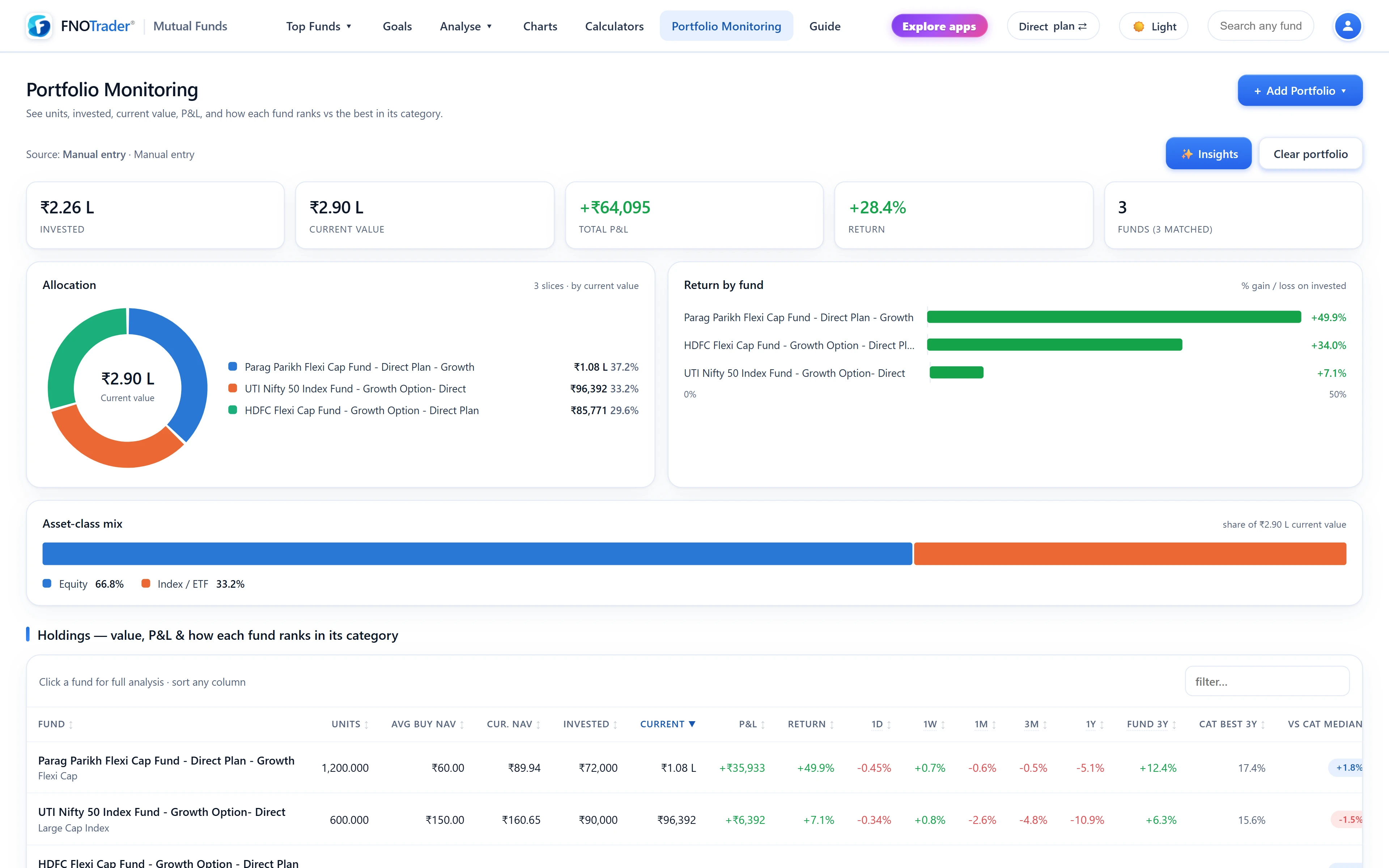
Portfolio Monitoring holds your mutual fund portfolio, values it against the NAV feed, and shows how each holding ranks against its category. The Insights pass goes further: what you own at the stock and sector level once every fund is looked through.
The portfolio is saved to your FNOTrader account, so it is there on any browser or device, and Clear portfolio removes it. The app has no connection to your folios, cannot transact, and holds no broker or distributor authority.
Three ways to load it
| Method | What you provide | Best for |
|---|---|---|
| CAS PDF | Your consolidated account statement from CAMS or KFintech, and its password | The complete picture in one step — every folio across every AMC, with units and cost |
| Excel / CSV | A sheet with a scheme-name column, plus units and invested amount if you have them; a template is provided | A portfolio you already track in a spreadsheet |
| Manual entry | Search each fund, enter units and your average buy NAV | A few holdings, or a hypothetical portfolio |
A CAS PDF is read in the request and only the resulting holdings are stored; the PDF and its password are not kept. Zero-balance schemes are skipped. Names from a CAS or spreadsheet are matched to the scheme master automatically, and anything that cannot be matched stays in the table marked "unmatched" rather than being dropped.
The holdings table
Each holding shows units, invested amount, current value, absolute and percentage gain or loss, category, returns, and how it ranks inside its category. A fund up 14% may still sit in the bottom quartile of its peers, and this is where that shows. Above the table: totals and three charts — allocation by fund, return by fund and asset-class mix. Click a row for the full fund page.
The gain shown is simple: current value against invested amount. For a SIP portfolio the right return measure is XIRR, explained in XIRR vs CAGR.
Insights: five blocks
- Opportunity — for each holding, what your invested amount would be after three years at your fund's trailing 3Y CAGR versus the category's leading Direct-Growth fund (among funds of at least ₹100 crore where available). This is illustrative arithmetic on past returns, not a projection, and the leader in hindsight is not a fund anyone could have picked in advance.
- Your true stock exposure — each fund's latest disclosed stock weights, scaled by that fund's current value and summed across every fund. Gold, debt and fund-of-funds sleeves carry no stock disclosure, so the caption states what share of your portfolio could be looked through, and how much of it your top ten stocks are.
- Sector exposure — the same look-through rolled up by sector, as a share of your equity.
- Category rankings — each holding's 3Y rank among Direct-Growth peers, its percentile, its 3Y return against the category median, and a chip: Category leader, Top x%, Above median, Below median or Bottom x%.
- Overlap between your funds — pairwise overlap for every combination, highest first, using the same sum-of-minimum-weights method as the Overlap tool.
A worked look-through example
Suppose you hold three hypothetical funds worth ₹4 lakh, ₹3 lakh and ₹3 lakh — ₹10 lakh in total. The same bank is 9%, 8% and 6% of them.
- Exposure = 4,00,000 × 9% + 3,00,000 × 8% + 3,00,000 × 6% = 36,000 + 24,000 + 18,000 = ₹78,000.
- As a share of the portfolio: 78,000 ÷ 10,00,000 = 7.8% in one company.
None of the three funds holds the bank above 9%, and yet nearly 8% of your money depends on it. This is the number pairwise overlap cannot show, and the reason to run Insights after every new fund you add. For acting on what you find, see how to rebalance a portfolio.
Limits
- Disclosures are monthly. The look-through uses each fund's latest disclosed portfolio, which may be several weeks old.
- Unmatched schemes cannot be valued from the NAV feed and are left out of the look-through and rankings.
- No advice. Ranks and opportunity figures describe past results; they are not switch recommendations.
Where to find it
- In Mutual Funds, click Portfolio Monitoring.
- Choose Upload CAS PDF, Upload Excel / CSV or Manual entry, and load your holdings.
- Press Insights for the look-through, rankings and overlap.
Common questions
Can I upload my CAS statement to track mutual funds?
Yes. Upload the CAMS or KFintech CAS PDF with its password. Only the resulting holdings are saved; the PDF and password are not kept.
How do I find my real stock exposure across mutual funds?
Portfolio Insights multiplies each fund's disclosed stock weights by your current value in that fund and adds them up across all your funds.
Can FNOTrader buy or sell funds in my portfolio?
No. It only analyses the holdings you load. It has no connection to your folios and cannot transact.
Can I track a portfolio without a CAS?
Yes. Upload an Excel or CSV with scheme names and amounts, or add funds manually with units and average buy NAV.
More on Mutual Funds
More in Mutual Funds · App: Mutual Funds · Definitions: glossary · All: every article