What it scans
The universe is indices and stocks, futures and options, scanned on the server every minute.
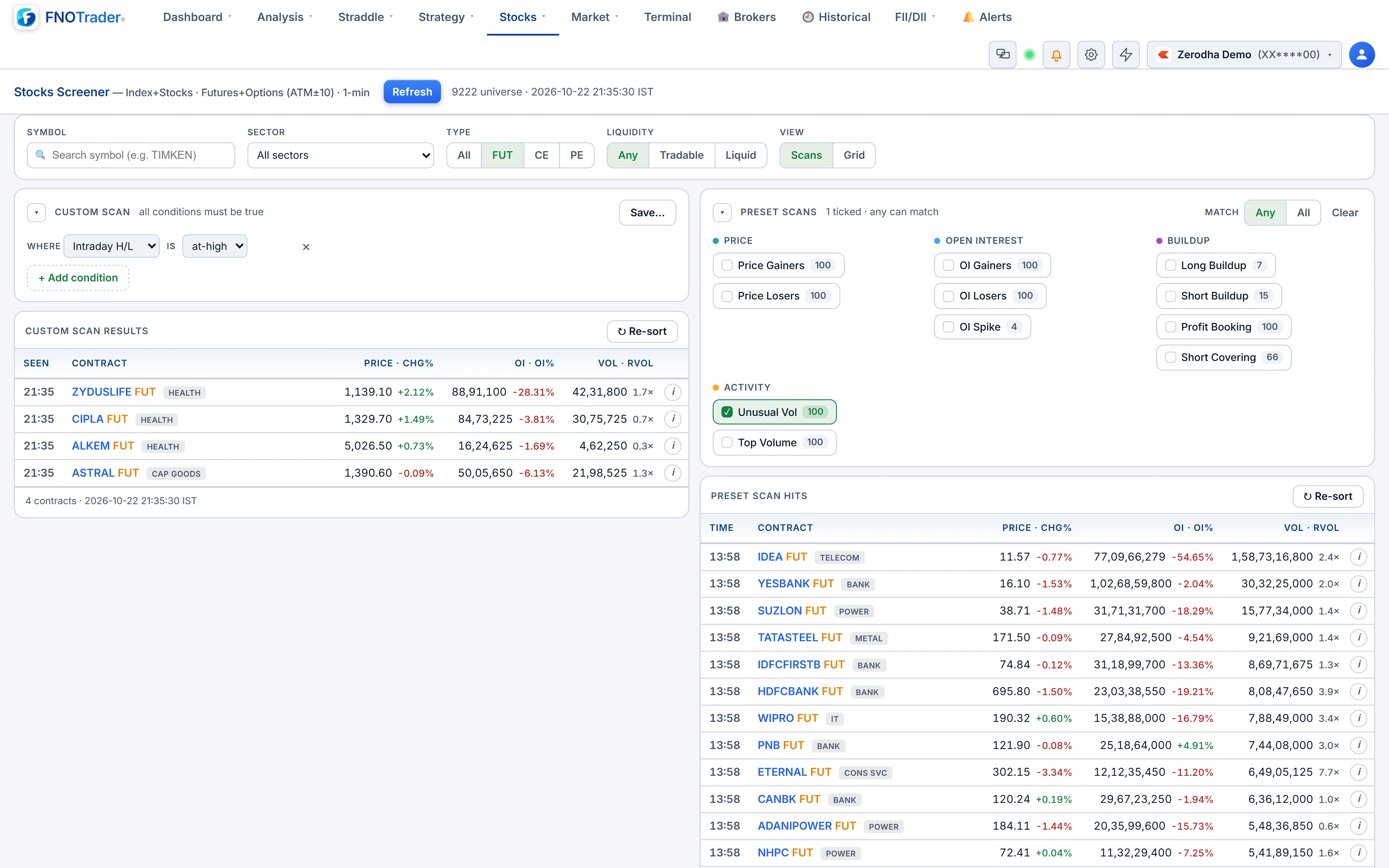
For options the scan covers ATM ±10 strikes on each underlying — enough to catch the strikes people actually trade without drowning in deep OTM noise. Every row is one contract, not one underlying, so a CE and a PE on the same stock can sit in different buckets.
If you are after cash-stock screening by fundamentals or price patterns, that is a different tool — see stock screeners in India. This one is for the derivatives book.
The preset buckets
Eleven presets sort the scan into themes:
| Bucket | What lands there |
|---|---|
| Price Gainers / Losers | Largest % moves up or down |
| OI Gainers / Losers | Largest % change in open interest |
| Long Buildup | Price up, OI up — fresh longs |
| Short Buildup | Price down, OI up — fresh shorts |
| Profit Booking | Price down, OI down — longs exiting |
| Short Covering | Price up, OI down — shorts exiting |
| OI Spike, Unusual Vol, Top Volume | Where positioning or activity is out of the ordinary |
The buildup tag is the most useful column on the page. A price gainer tagged short covering is shorts leaving, not new conviction — a very different trade from the same price move on long buildup. Each contract also carries the IST time it first qualified for a bucket today, so a fresh entry is easy to tell from a stale one.
The technical columns
| Column | States |
|---|---|
| 5m / 15m / 30m ORB | Above, within or below that opening range |
| CPR | Above R2, above R1, above CPR, in CPR, below CPR, below S1, below S2 on the previous day's pivots |
| EMA5 / EMA9 | Price above or below the average |
| X-Day H/L | Broke a multi-day high or low (for example 3D-HI), or in range |
| Day H/L | At the day's high, in the middle, or at the low |
| RVOL | The underlying's volume today versus its 20-day average |
| Liq | Liquid, OK or Thin |
The liquidity badge is built from how continuously the contract traded today — the share of elapsed minutes with a trade — together with OI and volume. A contract that printed one big block at 10:00 and nothing since rates Thin however large its volume looks, and anything under ₹0.50 is always Thin. The Tradable filter keeps Liquid and OK.
Worked example: building a scan
Say you want call options with momentum on stocks that are trading actively. In the Custom scan, add rows that are all AND-ed together:
- Type: CE; Liquidity: Tradable.
- 15m ORB: above; EMA9: above.
- RVOL ≥ 1.5; Chg% ≥ 10.
A hypothetical contract trading at ₹44 against a previous close of ₹38 shows Chg% = (44 − 38) ÷ 38 = 15.8%, passes the 10% floor, and appears only if its stock's volume is at least one and a half times the 20-day average. Results show the top 300 by absolute % change. Save the scan and it comes back with one click tomorrow.
Presets work alongside: tick several bucket chips, choose Match Any or Match All, and the hits carry tags showing which buckets each contract matched.
Limits and common mistakes
- Reading a % move on a cheap option as size. A ₹2 option up 100% is still a ₹4 option. Use the Liq badge and filter out Thin.
- Over-stacking filters. Every condition is AND. Six strict conditions on a quiet day can return nothing; loosen one at a time.
- Early-session ORB. The 30-minute range does not exist until 09:45 IST; before then, use the 5m and 15m windows.
- Expecting rows to re-sort. Existing rows hold their place so you do not lose what you were reading; new ones land on top and dropped ones dim.
Where to find it
- Open Options Analytics → Stocks → Stocks Screener.
- Set sector, type and liquidity in the Filters card, then build a Custom scan or tick Preset buckets.
- Switch to Grid to see every bucket as a mini-table, or type a symbol to see that underlying's full futures and options list.
- Click any contract for a 5-minute chart.
The page refreshes every minute while visible. For the same buckets as a wall of charts, see Scanner Alerts and Trade Finder.
Common questions
How often does the F&O screener update?
The scan runs on the server every minute during market hours, and the page reloads it every minute while it is open.
Which option strikes are included?
ATM plus or minus 10 strikes for each index and F&O stock, together with the futures.
What is the difference between long buildup and short covering?
Both have rising prices. Long buildup has rising open interest, meaning new longs; short covering has falling open interest, meaning shorts closing.
How is the liquidity badge decided?
Mainly by how continuously the contract traded today, together with open interest and volume. Options under ₹0.50 are always rated Thin.
More on Options App
More in Options App · App: Options Analytics · Definitions: glossary · All: every article