What the dashboard is
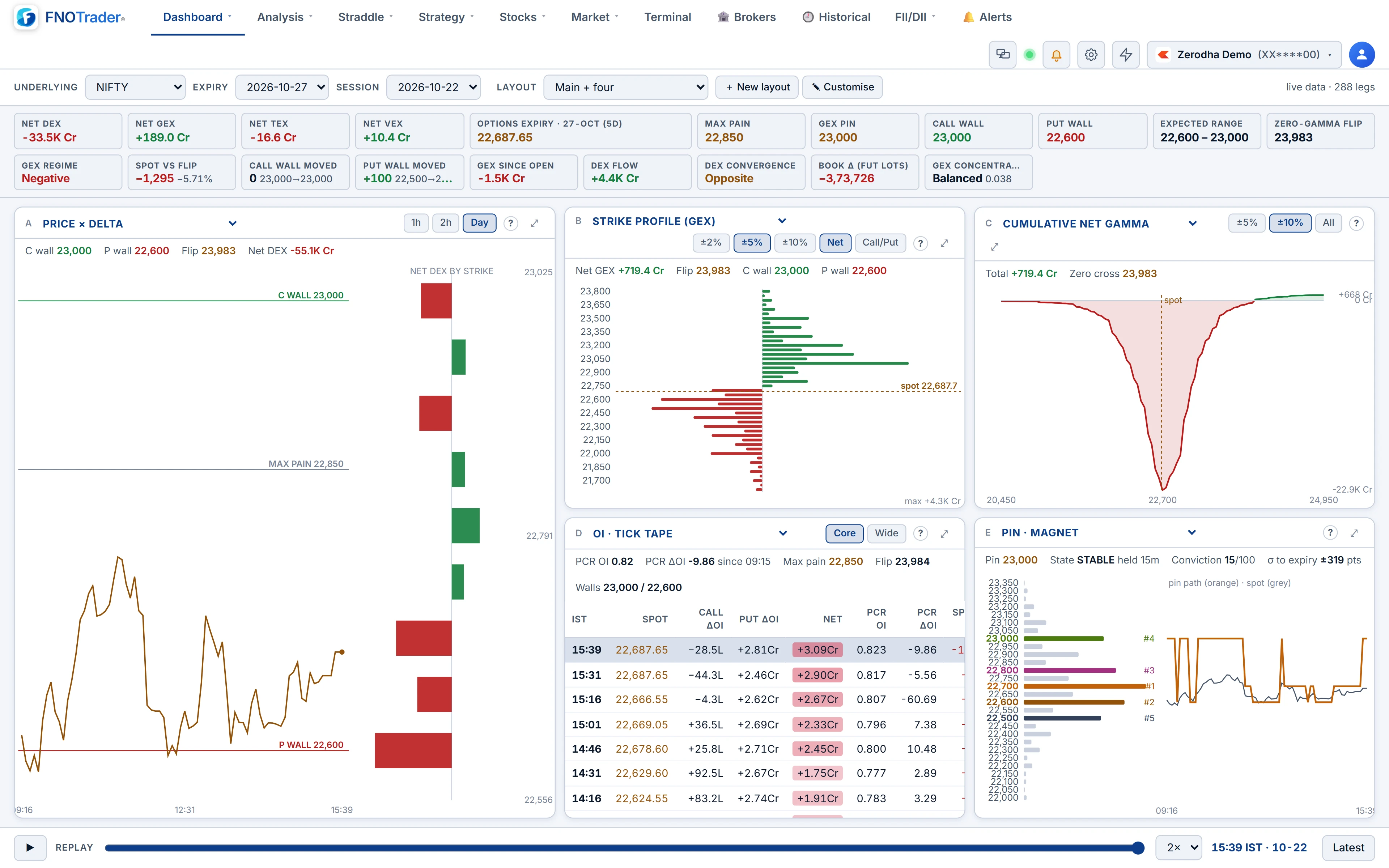
A grid of panels, each reading the same option chain at the same minute, with a summary strip across the top.
Pick the underlying (NIFTY, BANKNIFTY, SENSEX, FINNIFTY or MIDCPNIFTY), the expiry and the session — today live, or a recent day. The summary strip carries the same tiles as the Greeks Exposure page: where positioning sits on the first row, how it has changed today on the second. The method and its central assumption — that option writers hold the other side of the book — are the same, and are explained in that post.
The panels, in four groups
| Group | Panels |
|---|---|
| Read | Playbook · setup now; Insights; Summary tiles; Strategy · paper trade. |
| Intraday | Intraday net GEX; Spot · flip & walls; Intraday net DEX; Intraday VEX · CEX; Price × delta; Intraday table; OI · tick tape. |
| Strike charts | Gamma, Delta, Theta and Vega exposure; Net exposure summary; Cumulative net gamma; Strike profile (GEX); Gamma flip curve. |
| Positioning | DEX by strike · state / flow; Heaviest strikes; DEX term structure; Vanna & charm by strike; Writer flow · OI vs price; Pin · magnet; IV smile. |
Two are worth singling out. The Gamma flip curve shows net GEX if spot moved to each price, with every contract re-priced at its own IV — how quickly the regime would change. Pin · magnet scores each strike by gamma and closeness to spot and tracks the pin's path through the day.
Writer flow: gamma-weighted change in OI
Raw change in OI treats a lakh units of deep OTM calls the same as a lakh units at the money. Writer flow weights each strike's change in OI by its gamma, so the bars measure how much hedging the new positions carry.
For each leg it computes ΔOI × Γ × S² × 1% over a lookback of 5, 15 or 30 minutes, within ±1%, ±1.5% or ±3% of spot. Call writing and put covering go on the bearish side; put writing and call covering on the bullish side. If the net bias is less than 15% of the gross, the read is Neutral.
A worked example
Hypothetical, 15-minute lookback, spot 24,000, so S² × 1% = 57,60,000.
- 24,200 CE: OI up 3,00,000 units, Γ 0.0008. Weight = 3,00,000 × 0.0008 × 57,60,000 = ₹138.2 crore of call writing (bearish side).
- 23,800 PE: OI up 2,00,000, Γ 0.0007. Weight = ₹80.6 crore of put writing (bullish side).
- Bias = 80.6 − 138.2 = −₹57.6 crore. Gross = ₹218.8 crore; 15% of that is ₹32.8 crore. |−57.6| is larger, so the read is Bearish.
Read as: in those 15 minutes, call writing near the money carried more hedging than put writing — under the usual assumption about who wrote them.
Layouts and replay
- Ready layouts include Playbook, Full GEX page, Strike charts, Intraday, DEX positioning, Expiry day (writer flow), Main + four and plain grids from 2 × 2 to 4 × 3.
- Change any panel from the dropdown in its header, or use Customise / New layout to draw your own. Layouts are saved in your browser.
- Replay: drag the slider or press play and every panel and the strip move to that minute. Latest jumps back to now.
- Every panel has a (?) explaining what it shows and how it is computed, and can be maximised.
Limits
- The Playbook names setups from explicit conditions; it is positioning context, not a signal, and the panel says so.
- DEX term structure is available for the live session only.
- Layouts live in the browser, so they do not follow you to another device.
Where to find it
- Options Analytics › Dashboard › GEX Dashboard.
- Pick Underlying, Expiry and Session in the top bar.
- Choose a layout, then swap panels as needed.
- Use the replay slider to step through the session.
Common questions
What is writer flow in the GEX Dashboard?
It is change in open interest weighted by gamma, so each bar shows the hedging carried by positions opened or closed over the lookback. Call writing and put covering count bearish; put writing and call covering count bullish.
Can I replay a past session?
Yes. Choose a recent session and drag the replay slider; every panel and the summary strip move to the selected minute.
Which indices does the GEX Dashboard cover?
NIFTY, BANKNIFTY, SENSEX, FINNIFTY and MIDCPNIFTY.
Are my dashboard layouts saved?
Yes, in your browser. They do not sync to another device.
More on Options App
More in Options App · App: Options Analytics · Definitions: glossary · All: every article