What it is
A charting page with three parts: a watchlist on the left, chart panes in the middle, and a docked option chain on the right.
The chain follows whichever pane you last clicked. Pick a strike in it and that strike's CE and PE candle charts appear underneath, so moving from "the index is at resistance" to "what are the calls doing about it" takes one click instead of a tab switch.
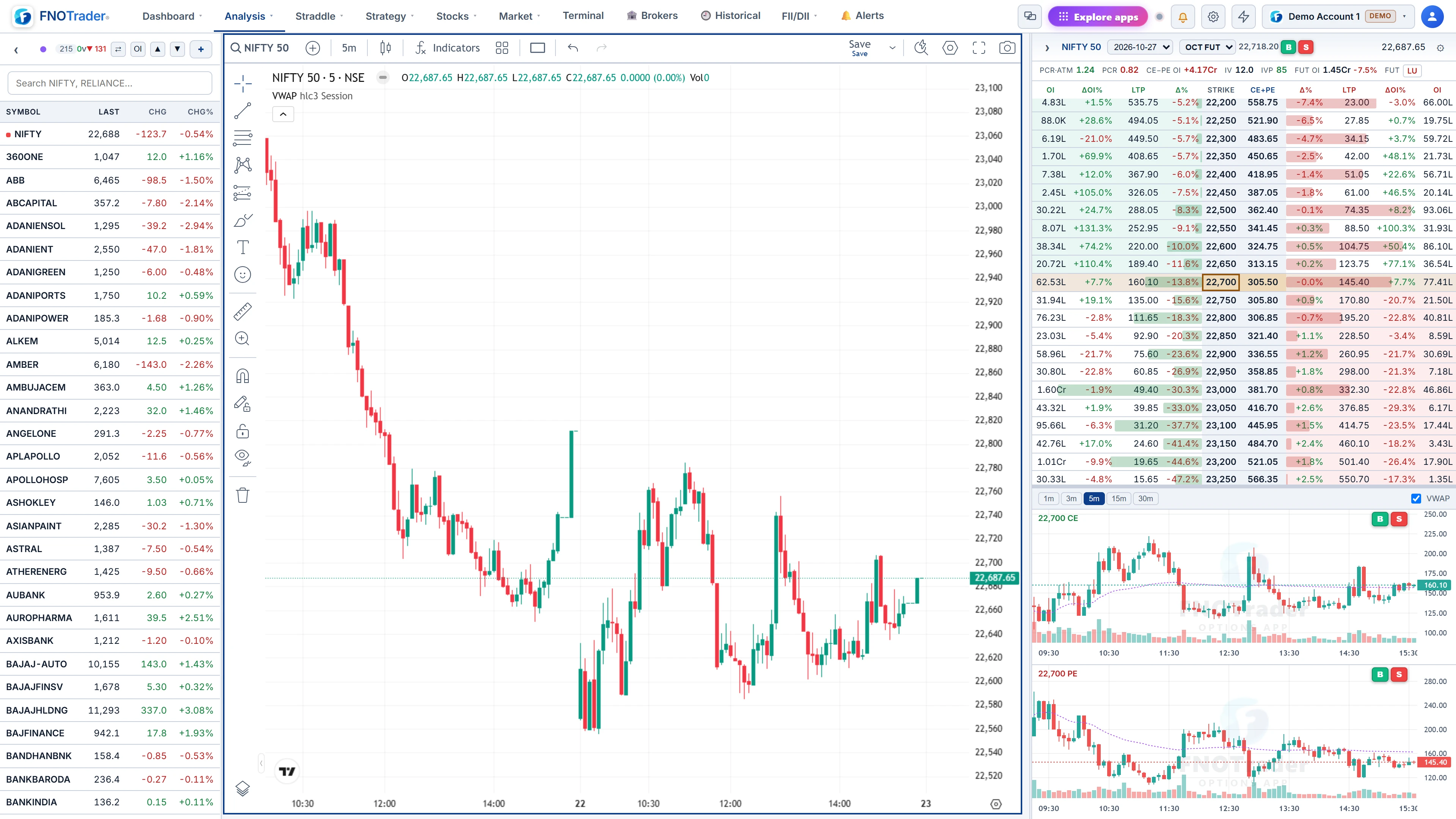
Chart panes and layouts
Layouts run from one pane to six — 2 side by side or stacked, 1+2, 2×2, 1+3, 3×2 and more — grouped by pane count in the layout picker. A watchlist click loads into the last-clicked pane; turn on Sync charts to load it into every pane while each keeps its own timeframe, a common setup for 5-minute, 15-minute and daily views of one symbol.
Timeframes are 1, 3, 5, 15, 30, 60, 120 and 240 minutes, plus daily, weekly and monthly. The full drawing toolset and indicator templates are available. Options-specific studies include pocket-pivot volume (a volume histogram that marks pocket-pivot bars), implied volatility, higher-timeframe candles, and the option Greeks; an OI Levels overlay draws the top call and put OI strikes as lines on the chart.
Each pane saves its studies, drawings and settings to your account, so a layout looks the same on another device. On a phone the page shows one pane, with a landscape button.
Watchlists
- F&O Stocks is built automatically: every F&O stock A to Z, with NIFTY pinned at the top.
- Sector lists are built automatically too: one list of sector indices and one per sector.
- Colour lists (red, orange, yellow, green, blue) and any number of your own lists.
- Columns are symbol, last, change and change %, all sortable, with live prices.
- Step through a list with the ▲/▼ buttons or the arrow keys.
- Import and export in TradingView's text format.
Your lists are saved to your account and follow you across devices. The Options Screener can filter by any of them.
The docked chain and CE/PE charts
The chain panel has its own expiry selector and a compact CE/PE table with the ATM row highlighted and re-centred as price moves. Default columns are OI, OI change %, LTP and change %, plus a combined CE+PE premium column; Vol, IV, delta, theta, VWAP, bid and ask can be added.
Click a strike and its CE and PE charts redraw below: 1, 3, 5 (default), 15 or 30-minute candles on an IST time axis, with VWAP and volume. Panel width and the chain/charts split are draggable and remembered.
Hovering a chain row shows buy and sell buttons, and right-clicking a watchlist symbol offers the stock, its future, or the ATM call or put. Each opens the order ticket filled in for you to review; nothing is sent from the button itself.
A worked setup
A common morning arrangement: choose the 1+2 layout. Big pane: NIFTY on 5 minutes with VWAP and OI Levels. Two small panes: NIFTY on 15 minutes and on daily. Sync charts off, so a watchlist click goes only to the pane you choose.
In the chain, select the current weekly and click the ATM strike. Now one screen shows the index structure on three timeframes and the ATM call and put on 5 minutes underneath. If NIFTY tests the top OI line while the ATM call fails to make a new high, you have seen the divergence without changing pages.
Freshness and limits
How fresh the numbers are. With a broker connected, the page updates live, tick by tick. Without one it refreshes once a minute with the last completed minute, and without a plan the data is delayed by 15 minutes. Connecting a broker upgrades the page to live without a reload.
The docked chain is deliberately compact. For the full set of columns, Greeks and the strategy grid, use the option chain page, and to spread MarketWatch across several screens see multi-monitor windows.
Where to find it
- In Options Analytics, open Analysis → MarketWatch.
- Pick a layout, then click a watchlist symbol into a pane.
- Set the chain's expiry and click a strike for its CE and PE charts.
Common questions
How many charts can MarketWatch show at once?
Up to six panes, in layouts from one pane to six.
Are my watchlists saved?
Yes, to your account, so they follow you to another device. The F&O Stocks and sector lists are rebuilt automatically each time.
Can I see option charts next to the index chart?
Yes. Click a strike in the docked chain and its CE and PE candle charts open below it, on 1 to 30-minute bars.
Can I place an order from MarketWatch?
The buy and sell buttons open the order ticket with the contract filled in. You review and submit it there.
More on Options App
More in Options App · App: Options Analytics · Definitions: glossary · All: every article