What it does
From the multi-monitor button in the top bar, you can pop any Options Analytics page out into its own browser window — up to 15 of them.
Each window keeps its own page, symbol and expiry. One can show the NIFTY chain, another the BANKNIFTY chain, a third MarketWatch and a fourth the screener, each independent of the others. Windows are not symbol-linked: changing the symbol in one does not change the rest, which is the point when you are watching different underlyings.
The multi-monitor dialog
- Pop out this page moves the page you are on into its own window.
- New window opens a page you pick from a list.
- The window list shows every open pop-out with Focus and Close buttons, and a count out of 15.
- Restore and Forget closed manage the saved layout.
- A Placement toggle asks the browser for permission to place windows on specific screens.
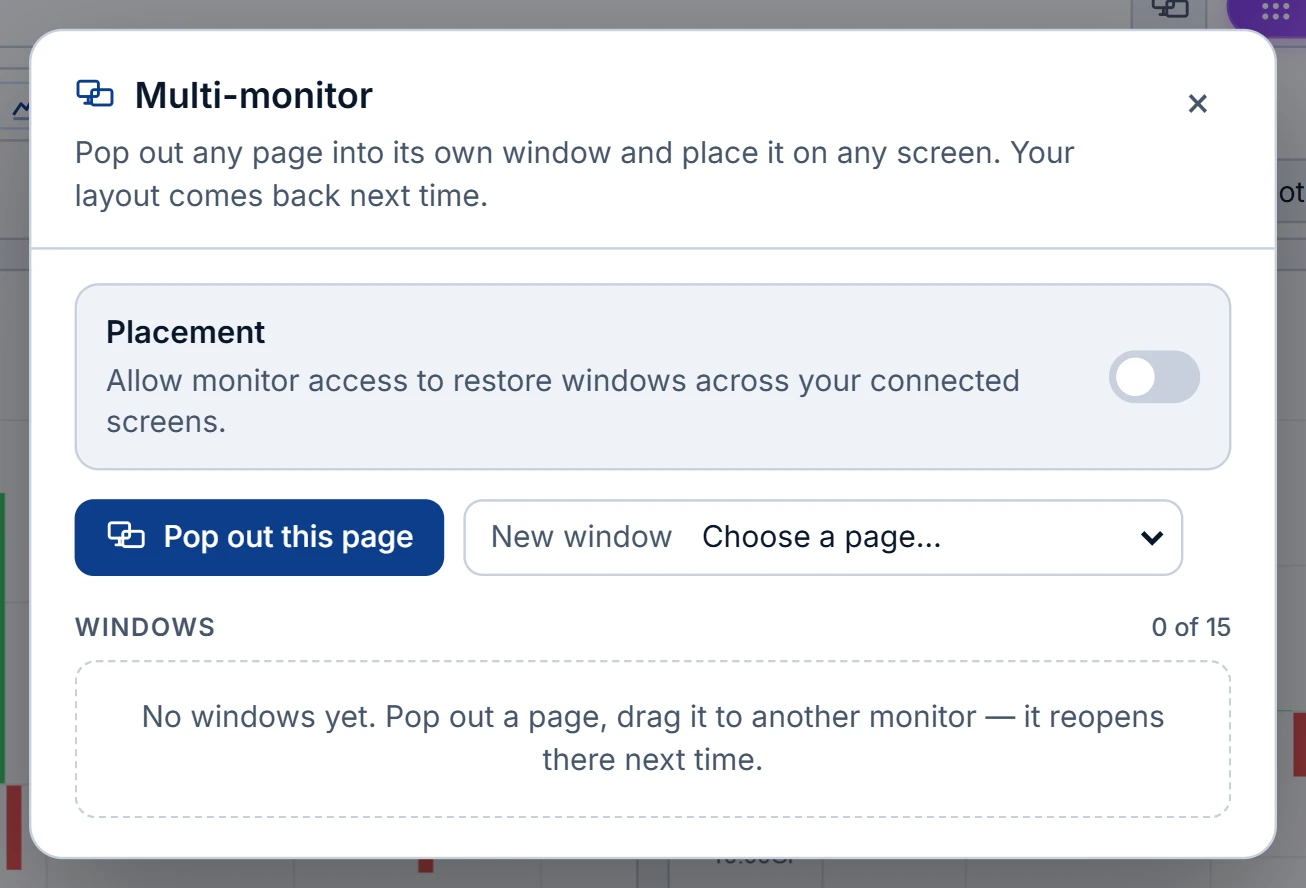
How layout and screen placement are remembered
Each pop-out reports its position and size as you move it, and the layout is saved in this browser on this computer — deliberately not on your account, because a three-screen desk at the office and a laptop at home need different layouts.
With the placement permission granted, every window is saved with the screen it was on and its position on that screen, and reopens on the same monitor. A small "Screen N · remembered" label confirms it. New windows open on a different screen from the main one. Without the permission, windows reopen at their last position and size, which works when your screen arrangement does not change. Screen placement needs a browser that supports it, such as Chrome or Edge.
Closing a pop-out removes it from the layout. Closing the whole browser keeps the layout, so the workspace comes back next time.
Reopening a workspace
When you next open the app, a bar offers to restore your pop-out windows. Browsers allow one new window per click, so if they block the rest, the bar counts down with an Open next button — "N to go" — until every window is back. If a single pop-out is blocked, allow pop-ups for the site once and it will not be asked again.
A worked three-screen setup
Left screen: the NIFTY option chain in Modern layout, ±10 strikes. Centre: MarketWatch with a 2×2 layout. Right screen, split in two windows: Options Flow for NIFTY on a 15-minute window, and the Options Screener with Unusual volume and Short covering ticked. That is four pop-outs plus the main window.
Why separate windows rather than one window with four charts? Because each page keeps its own controls. The flow window can stay on a 15-minute view while the chain is on the next weekly, and you never have to reset one to look at the other.
Grant placement, arrange them once, and the next morning one Restore click and three Open next clicks bring all of them back on the same screens.
Limits
Fifteen windows is the cap; the app asks you to close one before opening another. Each window is a full page with its own data, so on a slower machine or connection, fewer windows each showing more is usually smoother than many small ones. A good rule is one window per question you are actively watching; a window you never look at still costs bandwidth and attention. The multi-monitor button is hidden inside pop-outs; manage everything from the main window.
Where to find it
- In Options Analytics, click the multi-monitor button in the top bar.
- Turn on Placement and allow window management when the browser asks.
- Use Pop out this page or New window, then drag each window to its screen.
Common questions
How many pop-out windows can I open?
Up to 15, each with its own page, symbol and expiry.
Will my windows open on the same monitors next time?
Yes, if you grant the browser's window-placement permission. Without it, windows reopen at their last position and size.
Is the multi-monitor layout saved to my account?
No. It is saved per computer in that browser, so office and home setups stay separate.
Why does only one window open when I click Restore?
Browsers allow one new window per click. Use the Open next button until all windows are back.
Do pop-out windows update live?
Each window is a full page and refreshes on the same basis as the main app: live with a connected broker, otherwise once a minute, or 15 minutes delayed without a plan.
More on Options App
More in Options App · App: Options Analytics · Definitions: glossary · All: every article