Three labels, one question
Regime Hub puts every whitelisted index, sector and F&O stock into one of three states.
| State | What the environment looks like |
|---|---|
| Range | Quiet, low volatility, mean-reverting — moves tend to fade back |
| Trending | A directional move with contained noise |
| Chaos | High, two-sided volatility — large swings both ways, often around events |
The labels come from a proprietary quant model run on daily end-of-day data for the swing view, and on 1-minute data for a live intraday read while markets are open. The point is not the model; it is what you do with the label.
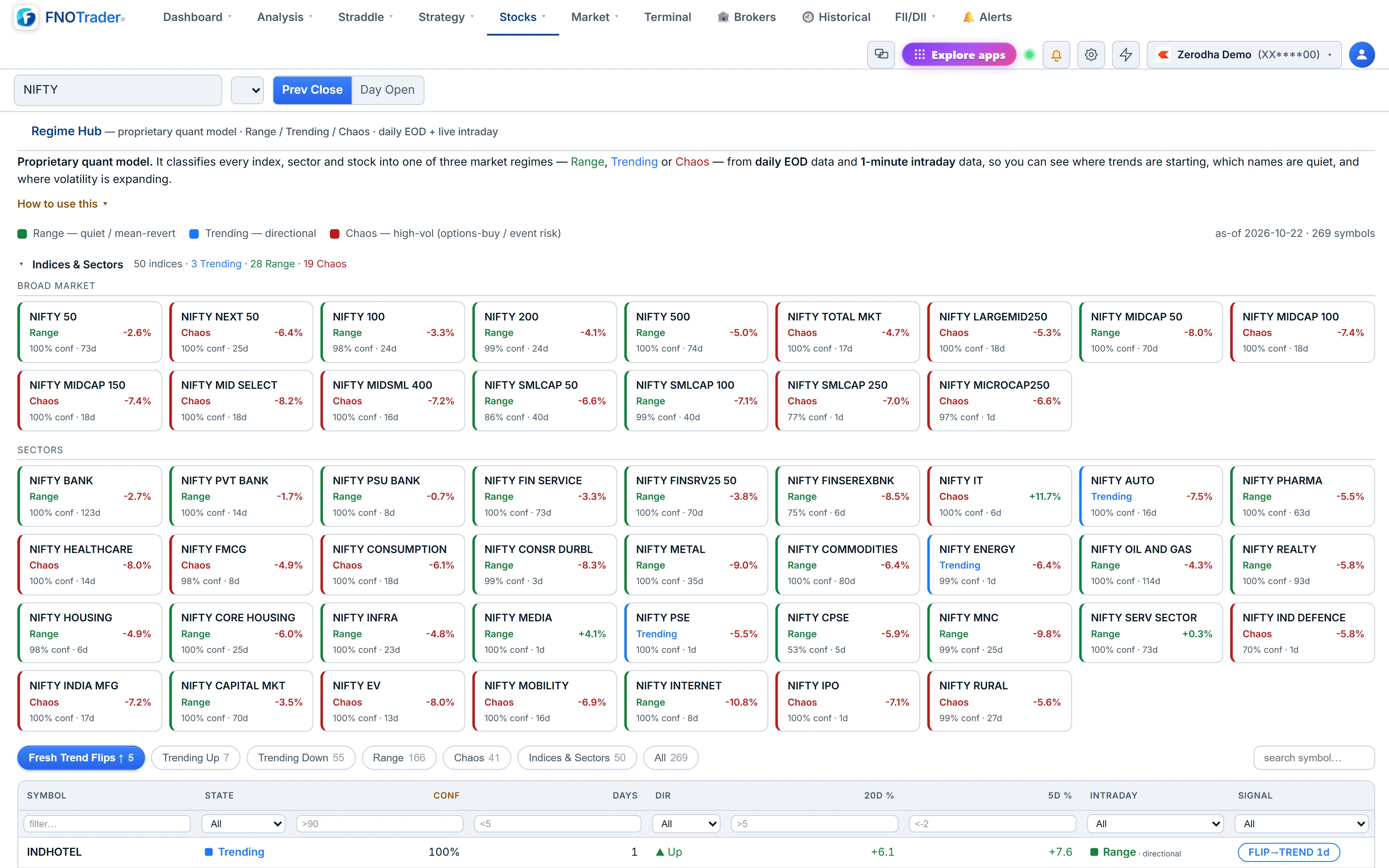
Reading a row
| Column | How to use it |
|---|---|
| State | The current regime |
| Conf | Model confidence in that state; higher means a cleaner, more certain read |
| Days | Sessions spent in this state; a low number in Trending means a fresh move |
| Dir | The actual 20-day price direction — Trending says nothing about up or down, this does |
| 20d %, 5d % | Price change over 20 and 5 sessions |
| Intraday | Today's within-session state plus a day-type: expansion, contained or directional |
| Signal | FLIP→TREND if it turned Trending in the last 10 sessions; →CHAOS if it jumped to Chaos in the last 5 |
The most common mistake is reading Trending as bullish. It is direction-agnostic. Always read it with Dir and 20d %.
How traders use the labels
- As a filter, not a trigger. Decide which kind of setup you are hunting, then look only where the regime suits it. A trend-following idea on a Range name is fighting the environment before you start.
- Fresh flips for swing timing. The default view, Fresh Trend Flips ↑, lists names that turned Trending recently with an upward direction — a short list to study, not to buy.
- Chaos as a volatility warning. A jump into Chaos says swings are getting wider. For option positions, that is the environment where premium tends to expand and where short-premium positions need the most attention. Check the events calendar for the reason.
- Sector context for a stock. A stock Trending up inside a sector that is Trending up has the wind behind it; the same stock in a Chaos sector is more fragile.
Treat a flip as confirmation of something already under way, not as a top or bottom tick.
Worked example
A hypothetical row: XYZ · Trending · Conf 84% · Days 3 · Dir up · 20d +6.8% · 5d +3.1% · Intraday Trending (directional) · FLIP→TREND 3d.
- The state changed three sessions ago, so it shows as a fresh flip.
- About 45% of the 20-day gain came in the last 5 days (3.1 ÷ 6.8), so the move is accelerating, not fading.
- Today's session agrees with the daily read.
Compare a second row: Trending · Conf 52% · Days 14 · Dir up · 5d −1.2%. Same label, a much weaker case: low confidence, an old trend and a recent pullback. The label alone would treat them as equal; the columns do not.
Limits
- Only broad-market and sector indices. Strategy, factor and thematic indices are excluded on purpose, so the index view stays readable.
- Intraday fills in during market hours. Outside the session the Intraday column is blank and the daily state is what you have.
- A regime describes the past. It tells you what the environment has been, with a confidence. Regimes change, and the change is usually only clear after a few sessions.
Where to find it
- Open Options Analytics → Stocks → Regime Hub.
- Pick a chip: Fresh Trend Flips ↑, Trending Up, Trending Down, Range, Chaos, Indices and Sectors, or All.
- Use the filter under any header — for example >80 under Conf, or <5 under Days. Column filters stack with the chip and the search box.
For which stocks inside a sector are doing the work, see the market breadth pages.
Common questions
What does Chaos mean in Regime Hub?
High, two-sided volatility with large swings in both directions. It is often seen around events and is a warning that ranges are widening.
Does Trending mean the price is going up?
No. Trending is direction-agnostic. Use the Dir and 20d % columns to see whether the trend is up or down.
What is a FLIP to TREND signal?
The symbol turned Trending within the last 10 sessions. The number beside it is how many sessions ago.
When does the Intraday column update?
During market hours, from 1-minute data. Outside the session only the daily state is shown.
More on Options App
More in Options App · App: Options Analytics · Definitions: glossary · All: every article