Why breadth matters
An index is a weighted average; breadth is a head count.
When both rise together, the move has participation behind it. When the index rises and the count falls, a handful of large weights are doing the lifting, and those moves are more fragile. Every page in the Market menu measures the F&O stock universe from a slightly different angle, so you can pick the one that answers your question fastest.
The Breadth page
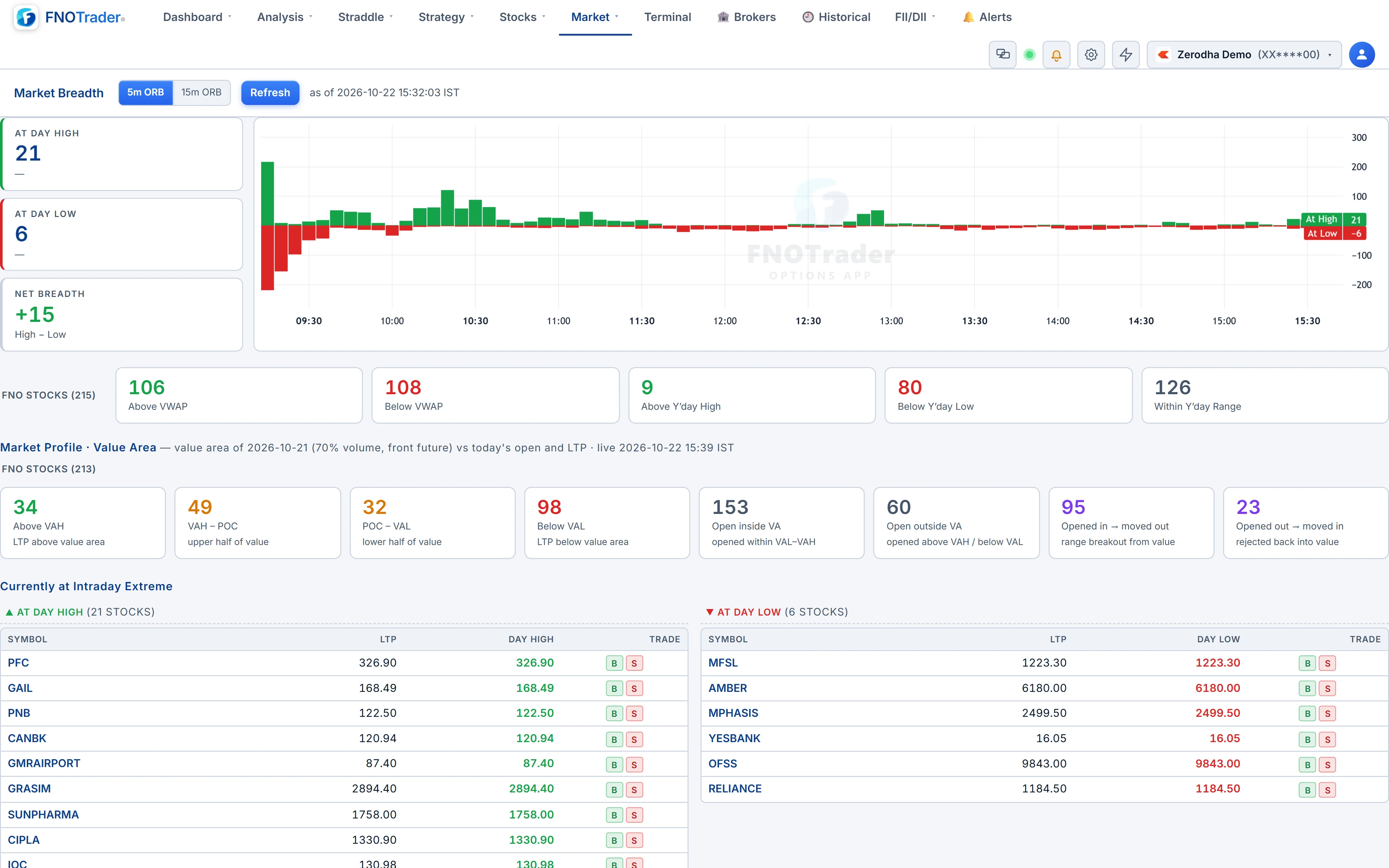
- At Day High, At Day Low, Net — how many F&O stocks are printing intraday highs versus lows, with a time series of the net through the session.
- VWAP and yesterday's range tiles — counts above and below VWAP, above yesterday's high, below yesterday's low and inside yesterday's range. Click a tile to list the stocks.
- Market Profile value area — each stock future's previous-session POC, VAH and VAL against today's open and LTP: above VAH, in the upper or lower half of value, below VAL, opened inside or outside value, and the two migrations — opened inside and broke out, or opened outside and was pulled back in.
- Currently at intraday extreme — the names at the high and the low right now.
- Breakout / Breakdown screener — 5-day high or low breaks with relative volume above 2× out of tight consolidation.
- Opening Range Breakout — above, inside and below the opening range, with a 5-minute or 15-minute window.
The other breadth views
| Page | What it shows |
|---|---|
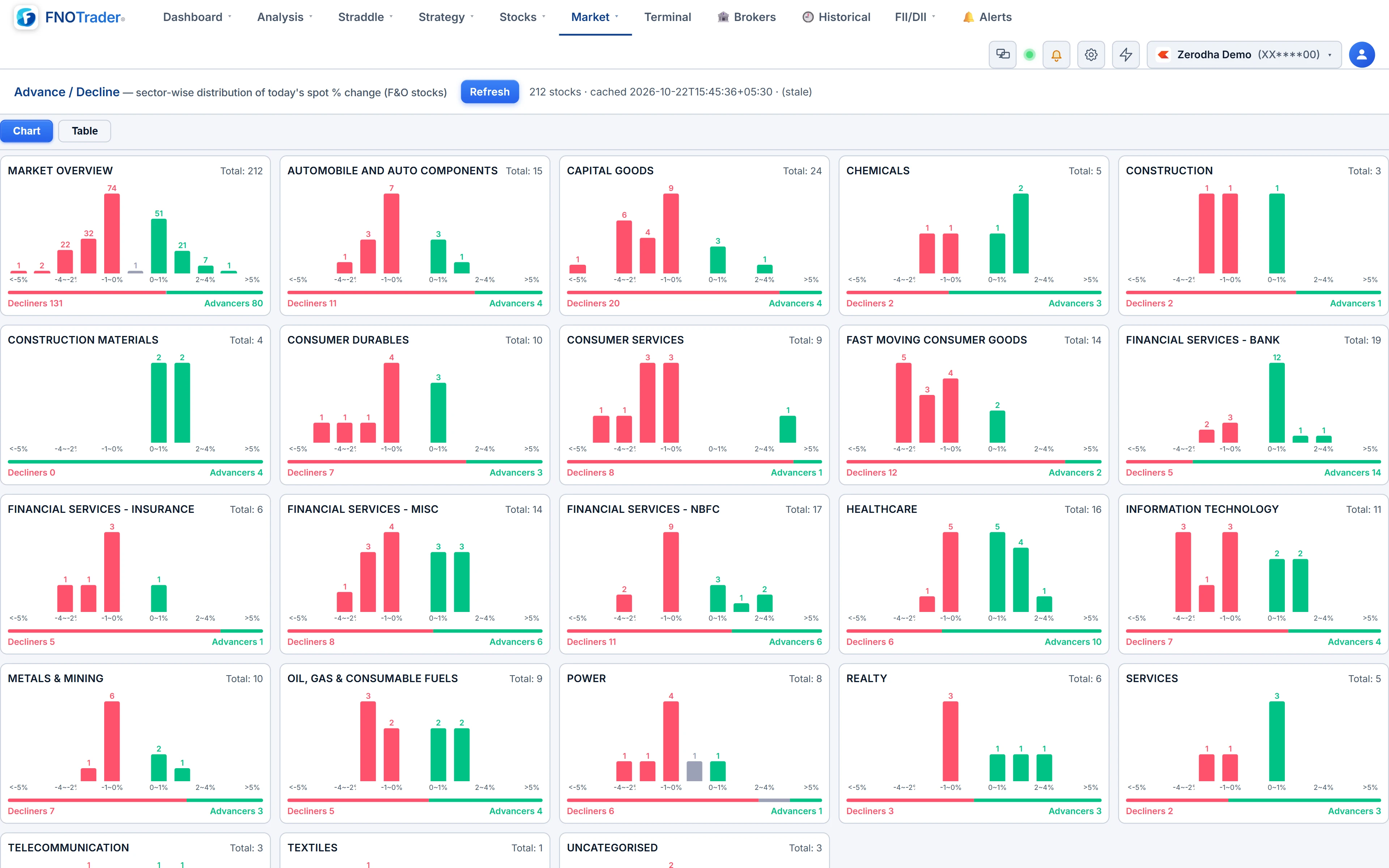
| Advance / Decline | For each sector, a histogram of its F&O stocks' % change across fixed bins, plus a market overview card |
| High / Low Bars | New highs above the axis and new lows below, bar by bar through the session |
| High / Low Heatmap | Stocks down the side, time across the top; green for a new high in that bar, red for a new low. 1, 5, 15 or 30-minute cells; all F&O, NIFTY 50 or Bank Nifty; sort by most highs, most lows or net |
| Sector Change | Average % change of F&O stocks per sector, and each sectoral index's own change |
| Sectors and Constituents | Sectoral indices, then the chosen sector's members with RVOL, then a chart of the clicked symbol |
| F&O Heatmap | A treemap of every F&O stock coloured by % change over 1D, 1W, 1M, 3M or 1Y, sized by market cap, equally or by move |
Sector Change is worth reading for its divergence. If the average member is up more than the sector index, the move is broad inside the sector; if the index is up more than its members, a couple of heavyweights are carrying it.
Worked example: a narrow rally
Hypothetical mid-morning reading on a universe of 200 F&O stocks:
- NIFTY is up 0.45%.
- At Day High: 18; At Day Low: 41; Net = 18 − 41 = −23, and falling for the last hour.
- Above VWAP: 74 of 200 = 37%.
The index is green, but nearly two-thirds of stocks trade below VWAP and lows outnumber highs by more than two to one. The High / Low Heatmap shows a red column building since 10:15. None of this says the index must fall; it says the rise is narrow, and the stock you are looking at may not be part of it.
Common mistakes
- Reading one tile in isolation. Net breadth at the open is noisy. The trend of the net over an hour says more than any single reading.
- Mixing universes. These pages count F&O stocks, not the whole exchange, so numbers will not match a broad-market advance/decline ratio.
- Treating ORB as a signal on its own. Above the opening range in a Range-bound market often fades. Check the regime first — see Regime Hub.
Where to find them
- Open Options Analytics → Market.
- Choose Breadth, Advance / Decline, Sector Change, Heatmap, Sectors and Constituents, High/Low Bars or High/Low Heatmap.
- On the F&O Heatmap, click a tile to open that stock's option chain in a new tab.
For the session summary built from these numbers, see the Market Report.
Common questions
What is net breadth?
The number of F&O stocks at their day high minus the number at their day low. Rising net breadth means strength is spreading.
What universe do the breadth pages use?
The F&O stock universe, not every listed stock, so the counts differ from exchange-wide advance/decline figures.
What does opened in, moved out mean on the value-area tiles?
The stock future opened inside the previous session's value area and has since traded outside it, a range breakout from value.
Which ORB windows does the Breadth page offer?
A 5-minute and a 15-minute opening range, toggled at the top of the page.
More on Options App
More in Options App · App: Options Analytics · Definitions: glossary · All: every article