What the Simulator is
It is the Strategy Builder with the clock turned back.
You pick a past trading day and a minute. The option chain, spot, futures, IVs and Greeks are then all as they were at that minute, and every tool in the builder works on them:
- presets and templates;
- the payoff and POP;
- breakevens and SD bands;
- the what-if row.
Move the clock forward and the whole page re-prices to the new minute.
Three things make it different from a backtest:
- You decide at every minute, with only the information you would have had then. A backtest runs fixed rules over many days. The Simulator is for practising judgement on one day: when to enter, when to adjust, when to leave.
- Prices are real. Every entry and exit fills at the archived 1-minute price of that contract at that minute.
- No order can be placed. There is no order path at all. Trade, Save and Share are hidden, and every exit is simulated.
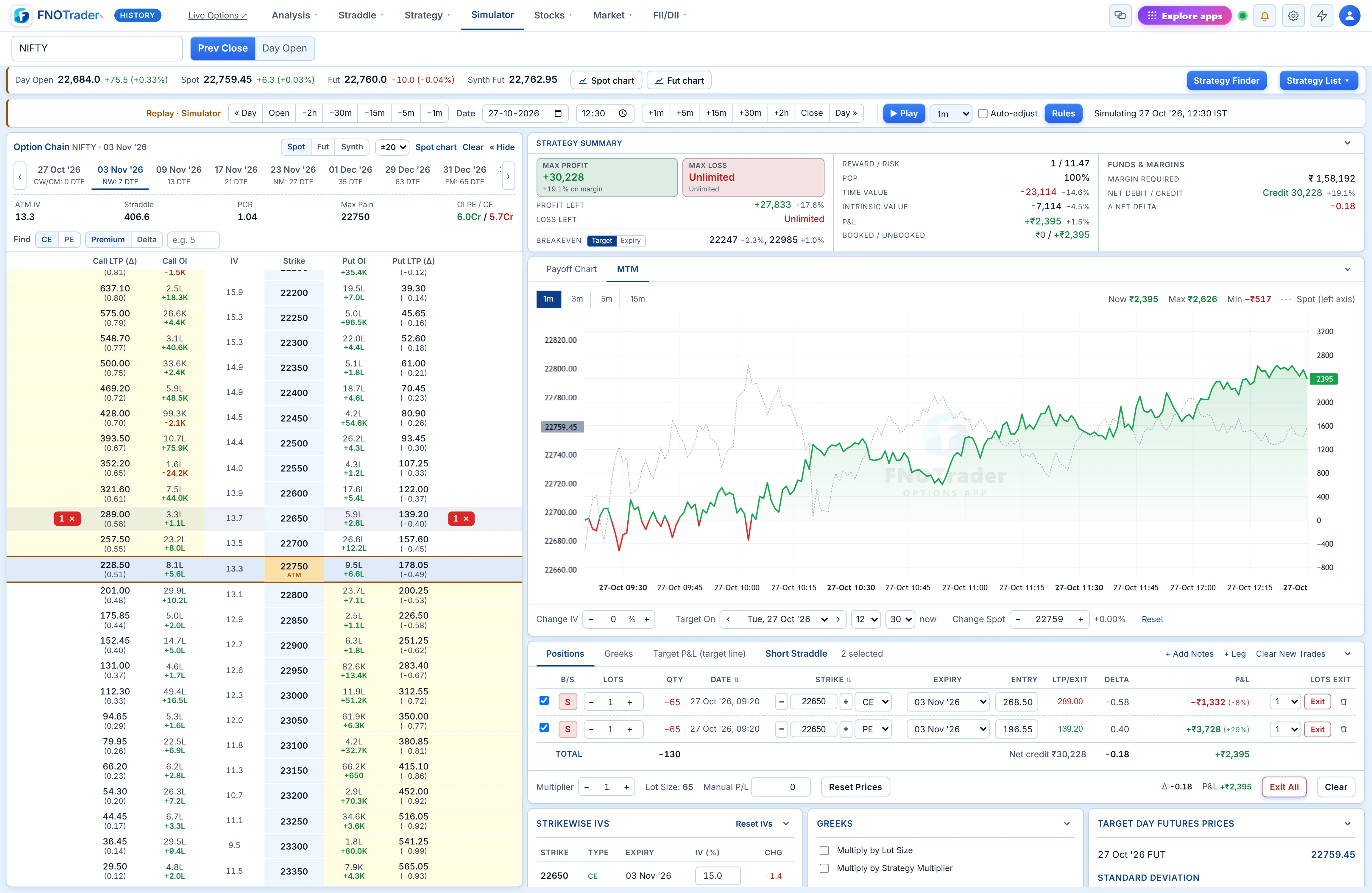
Opening it
The Simulator runs on the History site, options-hist.fnotrader.com/#simulator. From the main Options app, use the Simulator menu item or the Simulator button in the Strategy Builder; both open it in a new tab. The History site's light-blue theme is there so you can always tell replayed prices from live ones.
The Simulator keeps its own book. Legs you build in it never touch your live builder, and they stay in that browser between visits.
Setting and moving the clock
The replay bar under the market strip is the clock:
| Control | What it does |
|---|---|
| Date and time | Jump to any past trading day and minute. It opens on the previous weekday at 09:20; a holiday walks back to the session before. |
| « Day / Day » | Previous or next trading day, same minute. |
| Open / Close | Session open or close: 09:15 and 15:30 for NSE and BSE, 09:00 and 23:30 for MCX. |
| −2h … −1m, +1m … +2h | Step back or forward by 1, 5, 15 or 30 minutes, or 2 hours. |
| ▶ Play + timeframe | Plays the session forward one candle at a time (1m, 2m, 3m, 5m, 10m, 15m, 30m, 45m, 1h or 2h), aligned to candle closes from the open. On 30m it steps 09:45, 10:15, 10:45… and stops at the close. |
The status reads Simulating 27 Oct '26, 12:30 IST, so you always know which minute you are looking at.
Limits:
- Only finished sessions can be replayed; the most recent is the previous trading day.
- Data is in 1-minute steps.
- A minute with no data says so, rather than showing stale prices.

Building a position at a past minute
Everything from the Strategy Builder is there:
- B/S on the chain;
- the 15 Default Strategies and 20 Delta Focused strangles;
- the 36 Ready-made templates;
- Strategy Finder.
The expiry list shows only the contracts that were listed on the replay date. You cannot accidentally trade a weekly that did not exist yet.
Each leg is stamped with the minute it was entered, for example 27 Oct '26, 09:20, and its entry price is that minute's price. The Strategy Summary, payoff, Greeks and what-if row are then computed at the replay minute.
Chart windows (Spot chart, Fut chart, or any strike) stop at the replay minute and mark it with a vertical line. They do not show the rest of the day before you get there.
Exiting and adjusting
Exit a leg, part of a leg, or everything with Exit All. The exit fills at the replay minute's price:
- The leg moves to Closed Positions with its entry and exit times, and its P&L goes into Booked.
- Open legs stay in Unbooked.
- Add new legs at any later minute to roll, hedge or re-centre.
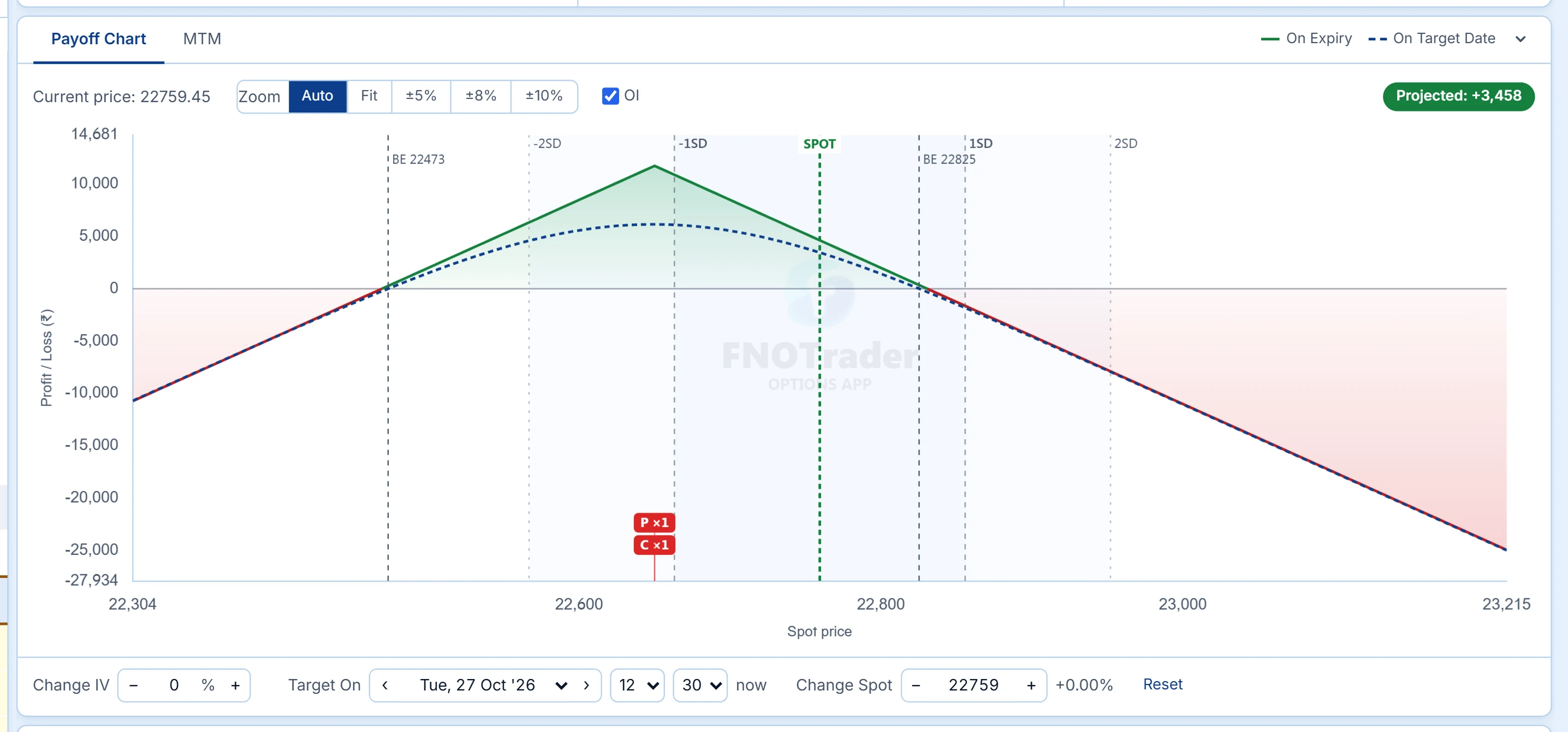
The example above is the plain expiry-day short straddle on 27 Oct 2026. The 22,650 straddle was sold at 09:20 for 104.05 + 76.60. By 11:00 the put had fallen to 24.05. Booking it locked +₹3,416. The call was then held, and at 14:30 it was 42.55, worth another +₹3,998. Total: +₹7,413 on one lot.
The MTM tab shows what that path cost in nerve. The book went as low as −₹2,191 before it worked. You would not see that dip in a summary report.
The MTM tab
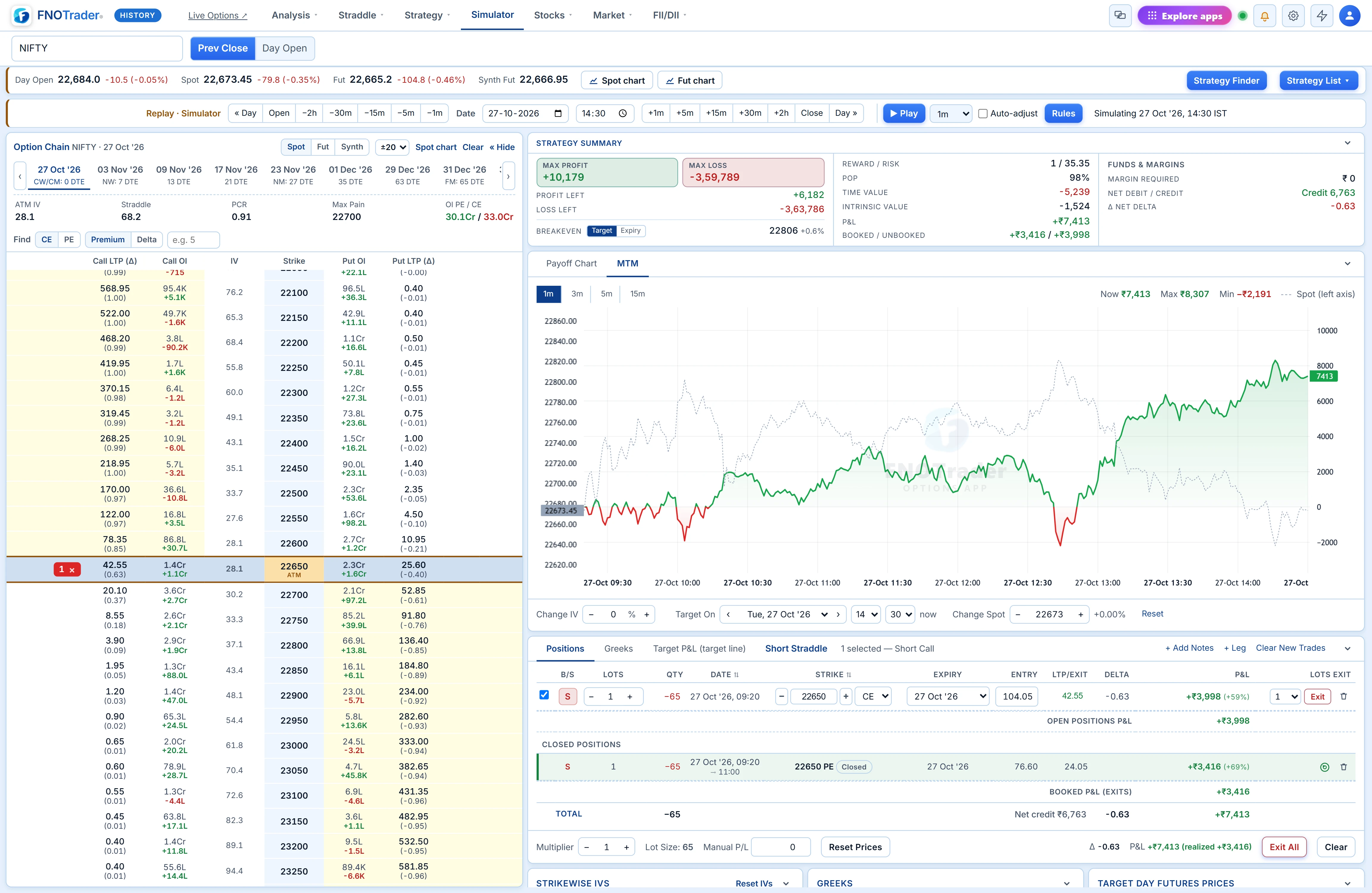
The MTM tab plots the P&L of the whole book every minute, from the first entry to the replay clock:
MTM = Σ (price − entry) × direction × quantity
- A closed leg is frozen at its exit price from the minute it was closed.
- Timeframes are 1m, 3m, 5m and 15m.
- The header shows Now, Max and Min.
- Spot is drawn dashed on the left axis, so you can see which move did what to the book.
Max and Min are the honest numbers. Max is the profit you could have taken. Min is the drawdown you had to sit through to get to Now.
Auto-adjust: test adjustment rules on a real day
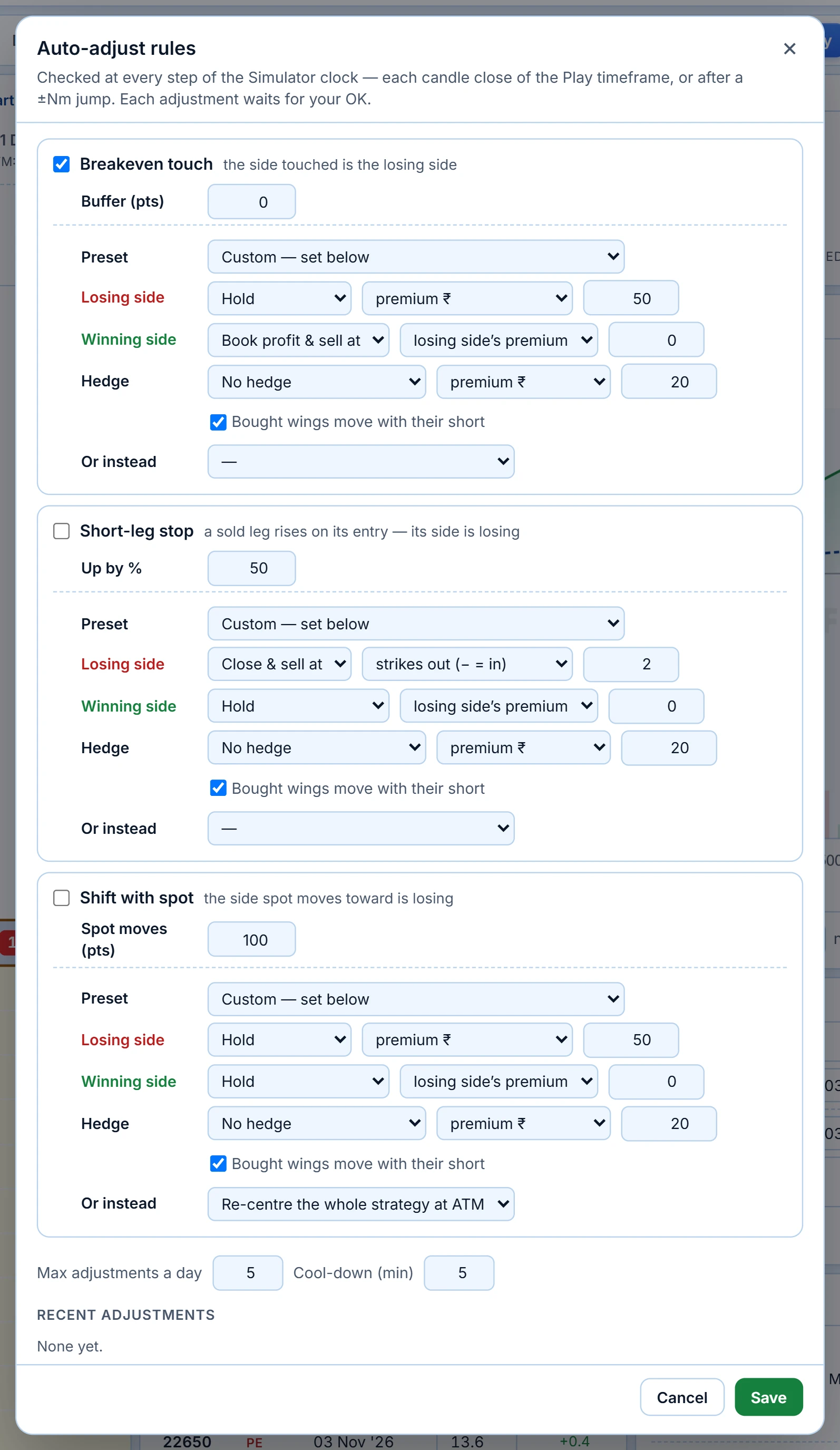
Turn on Auto-adjust and the Simulator checks your rules at every step of the clock: each Play candle, and each forward jump.
Rules (any combination)
- Breakeven touch, with a buffer in points. The side touched is treated as the losing side. The rule re-arms once spot is back inside.
- Short-leg stop: a sold leg has risen by X% from its entry (default 50%).
- Shift with spot: spot has moved N points from where the book was set (default 100).
Adjustments (per rule)
- Losing side: Hold, Close, or Close & sell at a new strike.
- Winning side: Hold, Book profit, or Book profit & sell at a new strike.
- Hedge: none, or buy a hedge on the losing side.
- Or instead: re-centre the whole strategy at ATM, or exit all legs.
The new strike can be chosen by:
- premium in ₹;
- points from spot;
- delta;
- a number of strikes out (or in);
- matching the other side's premium.
Bought wings can move with their short.
Eleven presets fill these in for you:
- book profit on the winning side and re-sell to match the losing side's premium;
- roll the losing side N strikes out;
- buy a hedge on the losing side;
- re-centre at ATM;
- exit all;
- and six more.
Two guards stop over-trading: Max adjustments a day (default 5) and a Cool-down in minutes (default 5).
Nothing happens without your OK
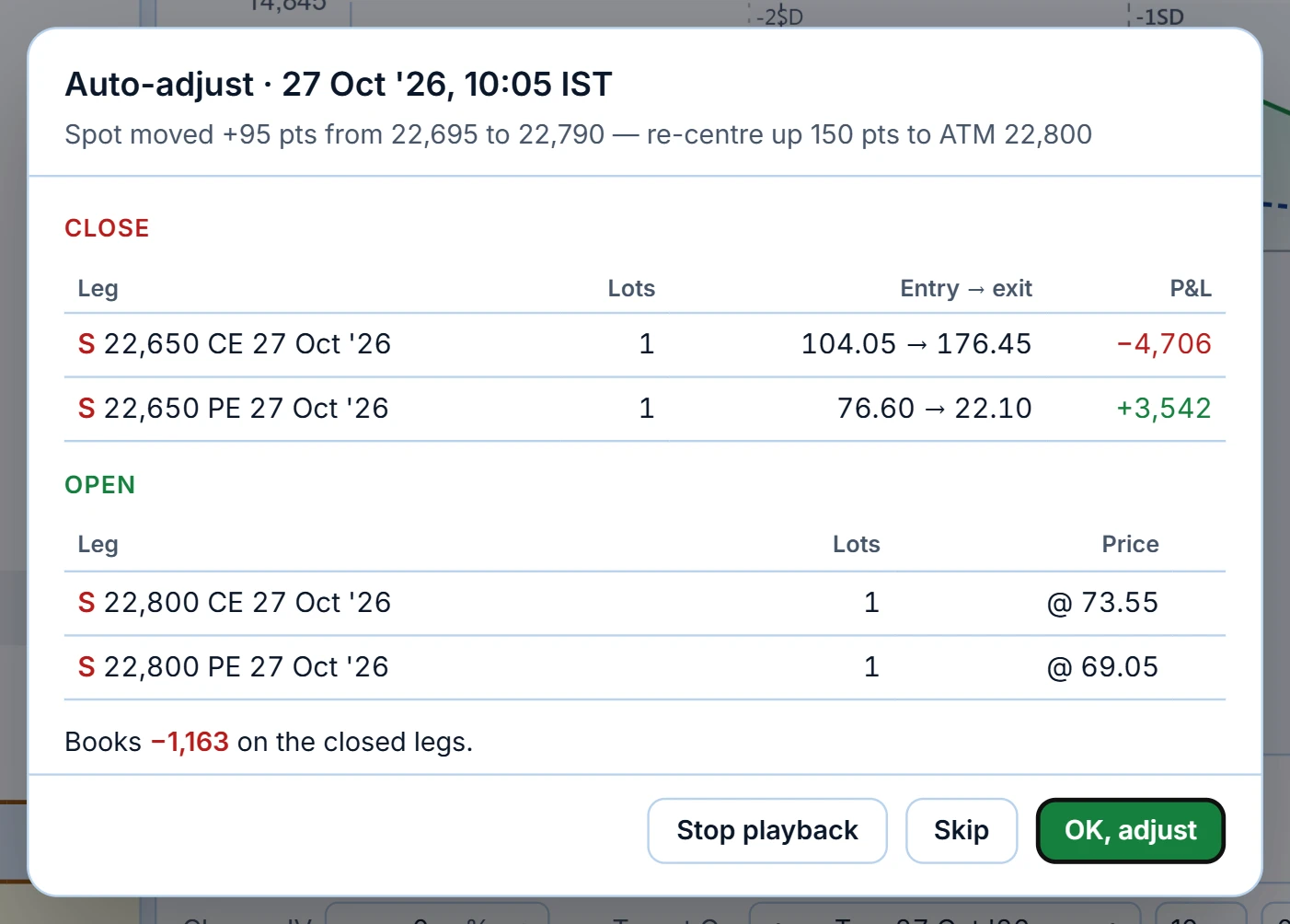
When a rule fires, playback pauses and a popup shows the full trade:
- the reason;
- every leg to close, with entry → exit and P&L;
- every leg to open, with its price;
- what the adjustment books.
Press OK, adjust to apply it at the replay price, Skip to ignore it, or Stop playback. Applied adjustments show in Positions, Closed Positions and MTM like manual trades. The Rules dialog keeps a log of recent ones.
This is the cheapest way to find out whether "re-centre when spot moves 100 points" actually helps your straddle. Replay the same day with and without the rule, then on a trend day and a range day.
Good ways to use it
- Practise expiry days. Replay recent weekly expiries at 09:20 and manage a short straddle to the close. Gamma on expiry afternoon is easier to respect after you have watched it from inside a position.
- Test an adjustment plan before trading it, on the days that would have hurt most: gap days, trend days and event days.
- Review a real trade. Rebuild a trade you took, at the minute you took it, and try the alternatives: an earlier exit, a hedge, a different strike.
- Teach. Step a session 5 minutes at a time and explain what each Greek is doing.
Limits
- Fills are at the minute's archived price, with no slippage, bid-ask spread or partial fills. Real fills in illiquid strikes will be worse.
- Replay is in 1-minute steps; moves inside a minute are not seen.
- Auto-adjust runs in your browser and only while the Simulator is open. It is a testbed for rules, not an algo. To run rules unattended, use Algo & Backtesting.
- The Simulator book is stored in the browser you use. It does not follow your login to another device.
Common questions
What is the FNOTrader Options Simulator?
A replay of any past trading session inside the Strategy Builder. You pick a date and minute, build option positions from that minute's real chain, step or play the clock forward, and exit or adjust at archived 1-minute prices. No real orders are placed.
Which dates can I replay?
Any finished trading session in the archive, up to the previous trading day. Only contracts that were listed on the chosen date appear in the expiry list.
Are the prices in the Simulator real?
Yes. Entries and exits fill at the archived 1-minute price of that exact contract at that minute. Slippage and bid-ask spread are not modelled.
Can the Simulator adjust my position automatically?
Auto-adjust checks rules (breakeven touch, short-leg stop, shift with spot) at every clock step and proposes the adjustment in a popup. It is only applied when you press OK, adjust.
How is Simulator MTM calculated?
Every minute from the first entry to the replay clock, MTM is the sum of (price − entry) × direction × quantity for each leg, with closed legs frozen at their exit price.
Can I place a real order from the Simulator?
No. The Simulator has no order path. Trade, Save and Share are hidden and every exit is simulated.
More on Options App
More in Options App · App: Options Analytics · Definitions: glossary · All: every article