What it does
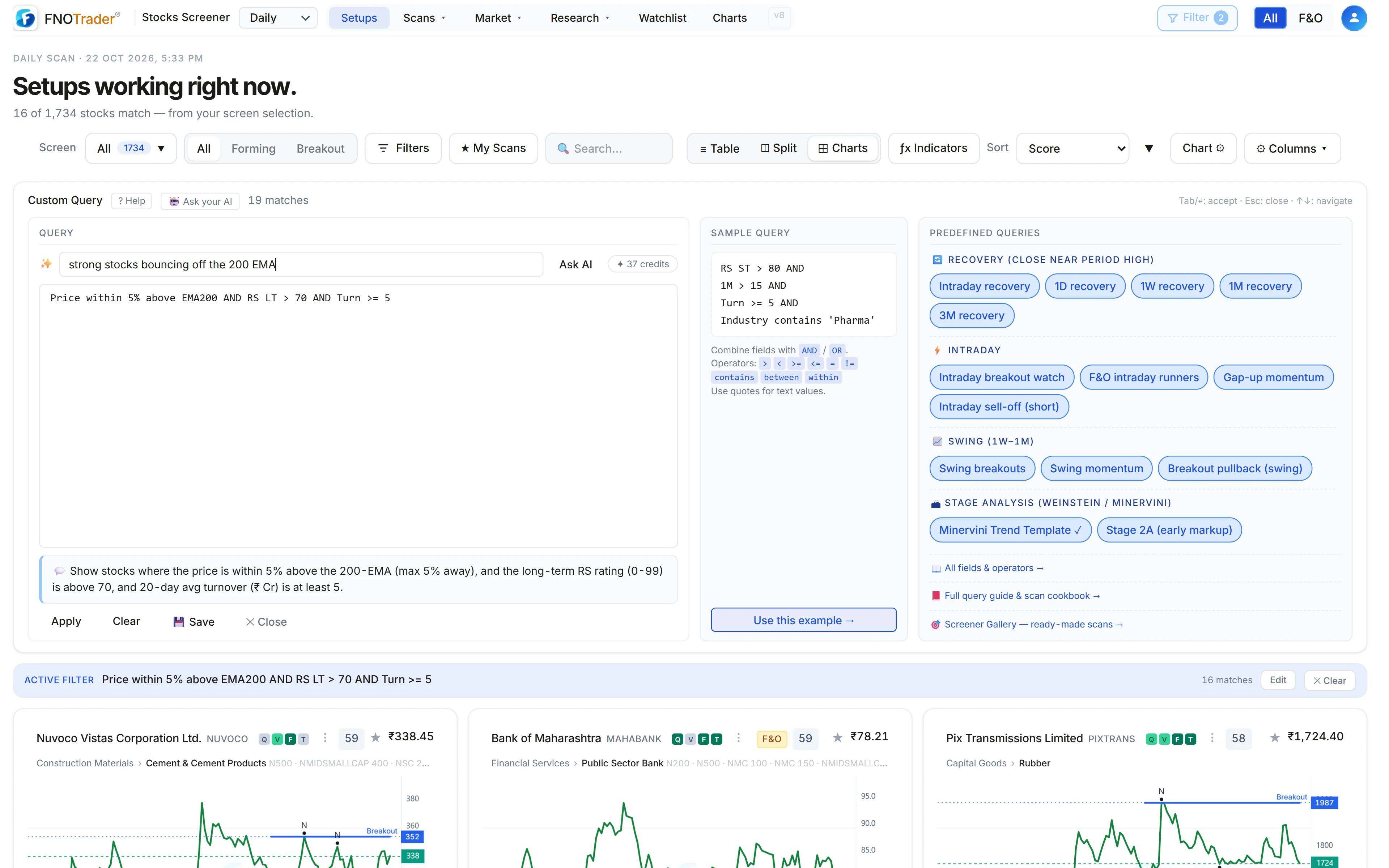
You type what you are looking for in English. Ask AI returns a Custom Query, puts it in the query box, runs it, and tells you in a sentence or two what the screen finds and how many stocks matched.
The important design choice is that the AI never answers on its own authority. The query it writes is run through the same screener engine as everything else in the app, and only a query that engine accepts is shown to you. You can read it, edit it and save it like any query you wrote yourself.
What happens after you press Ask AI
- Your sentence (up to 1,500 characters) is sent with the Custom Query reference, so the AI can use only fields and operators the screener actually has. If you are on the weekly or monthly scan, that is passed along as a hint.
- The AI replies with a query, a timeframe and a short explanation.
- The query is run on the screener engine. If the engine rejects it — an unknown field, a missing bracket — the error goes back to the AI for a corrected query.
- If the query is valid but matches zero stocks, the AI is asked to loosen the thresholds a little while keeping your intent.
- This repeats up to three attempts. The first query that works is filled in and applied; if the AI chose a different timeframe, the app switches to it.
If none of the attempts produce a valid screen, you get a message asking you to rephrase with fields the screener has — price, moving averages, RSI, RS rating, turnover — and the last attempt is shown so you can fix it manually.
A worked example
Suppose you type: strong stocks bouncing off the 200 EMA.
The AI's instructions say that “strong” means relative strength, that “bouncing off” means just above a level after recently touching it, and that a liquidity floor should be added unless you ask otherwise. A typical result looks like:
Price within 5% above EMA200 AND (1 day ago low < EMA200*1.02 OR 2 days ago
  low < EMA200*1.02) AND Change > 0 AND RS LT > 70 AND Turn >= 5
Read it back: within 5% above the 200 EMA; a low in the last two sessions within 2% of
it; up today; long-term relative strength above 70; at least ₹5 crore average daily
turnover. If that matched nothing, the retry might relax RS LT > 70 to
> 60. The exact query can differ from run to run, which is why it is shown
to you rather than hidden.
What it cannot do
- Things the screener doesn't have. Intraday timeframes, news, unsupported indicators and fundamentals outside the field list can't be screened. The AI builds the closest valid screen and says in the explanation what it left out — read that line.
- Non-screening questions. Ask AI on this page only builds stock screens; other questions are declined.
- Judgement. “Strong” becomes a threshold someone chose. Check the numbers in the query match what you meant before acting on the list.
- Usage limits. There is a per-account limit on how many questions you can ask in a few minutes and in a day.
Credits
Ask AI uses AI credits from your FNOTrader account; the remaining balance shows next to the button. Credits are taken only when a screen is delivered — a question that ends with no valid screen is not charged. Credit packs and what each plan includes are on the pricing page.
Running, editing and saving the query afterwards is ordinary Custom Query and uses no credits.
Where to find it
- Open the Stocks app on Setups and click Query.
- Type your request in the line marked “Ask AI in English” at the top of the query panel and press Enter or Ask AI.
- Read the explanation, check the query, then save it if you want to keep it.
Common questions
Can I screen Indian stocks by describing what I want in English?
Yes. Ask AI in the FNOTrader Stocks app turns a plain-English request into a Custom Query, checks it on the screener engine, and runs it over the scanned NSE stock list.
What happens if the AI writes a query that doesn't work?
The engine's error goes back to the AI for a correction, and a valid query with zero matches is loosened. It tries up to three times and only shows a query the engine accepted.
Does Ask AI use credits if it fails?
No. Credits are deducted only when a screen is delivered.
Can I edit the query Ask AI writes?
Yes. It is filled into the normal query box, so you can change any condition, re-apply it and save it.
Can Ask AI screen on news or intraday charts?
No. It can only use fields the screener has. It builds the closest valid screen and states in its explanation what was left out.
More on Stocks App
More in Stocks App · App: Stocks Scanner · Definitions: glossary · All: every article