What it is
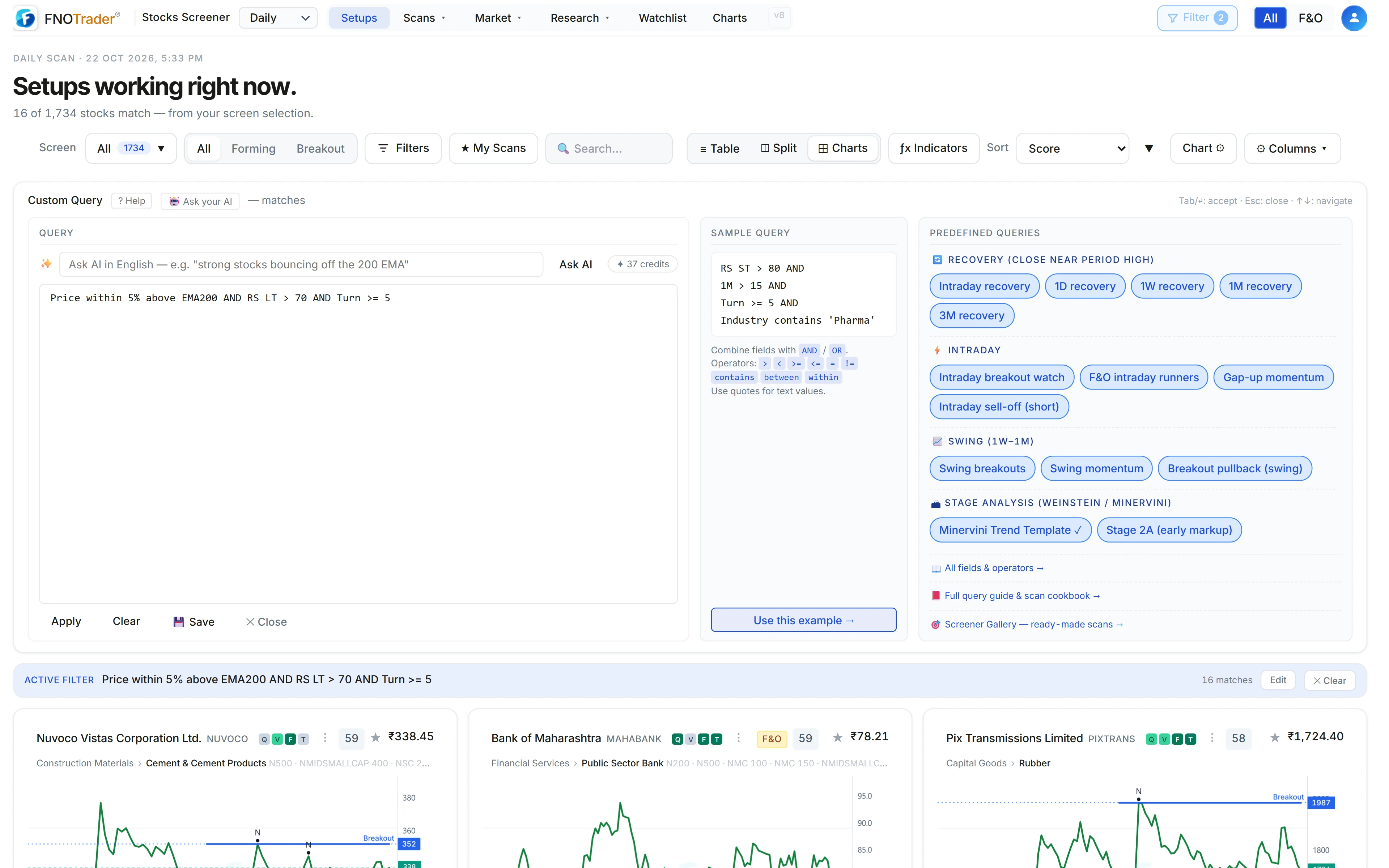
A screen is a list of conditions every stock must pass. Custom Query is a small language for writing that list, with the same engine behind the Setups page, the Screener gallery and Ask AI.
Each condition is FIELD OPERATOR VALUE. Join conditions with
AND, OR and NOT, and group them with brackets.
Field names and operators are not case-sensitive; text values go in quotes. As you type,
the box suggests field names and shows an English reading of what you have written, so a
typo shows up before you apply it.
Operators
| Operator | Example |
|---|---|
| Compare | RSI > 60, PE <= 25, != |
| Range | 1M between 10 and 30 |
| Proximity | Price within 3% of 52W High, within 5% above EMA200 |
| Field vs field | EMA10 > EMA20, Price < 1.05*EMA200 |
| Cross events | Price crossed above SMA20, RSI crossed below 40 |
| Text | Industry contains 'Pharma', Stage in ('2A','2B') |
| Presence | GSM is empty, PE is not empty |
| Yes/no fields | FNO, SuperTrend Flipped Up |
Precedence is NOT, then AND, then OR. A OR B AND C means
A OR (B AND C); bracket the OR group when it should gate everything else. A
missing bracket is an error, never a guess.
The fields
The catalogue runs to more than 650 field names and aliases. The main groups:
- Price and performance — Price, Change, 1D to 5Y returns, recovery within the day/week/month/quarter range, close position in the day's range.
- Volume and liquidity — RVol (today vs 20-day average), Turn
(20-day average turnover in ₹ crore), ADR, delivery %, price band (
Band = 9999means no band), GSM stage, F&O. - Trend and levels — SMA and EMA 10/20/50/100/200, the
vsdistance fields (vs EMA200is the % gap), 52W High/Low, ATH, PDH/PDL. - Indicators — RSI, MACD, Bollinger Bands, Stochastic, ADX/DI,
SuperTrend, each with a
WeeklyorMonthlyprefix for the higher timeframes. - Strength and stage — RS ST, RS LT and RS ratings (0–99),
Weinstein Stage, Mansfield RS, the Minervini trend template score, daily regime, and
Setups, the detected setup tags as text. - Classification and fundamentals — Sector, Industry, Index, MCap, PE, PB, ROCE, ROE, holdings, growth rates and quarterly streaks.
Closed candles and bar offsets
This is the part people get wrong. Indicators are always read from the last
closed candle. During the session, MACD is yesterday's MACD,
Weekly RSI is last completed week's, Monthly MACD is last
completed month's. The live price is what you compare against them. So mid-session,
Price > BB Upper means today's price above yesterday's upper band.
Bar offsets reach back into history: 3 days ago (a close),
2 days ago high, 1 week ago high, 2 months ago
range. On weekly and monthly offsets, 1 is the last completed
week or month; the forming one is never a candle yet. Daily closes go back 21 bars,
daily highs/lows/ranges 8, weekly 13 and monthly 12.
Worked examples
The difference between “near” and “above” trips up most first attempts. Say a stock's EMA200 is ₹1,000.
Price within 5% above EMA200passes for any price from ₹1,000 to ₹1,050 — the pullback zone.Price > EMA200 + 5%passes only above ₹1,050. The offset moves the level; it does not create a band.
A few screens to adapt:
- Pullback to the 200 EMA in a strong stock:
Price within 5% above EMA200 AND RS LT > 70 AND Turn >= 5 - New three-month high:
High > 1 month ago high AND High > 2 months ago high AND High > 3 months ago high - Weekly breakout on today's candle:
close > 1 week ago high AND RVol >= 1.5 - Squeeze in liquid names:
BB Width < 6 AND Turn >= 5
Gotchas
- Turn is an average, not today's turnover. Pair it with RVol for today's activity.
- Missing data fails. A stock with no PE fails
PE < 20. Useis not emptywhen you want to require coverage. - Not available: intraday timeframes, VWAP, Ichimoku and custom indicator settings — indicators use fixed standard settings.
- Saving shares it. A saved query appears under My Screeners and in Community Screeners with your chosen author name; see the Screener gallery.
Where to find it
- Open the Stocks app on Setups and click Query (or Custom Query from the Scans overview).
- Type a query, or click a predefined one on the right, then Apply.
- Use ? Help for the full field list. Prefer English? See Ask AI.
Common questions
Can I write my own stock screener formula for NSE stocks?
Yes. Custom Query in the FNOTrader Stocks app takes conditions like RS ST > 80 AND Turn >= 5, combined with AND, OR, NOT and brackets, and runs them over the scanned NSE stock list.
Are weekly RSI and MACD in the screener calculated on the live candle?
No. Indicators always use the last closed candle: during the session daily values are yesterday's, and weekly or monthly values are from the last completed week or month.
How do I screen for stocks near the 200 EMA?
Use the proximity operator: Price within 5% above EMA200 finds stocks between the EMA and 5% above it. Price > EMA200 + 5% means more than 5% above, which is a different screen.
Does Custom Query support crossovers?
Yes. crossed above and crossed below are true only when the previous bar was on the other side, and they work on price, moving averages, RSI and other indicators.
What does Turn mean in the screener?
The 20-day average daily turnover in ₹ crore. Turn >= 5 means at least ₹5 crore traded per day on average.
More on Stocks App
More in Stocks App · App: Stocks Scanner · Definitions: glossary · All: every article