What the Indices page answers
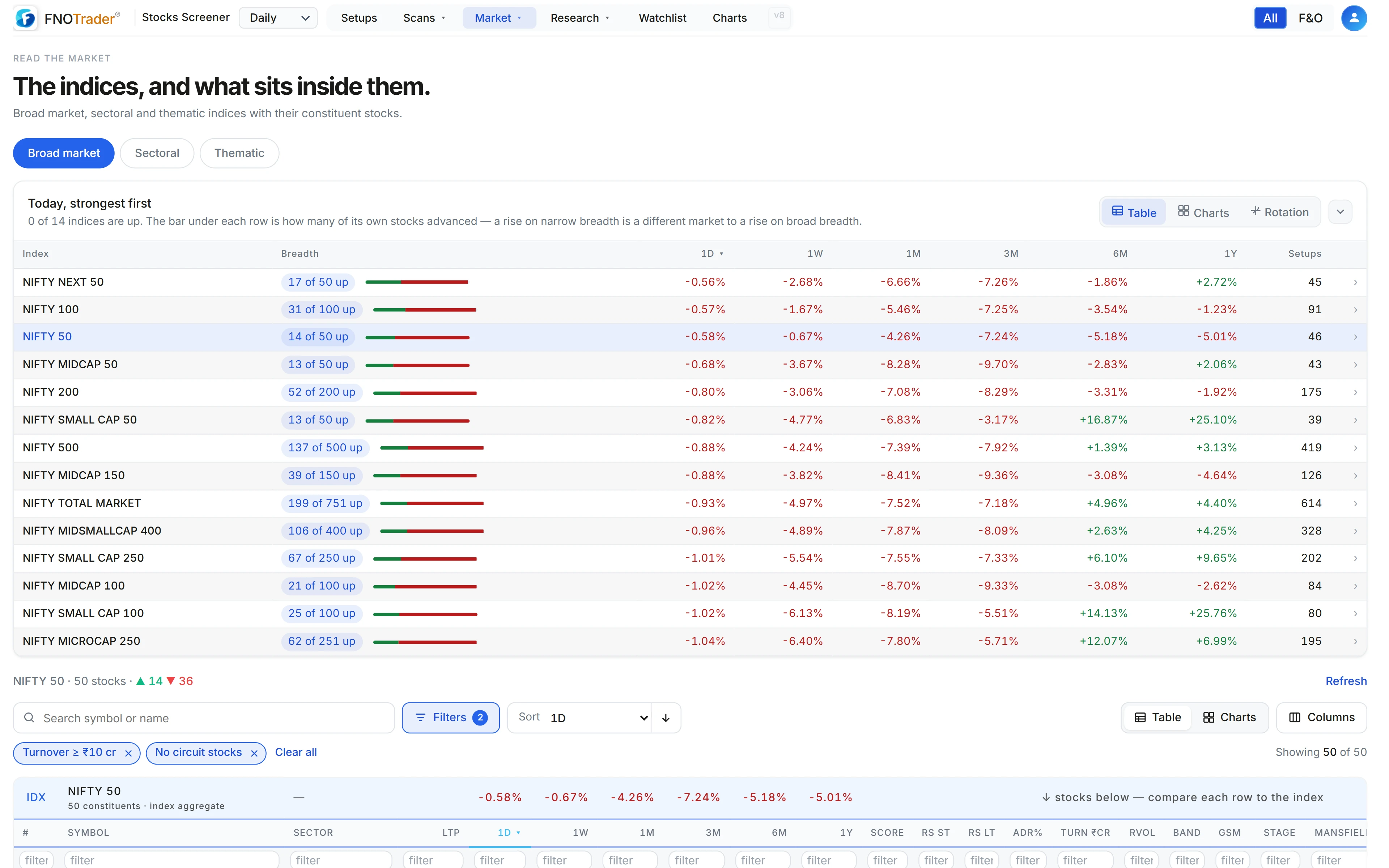
The Indices page lists NSE indices in three tabs — broad market, sectoral and thematic — and for each one shows how many constituents advanced and declined, their returns from 1D to 1Y, and how many currently have a live setup.
The list opens sorted strongest first by the day’s move, with a bar under each row showing how many of its own stocks advanced. That bar is the point: an index up 0.8% with 70% of its stocks up is a different market from one up 0.8% with 35% up.
Opening an index
Click an index and its constituents load underneath: price, returns over each period, Weinstein stage, Mansfield relative strength, trend-template score, whether a setup is live, and an F&O tag. A sticky row at the top gives the index’s aggregate, so you can see at a glance which members are beating it and which are dragging.
The list can also be shown as Charts (one chart per index, with up and down counts) or as Rotation — a Relative Rotation Graph of every broad, sectoral and thematic index against Nifty 50, Nifty 500 or Nifty 100. Strategy and factor indices (alpha, momentum, quality, low-volatility) are one click away in the same graph. How to read the RRG is covered in reading sector rotation in the app.
Why the aggregate row is equal-weight
The aggregate row is the equal-weight average of the constituents’ returns, not the official index return. That is a deliberate choice, and it is worth understanding before comparing numbers.
A made-up three-stock index with weights 60%, 30% and 10% and day returns of +1%, −2% and −3%:
- Weighted: 0.6 × 1 + 0.3 × (−2) + 0.1 × (−3) = 0.6 − 0.6 − 0.3 = −0.3%
- Equal-weight: (1 − 2 − 3) ÷ 3 = −1.33%
The official index fell a little; the typical stock in it fell four times as much. When the two diverge like this, the heavyweights are hiding the rest of the index. Use the equal-weight row to compare members with each other, and the index chart for the official level.
The market heatmap
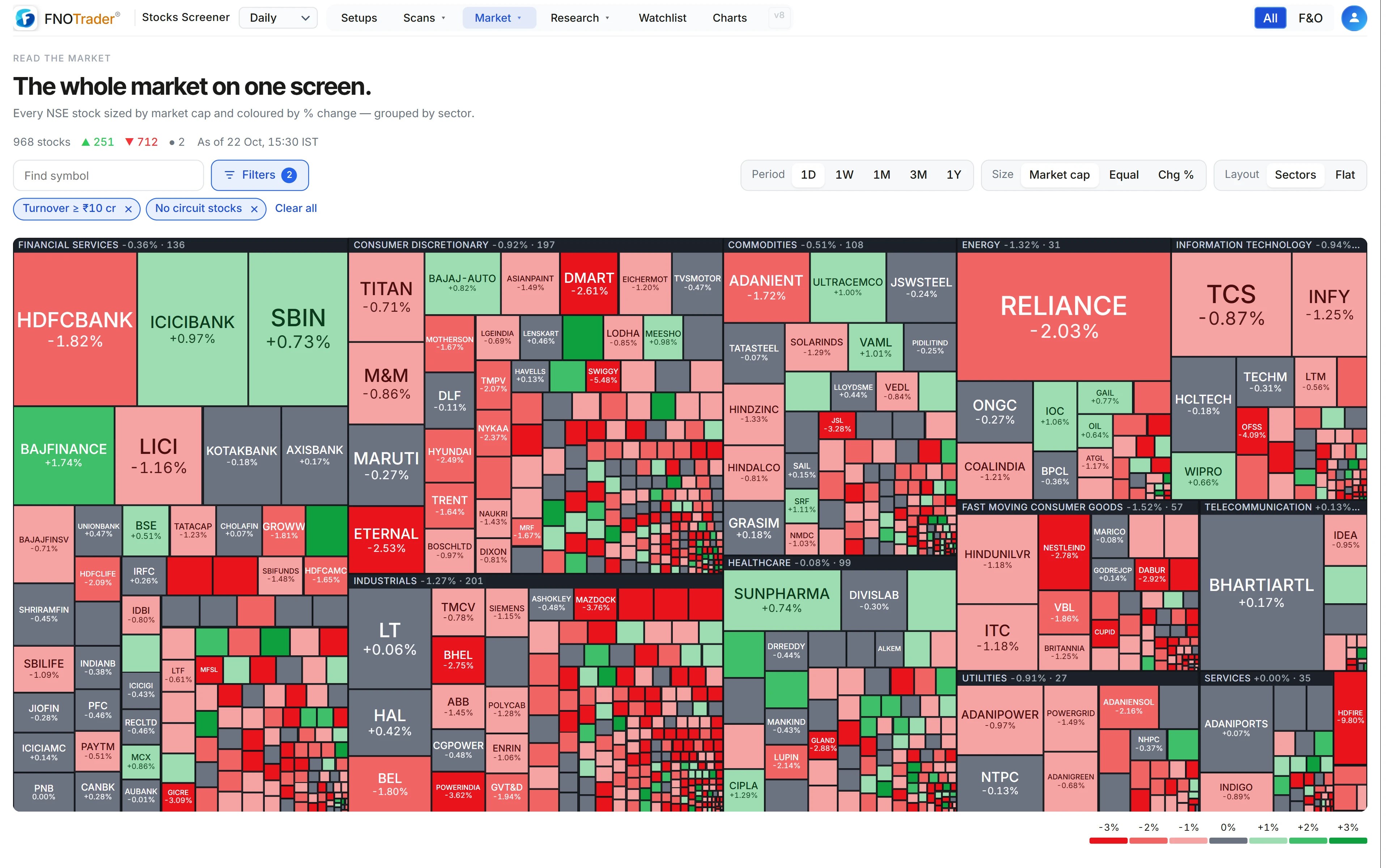
Market → Heatmap draws every NSE stock as a tile in a treemap, coloured from red through grey to green by its percentage change. It is the fastest way to see whether a day was broad or narrow.
| Control | Options |
|---|---|
| Period | 1D, 1W, 1M, 3M, 1Y. Colour saturates at ±3%, ±6%, ±10%, ±20% and ±40% respectively, so a long period is not all deep green. |
| Tile size | Market cap, equal, or size of the % change. |
| Layout | Grouped by sector, or flat. |
| Search | Find a symbol on the map. |
A stock without market-cap data is sized from its turnover, scaled to match the others. Counts of stocks up and down sit above the map; click any tile to open the stock.
Limits and common mistakes
- Equal-weight is not the index. Don’t quote the aggregate row as “Nifty did X”.
- Market-cap tiles hide breadth. Sized by cap, a few large green tiles can make a weak day look strong. Switch to equal sizing to see the typical stock.
- Constituents are today’s. Long-period returns are for the current members, which flatters history slightly because removed stocks are not there.
- The heatmap colour scale is capped, so two tiles at the cap can have very different returns. Hover for the number.
Where to find it
- Open the Stocks Scanner and choose Market → Indices.
- Pick Broad, Sectoral or Thematic; click an index to load its constituents.
- Use the Table / Charts / Rotation switch on the list for the other views.
- For the treemap, choose Market → Heatmap.
For the whole-market counts over time, see the breadth monitor.
Common questions
How do I see the constituents of a Nifty index with their performance?
Open Market → Indices, choose the Broad, Sectoral or Thematic tab and click the index. Its constituents load with returns from 1D to 1Y, stage, relative strength and setup status.
Why is the index row different from the official Nifty return?
The aggregate row is an equal-weight average of the constituents, not the market-cap-weighted index. It shows what the typical member did.
What is a stock market heatmap?
A treemap where each stock is a tile, sized by market cap (or equally) and coloured by its percentage change, so you can see at a glance how broad a move was.
Can I see a rotation graph for thematic and strategy indices?
Yes. The Rotation view on the Indices page covers broad, sectoral and thematic NSE indices, with strategy and factor indices available as an extra group.
More on Stocks App
More in Stocks App · App: Stocks Scanner · Definitions: glossary · All: every article