Two different questions
“Which sector is strongest?” and “which sector is gaining strength?” have different answers more often than not. A sector can be at the top of the table and already losing pace; another can be near the bottom and improving fast.
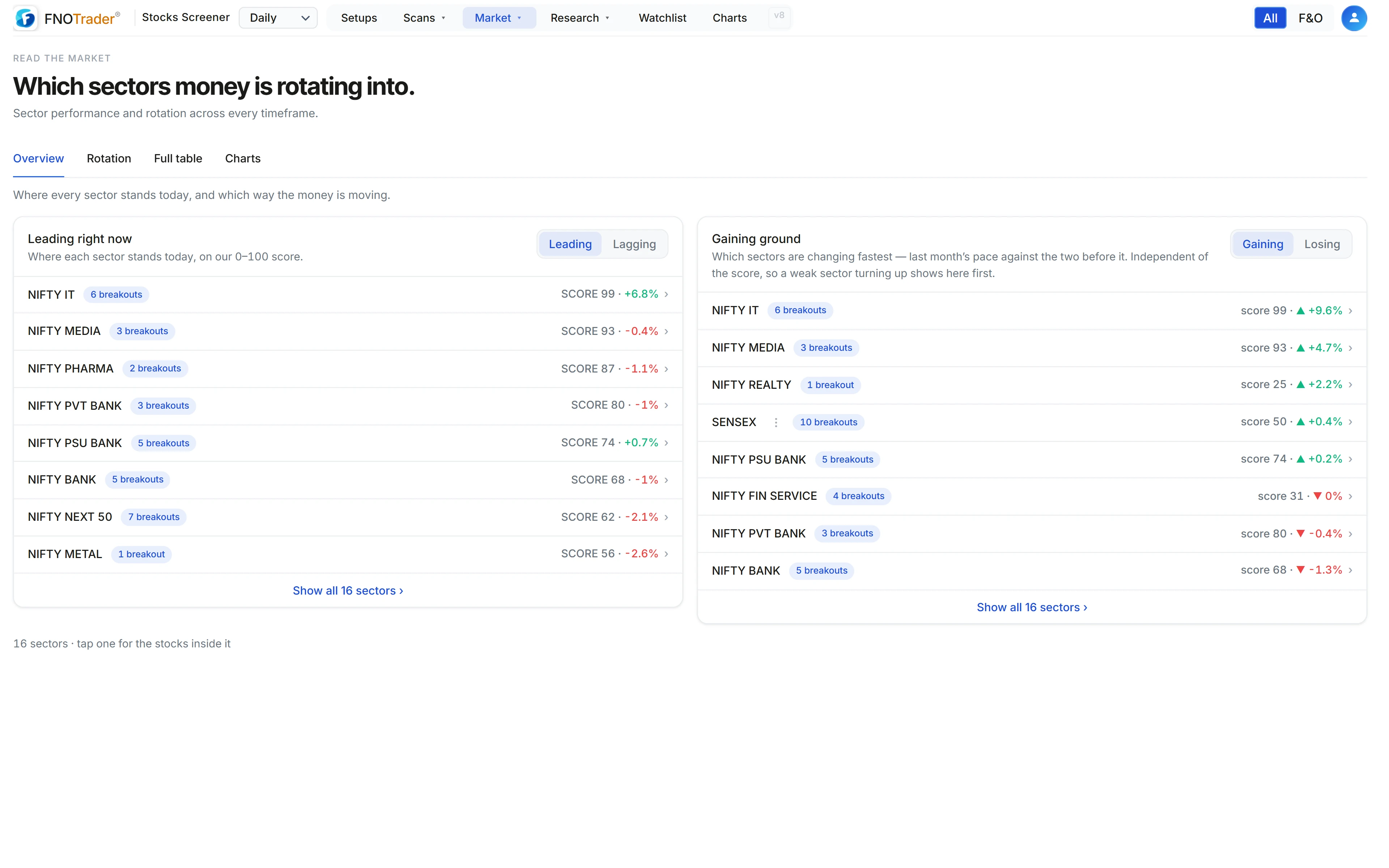
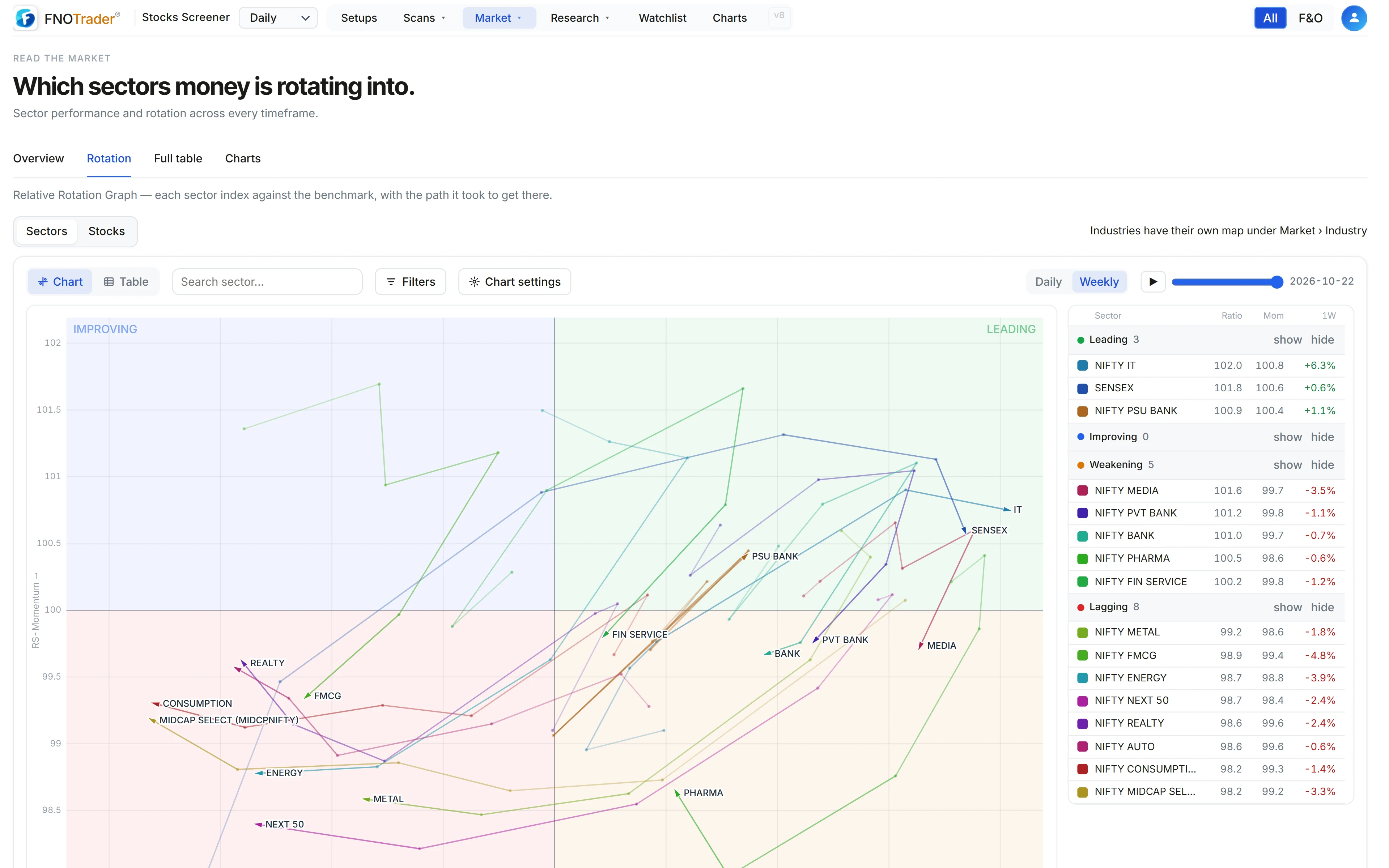
The Sectors page puts these side by side. The Overview ranks every NSE sector index on a single strength score. The Rotation view plots each one on two axes — relative strength and its rate of change — so leadership changes are visible as movement, not as a reshuffled list.
If you want to know whether trading rotation as a rule actually works, that is a backtesting question, covered in sector rotation, and how to test it honestly. This post is about reading the picture.
The sector strength score
Each sector gets a strength value built from three parts, each capped so no single one can dominate:
- Trend, 45% — the sector’s recent weekly closes, comparing the average of the latest third with the earliest third.
- Momentum, 30% — 60% of the 3-month return plus 40% of the 6-month return.
- Breadth, 25% — the share of the sector’s stocks up over the month minus the share down.
A rally with clearly negative breadth is held below the top band, however strong the index looks. Sectors are then ranked into a 0–99 score and given a label — Strong, Rising, Neutral, Weak or Falling — describing the trend, not what to do about it.
How the Relative Rotation Graph is calculated
For each sector index against the benchmark:
- Relative strength = 100 × sector ÷ benchmark.
- RS-Ratio = 100 + the z-score of that line over the last 14 bars (weekly) or 20 bars (daily). 100 means in line with its recent relative average.
- RS-Momentum = 100 + the z-score of the rate of change of RS-Ratio, over the same window.
- Both are lightly smoothed with a 3-bar EMA so the paths read as paths, not noise.
The four quadrants follow: Leading (both above 100), Weakening (ratio above, momentum below), Lagging (both below), Improving (ratio below, momentum above). Groups tend to rotate clockwise through them — a tendency, not a rule.
A worked example
Made-up numbers on the weekly chart. A sector’s relative-strength line has averaged 50.0 over the last 14 weeks with a standard deviation of 0.8. This week it reads 51.2.
z = (51.2 − 50.0) ÷ 0.8 = 1.5, so RS-Ratio is about 101.5 before smoothing — stronger than its own recent relative level. If the ratio’s weekly change is shrinking compared with its recent changes, RS-Momentum falls below 100 and the dot sits in Weakening: still outperforming, but by less each week.
That is the reading a return table cannot give you.
The controls
| Control | What it changes |
|---|---|
| Daily / Weekly | Bar size and the z-score window (20 daily or 14 weekly bars). Starts on Weekly. |
| Benchmark | Nifty 50 (default), Nifty 500 or Nifty 100. |
| Tails | Off shows dots (the hovered one still shows its trail); On draws every path. Sectors start with tails off. |
| Tail length | 1 to 20 bars, default 5. |
| Time slider and play | Move the chart back in time, or replay how the dots travelled. |
| List | RS-Ratio, RS-Momentum, ratio change over the tail and the heading of the last step, per sector. |
A Stocks switch on the same page plots individual stocks on a simpler strength-versus-momentum map. Industries have their own RRG under Industry, and every NSE index has one on the Indices page.
Cross-checking with foreign flows
Market → FPI flows shows NSDL’s fortnightly sector-wise report of foreign portfolio investment: net investment by sector for each fortnight, assets under custody, and a heatmap of the year’s fortnights per sector. You can switch between equity, debt, hybrid and mutual-fund flows, and between ₹ crore and USD million.
It is slow data — a fortnight at a time, published after the fact — so it confirms rather than leads. A sector rotating into Leading while foreign holders are net sellers is a move driven by domestic money, which is useful context, not a verdict.
Limits, and where to find it
- RRG is relative. In a falling market a sector can be Leading while losing money, simply by falling less than the benchmark.
- The centre moves. Because of the z-score window, 100 means “normal for the last few months”, not a fixed level.
- Daily and weekly can disagree. Daily is quicker and noisier; check both before treating a quadrant change as real.
- Open the Stocks Scanner and choose Market → Sectors.
- Overview ranks sectors; Rotation opens the RRG; Full table shows every timeframe and Charts shows each sector index as a chart.
- For flows, choose Market → FPI flows.
Common questions
What is a Relative Rotation Graph?
A chart that plots each sector by its relative strength against a benchmark (RS-Ratio, across) and the rate of change of that strength (RS-Momentum, up), with a tail showing the path it took.
What do the RRG quadrants mean?
Leading is strong and gaining, Weakening is strong but losing pace, Lagging is weak and still falling behind, Improving is weak but turning up. Groups tend to move clockwise through them.
Which benchmark should I use for NSE sector rotation?
Nifty 50 is the default; Nifty 500 or Nifty 100 can be chosen. A broader benchmark like Nifty 500 compares sectors against the wider market rather than the largest companies.
Why is a falling sector shown as Leading?
Because the graph is relative. If the benchmark falls more, the sector's relative strength rises even though its price fell.
Where can I see FPI flows by sector in India?
Under Market → FPI flows in the Stocks Scanner, built from NSDL's fortnightly sector-wise FPI report, in ₹ crore or USD million.
More on Stocks App
More in Stocks App · App: Stocks Scanner · Definitions: glossary · All: every article