Three scopes, five tools
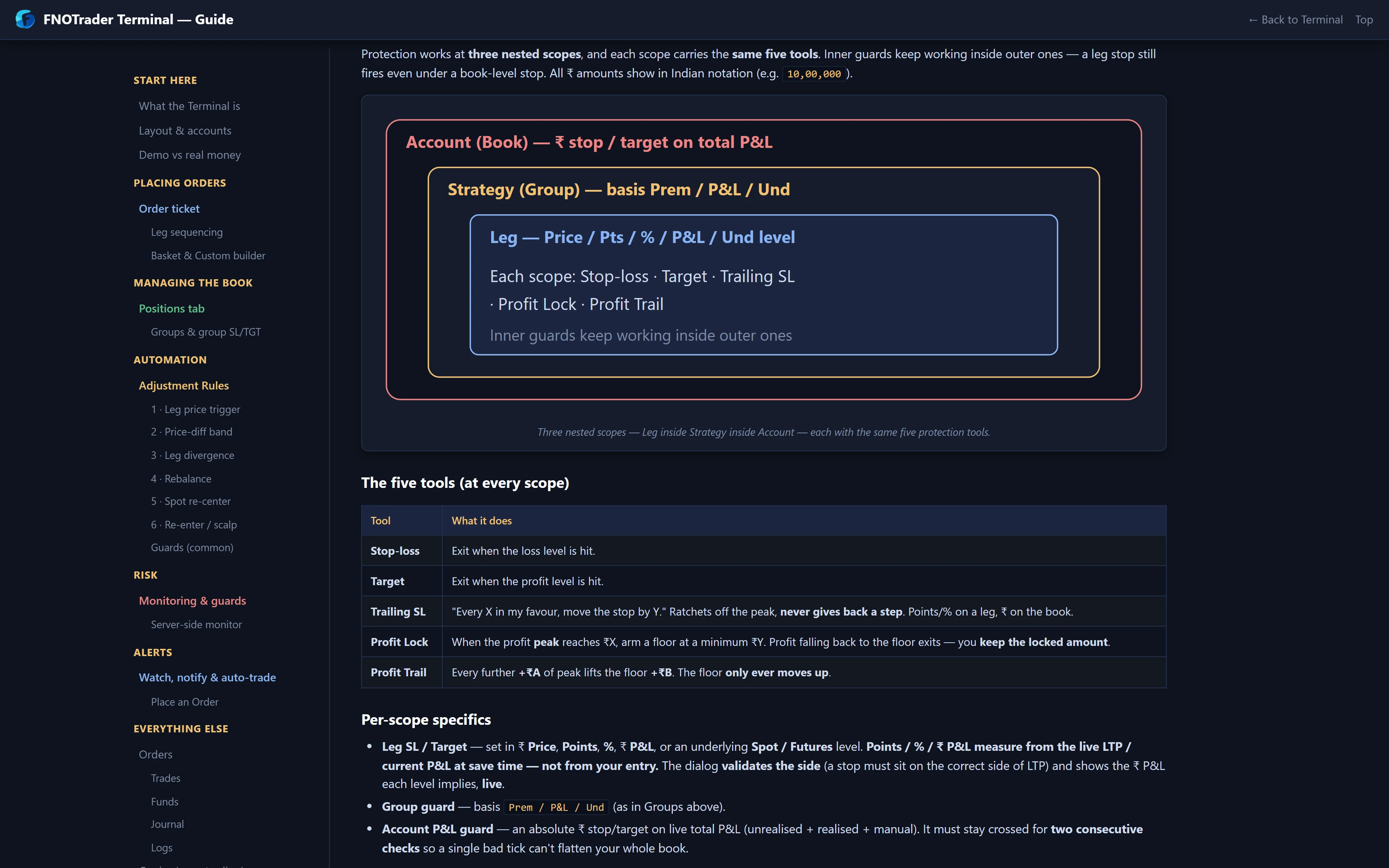
You can protect a single leg, a strategy group or the whole account, and each scope has the same five tools.
| Tool | What it does |
|---|---|
| Stop-loss | Exits when the value reaches your loss level |
| Target | Exits when the value reaches your profit level |
| Trailing SL | Every X in your favour moves the stop by Y, off the peak |
| Profit locking | Once profit reaches ₹X, guarantees at least ₹Y |
| Profit trailing | Each further ₹A of peak profit lifts that floor by ₹B |
Guards run on the server for every account with a guard set — there is no switch to turn it on. A breach sends live square-off orders on a real account, unattended. That is the point of a stop; it is also why levels need to be where you mean them.
What each scope measures
- Leg (+ SL/TGT on a row) — a ₹ price, points, % from LTP, a ₹ P&L give-back, or a level on the underlying's spot or futures. The panel shows side, quantity, average, LTP and P&L so the level is placed in context.
- Strategy (SL/TGT on a group header) — one rule for the whole structure on combined premium, group P&L or the underlying. A breach exits every leg together, which is what you want on a strangle: no leg left naked.
- Account (Settings → Account SL/TGT) — on the live account total, unrealised plus realised plus manual. Levels are signed: −10,000 is a loss limit; 25,000 exits in profit. A breach squares off every position.
The Manual ₹ field on a strategy lets you add P&L booked elsewhere (negative for a loss), and it counts towards that strategy's P&L-based guard and the account total.
Profit locking and trailing: the floor that only rises
Lock and trail are one idea: a floor under your profit that ratchets up and never down. When profit first reaches the lock level ₹X, the floor is set at your minimum ₹Y. Every further ₹A of peak profit above the lock level lifts the floor by ₹B. If profit falls back to the floor, that scope exits.
The trailing stop-loss works the same way on price or P&L: on a leg the stop follows the option price in points or %; on a group or the account it follows P&L. It trails from the peak and never gives a step back.
Worked example: a short-premium day
Hypothetical account guard: stop −10,000; lock at 25,000 keeping 10,000; profit trail 5,000 → 2,000.
- Profit reaches ₹25,000 at 11:00. The floor is set at ₹10,000.
- The peak reaches ₹40,000 at 13:30. Steps above the lock level: (40,000 − 25,000) ÷ 5,000 = 3. Floor = 10,000 + 3 × 2,000 = ₹16,000.
- A move against you takes profit from ₹40,000 down to ₹16,000. The account squares off, keeping about ₹16,000 before slippage and costs.
The floor did not move when profit fell from ₹40,000; it only moved on the way up. A peak of ₹44,000 would still be three full steps, because the fourth needs ₹45,000. Without the lock, the same day could have been held all the way back to the −10,000 stop.
Common mistakes
- Entering a loss limit as a positive number. Account levels are signed P&L. "10,000" is a profit level; the loss limit is "−10,000".
- Leg stops on every leg of a strangle. Two independent leg stops can leave one side open after the other exits. A strategy-level guard closes the structure together.
- Stops too tight for the premium. A ₹3 stop on a ₹40 option is inside normal noise. Check the liquidity and spread meters first.
- Assuming the exit price equals the level. The guard sends the exit when the level is breached; in a fast market the fill can be worse.
Where to find it, and how to check it
- Leg: + SL/TGT on any row in Positions.
- Strategy: SL/TGT on a group header; choose the basis.
- Account: Settings above the book → Account SL/TGT.
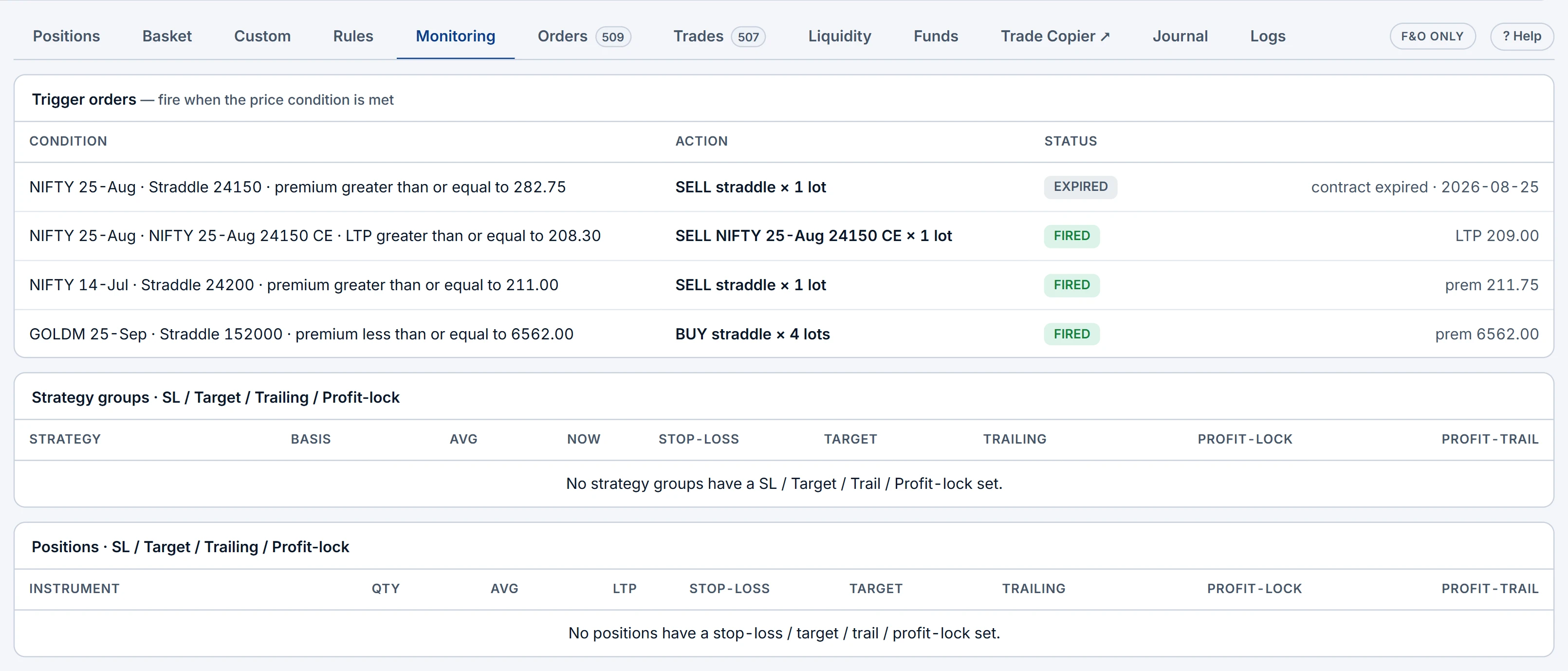
- Then open Monitoring: every trigger order (ARMED, FIRED or EXPIRED, with the fire price), every group guard and every position guard in one list.
Guards exit; they do not adjust. For rules that roll or re-centre a running strategy, see adjustment rules. Try any guard on a Demo account first.
Common questions
Do Terminal stop-losses work if I close the browser?
Yes. Guards are saved to the server and checked about once a second, on Demo and real accounts, with the Terminal open or closed.
What is the difference between profit locking and profit trailing?
Profit locking sets a minimum profit once a level is reached. Profit trailing raises that minimum by a fixed step for every further step of peak profit.
Can I set one stop-loss for a whole strangle?
Yes. A strategy guard on combined premium, group P&L or the underlying exits every leg together when breached.
How do I enter an account loss limit?
As a negative number, for example -10,000. Positive numbers are profit levels.
More on QuikTrade Terminal
More in QuikTrade Terminal · App: QuikTrade Terminal · Definitions: glossary · All: every article