What privacy mode hides, and what it keeps
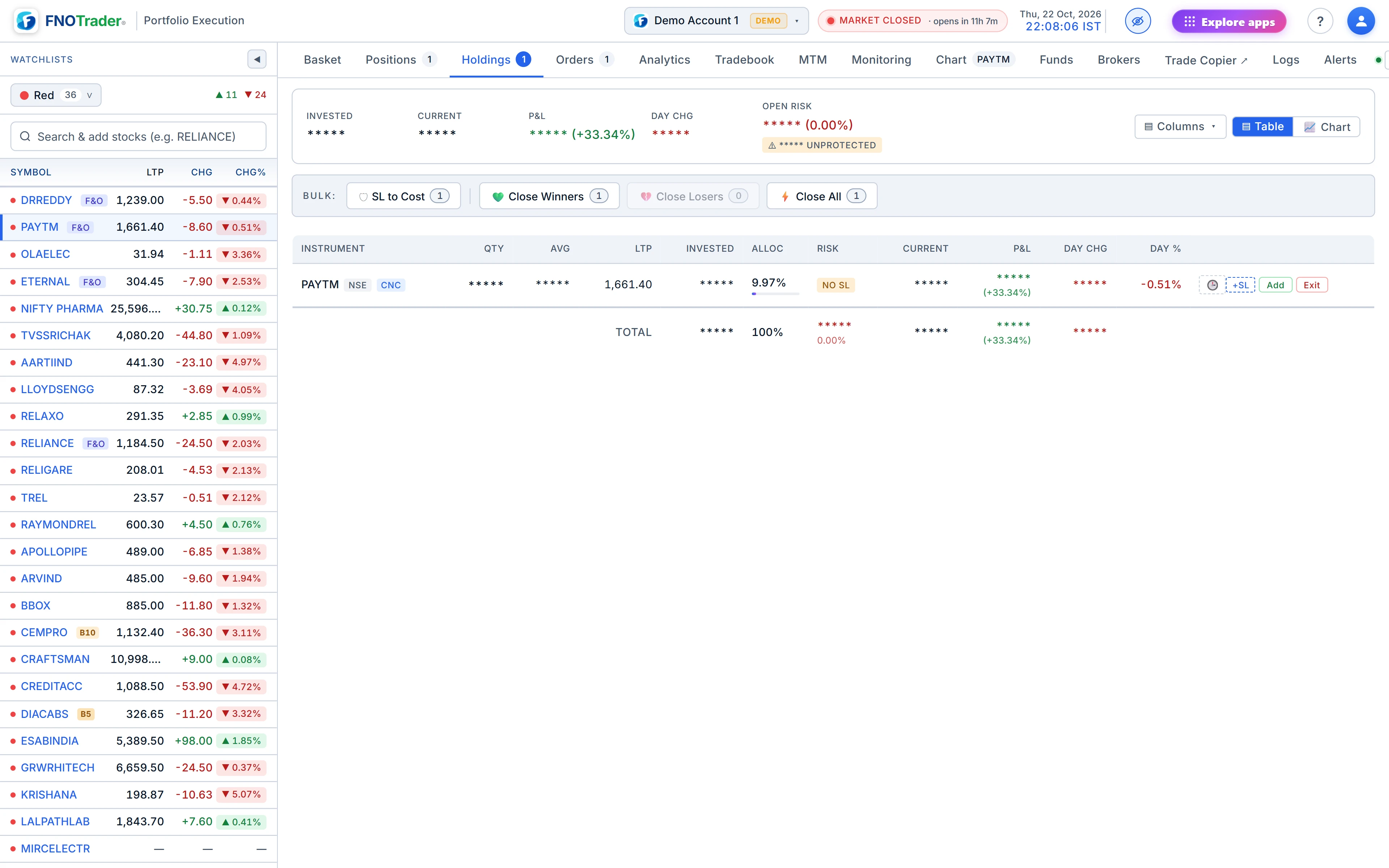
With privacy mode on, every rupee amount, quantity and average or entry price in the app is
replaced by *****.
| Masked | Kept visible |
|---|---|
| ₹ amounts — P&L, invested, funds, proceeds, charges | Percentages — P&L %, ROIC, win rate, allocation |
| Quantities and share counts | LTP and day change of the stock |
| Average and entry prices | Counts of orders, days and symbols |
The line is drawn there on purpose. A percentage tells a viewer how a trade is going without telling them your account size. LTP is public market data, and the order tickets and charts need it. Average price is masked because combined with LTP and a percentage it would let anyone work back to your position.
It covers Positions, Holdings, Funds, Analytics, Tradebook, Monitoring, Logs and the watchlist's owned tags. Calendar tooltips that carry amounts are masked too.
How it behaves
- Per device. The setting is stored in that browser. Turning it on for a projector laptop does not change your phone.
- Across tabs. Other open tabs of the app on the same browser switch with it, so a second window does not give you away.
- No flash. It is applied before the page draws, so a reload never shows the real numbers for a split second.
The common mistake is assuming it travels with the account. It does not; check the toggle on the machine you are presenting from.
A good habit before any session where your screen is visible to others: switch privacy on first, then open the app's tabs one by one — Positions, Holdings, Funds, Analytics — and confirm the masks are in place before you start sharing. It takes half a minute and is cheaper than editing a recording afterwards. When you are done, switching it off restores every number at once; nothing is lost or recalculated, because the mask is only applied where values are displayed.
A worked example
Hypothetical. A holding shows: quantity 120, average ₹1,450.00, LTP ₹1,522.50, P&L ₹8,700.00 (+5.00%). With privacy on, the row reads quantity *****, average *****, LTP ₹1,522.50, P&L ***** (+5.00%). A viewer learns the stock is up 5% from your entry, and nothing about how much you hold.
The phone layout
On a screen up to about 900 pixels wide the terminal switches to a phone layout with a bottom bar of five buttons:
| Button | What it opens |
|---|---|
| Watchlist | Your lists, full width, with owned quantities on each row. |
| Orders | Sub-tabs Open, Executed, Basket, Alerts and SL / TGT (the monitoring view). |
| Portfolio | Holdings and Positions. |
| Chart | The chart for the selected stock. |
| Account | Funds and brokers; reports (Analytics, Tradebook, MTM Calendar, Logs); theme and the privacy toggle. |
Tapping a watchlist row opens an action sheet — buy, sell, chart, alert, basket, move or remove — instead of the small row buttons the desktop uses. Watchlists you edit on the phone are saved to your account and appear on the desktop; see watchlists.
Limits
- Privacy mode hides numbers on screen. It does not change what is stored, exported or sent in alerts.
- A webhook or Telegram alert still carries the message text you wrote; keep amounts out of it if that matters.
- The phone layout is the same app, not a cut-down one, but dense tables are easier to read on a wider screen.
Where to find it
- On desktop, click the privacy toggle (the eye) in the Portfolio Execution header.
- On a phone, open Account from the bottom bar and use the privacy switch.
- For an overview of the rest of the terminal, see the trade terminal guide.
Common questions
How do I hide my portfolio value while screen-sharing?
Turn on privacy mode in the Trade app. Rupee amounts, quantities and average prices are replaced by asterisks while percentages and LTP stay visible.
Does privacy mode apply on all my devices?
No. It is saved per browser, so turn it on on the device you are presenting from. Other tabs on that browser follow it.
Why are percentages still shown in privacy mode?
So you can show how trades are performing without revealing your account size. A percentage alone does not give away the amount.
Can I use the Trade app on my phone?
Yes. On a narrow screen it switches to a phone layout with a bottom bar for Watchlist, Orders, Portfolio, Chart and Account.
More on Portfolio Execution
More in Portfolio Execution · App: Portfolio Execution · Definitions: glossary · All: every article