What a backtest run is, and what it is not
A backtest replays a strategy you have already built against minute-by-minute history and reports what it would have done, day by day.
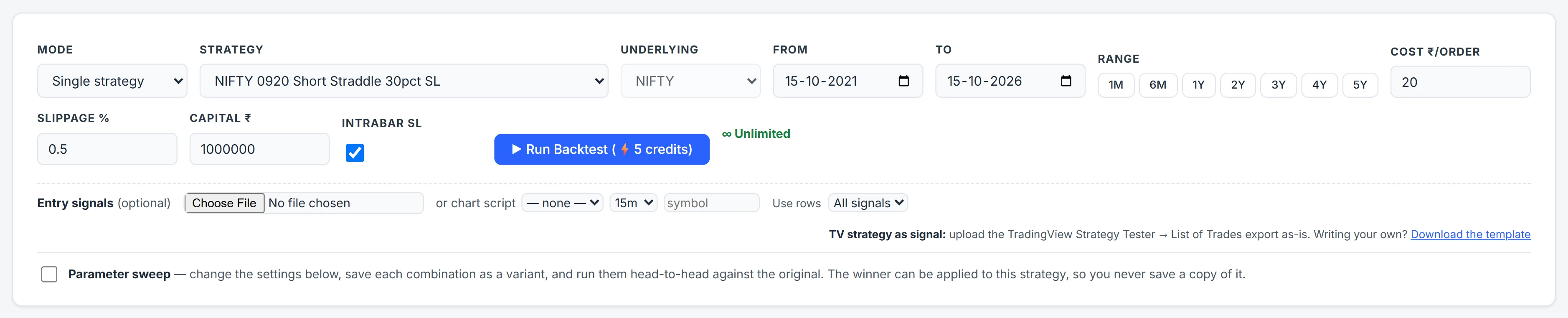
In Algo the strategy is built once in the Strategy Builder — legs, strikes, entry and exit rules, stops. The Backtest page does not change any of that. It decides only how the replay is run: which dates, what friction to charge, what capital to measure returns against, and how strictly stops are tested inside each bar.
Those few choices move results more than most strategy tweaks do, which is why each one gets its own section below. The general case for why a backtest needs them is in options backtesting in India; this post is about the settings themselves.
What you can backtest, and over what dates
The replay runs on 1-minute bars: option open, high, low, close, open interest and IV for the chain around the money, plus spot bars. Index history starts on different dates because the contracts listed on different dates:
| Underlying | History from |
|---|---|
| NIFTY | January 2019 |
| BANKNIFTY | January 2019 |
| FINNIFTY | January 2021 |
| MIDCPNIFTY | January 2022 |
| SENSEX | May 2023 |
| NIFTYNXT50 | April 2024 |
Single-stock options are also covered, with monthly expiries only and a start date that varies by stock. MCX commodities have no backtest archive — use a forward test for those. One run can span up to about five years; how far back you can go also depends on your plan (see /pricing).
The Underlying box on the Backtest page is filled in from the strategy and cannot be edited. That is deliberate: a SENSEX strategy can never be replayed on NIFTY bars by mistake.
The settings, one by one
| Setting | What it changes |
|---|---|
| Range presets 1M, 6M, 1Y–5Y | Set From and To in one click. The end date is set about a week back, because the most recent days are still being added to the archive. You can type any dates instead. |
| Cost ₹/order (default 20) | A flat charge for brokerage, STT, GST, exchange and stamp duty on each order. Every buy and every sell is one order. |
| Slippage % (default 0.5) | An adverse fill on every leg's entry and exit, as a percentage of the option price. A sell fills that much lower, a buy that much higher. |
| Capital ₹ (default ₹10 lakh) | The base for Return % and CAGR. When the report knows the real margin the strategy blocks, returns are measured on that margin instead. |
| Intrabar SL/TGT (on by default) | On: price-level stops and targets are tested against each bar's high and low and fill at the trigger level. Off: they are tested on the bar close and fill at the next bar's open. |
| Mode | Single strategy, or a whole portfolio replayed over the same dates and combined into one equity curve, each strategy on its own underlying. |
Leave intrabar on. With it off, a spike that hits your stop and retraces before the minute closes is simply missed, and the result is flattered by stops that would have fired in real trading.
A worked example: what friction costs a straddle
Take a hypothetical short straddle — sell one call and one put — that enters and exits once a day, with a 75-unit position per leg.
- Costs. Two legs, each entered and exited, is four orders. At ₹20 per order that is ₹80 a day. Over 250 trading days, ₹20,000 — before the strategy has done anything right or wrong.
- Slippage. Say the call is sold at ₹100 and bought back at ₹60. At 0.5%, the entry fills at ₹99.50 and the exit at ₹60.30. That is ₹0.80 a unit, or ₹60 on 75 units, on one leg. Both legs together roughly double that.
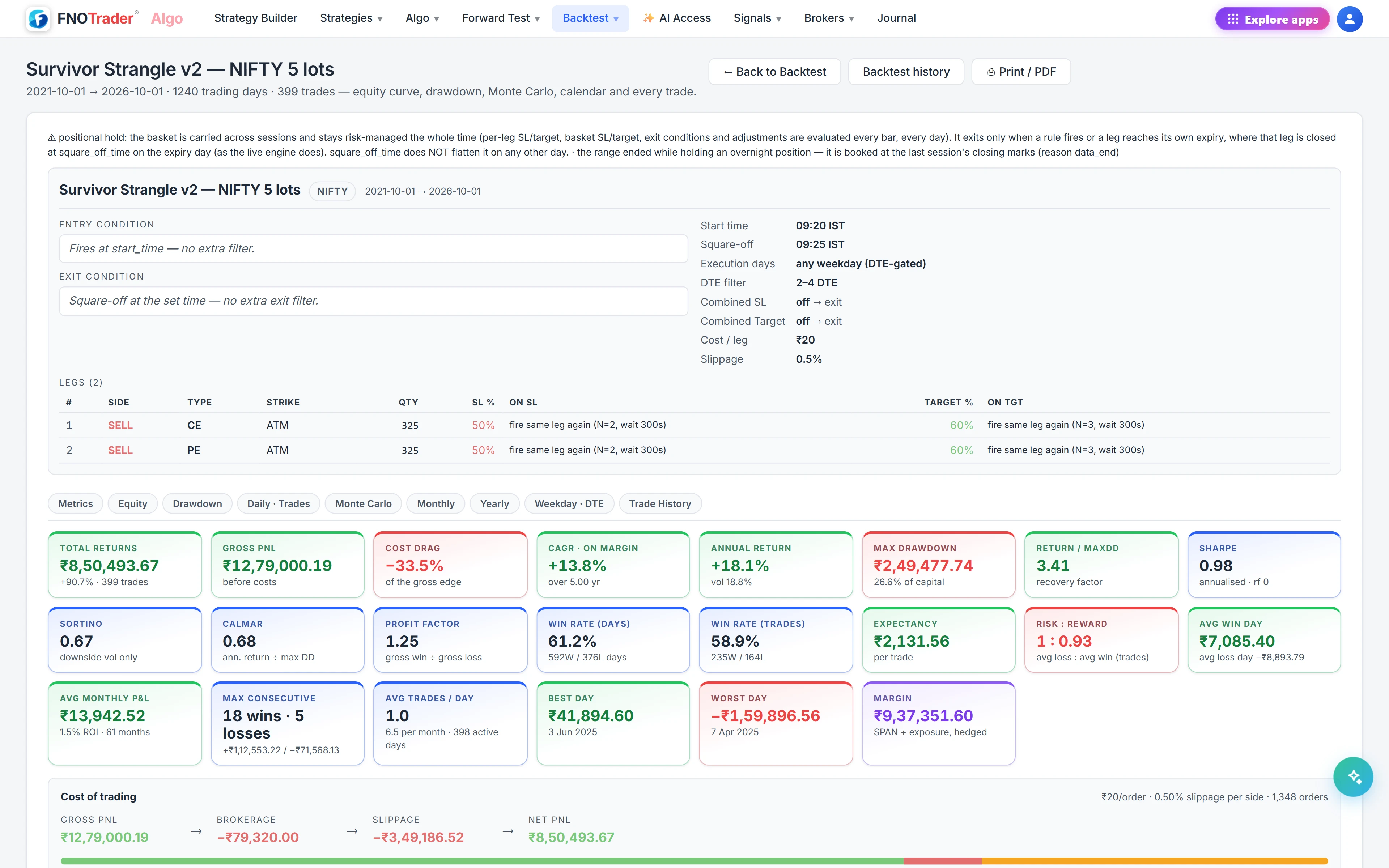
So a strategy that shows ₹300 a day before friction keeps roughly ₹100 after it. That is the whole reason the report shows Plain, With Costs and With Slippage side by side — see reading the backtest report.
Common mistakes
- Setting costs to zero to "see the raw edge". The raw edge of an option selling strategy is often smaller than its friction. Look at the Plain tab if you want it; never size from it.
- Testing only a calm window. A 6-month range that holds no sharp move tells you how the strategy behaves when nothing happens. Run the longest range the underlying allows.
- Reading CAGR on an arbitrary capital figure. CAGR on ₹1 crore and on ₹2 lakh are different numbers for the same trades. When the report shows returns "on margin", it is using the margin the position blocks at current prices, which is the fairer base.
- Firing runs and waiting. Runs queue in the background. You can submit another while one is running; the report opens for your latest submission and earlier ones land in Backtest History.
Where to find it
- Open Algo and build and save the strategy in the Strategy Builder.
- Go to Backtest. Choose Single strategy or Portfolio, then pick it.
- Click a range preset or type From and To.
- Set Cost ₹/order, Slippage % and Capital ₹, and leave Intrabar SL/TGT ticked.
- Optionally add an entry signal file or chart script, or switch on a parameter sweep.
- Click Run Backtest. The report opens on its own page when the run finishes.
Common questions
What cost per order should I use for an options backtest in India?
Use your own all-in charge per executed order: brokerage plus STT, GST, exchange fees and stamp duty. ₹20 is the default and a typical flat-brokerage figure. Every buy and every sell counts as one order.
Does the backtest fill stops at the bar's close?
Not by default. With Intrabar SL/TGT on, price-level stops and targets are checked against each 1-minute bar's high and low and fill at the trigger price, the way a live stop order would. Turning it off tests on the close and fills at the next bar's open.
Which underlyings can I backtest in Algo?
NIFTY and BANKNIFTY from January 2019, FINNIFTY from 2021, MIDCPNIFTY from 2022, SENSEX from May 2023, NIFTYNXT50 from 2024, and single-stock options with monthly expiries. MCX has no backtest history; forward test it instead.
Why can't I change the underlying on the Backtest page?
It is taken from the strategy's own legs so that a strategy can never be replayed on the wrong index's bars. To test another underlying, change it in the Strategy Builder.
Can I backtest several strategies together?
Yes. Choose Portfolio mode and every strategy in the portfolio is replayed over the same dates, each on its own underlying, and combined into one equity curve and drawdown.
More on Algo & Backtesting
More in Algo & Backtesting · App: Algo & Backtest · Definitions: glossary · All: every article