Four tools, two kinds
Footprint and Market Profile replace the candles, so they are chart types. Volume Profile and order-flow CVD sit on top of any chart, so they are indicators.
If the concepts are new, start with footprint charts explained; this post is about how they work here.
Footprint and order-flow CVD use FNOTrader’s order-flow data, which your account needs access to (see pricing). Volume Profile and Market Profile are computed from the chart’s own candles.
The footprint chart type
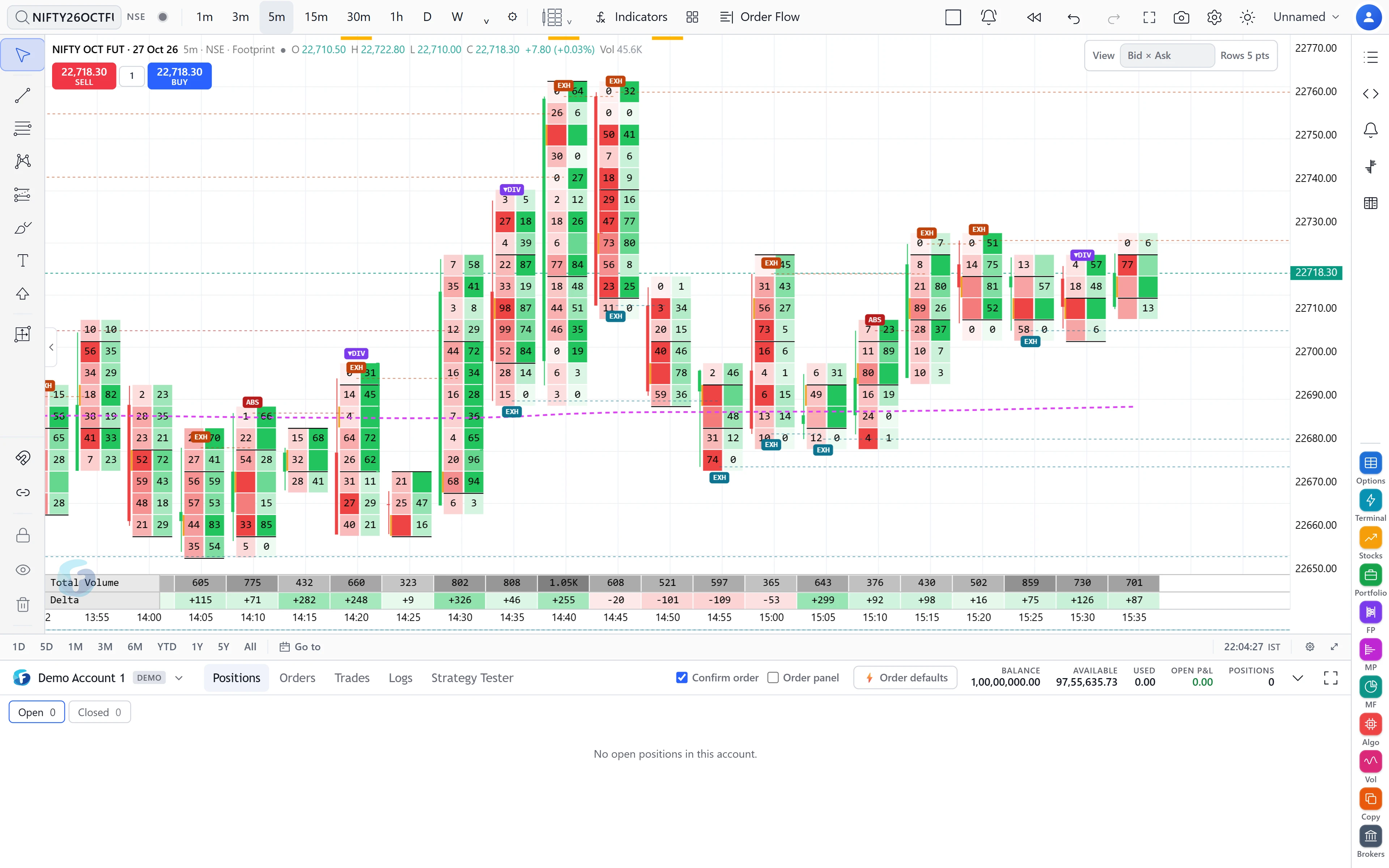
Each bar shows volume at each price. Views include Bid × Ask, Delta, Bid only, Ask only, Volume, a bar version of each, and a Ladder. Quantities can be shown in lots or units.
| Setting | Default and effect |
|---|---|
| Row size | Auto (ATR ÷ 10). Alternatives: the exchange data step, or a manual number of points. |
| Imbalance ratio (diagonal) | 2. Highlights a price where one side traded at least this multiple of the other, compared diagonally. |
| Stacked imbalance | 3 rows in a row; 0 turns it off. |
| Levels | Value area + POC per bar (70%), session VWAP; optional POC line, developing session POC/VAH/VAL, COT since session high/low. |
| Signals | On: absorption, exhaustion, tails and divergence at candle highs and lows. |
| Stats under bars | Volume and delta on; CVD, buy, sell and trades optional. |
Market Profile and Volume Profile
Market Profile (TPO) draws letters per period. The profile period can be daily, weekly, monthly, cumulative, or intraday blocks of 5, 15, 30 or 60 minutes; daily profiles can merge several days. TPO period is 30 minutes by default, value area 70%. It marks POC, VAH and VAL, naked (untested) POC and value area to the right, buying and selling tails, and optionally initial balance with extensions, single prints, poor highs and lows, and low- and high-volume nodes. It can label open type, day type and profile shape. Right-click a profile to merge it with the previous one or split it.
Volume Profile as an indicator can be built per session, weekly, monthly, multi-day (default 5 days), cumulative across the chart, as intraday blocks, over a custom date range, or anchored from a date to now. It shows up/down volume, total or delta, with POC and value area lines.
Order-flow CVD plots cumulative delta from aggressor trades. It resets every session by default, or never.
Profiles over a range you pick
In the drawing tools’ volume group there are three range tools:
- Fixed Range Volume Profile — two clicks; the profile of the bars between them (48 rows and a 70% value area by default).
- Anchored Volume Profile — one click; from that bar to the latest, updating live.
- Fixed Range Market Profile (TPO) — two clicks; a TPO profile of the range, with volume beside it.
A worked example: the value area
Suppose (hypothetically) a session traded 10 lakh contracts. A 70% value area is the narrowest band of prices around the POC that holds 7 lakh of them.
One common way to build it: start at the POC row, say 3 lakh. Compare the rows just above and below and add the larger: 1.4 lakh above → 4.4 lakh. Next pair: 1.2 lakh below → 5.6 lakh. Then 0.9 above → 6.5, then 0.6 below → 7.1 lakh. You have passed 7 lakh, so the top and bottom rows reached are VAH and VAL.
On the footprint, an imbalance at ratio 2 is simpler arithmetic: 600 bought at the ask against 250 sold at the bid one row lower is 600 ÷ 250 = 2.4, which is at least 2, so the cell is highlighted.
Limits and common mistakes
- Footprint is built for intraday bars. The order-flow data is built for intervals up to one hour.
- Row size changes everything. Rows too small scatter volume and hide imbalances; too large merge distinct levels. Auto (ATR-based) is a reasonable start.
- Up/down volume in a candle-based profile is an approximation. It splits volume by whether each candle closed up or down, not by aggressor. For true aggressor delta, use the footprint or order-flow CVD.
- Profiles rebuild when a bar closes rather than on every tick, so they stay smooth while live.
Where to find it
- On FNOTrader Charts, open the chart-type menu and pick Footprint or Market Profile (TPO) under Order flow.
- For Volume Profile or order-flow CVD, open Indicators and search for them.
- For a range profile, open the drawing tools’ volume group and click the chart.
Related: intervals and chart types.
Common questions
What is the imbalance ratio on a footprint chart?
The multiple by which one side's volume must exceed the other's, compared diagonally across adjacent price rows. The default here is 2.
Can I draw a volume profile for a custom date range?
Yes. Use the Volume Profile indicator's custom range or anchored option, or the Fixed Range and Anchored Volume Profile drawing tools.
Does Market Profile show initial balance?
Yes. Turn on Initial balance to draw IBH and IBL, with optional 0.5x to 3x extensions.
Is volume profile based on bid and ask data?
The Volume Profile indicator and range tools are computed from candles, so up/down volume is split by candle direction. Aggressor delta comes from the footprint and order-flow CVD.
More on Charts & Marketplace
More in Charts & Marketplace · App: FNOTrader Charts · Definitions: glossary · All: every article