Bar delta and cumulative delta
Bar delta is a candle's buy volume minus its sell volume. Cumulative volume delta (CVD) is the running sum of bar delta through the session.
Bar delta answers “who was more aggressive in this candle”. CVD answers “who has been more aggressive since the open”. Most of the interesting reads come from comparing CVD with price: price making new highs while CVD stalls is a different market from both rising together.
Two patterns are worth knowing. If price makes a higher high but CVD makes a lower high, the new high came on less net buying than the previous one. If price is flat while CVD climbs steadily, aggressive buying is being met by resting sellers at those prices. Neither tells you what happens next; both tell you the price chart alone is hiding something.
Both are built on classified volume — see how trades are classified.
When CVD and VWAP reset
CVD resets to zero at the start of every trading session, so each day starts flat. For NSE futures and options that is 09:15 IST; for MCX contracts it is the MCX open. VWAP on the footprint follows the same daily reset.
This matters when you scroll back across several days: CVD will not carry Monday's selling into Tuesday. If you want a multi-day view of flow, compare each day's closing CVD rather than reading one continuous line.
The six bottom-pane modes
| Mode | What it shows |
|---|---|
| Off | No bottom pane; the footprint takes the full height. |
| Volume (default) | A volume histogram coloured by candle direction. |
| Panel | A grid of per-candle numbers: CVD, Delta, Buy Vol, Sell Vol, OI, Volume, COT-H and COT-L, shaded by sign. |
| Bar Delta | A histogram of each candle's delta, green above zero and red below. |
| Cum Delta | A histogram of the running session CVD. |
| Delta OHLC | CVD drawn as candles: each opens at the previous candle's CVD and closes at the new one, so you can see CVD trend like price. |
Panel is the densest. It is the quickest way to answer “was that big green candle actually bought”, because delta and buy/sell volume sit right under it.
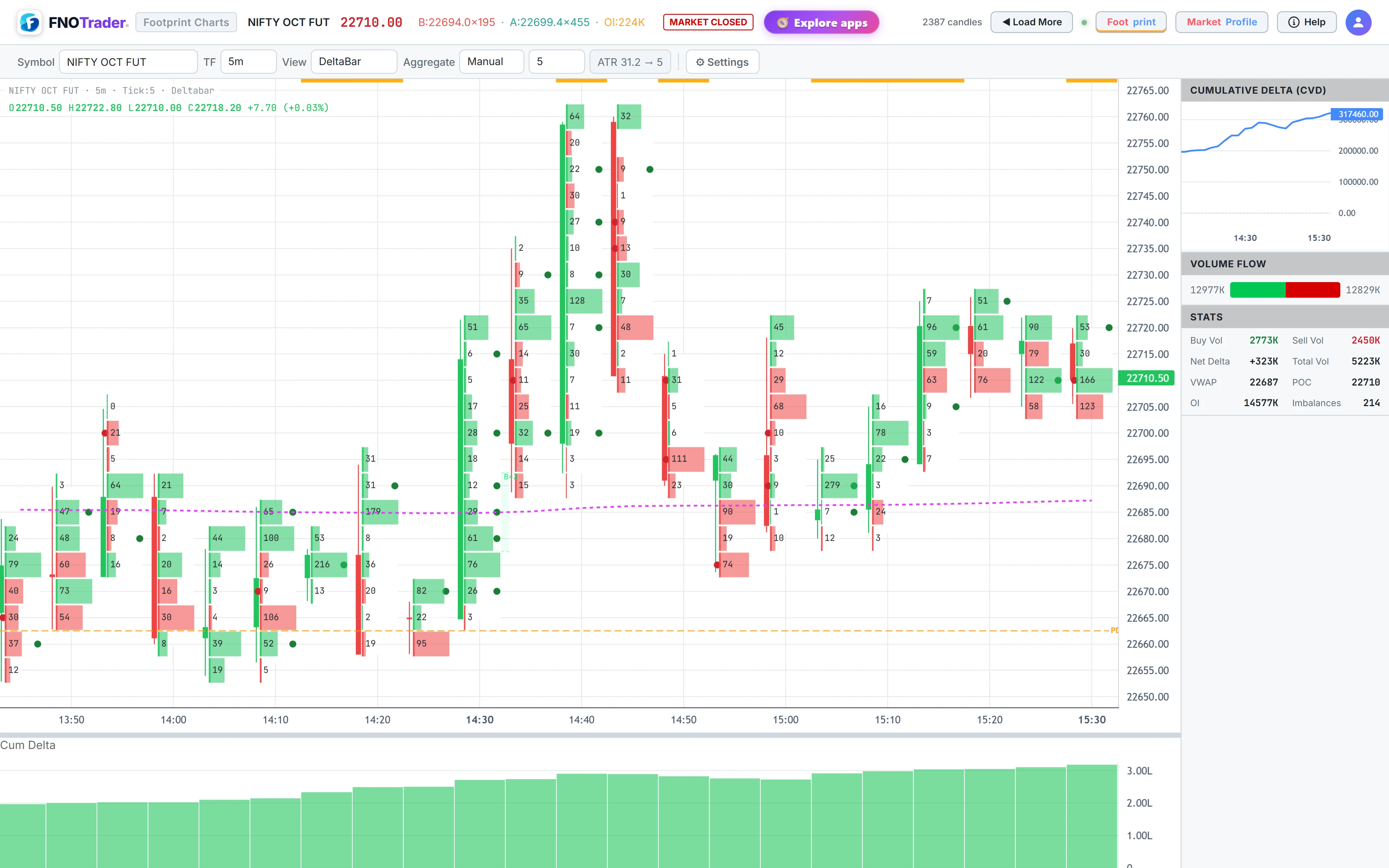
The right panel
The Right button under Settings opens a side panel. It is hidden by default to give the chart room. From top to bottom:
- Cumulative Delta (CVD) — a small line chart of the session CVD.
- Volume Flow — a bar splitting total buy and sell volume.
- Stats — buy volume, sell volume, net delta, total volume, VWAP, POC, open interest and the imbalance count.
- Insights — the bias meter, explained in the Insights post.
- Time & Sales — a running list of prints with time, side, price and quantity.
A worked example
Hypothetical session, four 15-minute candles:
| Candle | Buy − Sell (lots) | Bar delta | CVD |
|---|---|---|---|
| 09:15 | 900 − 600 | +300 | +300 |
| 09:30 | 700 − 750 | −50 | +250 |
| 09:45 | 500 − 800 | −300 | −50 |
| 10:00 | 650 − 600 | +50 | 0 |
If price made a new high in the 09:45 candle, that high came on the session's heaviest net selling — a mismatch the Bar Delta mode shows immediately and the price chart hides. In Delta OHLC mode the 09:45 candle would open at +250 and close at −50.
Things that trip people up
- Delta in lots. Values are shown in lots, so compare like with like across contracts with different lot sizes.
- Session reset. A CVD of zero at 09:15 is not a reading, it is a reset.
- CVD versus COT. CVD runs from the open; COT High and Low run from the latest extremes — see COT High and Low.
Where to find it
- Open Footprint & Market Profile and click Settings.
- Choose a mode in the Bottom dropdown.
- Click Right to open the CVD, volume flow, stats and Time & Sales panel.
Common questions
What is CVD on a footprint chart?
CVD, cumulative volume delta, is the running total of each candle's buy volume minus sell volume through the session. It shows which side has been more aggressive since the open.
When does CVD reset in the footprint app?
At the start of every trading session: 09:15 IST for NSE F&O and the session open for MCX. VWAP resets at the same point.
What is Delta OHLC?
It draws CVD as candles. Each candle opens at the previous candle's CVD and closes at the new value, so you can read CVD trends the way you read price.
Where is Time and Sales in the footprint app?
In the right panel. Open Settings and click Right; Time and Sales is at the bottom of the panel.
More on Footprint & Market Profile
More in Footprint & Market Profile · App: Footprint & Market Profile · Definitions: glossary · All: every article