Why levels belong on the footprint
Levels answer “where”; the footprint answers “what happened there”. Together they let you see how the market behaved when it reached a price people were watching.
All of these live behind the Settings button on the footprint toolbar. VWAP and PDH/L are on by default; the rest are off until you turn them on.
Volume-based levels
| Toggle | What it draws |
|---|---|
| VWAP | The session volume-weighted average price, built from each footprint row's price and volume. Resets daily. |
| POC | A line joining each candle's point of control — the row with the most volume in that candle. |
| VP | A developing session volume profile: POC as a solid line and the 70% value area high and low as dashed lines, recomputed candle by candle so you see how value migrated through the day. |
The value area is found the usual way: start at the session's highest-volume price and keep adding the larger of the next row above or below until 70% of the session's volume is inside. The full profile study, with letters and day types, lives on the Market Profile page.
Price-based levels
- SMA and EMA — type a comma-separated list of periods next to each
button, for example
20,50or9,21(those are the defaults). - Pivots — classic floor pivots from the previous day's high, low and close: PP = (H + L + C) ÷ 3, with R1–R3 and S1–S3.
- CPR — central pivot range: pivot, bottom central (H + L) ÷ 2, and top central at the same distance on the other side of the pivot.
- PDH/L — previous day's high and low.
- Hist — shows pivot, CPR and high/low lines for past days too, not just today.
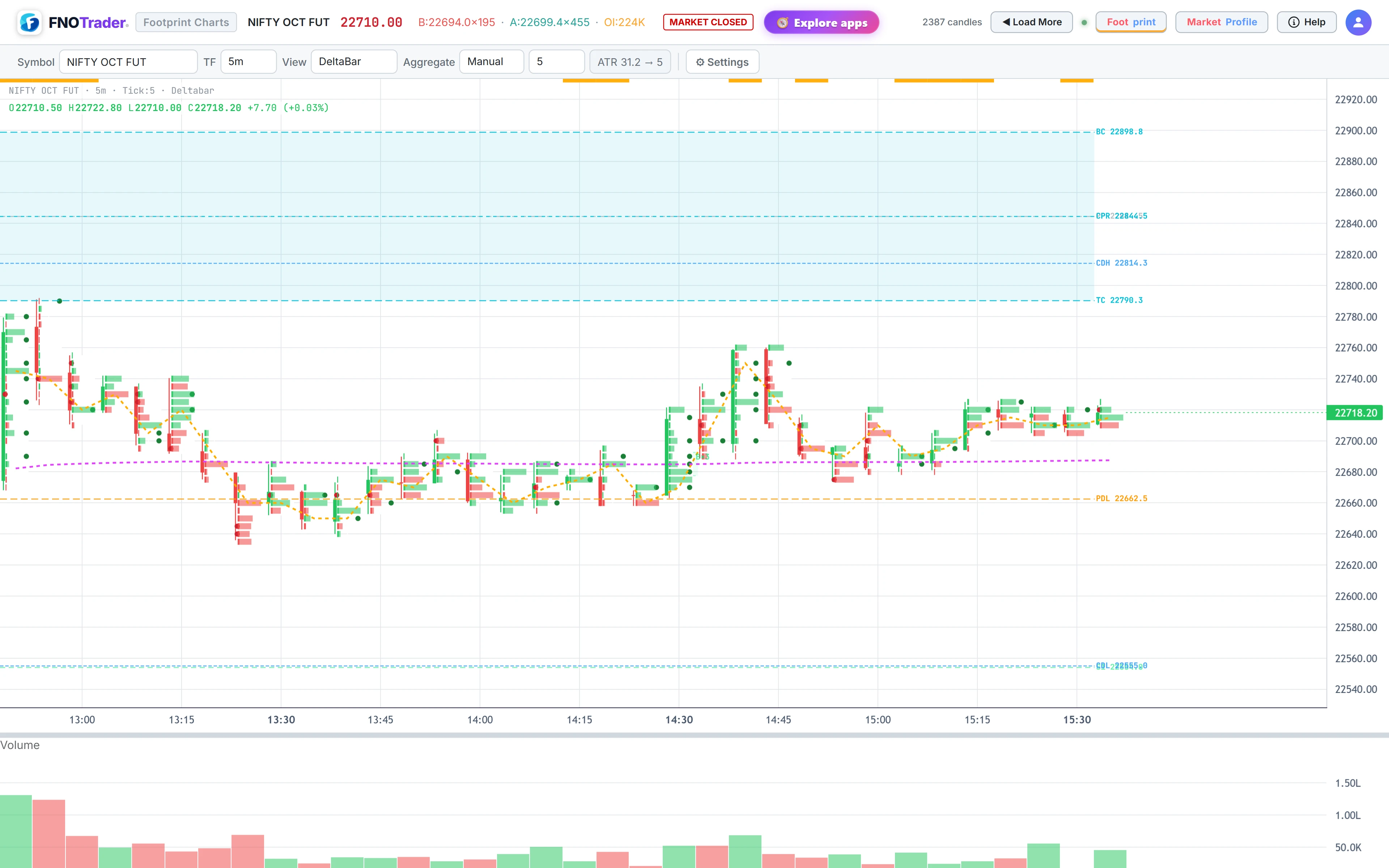
A worked example: CPR
Suppose yesterday's NIFTY future range was high 24,500, low 24,300, close 24,450.
- Pivot = (24,500 + 24,300 + 24,450) ÷ 3 = 24,416.7
- Bottom central = (24,500 + 24,300) ÷ 2 = 24,400
- Top central = 24,416.7 + (24,416.7 − 24,400) = 24,433.3
- R1 = 2 × 24,416.7 − 24,300 = 24,533.3; S1 = 2 × 24,416.7 − 24,500 = 24,333.3
A CPR about 33 points wide on a 200-point range is narrow. Whatever you make of that, the footprint now lets you watch the actual flow as price reaches 24,400–24,433 instead of guessing.
Split view and drawings
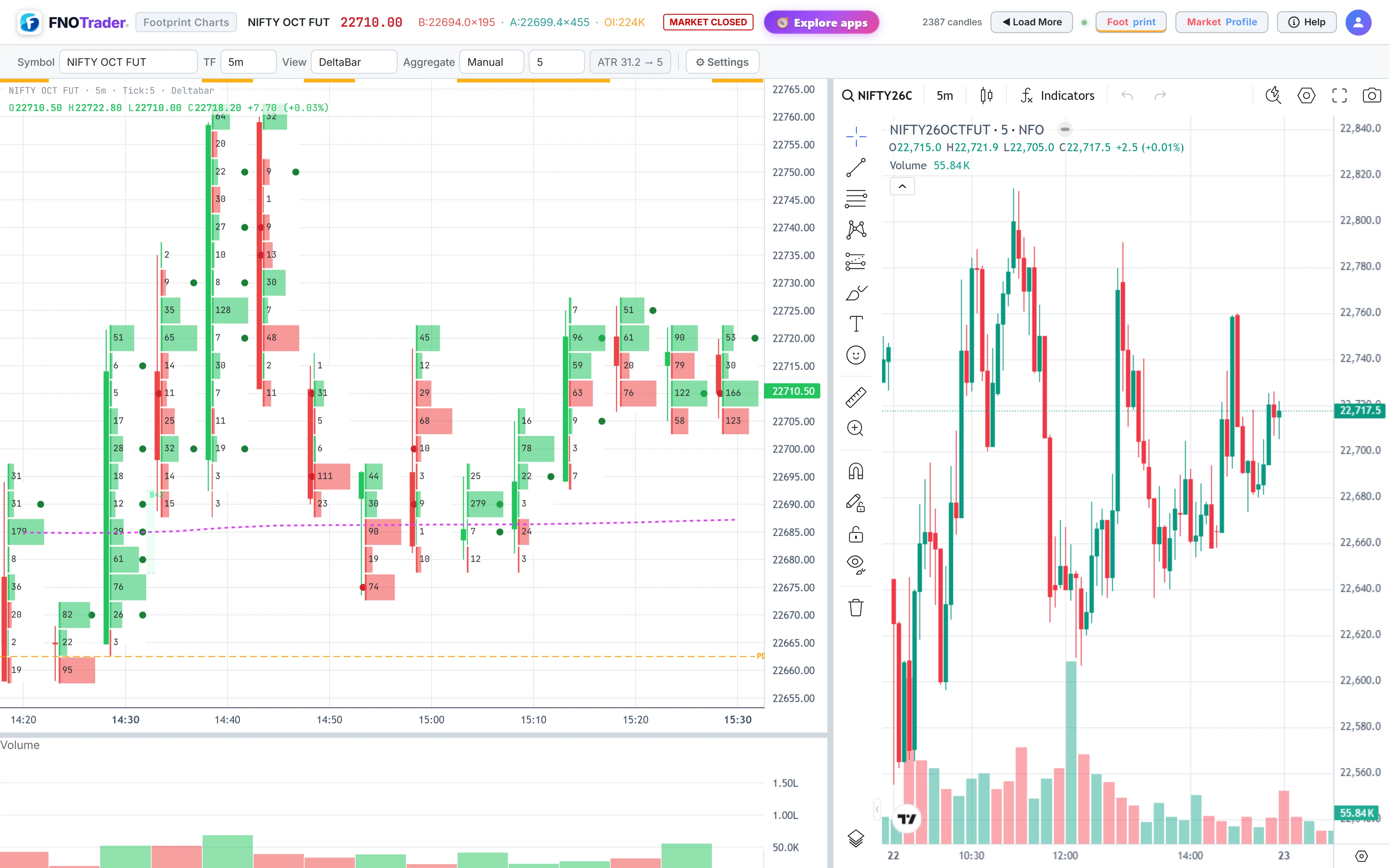
Split puts an independent candle chart beside the footprint. It is on by default. Drag the divider to resize. The candle side has its own symbol search and timeframe, so you can keep a 15-minute view of the index next to a 3-minute footprint of the future.
Draw opens a small toolbar: horizontal line, trendline, rectangle, circle, text label and an eraser. Use it to mark a stacked zone or yesterday's value area you want to watch.
Common mistakes
- Too many lines. Pivots, CPR, two EMAs, VWAP and a value area at once bury the cells. Pick the two or three you actually use.
- Per-candle POC versus session POC. The POC toggle joins each candle's own busiest row; the VP toggle shows the session's. They are different numbers.
- VWAP across days. It resets each session; a gap in the line at the day boundary is intentional.
Where to find it
- Open Footprint & Market Profile and click Settings.
- Toggle VWAP, POC or VP in the first row; SMA, EMA, Pivots, CPR, PDH/L and Hist in the next.
- Use Split and Draw for the side chart and annotations.
Signals near PDH/PDL get a gold ring — see footprint signals.
Common questions
How is VWAP calculated on the footprint chart?
From the footprint itself: each row's price is weighted by the volume traded there, summed through the session and divided by total volume. It resets at the start of each trading day.
What is the developing value area?
It is the session's 70% value area recomputed after every candle, so the VAH, VAL and POC lines move as the day builds rather than appearing only at the close.
How is CPR calculated?
Pivot is the average of the previous day's high, low and close. Bottom central is the average of high and low. Top central is placed the same distance on the other side of the pivot.
Can I show more than one EMA on the footprint?
Yes. Type a comma-separated list of periods next to the EMA button, for example 9,21,50. The SMA box works the same way.
More on Footprint & Market Profile
More in Footprint & Market Profile · App: Footprint & Market Profile · Definitions: glossary · All: every article