Why reshape a profile
A profile's POC and value area are only as meaningful as the period they describe. Merge too little and you see noise; merge too much and two different markets blur into one.
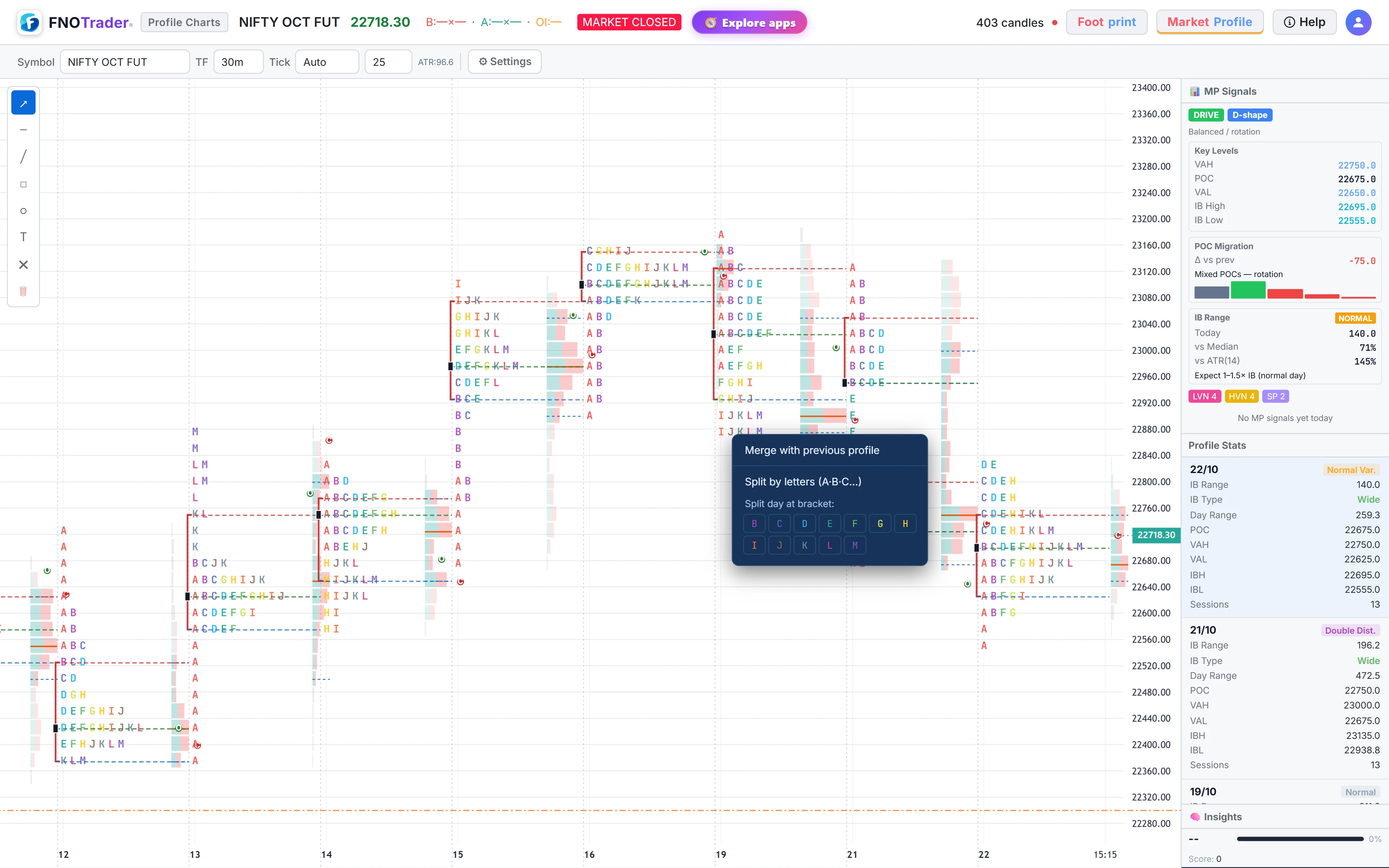
The editing tools live on a right-click menu on any profile, and every change is saved with your layout.
The right-click menu
| Action | What it does |
|---|---|
| Merge with previous profile | Joins this day to the profile before it. Repeat to chain several days into one composite with a single set of letters, volume, POC and value area. |
| Split merged profile | Breaks a composite back into separate days. |
| Split day at bracket | Pick a letter; brackets from that letter onward are restacked as a second distribution beside the first, each with its own levels. |
| Split by letters (A·B·C…) | Places every 30-minute bracket in its own column, left to right in time, so you can watch the day build. The volume profile stays whole. |
| Remove day split / Remove letter split | Restores the whole-day profile. |
A day can have a bracket split or a letter split, not both.
Daily, weekly and history
- Daily (default) draws one profile per session; the most recent ten sessions are shown.
- Weekly groups each week into one profile.
- +5 Days loads five more sessions of history each time you click it.
MP signals and their scores
The Signals toggle draws badges where price interacted with a day's profile levels. Signals are off by default; the dropdown chooses which types appear.
| Badge | Condition | Score |
|---|---|---|
| IB↑ / IB↓ | After the first hour, a bar opens inside the IB and closes beyond it | 3 |
| VAH-REJ / VAL-REJ | A bar reaches near the value-area edge and closes more than a tick back inside | 3 |
| VAH-BRK / VAL-BRK | Two consecutive closes beyond the edge, the second bar having opened inside | 3 |
| LVN↑ / LVN↓ | A bar opens on one side of a low-volume node and closes more than a tick past it | 2 |
| POC | A small-bodied bar closing within 1.5 ticks of the POC (indecision) | 1 |
Confluence: every signal gets +1 if the day's open type was Drive, and +1 if the shape is P or b. Signals scoring 4 or more are outlined in the panel. Open type and shape are explained in open types, shapes and day types.
The MP Signals panel
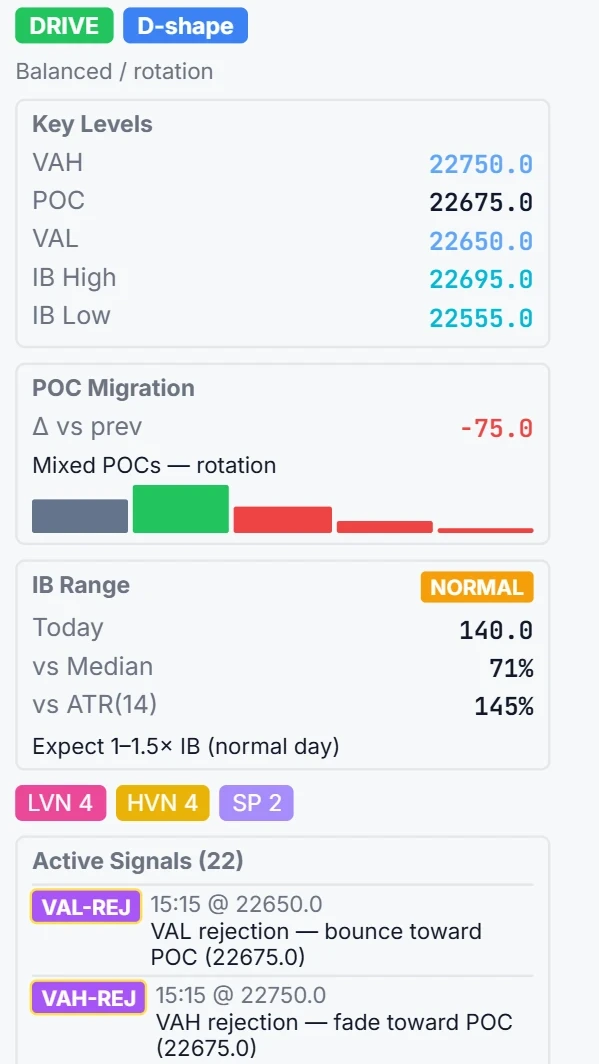
The panel summarises the newest day: open type and shape badges, key levels (VAH, POC, VAL, IB high and low), POC migration versus the previous day with a small chart of the last five POCs, the IB range compared with its median over the loaded days and with the 14-bar ATR, counts of LVNs, HVNs and single prints, and the last six signals with time and price.
The POC migration line reads “rising” or “falling” only when moves in one direction outnumber the other by more than one across the loaded days; otherwise it reads mixed.
A worked example, and one caution
Hypothetical: the day opened with a Drive and is shaping as a P. At 11:45 IST a bar opens at 24,375, inside an IB high of 24,380, and closes at 24,392. That is an IB↑ signal: base score 3, +1 for Drive, +1 for P, total 5 — outlined in the panel.
The caution: signals are checked against the day's profile as it stands now. As the value area develops, an earlier bar can gain or lose a signal because the edge it was measured against has moved. Read them as a map of interactions with today's levels, not as a record of what was knowable at the time.
Where to find it
- Open Market & Volume Profile.
- Right-click a profile to merge or split it. Use Daily, Weekly and +5 Days under Settings.
- Turn on Signals and choose types from its dropdown; the panel shows the summary for the newest day.
For order flow at the same levels, open the footprint — see levels on the footprint.
Common questions
How do I create a composite market profile?
Right-click a day's profile and choose Merge with previous profile. Repeat on the next day to chain more sessions into one composite with a single POC and value area.
What does Split by letters do?
It places each 30-minute TPO bracket in its own column in time order, so you can see how the day built. The volume profile stays as one.
How are MP signal scores calculated?
IB breakouts and value-area rejections or breakouts score 3, LVN crosses 2 and POC indecision 1. Each gets +1 if the open was a Drive and +1 if the shape is P or b.
Can I see weekly market profiles?
Yes. Switch from Daily to Weekly under Settings to group each week into one profile, and use +5 Days to load more history.
More on Footprint & Market Profile
More in Footprint & Market Profile · App: Market & Volume Profile · Definitions: glossary · All: every article