What an alert is, and why the scope matters most
An alert is three decisions: what to watch, what number on it to test, and what to do when the test passes.
The first decision — the scope — is where most alerts go wrong. The same condition, "price below 80", means something completely different on a single put, on a fixed-strike straddle and on a straddle that re-centres every minute. Pick the scope for the question you are actually asking:
| Scope | What the engine watches |
|---|---|
| Spot | The cash index or stock price |
| Future | An expiry's futures price, plus basis over spot |
| Option (CE / PE) | One leg at one strike, with IV and per-leg Greeks |
| Straddle (fixed) | CE + PE premium at one strike that never moves |
| Strangle (fixed) | An OTM call plus an OTM put at two fixed strikes |
| ATM Straddle (rolling) | The at-the-money straddle, re-resolved every bar as spot moves |
| Custom | Any number of legs with signed ratios — condors, ratio spreads, calendars |
The classic mistake is choosing a fixed Straddle when you meant the rolling one. By the afternoon your "ATM" strike can be two strikes in the money, and the alert is now measuring a position you do not have.
Parameters, operators and AND / OR
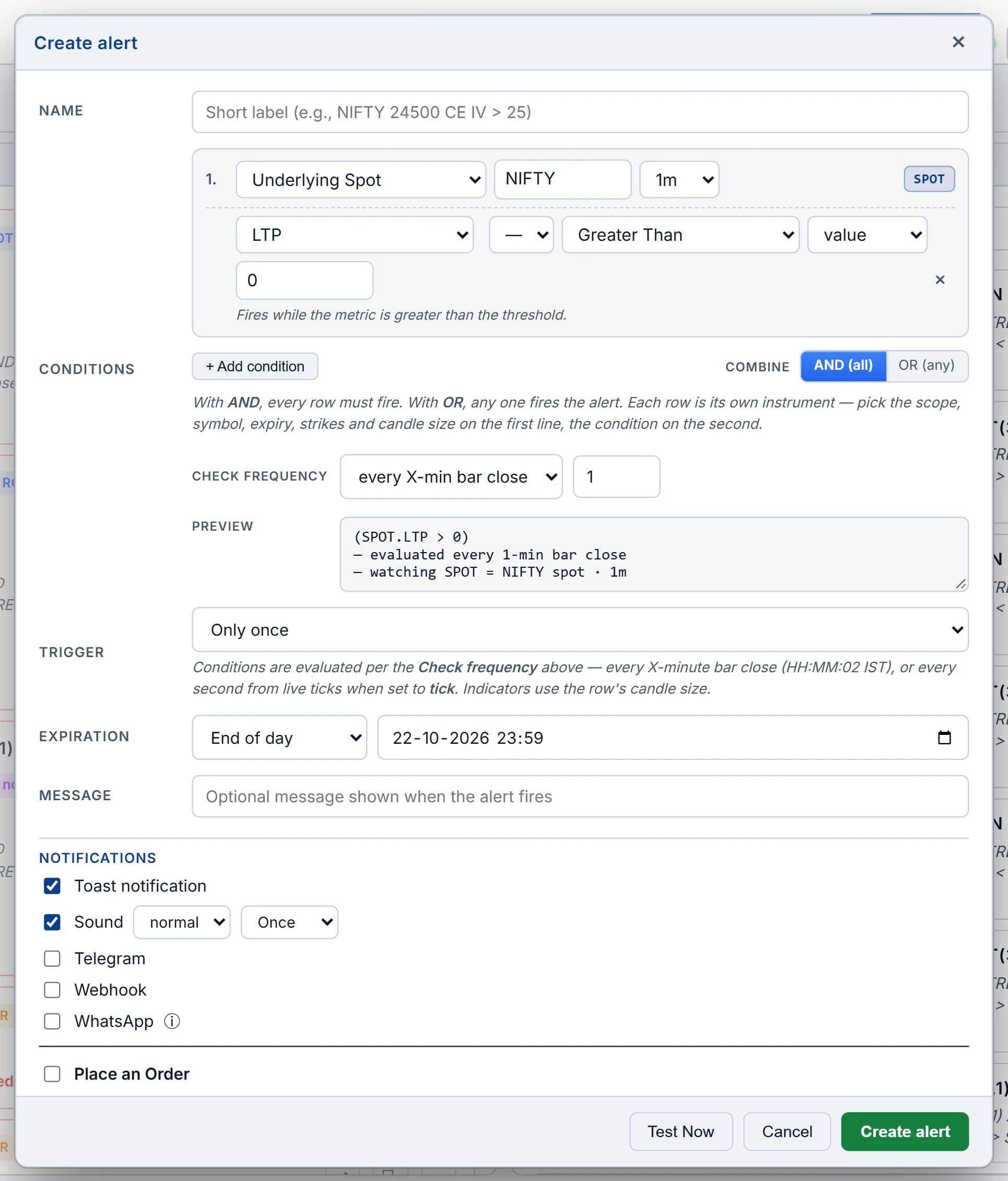
Each condition row is parameter + operator + value. The parameters on offer depend on the scope: a single option has LTP, change, OI, volume, IV and Delta, Gamma, Theta and Vega; combined scopes (straddle, strangle, custom) expose price, OI and volume plus net Delta, Theta and Vega, but no IV, because a summed IV means nothing. Futures add basis and basis %.
Operators come in two families, and mixing them up causes most "my alert spammed me" and "my alert never fired" complaints:
- Level — ≥, ≤, >, <, =, ≠. True on every bar where the condition holds.
- Edge — Crossing Up, Crossing Down, Crossing, Entering or Exiting a channel, New Day High, New Day Low, Moving Up or Down by an amount over N bars. True only on the bar where the transition happened.
Combine rows with AND when you need confluence (a break and a volume condition on the same bar) and OR when either event is enough — the everyday stop-or-target guard.
One subtlety: Day High and Day Low are tracked by the engine from the moment you create the alert, not taken from the broker's day range. For a straddle, the broker's "low of CE plus low of PE" is a price the pair never traded at together; a running minimum of the combined premium is the honest number.
When the engine checks, and the one-second loop
Alerts live on the server. The engine evaluates every active alert at each 1-minute bar close, two seconds past the minute, during market hours: 09:15–15:30 IST on NSE trading days for equity F&O, and 09:00–23:30 IST for MCX symbols, each on its own clock. Holidays on the exchange calendar are skipped, and nothing fires on post-close prints.
Custom multi-leg alerts get a faster path. If every condition is a price condition — net premium, combined premium, or the difference between the first two legs — the alert is taken out of the minute loop and checked every second from the live tick feed. You can price the legs at LTP or at bid/ask, where a short leg is marked at the ask and a long leg at the bid, which is what it would actually cost to get out. This loop fires on the false-to-true edge and re-arms once the condition is false again.
Anything that needs chain data — OI, Greeks, day extremes — stays on the minute path.
Trigger modes, expiry and delivery
| Setting | What it does |
|---|---|
| Only once | Fires once, then disables itself. Use for stops, targets and one-shot entries. |
| Per minute | Re-armed every bar. Use for monitoring, knowing it repeats. |
| Expiry | Defaults to end of day (23:59 IST); end of week, end of month or a custom time are available. |
| Toast and sound | In any open tab; a looping loud sound for can't-miss alerts. |
| Telegram | Your own bot token and numeric chat ID, set once and reused. |
| To your registered number, within WhatsApp's 24-hour messaging window. | |
| Webhook | A POST with a body template and variables such as symbol, strike and LTP. Five-second timeout, no retry. |
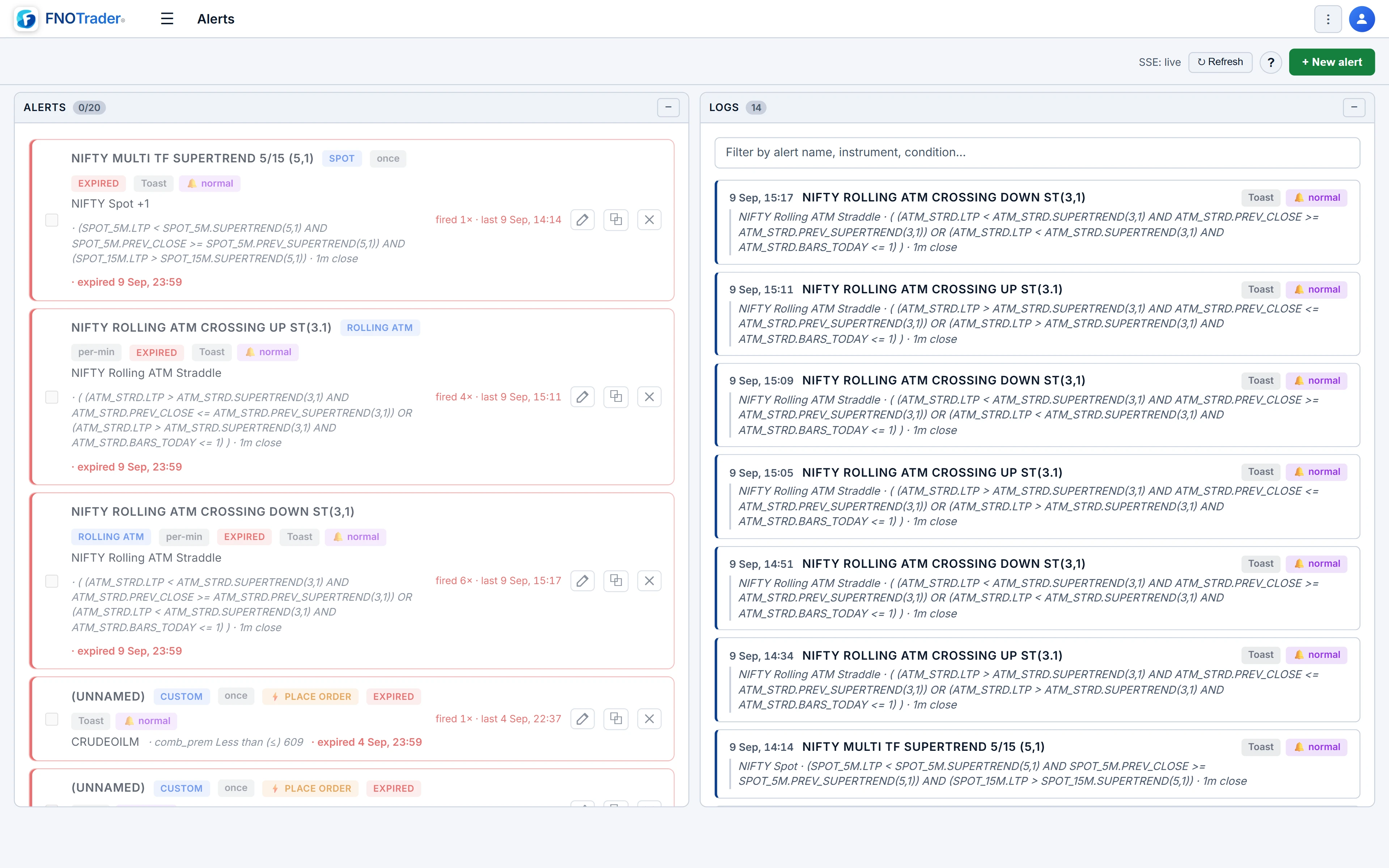
You can keep up to 20 active alerts; disabled and expired ones do not count. Test Now in the editor dry-runs the conditions against live data and shows which rows matched — use it before trusting anything.
Any alert can also place an order when it fires: side, lots, MIS or NRML, and one or more accounts. Demo accounts are always allowed. Real accounts are skipped unless you switch on that alert's live-trading toggle, and every fire records placed, failed or skipped per account with the reason. With live trading on, nothing asks you to confirm at fire time. If your subscription lapses, alerts pause rather than vanish and resume on renewal.
Worked example: a short strangle on the one-second loop
Hypothetical numbers. You sell a 24,200 CE at ₹62 and a 23,800 PE at ₹58 — combined premium ₹120. You want out if the pair decays to ₹72 (40% of the premium captured) or swells to ₹180 (a loss of ₹60 per unit).
- Scope: Custom, two legs, both SELL with ratio 1.
- Logic: OR. Conditions: Combined premium ≤ 72; Combined premium ≥ 180.
- Price source: bid/ask, so each short leg is valued at the ask you would pay to close.
- Trigger: Only once. Notify: sound and Telegram.
Because both conditions are price conditions, this alert is checked every second. Say the CE ask is ₹33 and the PE ask is ₹38: combined ₹71, the first condition is true and it fires within a second — not at the next minute close. Had you added an OI condition, the whole alert would fall back to the minute loop.
Common mistakes
- Crossing Up "did not fire". It is an edge trigger. If the previous bar was already above the level, there was no crossing.
- A level trigger on Per minute. "LTP ≥ 24,100, per minute" pings every bar the index stays there. That is monitoring, not an entry signal.
- Webhook for the only critical alert. No retry means a six-second outage loses the fire. Pair it with Telegram.
- Telegram username instead of chat ID. The bot needs the numeric ID, and you must message the bot once first.
Where to find it
- Open Options Analytics and click Alerts in the top menu.
- Click + New alert, choose the scope, then add condition rows.
- Set AND / OR, trigger mode, expiry and notifications; tick Place an order only if you want it to trade.
- Press Test Now, then save. Fires appear in the log tab with the instrument, LTP at fire and the condition that matched.
For the guards that protect a position once you hold it, see server-side risk guards. For the straddle concepts behind these scopes, see straddle vs strangle.
Common questions
Do options alerts work when my browser is closed?
Yes. Alerts are stored and evaluated on the server, so they keep running and delivering to Telegram, WhatsApp or a webhook with every tab closed.
How often are alerts checked?
At every 1-minute bar close during market hours. Custom multi-leg alerts built only from price conditions are checked every second from live ticks.
What is the difference between Straddle and ATM Straddle scope?
Straddle watches one fixed strike all day. ATM Straddle re-resolves the at-the-money strike every bar, so it tracks the current ATM premium rather than a specific contract.
Can an alert place an order on a real broker account?
Yes, if you add an order to the alert and switch on its live-trading toggle. Without that toggle it can only place on Demo accounts.
How many alerts can I keep active?
Up to 20 enabled alerts at a time. Expired or disabled alerts stay in your list and do not count.
More on Options App
More in Options App · App: Options Analytics · Definitions: glossary · All: every article